Remember Settings Window
approvedby xzhi
Remember and restore the size and position of the settings popout window. 记住并恢复【在独立窗口中打开设置】窗口的尺寸和位置。 - This plugin has not been manually reviewed by Obsidian staff.
Remember Settings Window
中文 | English
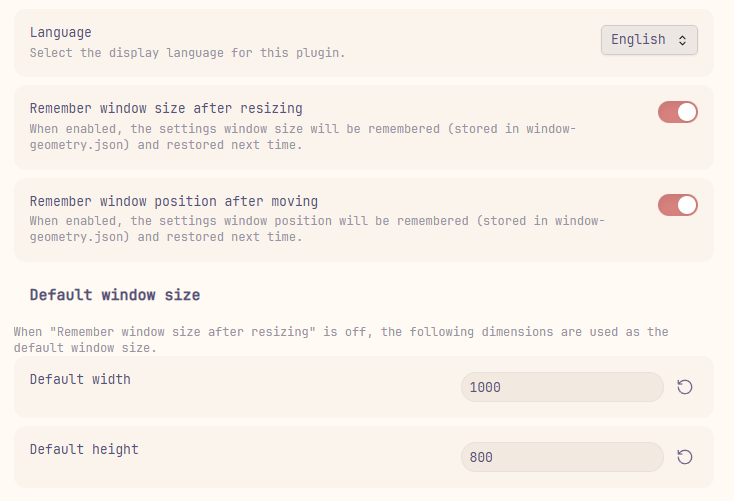
An Obsidian plugin that remembers the size and position of the settings popout window (introduced in Obsidian 1.13.0), and restores them automatically next time you open it.
👀 Preview
📖 Background
Starting from Obsidian 1.13.0, Settings can open in a separate window instead of a modal dialog (toggle via Settings → Interface → Open settings in new window). However, the window always opens with a default size and position, and any manual adjustments are lost after closing.
This plugin solves that problem.
✨ Features
| Feature | Description |
|---|---|
| Remember window size | Saves the settings window size after drag-resizing |
| Remember window position | Saves the settings window position after drag-moving |
| Default size | Configurable default width & height, used when "remember size" is off |
| Multi-language | Supports English and Chinese, extensible via JSON locale files |
📦 Installation
From Obsidian Community Plugins (Recommended)
- Open Obsidian → Settings → Community plugins
- Click Browse and search for Remember Settings Window
- Click Install, then Enable
From GitHub Releases
- Download
main.jsandmanifest.jsonfrom the latest release - Place them in
<vault>/.obsidian/plugins/obsidian-remember-settings-window/ - Restart Obsidian and enable the plugin in Settings → Community plugins
From source
- Clone this repository
- Install dependencies and build:
npm install npm run build - Copy the contents of the
dist/folder into your vault's plugin directory:<vault>/.obsidian/plugins/obsidian-remember-settings-window/ - Restart Obsidian and enable Remember Settings Window
🚀 Usage
After enabling the plugin, open its settings panel (Settings → Community plugins → Remember Settings Window):
| Setting | Description |
|---|---|
| Language | Choose display language (Auto follows your system locale) |
| Remember window size | Toggle on/off. When on, the settings window reopens with the last drag-resized dimensions |
| Remember window position | Toggle on/off. When on, the settings window reopens at the last drag-moved screen position |
| Default width / height | The size applied when "remember size" is off |
All settings take effect the next time the settings window opens.
🌐 Language / i18n
The plugin loads language files in real-time from the locale/ directory inside the plugin folder. New language files are detected automatically when you open the settings panel — no restart or reload needed.
Built-in languages
| File | _displayName | Language |
|---|---|---|
en.json | English | English |
zh-cn.json | 简体中文 | Simplified Chinese |
These files are bundled in locale/ when you install the plugin.
Adding a new language
- Navigate to your plugin's
locale/directory:<vault>/.obsidian/plugins/obsidian-remember-settings-window/locale/ - Create a new JSON file named
<code>.json(e.g.ja.jsonfor Japanese,fr.jsonfor French) - Add a
_displayNamefield with the language's native name, then translate all other keys (copy fromen.jsonas reference) - Open the plugin settings panel — your new language will appear in the dropdown automatically
Example ja.json:
{
    "_displayName": "日本語",
    "settingRememberSize": "リサイズ後のウィンドウサイズを記憶",
    "settingRememberSizeDesc": "有効にすると、設定ウィンドウのサイズが記憶され、次回開いた時に復元されます。",
    "settingRememberPosition": "移動後のウィンドウ位置を記憶",
    "settingRememberPositionDesc": "有効にすると、設定ウィンドウの位置が記憶され、次回開いた時に復元されます。",
    "defaultSizeHeader": "デフォルトのウィンドウサイズ",
    "defaultSizeDesc": "「リサイズ後のウィンドウサイズを記憶」が無効の場合、以下のサイズが使用されます。",
    "defaultWidth": "デフォルトの幅",
    "defaultHeight": "デフォルトの高さ",
    "language": "言語",
    "languageDesc": "プラグインの表示言語を選択します。",
    "languageAuto": "自動(システムに従う)",
    "enabled": "有効",
    "disabled": "無効"
}
Tip: If you create a translation, consider submitting a pull request so it can be bundled as a built-in language!
⚙️ Configuration files
| File | Purpose |
|---|---|
data.json | Plugin settings: language, toggles, and default dimensions |
window-geometry.json | Saved window bounds — auto-generated on first load |
locale/*.json | Language files — auto-copied on first load, user-extensible |
🔧 How it works
- On plugin load, monkey-patch
app.setting.opento intercept settings window creation. - When the settings window opens, compare
BrowserWindow.getAllWindows()against known window IDs to identify the new window. - Attach Electron
resize/moveevent listeners to capture geometry changes in real-time. - On
resize-ended/move-ended(drag finished), persist the bounds towindow-geometry.jsonwith debouncing. - Next time the settings window opens, apply saved or default geometry via
setBounds().
📋 Requirements
- Obsidian 1.13.0+(设置独立窗口功能从此版本开始支持)
- Desktop only (the plugin relies on the Electron API)
🛠️ Development
npm install
npm run dev     # Watch mode, output to dist/
npm run build   # Production build, output to dist/
📄 License
💖 Support
If you enjoy this plugin and want to say thanks, you can buy me a bubble tea!
| WeChat Pay | WeChat Tip | Alipay |
|---|---|---|
 |  |  |
For plugin developers
Search results and similarity scores are powered by semantic analysis of your plugin's README. If your plugin isn't appearing for searches you'd expect, try updating your README to clearly describe your plugin's purpose, features, and use cases.