by Patrik Granlöv
Edit documents and send them for approval through GitHub pull requests, from one simple panel without git in sight.
↓ 68 downloadsUpdated 27d agoMIT
Review Flow
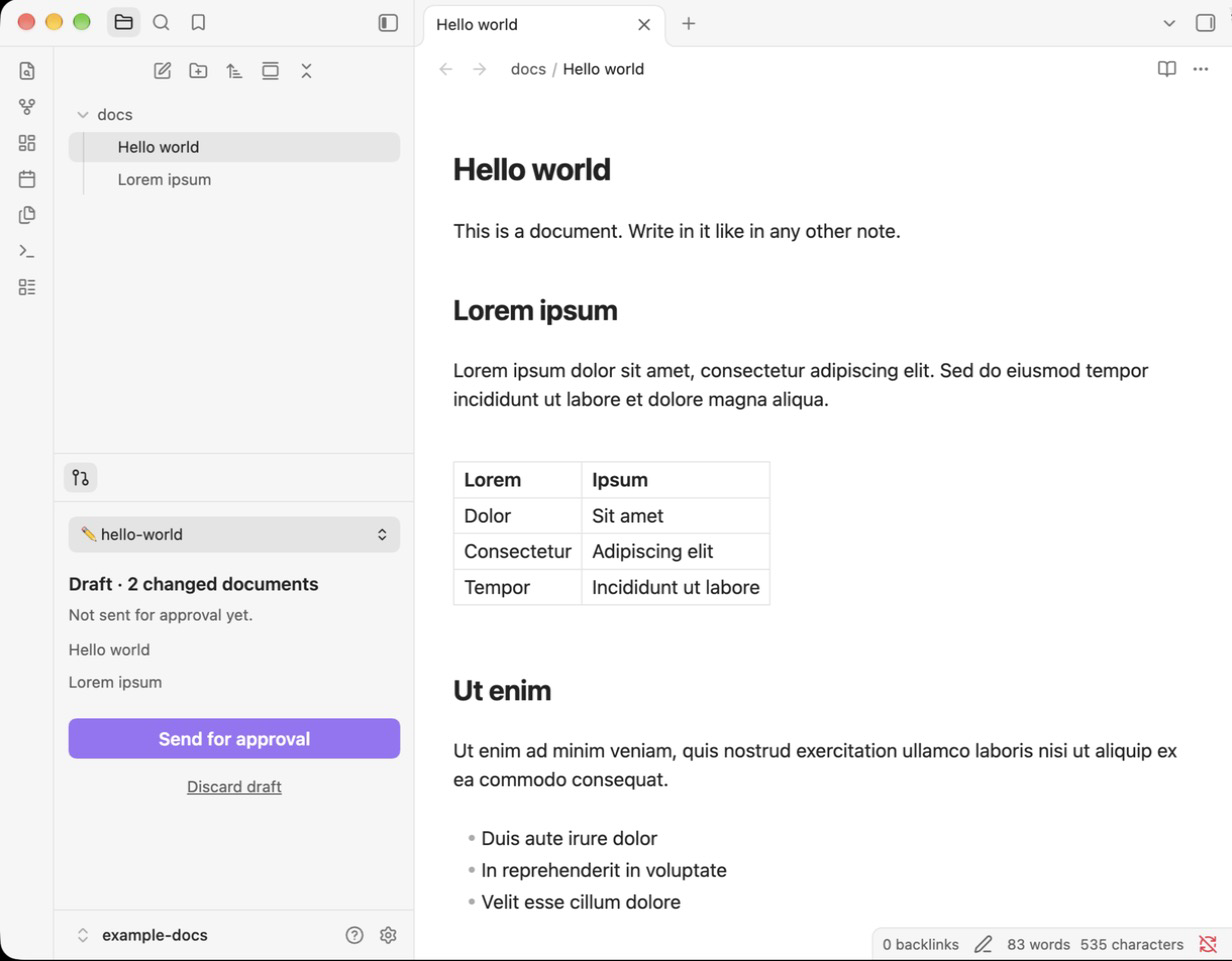
Edit documents in Obsidian and send them for approval on GitHub, without knowing git.
Installation
- Download Obsidian.
- Install Review Flow.
- Follow the Changes panel on the left. It helps you sign in to GitHub and get the documents.
Usage
- Write in a document. A draft is created automatically.
- Click Send for approval. The change takes effect once it is approved on GitHub.
- Switch between your drafts with the picker at the top of the panel.
Good to know
- Needs a GitHub account and works on desktop only.
- The plugin runs
gitandghon your computer. They only talk to GitHub. gh auth setup-gitadds the GitHub sign-in to your~/.gitconfig.- No telemetry, no ads.
- Approval is enforced by GitHub. Protect the
mainbranch so changes need approval.
Development
npm install
npm run build
npm test
The source is in src/. New version: npm version patch and git push --follow-tags.
License
For plugin developers
Search results and similarity scores are powered by semantic analysis of your plugin's README. If your plugin isn't appearing for searches you'd expect, try updating your README to clearly describe your plugin's purpose, features, and use cases.