Solve
unlistedby Liam Riddell
Supercharge your notes with real-time calculations without AI fuss. From dates ('Now + 20 days'), percentages ('10% of 120'), units of measurement ('100cm + 2m'), arithmetic ('10 + 5') and more!

A calculator built into your notes.
Type an expression on any line and the answer appears next to it as you type. Dates, units, percentages, currency and plain arithmetic all work in the same note you are already writing in.


Solve 2.0 is here. The engine has been rewritten from scratch. The old Ohm.js grammar is gone, replaced by a lexer, a parser and a bytecode virtual machine, published separately as solve-engine. Results are faster and more consistent, and there is now a proper syntax reference in place of the old wiki. See the release notes for the full list of changes.
Going forward, new syntax and engine features ship through solve-engine. This repository consumes it as a dependency and updates automatically when a new version is released. Engine feature requests and syntax questions belong there. This repository is for the Obsidian integration itself: settings, rendering and editor behaviour.
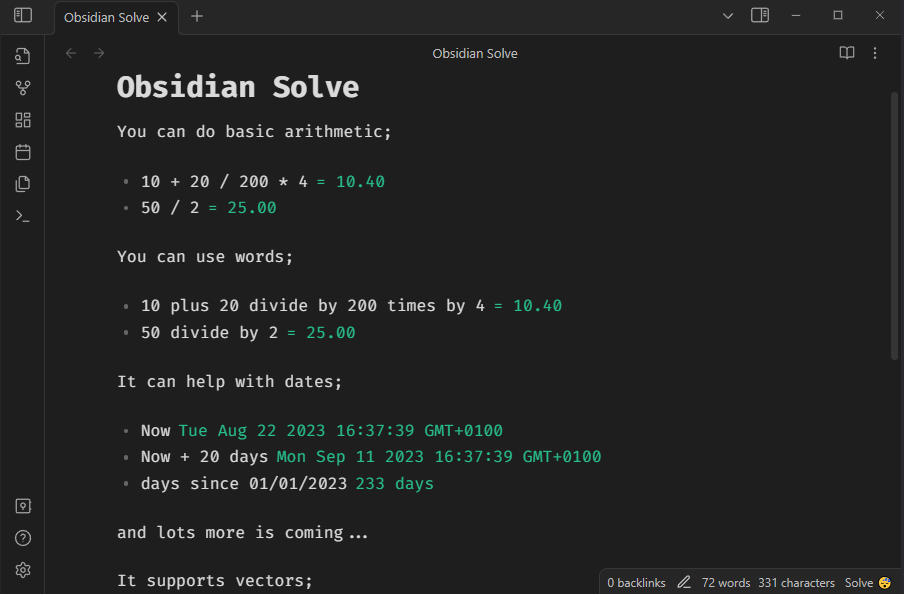
Solve embeds solve-engine, a
standalone natural language expression engine, in Obsidian's editor. Every
line is evaluated as you type, and the result appears next to it without
leaving the note.
10 + 20 / 200 * 4              // = 10.40
days since 01/01/2023          // = 233 days
01/01/2023 + 20 days           // = Sat Jan 21 2023
15% of 2400                    // = 360
100cm + 2m                     // = 300.00 cm
$100 + $250                    // = $350.00
The syntax reference is the full list of what the engine understands: arithmetic, dates, percentages, units, currency, dice, conditionals and more. Everything on that page works the same way inside a note.
Install
From Obsidian
Open Settings, go to Community plugins, then Browse. Search for "Solve" and click Install, then Enable.
Manually
Copy main.js, styles.css and manifest.json into
VaultFolder/.obsidian/plugins/solve/. Reload Obsidian and enable the
plugin from Community plugins.
How it works
Each line is evaluated independently as you type. A result that resolves immediately, such as arithmetic, dates or units, renders inline right away. A result that depends on an async source, such as currency conversion or live weather, shows a pending state until it resolves. Click a result to commit it into the line as text.
Evaluation, caching and formatting all come from solve-engine. This
repository wires that engine into Obsidian's editor (CodeMirror 6) and
exposes the parts of it that make sense as user-facing settings: safety
limits, result formatting and inline solve commit behaviour. See
solve-engine for the engine
itself, including its architecture and design notes.
License
MIT. See LICENSE.md.
If it is useful to you, sponsorship or a coffee is welcome and never expected.
For plugin developers
Search results and similarity scores are powered by semantic analysis of your plugin's README. If your plugin isn't appearing for searches you'd expect, try updating your README to clearly describe your plugin's purpose, features, and use cases.