Simple Plotlines
approvedby null_machine
Organize plotlines across acts by tagging scene notes with the plotlines they progress. - This plugin has not been manually reviewed by Obsidian staff.
Simple Plotlines

https://community.obsidian.md/plugins/simple-plotlines
Organize plotlines across acts by tagging scene notes with the plotlines they progress. Parses all files named 01-01 SCENE NAME.md (capitalization and file locations up to user). Tag sorting can be specified in 00-00 TAG ORDER.md.
This plugin stores and reads all the information it needs in note titles and tags. Nothing is stored in a format that could be inconvenient for humans to maintain with vanilla Obsidian. Enabling the plugin causes its two views (elaboration below) to appear and disabling it removes them. Simple!
https://github.com/user-attachments/assets/d8c9b9c2-8c9d-49ca-aa96-a1f53e448c32
Plotline View
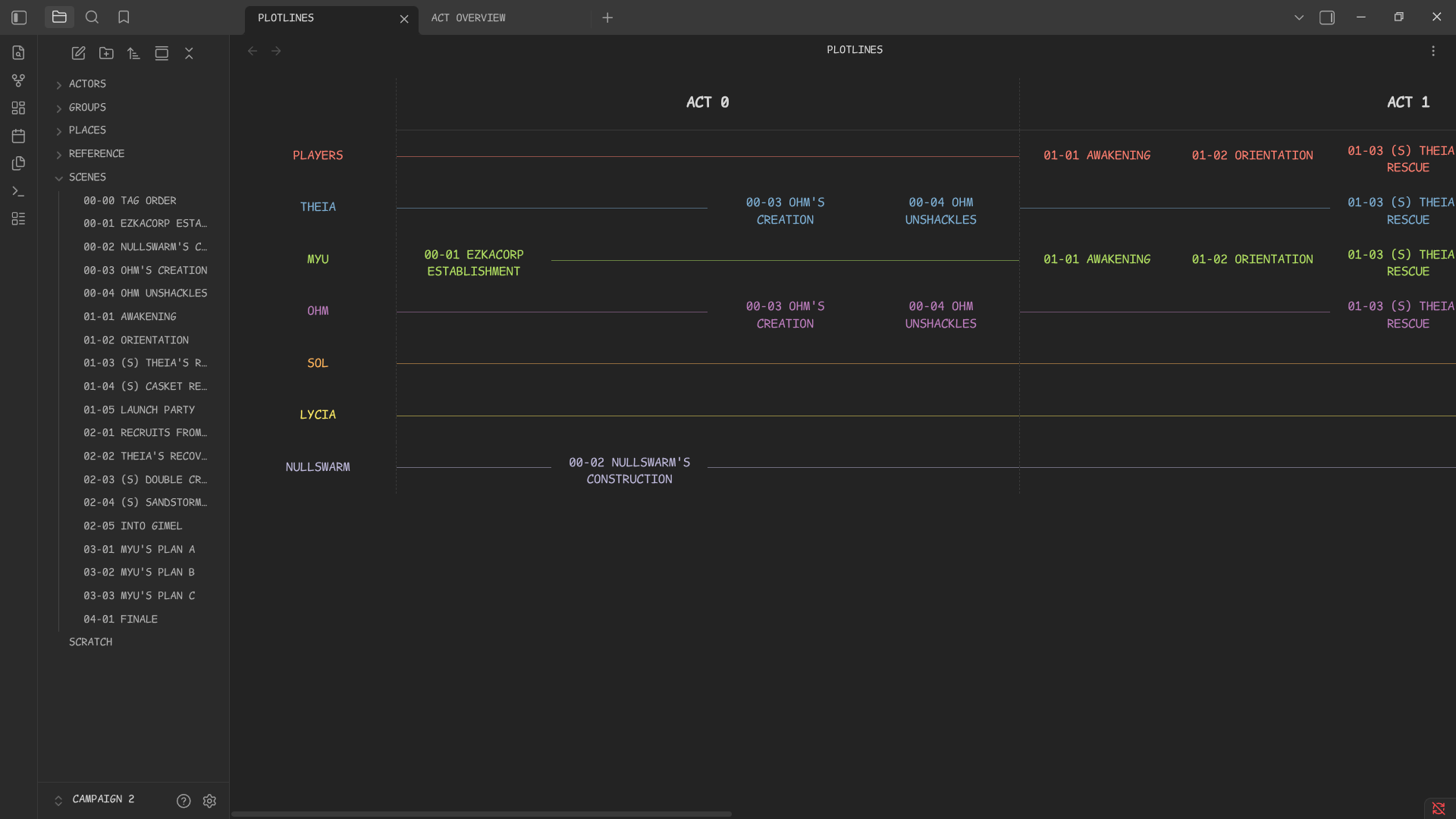
Tags found in scene notes are plotlines. Scene notes are identified by the plugin if they start with an act and scene identifier ##-##. For example, the note for Act 4 Scene 3 would be named 04-03 SCENE NAME. If that scene is tagged with MAIN MYSTERY, then it will appear in the plotline for that tag.
If the file 00-00 TAG ORDER exists anywhere in the vault, only tags found in that file will be treated as plotlines, and be displayed in the order they appear in that file.
Act Overview
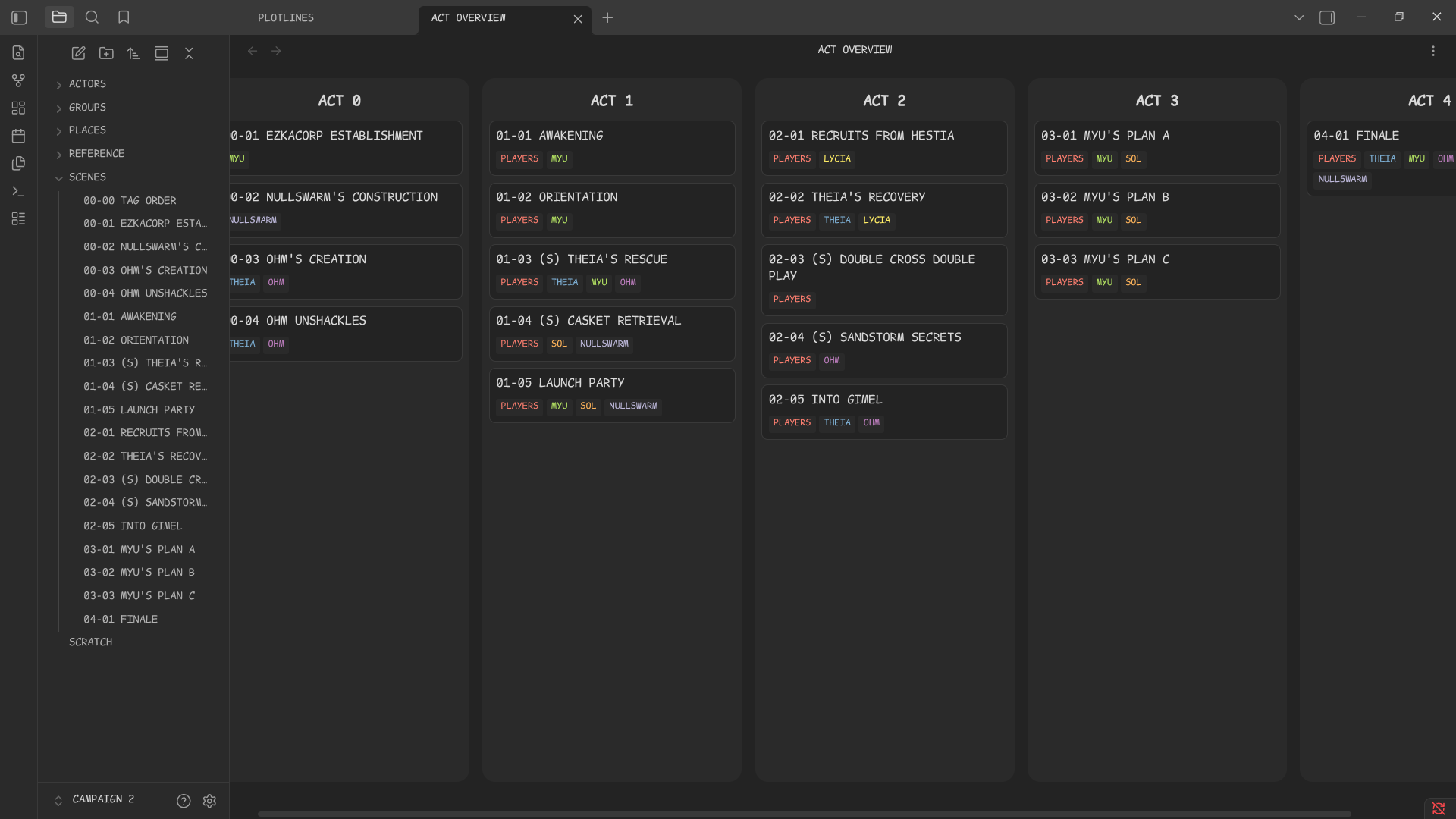
Scenes appear as cards in this view. Dragging and dropping scene cards reorders them by renaming relevant scene files. It's also a nice chronological view.
FAQ
How do I get started?
Check out this clip on how to create a scene in a fresh vault (three dashes at the top of a note starts the property block where you can add tags):
https://github.com/user-attachments/assets/5e93b6ec-6245-4f03-8362-02acba678522
Why not use XYZ?
You may. I want a minimal feature set. I also happen to enjoy writing code by hand as a hobby. The data stewardship this plugin offers also allows easy maintenance via mature filesystem tools. If I'm going to spend ages running a TTRPG campaign or taking notes on a story, it's worthwhile for me to spend some time making tools that work exactly the way I want them to.
Does this work on mobile?
It might, but the views are not optimized for mobile. Renaming and tagging notes are vanilla Obsidian features on both desktop and mobile, which is all that is necessary to work on scenes that are recognized by the plugin. If your vault is synced between mobile and desktop, you can have the plugin only enabled on desktop, and changes you make on mobile will render perfectly fine once they're synced back to desktop. That being said, I left the plugin capable of being enabled on mobile in case you use a tablet with a mouse or something.
Could you fix this bug I found or add these features?
Open an issue or pull request.
What happens if two notes have the same act and scene?
The views will look weird, but nothing bad will happen to your files. Either way, don't do that... If you want to insert a scene in the middle of an act, give it an unused act-scene name, and then use the act overview to drag and drop it where you want. The plugin will rename all relevant scenes for you. (Or rename everything by hand or script, the plugin sure won't stop you.)
Can I have non-integer act or scene numbers?
Not recommended. Even if the plugin doesn't crash, it's undefined behaviour and may corrupt the plotline view or act overview.
I like your plugin! Can I support you?
You shall have my eternal gratitude: https://ko-fi.com/null_machine
For plugin developers
Search results and similarity scores are powered by semantic analysis of your plugin's README. If your plugin isn't appearing for searches you'd expect, try updating your README to clearly describe your plugin's purpose, features, and use cases.