Simple Streams
approvedby Utku Aytaç
Render a filtered, sorted stream of notes from a code block. - This plugin has not been manually reviewed by Obsidian staff.
Simple Streams
An Obsidian plugin that renders a filtered, sorted stream of notes wherever you drop a stream code block.
Journal-shaped, but not journal-only: the filter decides what the stream is.
folder: Journal
tags: [book]
date-field: date
sort: date desc
group: day
display: preview
limit: 50
Installing
In Obsidian, open Settings → Community plugins, turn off Restricted Mode if it is on, then Browse and search for Simple Streams. Install it, enable it, and add a stream block to any note.
Installing by hand instead
- Download
main.js,manifest.jsonandstyles.cssfrom the latest release, or build them yourself (see Development). - Put all three in
<your vault>/.obsidian/plugins/simple-streams/. - Enable Simple Streams under Settings → Community plugins.
Each release asset carries a signed provenance attestation, so a downloaded build can be tied back to this repository:
gh attestation verify main.js --repo ukaytac/obsidian-simple-streams
Requires Obsidian 1.7.2 or newer. Works on desktop and mobile.
What it reads, and what it never does
A query that can select from the vault has to be able to see the vault, so Simple Streams enumerates it — this is worth stating plainly rather than leaving you to find it in a permissions list.
- It lists every Markdown note.
app.vault.getMarkdownFiles(), one call site:src/obsidian/adapter.ts. Markdown only — notgetFiles(), so attachments and non-note files are never enumerated. What it takes from each is its path, name, tags, frontmatter and timestamps, all of which are already in Obsidian's metadata cache. Afolder:narrows what a stream shows; the list it filters is still the whole vault. - It reads note bodies only to draw them.
vault.cachedRead, and only for the items a stream actually renders — bounded by the query'slimitand, for a long stream, by how far you have scrolled. - It never writes to your notes. None is created, edited, renamed or deleted. It subscribes to those events to know when to re-run a query; it does not cause them. The one thing it does write is its own settings file — the sidebar query, in
data.jsoninside the plugin's folder in your vault. - It never talks to the network. There is no
fetch, norequestUrl, and no dependency that makes one. Nothing about your vault leaves your machine.
None of that is a claim you have to take on trust. The test suite and the type check run in CI on every push, npm run check:floor proves each release against the typings for the Obsidian version the manifest promises, and the assets carry the attestation described under Installing.
Fields
| Field | Type | Default | Meaning |
|---|---|---|---|
folder | text or list | whole vault | Path prefix, subfolders included |
tags | text or list | — | All listed tags must be present |
tags-any | text or list | — | At least one of the listed tags |
exclude-folder | text or list | — | Drop notes under these paths |
exclude-tags | text or list | — | Drop notes carrying any of these tags |
title | text or /regex/ | — | Matches the note's file name |
where | map | — | Frontmatter conditions, including this. references to the host note |
date-field | text | file.ctime | Which field is "the date" |
from, to | date | — | Inclusive date bounds |
sort | text or list | file.ctime desc | "<field> <asc|desc>", direction defaults to asc |
group | day|month|year|none | none | Date headers, using date-field |
display | full|preview|title | preview | How much of the body to show |
preview-length | number | 200 | Character budget for previews |
limit | number | 50 | Maximum items |
Fields addressable in sort and where: any frontmatter key by name, plus file.ctime, file.mtime, file.name and file.path.
Two things worth knowing about date-field, because they surprise people:
groupreadsdate-field, not yoursortfield. If you sort by a frontmatterdatebut leavedate-fieldat its default, the headers say file-creation dates and the stream is reordered to match them — your declared sort survives only inside each group. Setdate-fieldto the same field you sort by, as the example above does.fromandtoalso readdate-field, and so does the date shown beside each item.
Matching rules
Tags match their descendants: tags: project also matches a note tagged project/streams.
Folder paths, tag names, title text and where equality are all case-insensitive. A title regex is not — write /weekly/i if you want it to be.
A tag written with its hash must be quoted — tags: ["#book"] — because YAML reads a bare # as a comment. Writing the tag without the hash needs no quotes.
where conditions: field: value (equality), field: [a, b] (any of), field: exists / field: missing, and comparisons — field: ">3", ">=3", "<3", "<=3", "!=done".
Comparisons must be quoted. Unquoted, YAML reads > and ! as its own syntax and your condition becomes something else entirely; Simple Streams rejects the result with an error rather than showing you an empty stream. A field with no value matches only missing.
Equality looks inside a frontmatter list too: where: {tags: book} matches a note whose tags are [Book, Read]. Numbers compare as numbers and booleans as booleans.
Values are compared as the notes they name, so a property holding [[My Project]] matches one holding My Project, and an alias or a heading in the link — [[My Project|MP]], [[My Project#Goals]] — matches the plain link too. Write whichever your vault uses; a stream never depends on the two notes having spelled the relationship the same way.
A where value may also name a property of the note the block sits in, by writing this. in front of it:
folder: Notes
sort: file.ctime desc
where:
  Project: this.Project
In a note whose properties say Project: Orbit, that stream shows every note whose Project is Orbit. Put the block in a template and every project note made from it carries its own running history, with nothing to edit per note. Beyond frontmatter keys, this.file.name and this.file.path reference the host note itself — the two file properties worth referencing this way; this.file.ctime and this.file.mtime resolve too, but to raw epoch milliseconds, which will not match anything meaningful.
A reference can be written as a link — Project: "[[this.Project]]" — which is what reads naturally in a vault whose properties hold links. It resolves to exactly one link whether the host note's own property is My Project or [[My Project]]. Because values already compare as the notes they name, this spelling and the plain this.Project match the same notes; write whichever looks right in the block.
If the host note's property holds a list, the stream matches any of its values. If the note has no such property — a template's note before it is filled in — the stream matches nothing and says so, rather than quietly widening to the whole vault. A this. reference has to be the whole condition, in either spelling: it cannot sit inside a list or after a comparison operator. A link reference names a property, so it cannot carry an alias or a heading either — "[[this.Project|MP]]" is an error, not a match. Text that reaches for a link reference and misses — "![[this.Project]]", "[[this.Project]]extra" — is an error too, rather than a literal match that would quietly find nothing. A value starting with this. is always read this way, so there is no way to match a property whose own text genuinely starts with this. — nor one whose text contains [[this. anywhere, which is an error for the same reason rather than a literal match.
A stream filtering on the host note's own property matches the host note too — its Project equals its own Project by construction. Keeping the streamed notes in a folder of their own, as folder: Notes does above, is what leaves the project note itself out of its own stream.
Dates accept YYYY-MM-DD, today, yesterday, and signed offsets like -30d, -2w, -6m, +1y. The sign is required — a bare 30d is an error rather than a guess at which direction you meant. Month and year offsets clamp to the end of the target month, so one month before 31 March is 28 February in a common year and 29 February in a leap year.
The sidebar
Simple Streams can also run one stream in a sidebar that follows whichever note you are looking at. Turn it on with Settings → Simple Streams → Show sidebar, or from the command palette with Simple Streams: Open sidebar.
Its query lives just below that toggle, in Sidebar query, and it is the same syntax a stream block uses, with one addition: active.Property names a property of the note you are currently on.
where:
  Project: active.Project
sort: file.mtime desc
display: preview
Open a project note and the sidebar lists that project's notes; move to a client note and it lists that client's. Nothing has to be added to the notes themselves.
active.file.name, active.file.path, active.file.ctime and active.file.mtime work too, as do the link spellings — "[[active.Project]]" for vaults that store relationships as links.
this. and active. are not interchangeable. this. names the note holding a stream block, so it works in a block and not in the sidebar. active. names the note you are looking at, so it works in the sidebar and not in a block — a block's results must not change depending on which pane has focus. Writing either one in the wrong place is an error that names the spelling to use instead.
The sidebar keeps following the last Markdown note when you click into the sidebar itself or open a PDF, and leaves the followed note out of its own results.
Several streams on one page
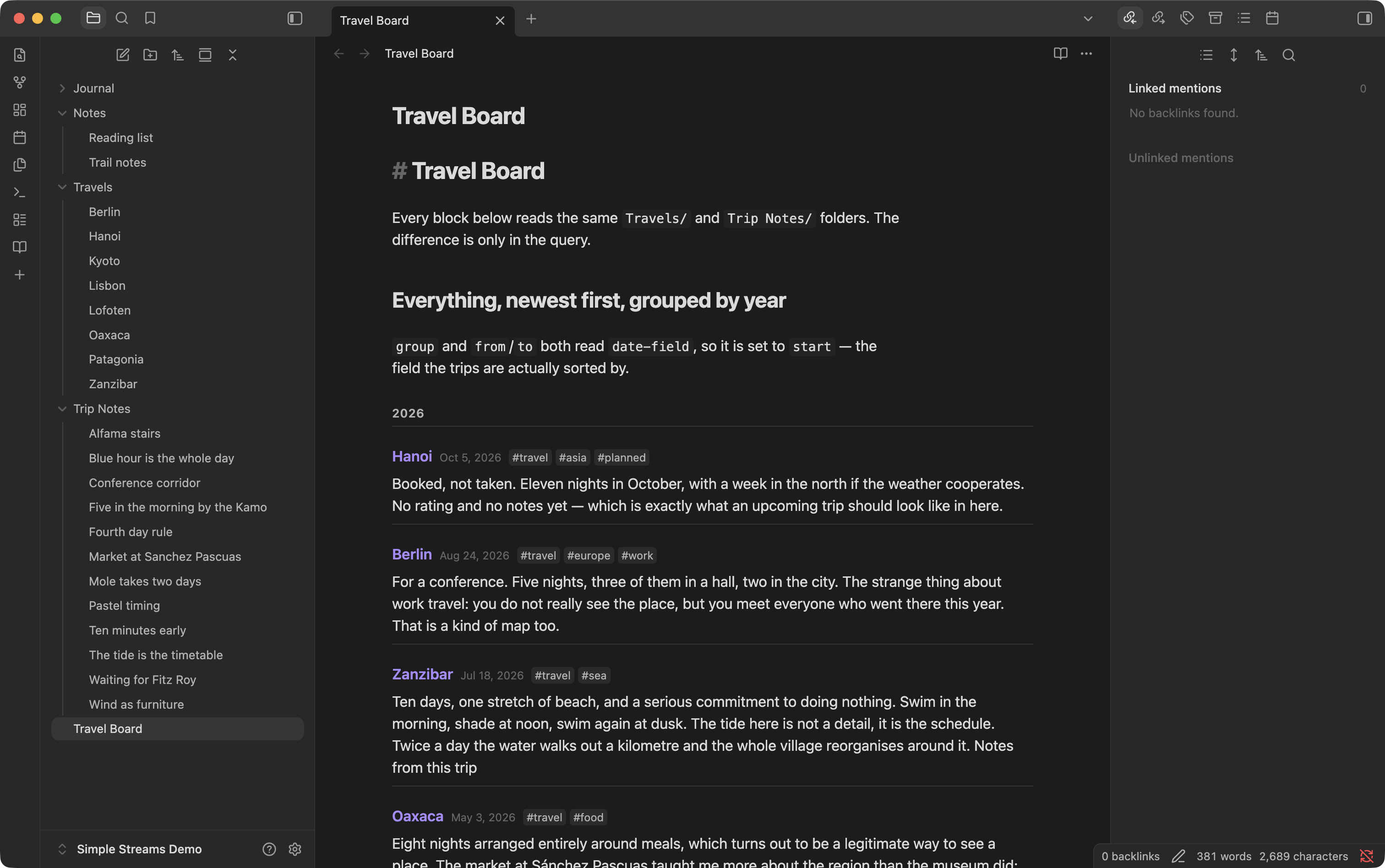
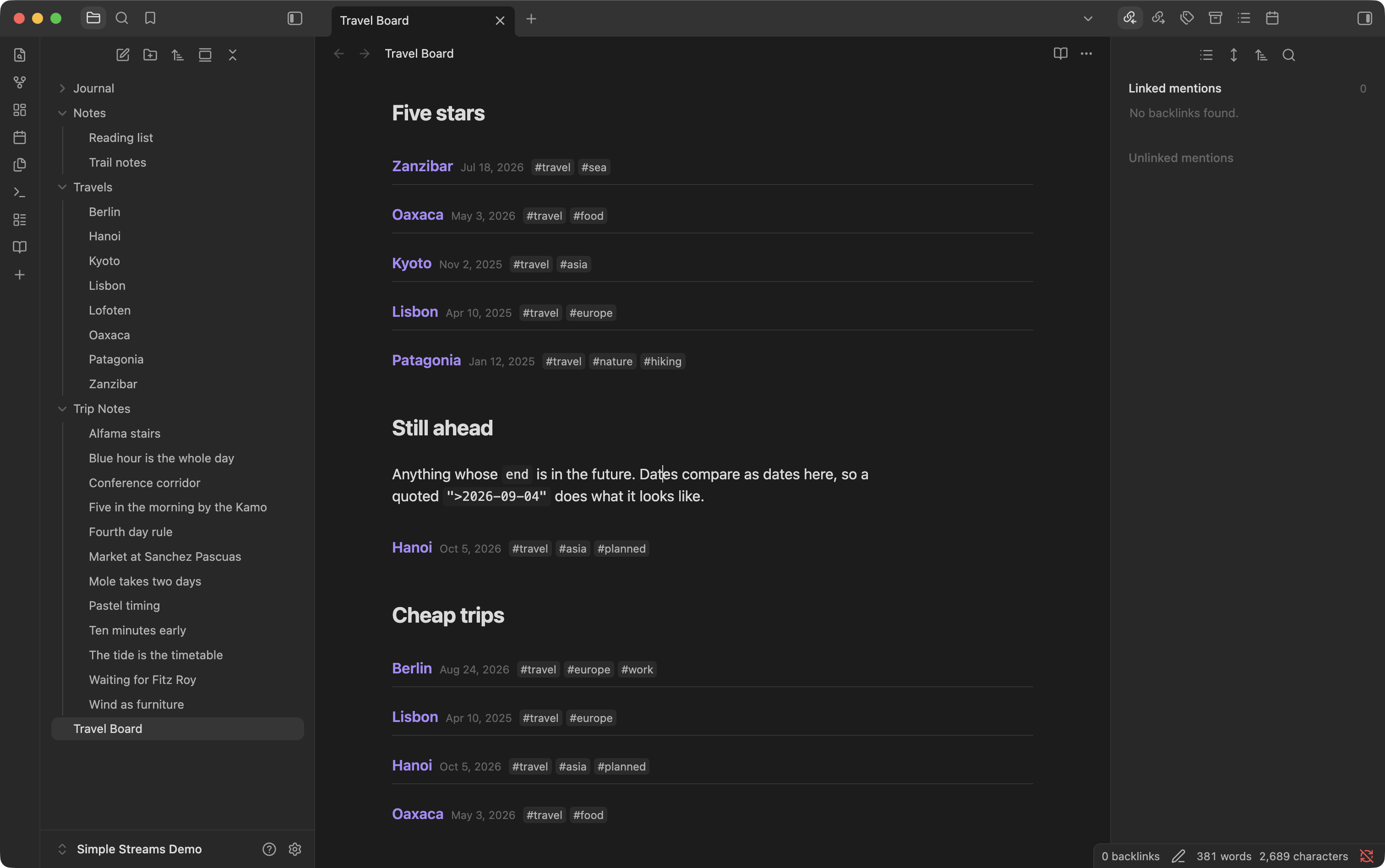
Nothing stops a note from holding as many blocks as it needs. These are all reading the same two folders — a Travels/ folder whose notes carry start and end dates, and a Trip Notes/ folder of short notes tagged to a trip. Only the query differs.
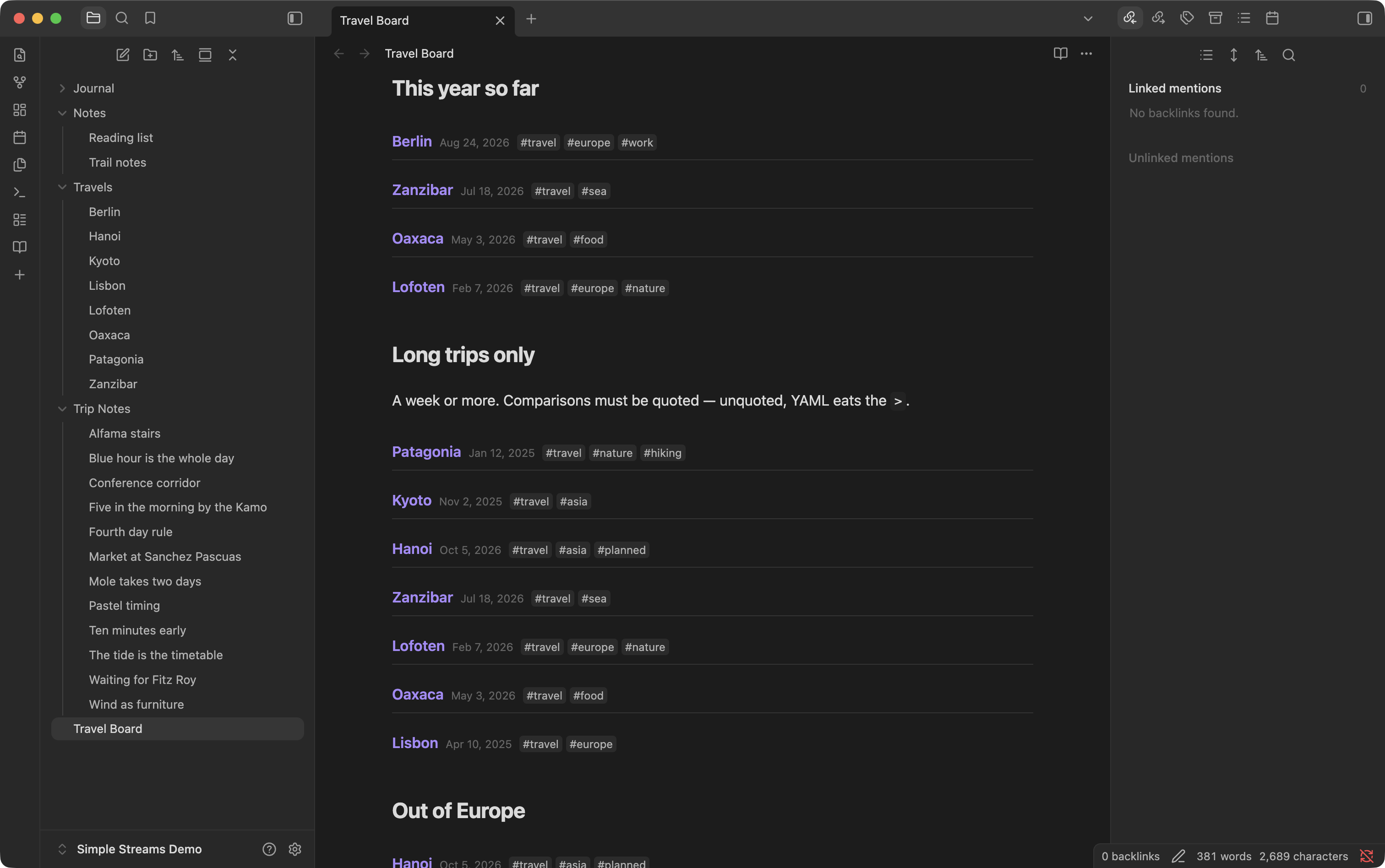
where is what makes a stream specific: a rating, a budget, a date in the future, a field that is simply missing.
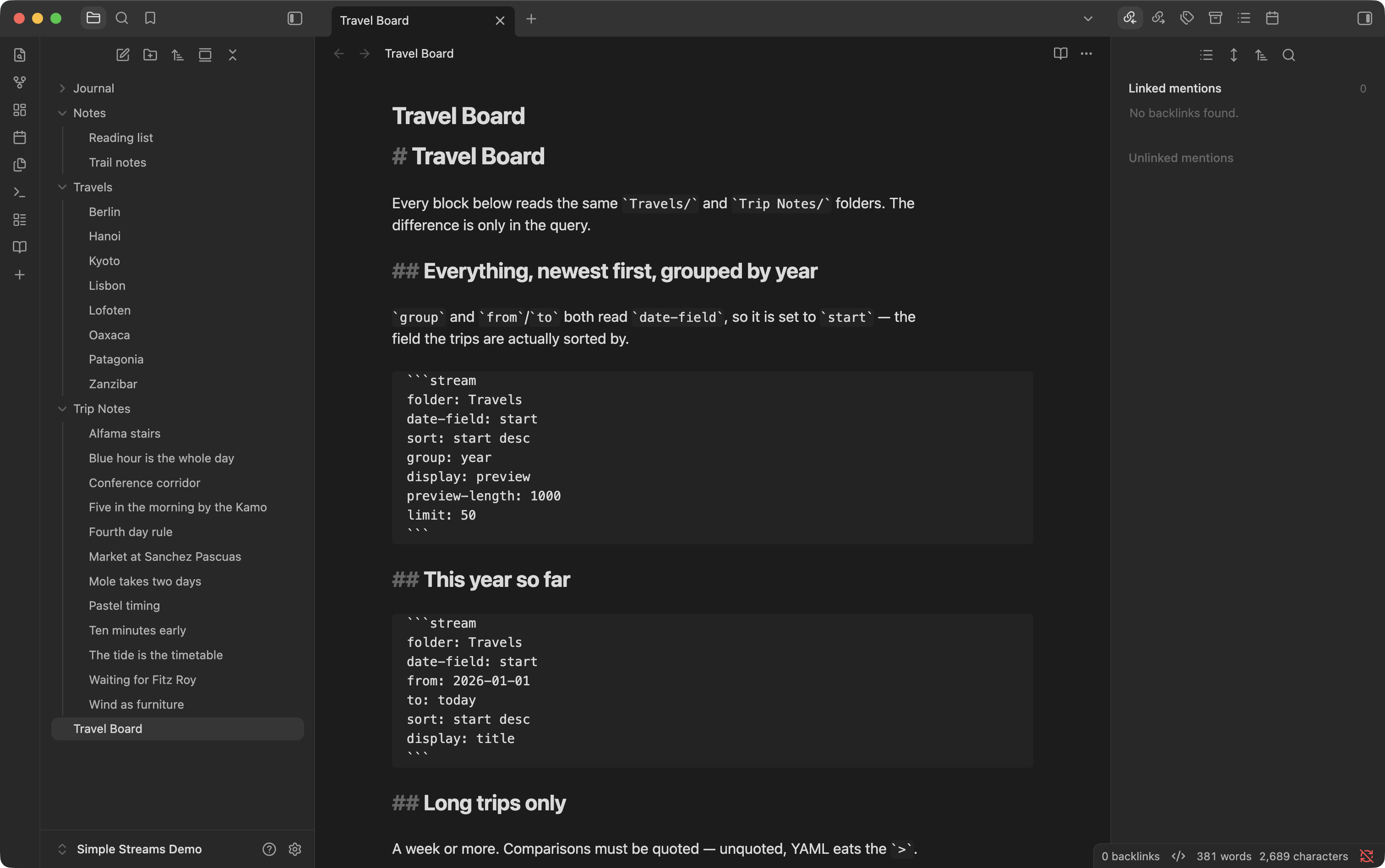
And what that page is, underneath: plain code blocks in a Markdown note.
Development
npm install
npm test          # engine, parser and one budget test
npm run dev       # watch build
npm run build     # type-check and bundle
main.js is a build artifact and is not in the repository — npm run build writes it at the root, next to the manifest.json and styles.css a user installs alongside it.
To try a change in a real vault, point a plugin folder at the build rather than copying after every edit:
VAULT=~/path/to/your/vault
mkdir -p "$VAULT/.obsidian/plugins/simple-streams"
ln -sf "$PWD"/{main.js,manifest.json,styles.css} \
  "$VAULT/.obsidian/plugins/simple-streams/"
npm run dev
npm run dev writes main.js at the repo root on every save, and the symlinks mean Obsidian sees it immediately — reload with Reload app without saving from the command palette. Use a scratch vault: a stream is read-only, but a plugin under development is still a plugin under development.
tests/view/ mounts the view in jsdom, which has one window and one rendering mode. What that leaves over — popout windows, Live Preview, mobile — is in docs/manual-testing.md, along with what each run of it found.
Design: docs/superpowers/specs/2026-09-04-simple-streams-design.md Plan: docs/superpowers/plans/2026-09-04-simple-streams.md Publishing: docs/publishing.md
License
MIT — see LICENSE.
For plugin developers
Search results and similarity scores are powered by semantic analysis of your plugin's README. If your plugin isn't appearing for searches you'd expect, try updating your README to clearly describe your plugin's purpose, features, and use cases.