Smart Done Mover
approvedby wxjett
Move completed tasks into a customizable Done section with nested task filtering, auto mode, and Tasks plugin support. - This plugin has not been manually reviewed by Obsidian staff.
Smart Done Mover
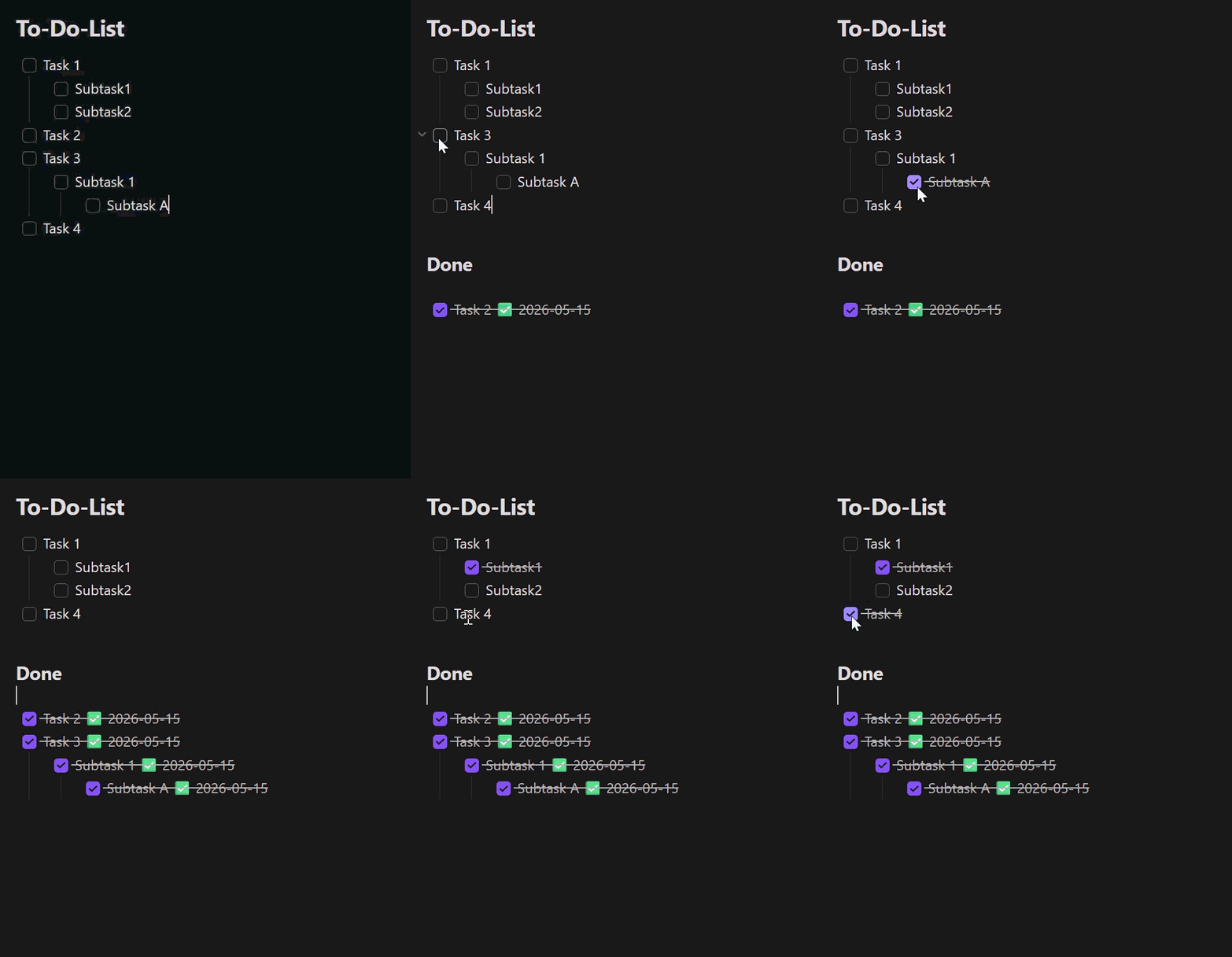
An Obsidian plugin that moves completed checkbox tasks — including their indented sub-tasks — into a customizable Done section of the same note.
🌍 Languages: English (this page) · Deutsch · 简体中文 The plugin interface follows Obsidian's UI language: English by default, German when Obsidian is set to German, and Simplified Chinese when Obsidian is set to Chinese.
Demo
Features
- Right-click menu in the editor:
- Move completed tasks to Done — moves every fully completed task.
- Move selection to Done — moves the task blocks touched by the current text selection (only shown when text is selected).
- The same actions are available as commands (command palette, can be bound to hotkeys).
- Auto mode (optional): as soon as a task is checked, it moves to Done automatically. It also detects task completions written back to source notes by the Tasks plugin after a short debounce (about 400 ms or more).
- Task filter (optional): move only tasks matching a text filter such as
#task. The filter applies to auto mode, Move completed tasks to Done, and Move selection to Done.- Leave the filter empty to keep the original behavior: all fully completed task blocks can move.
- A matching task must be checked. If it has matching descendants, they must be checked too; non-matching descendants do not block the move.
- A matching parent moves its complete indented block, including notes and non-matching child checkboxes. A matching child under a non-matching parent moves independently with its own indented block.
- Excluded folders/files (optional): auto mode stays inactive in the configured vault paths (including subfolders); manual commands still work there.
- Sub-tasks move along with their parent; indentation is preserved.
- Optionally appends a completion date
✅ YYYY-MM-DDto each moved, checked line (no duplicate dates). - Use a plain Done heading name for the original
### Donebehavior, or enter a full Markdown heading such as# Completedto choose its level. An existing heading with the same title is reused.
Settings
| Setting | Description | Default |
|---|---|---|
| Auto mode | Move completed tasks automatically | off |
| Done heading | Target heading. Plain text creates ###; a Markdown heading keeps its level. | Done |
| Task filter | Text a task must contain before it can move; empty disables filtering. | empty |
| Append completion date | Append a ✅ date to moved lines | on |
| Excluded folders/files | Vault paths (one per line) where auto mode stays inactive | empty |
Usage
- Open a note that contains a checkbox to-do list.
- Configure the optional Task filter if only marked tasks, such as
#task, should move. - Right-click in the editor and choose an action, run the matching command from the command palette, or enable Auto mode.
- Completed tasks are moved under the configured Done heading.
Disclosures
- The plugin works entirely offline and makes no network requests.
- It collects no telemetry and stores no data outside your vault.
- It only modifies the note in which a move action runs (manually or via auto mode) and never touches other files.
- Settings are stored in the plugin's
data.jsoninside your vault's configuration folder. - No account, payment, or external service is required.
Build from source
npm ci
npm test          # unit tests (Vitest)
npm run build     # produces main.js
Install into a vault
For normal installation, download main.js and manifest.json from the
matching GitHub Release. Copy them into
<Vault>/.obsidian/plugins/smart-done-mover/, then enable the plugin under
Settings → Community plugins.
For development you can use the project folder directly as the plugin folder
(npm run dev for a watch build).
Releases
Pushing a git tag triggers the GitHub Actions workflow in
.github/workflows/release.yml, which builds the plugin and attaches
main.js and manifest.json to a new GitHub release. Make sure the tag
matches the version in manifest.json.
Project structure
| File | Purpose |
|---|---|
main.ts | Plugin class: commands, context menu, auto mode |
src/taskParser.ts | Markdown parsing, section and block detection |
src/mover.ts | Pure move logic (moveCompletedTasks, moveSelectedTasks) |
src/settings.ts | Settings UI |
src/exclusions.ts | Path-exclusion matching for auto mode |
src/i18n.ts | UI string localization (English / German / Simplified Chinese) |
src/types.ts | Shared types and defaults |
src/*.test.ts | Unit tests |
taskParser.ts, mover.ts and exclusions.ts have no Obsidian dependencies,
so they are unit-testable without a running Obsidian instance.
Origin
Smart Done Mover is an independent project based on To-Do to Done Mover by DonnervS. It retains the original MIT license.
License
For plugin developers
Search results and similarity scores are powered by semantic analysis of your plugin's README. If your plugin isn't appearing for searches you'd expect, try updating your README to clearly describe your plugin's purpose, features, and use cases.