To-Do to Done Mover
approvedby wenzel1983
Move completed checkbox tasks (with their sub-tasks) into a Done section — via right-click, command, or automatically. - This plugin has not been manually reviewed by Obsidian staff.
To-Do to Done Mover
An Obsidian plugin that quickly moves completed
checkbox tasks — including their indented sub-tasks — from a to-do list into
a ### Done section of the same note.
🌍 Languages: English (this page) · Deutsch The plugin interface follows Obsidian's UI language: English by default, German when Obsidian is set to German.
Demo
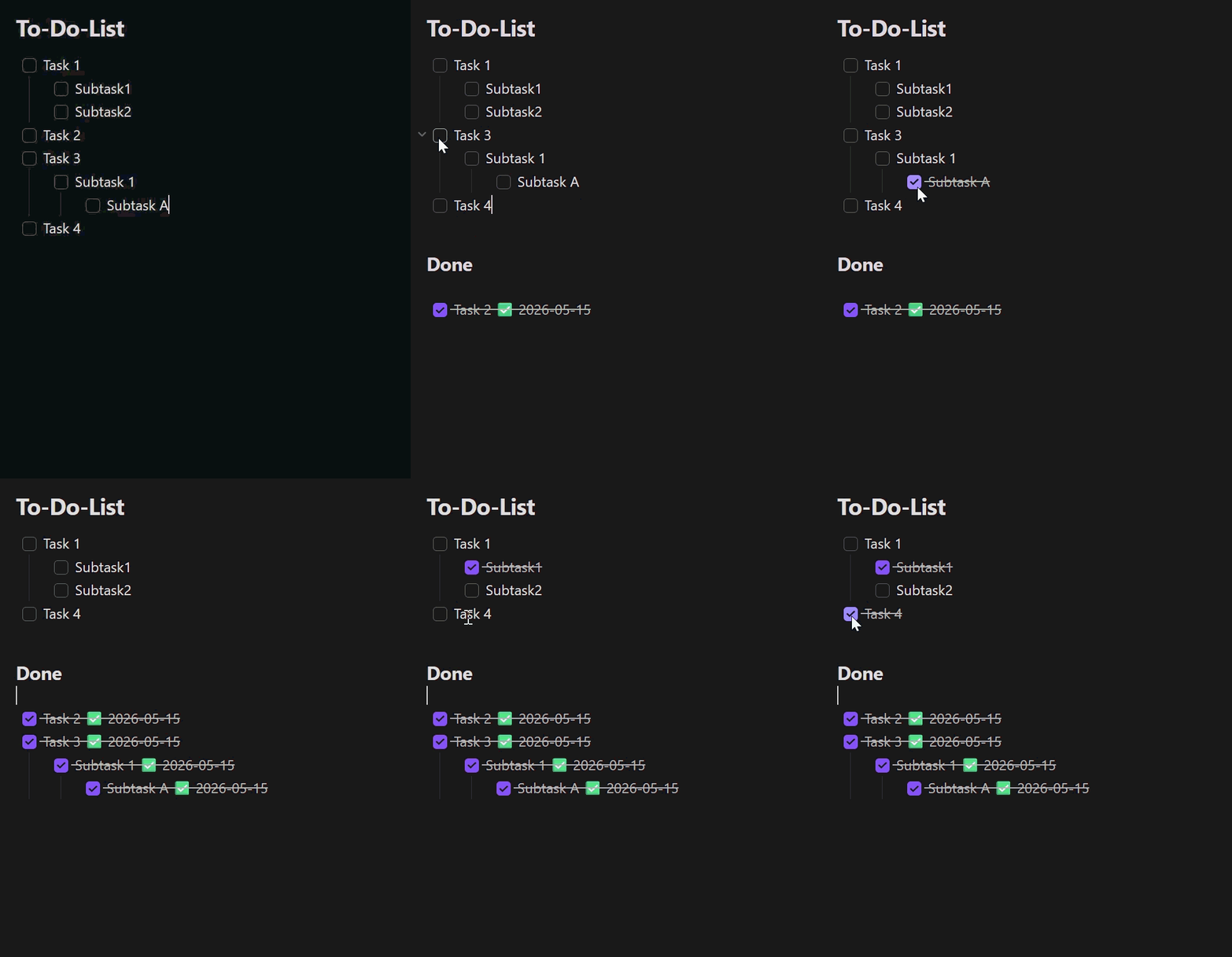
Features
- Right-click menu in the editor:
- Move completed tasks to Done — moves every fully completed task.
- Move selection to Done — moves the task blocks touched by the current text selection (only shown when text is selected).
- The same actions are available as commands (command palette, can be bound to hotkeys).
- Auto mode (optional): as soon as a task is checked, it moves to Done automatically — but only when the task and all of its sub-tasks are checked.
- Excluded folders/files (optional): auto mode stays inactive in the configured vault paths (including subfolders); manual commands still work there.
- Sub-tasks move along with their parent; indentation is preserved.
- Optionally appends a completion date
✅ YYYY-MM-DDto each moved, checked line (no duplicate dates). - If the
### Doneheading does not exist, it is created at the end of the note.
Settings
| Setting | Description | Default |
|---|---|---|
| Auto mode | Move completed tasks automatically | off |
| Done heading | Name of the target heading | Done |
| Append completion date | Append a ✅ date to moved lines | on |
| Excluded folders/files | Vault paths (one per line) where auto mode stays inactive | empty |
Usage
- Open a note that contains a checkbox to-do list.
- Right-click in the editor and choose an action, or run the matching command from the command palette.
- Completed tasks are moved under the configured Done heading.
Disclosures
- The plugin works entirely offline and makes no network requests.
- It collects no telemetry and stores no data outside your vault.
- It only modifies the note in which a move action runs (manually or via auto mode) and never touches other files.
- Settings are stored in the plugin's
data.jsoninside your vault's configuration folder. - No account, payment, or external service is required.
Build from source
npm install
npm test          # unit tests (Vitest)
npm run build     # produces main.js
Install into a vault
Copy main.js and manifest.json into
<Vault>/.obsidian/plugins/todo-done-mover/, then enable the plugin under
Settings → Community plugins.
For development you can use the project folder directly as the plugin folder
(npm run dev for a watch build).
Releases
Pushing a git tag triggers the GitHub Actions workflow in
.github/workflows/release.yml, which builds the plugin and attaches
main.js and manifest.json to a new GitHub release. Make sure the tag
matches the version in manifest.json.
Project structure
| File | Purpose |
|---|---|
main.ts | Plugin class: commands, context menu, auto mode |
src/taskParser.ts | Markdown parsing, section and block detection |
src/mover.ts | Pure move logic (moveCompletedTasks, moveSelectedTasks) |
src/settings.ts | Settings UI |
src/exclusions.ts | Path-exclusion matching for auto mode |
src/i18n.ts | UI string localization (English / German) |
src/types.ts | Shared types and defaults |
src/*.test.ts | Unit tests |
taskParser.ts, mover.ts and exclusions.ts have no Obsidian dependencies,
so they are unit-testable without a running Obsidian instance.
License
For plugin developers
Search results and similarity scores are powered by semantic analysis of your plugin's README. If your plugin isn't appearing for searches you'd expect, try updating your README to clearly describe your plugin's purpose, features, and use cases.