Spellcheck Toggler
approvedby julzerinos
Toggle spellchecking for types of text blocks in the editing view.
Spellcheck Toggler
A plugin for Obsidian which gives you more control over the red-underline spellcheck behaviour.
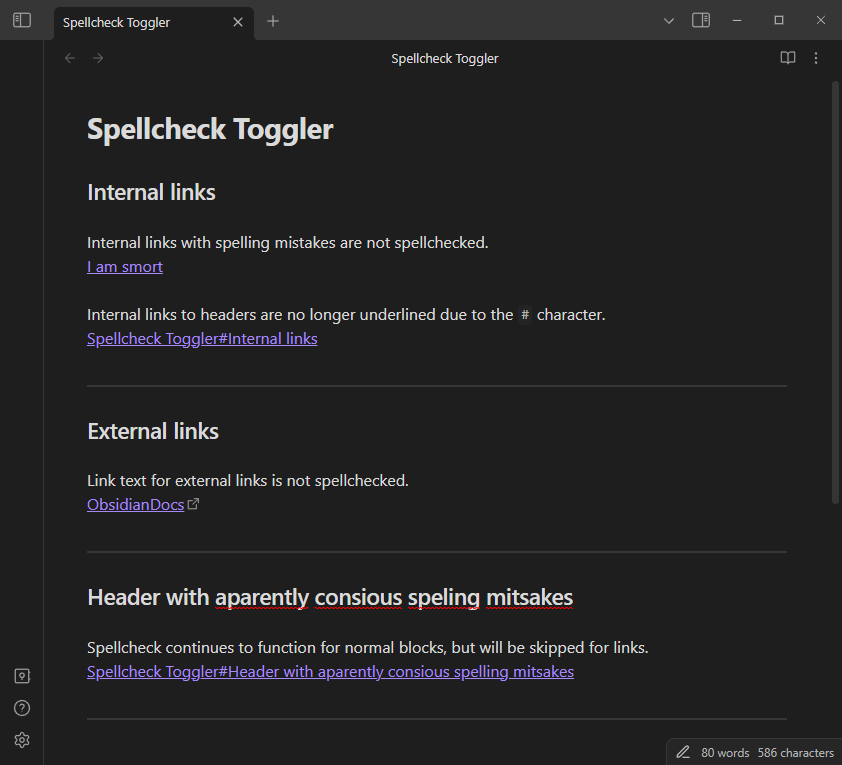
If you spend most of your time in the editing view and find yourself annoyed by the red spellcheck underline, you might find this plugin handy to toggle spellchecks for select types of blocks in your notes.
Originally created to disable spellcheck underlining for links in the editing view, but can easily be expanded to support other types of blocks.
Features
- Feature toggles
- External links
- Internal links
- HTML comments
- Block quotes
- Emphasis (italic)
- Strong (bold)
- Entire-file toggle
- Robust behaviour per-file toggle control, with user-set frontmatter properties
- Modules - each toggle can be controlled from the plugin setting tab to customize for your use case.
- Open to requests - you can create an issue to request spellcheck toggling for a specific type of block.
Examples
Settings
Configure the spellcheck options with precise control.
You can tweak each spellcheck option individually, either entirely ignoring that option or applying it to your use case with the behaviour dropdown.
Configure spellchecking options. The behaviour of a spellcheck option is defined as follows:
- "Always spellcheck": the editor default behaviour will be applied (the plugin is not active for the option).
- "Frontmatter": explicitly use the defined frontmatter override property to toggle spellchecking in a given file, otherwise use a fallback behavior in files without the property.
- "Never spellcheck": do not use spellcheck in any file for the option.`
For plugin developers
Search results and similarity scores are powered by semantic analysis of your plugin's README. If your plugin isn't appearing for searches you'd expect, try updating your README to clearly describe your plugin's purpose, features, and use cases.