Star Icons
approvedby Kerekes Stefan
The icon collection manager for Obsidian. Browse 103,000+ bundled icons, build collections and tags, and apply icons to files, folders and tabs with an intuitive rules engine and live preview. - This plugin has not been manually reviewed by Obsidian staff.
⭐ Star Icons
The icon collection manager for Obsidian — 103,000+ icons, organized into collections and tags, and applied to files, folders and tabs through an intuitive rules engine with live preview and full transparency.
Star Icons takes a third path in the icon-plugin landscape:
- Iconize gives you total manual control.
- AutoIcons gives you set-and-forget automation.
- Star Icons gives you a library: curate, tag and collect icons like music playlists, then apply them with rules that explain themselves.



⚠️ Attribution & trademarks: Star Icons bundles icon sets from many third parties — Font Awesome, Twemoji, OpenMoji, Simple Icons, brand logos and more. Every pack keeps its original license and any required credit line (details in Licenses & trademarks below), and third-party logos/names are trademarks of their respective owners — their inclusion here is not an endorsement.
📸 Screenshots
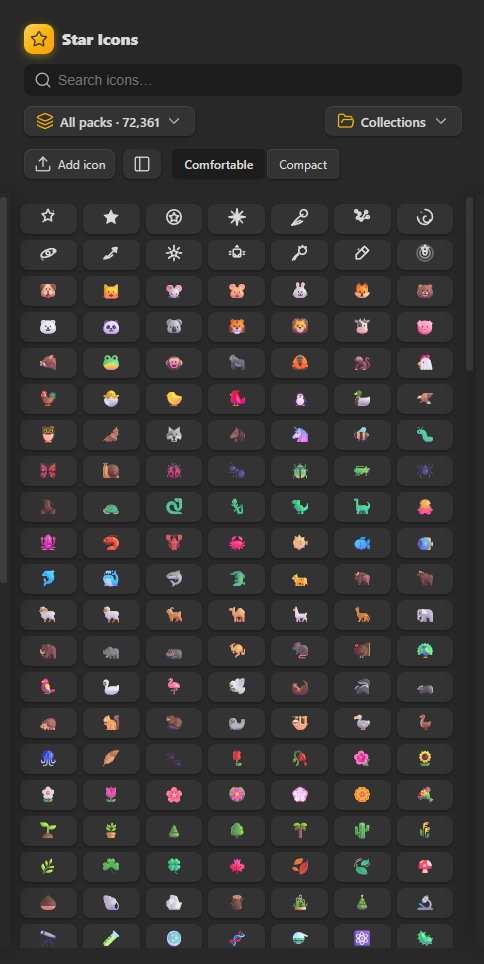 | 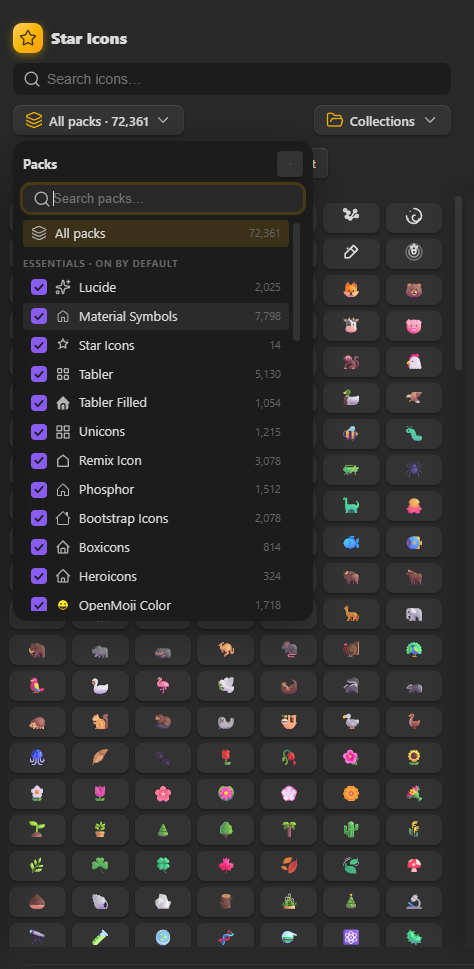 |
| Icon Manager — the collection hub | Icon picker — search & apply |
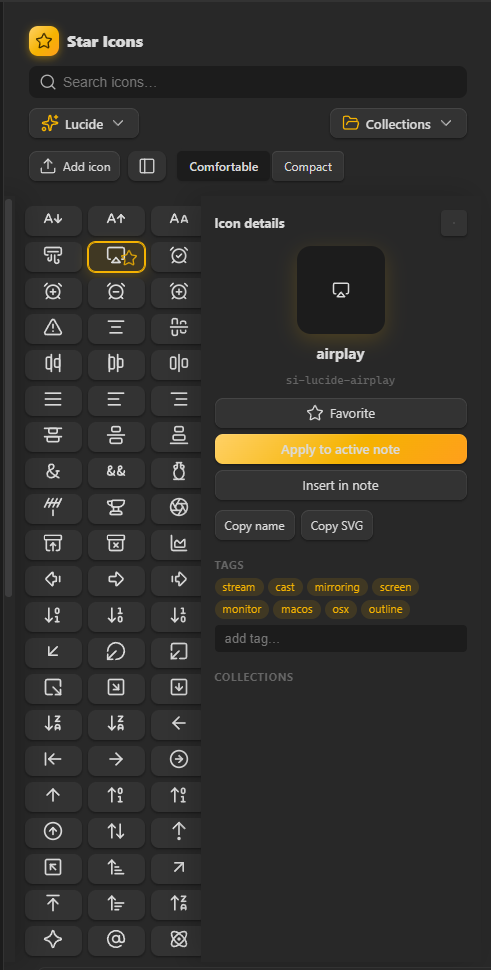 | 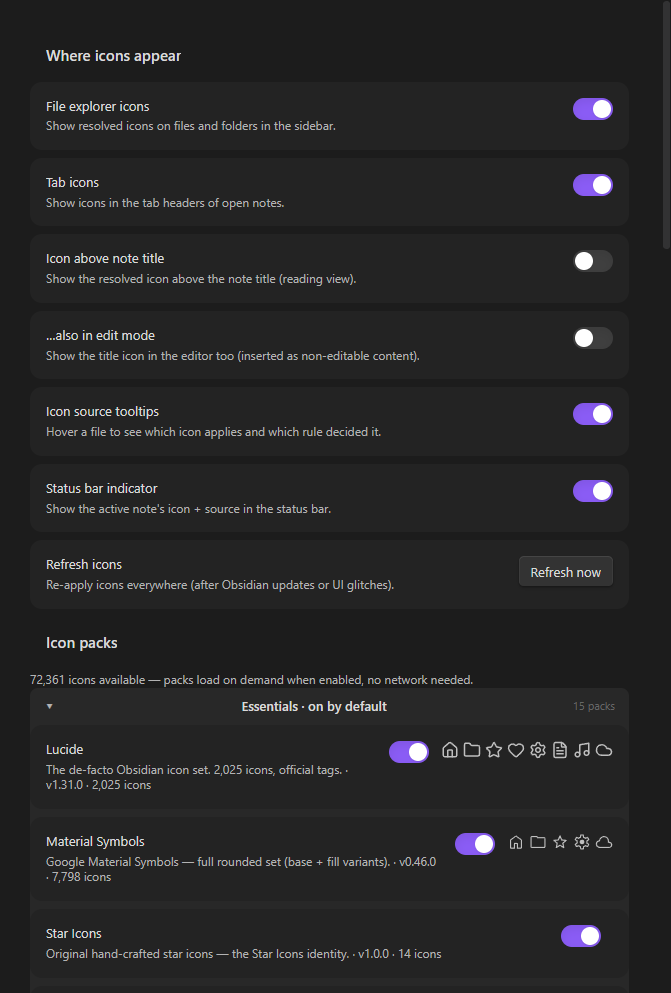 |
| Icon details — preview, tags, collections | Settings — packs, file types, data |
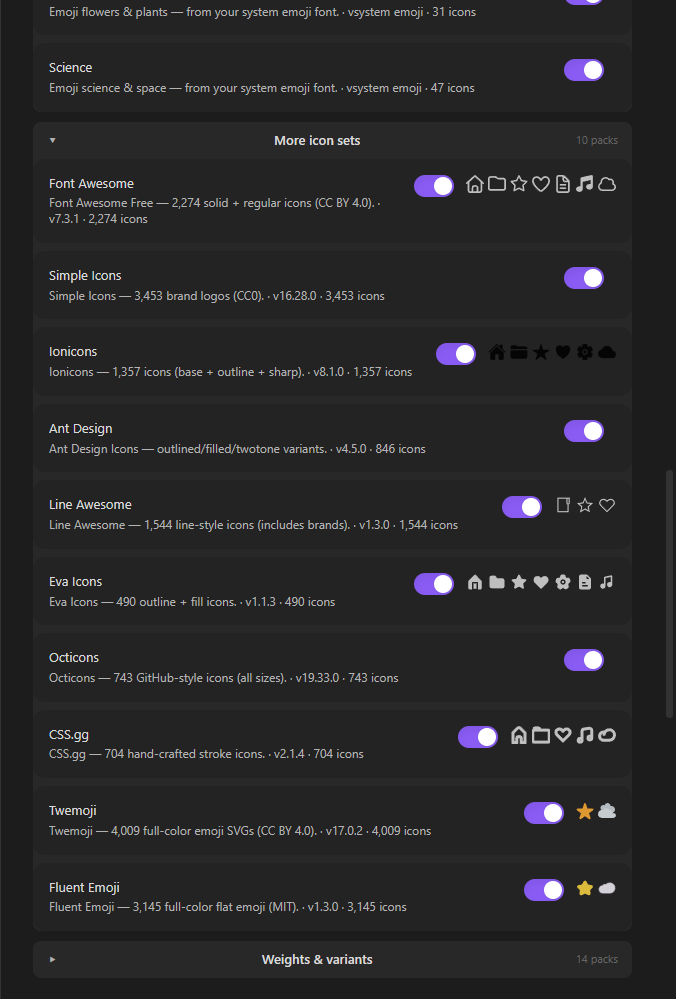
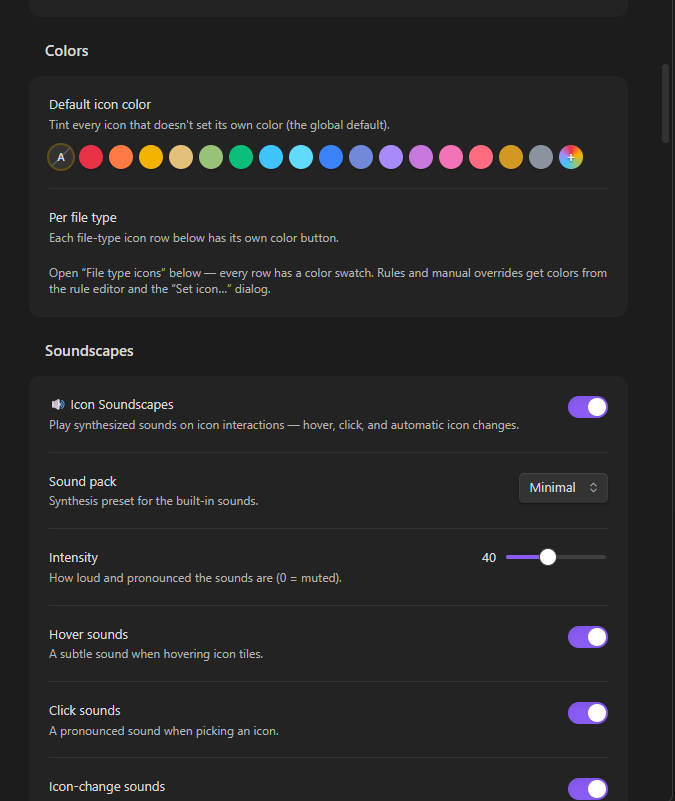 | 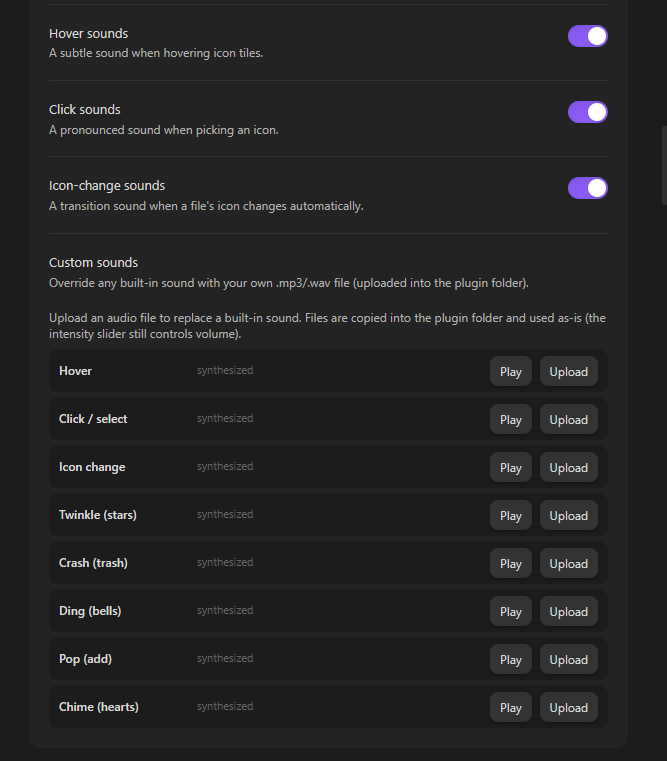 | 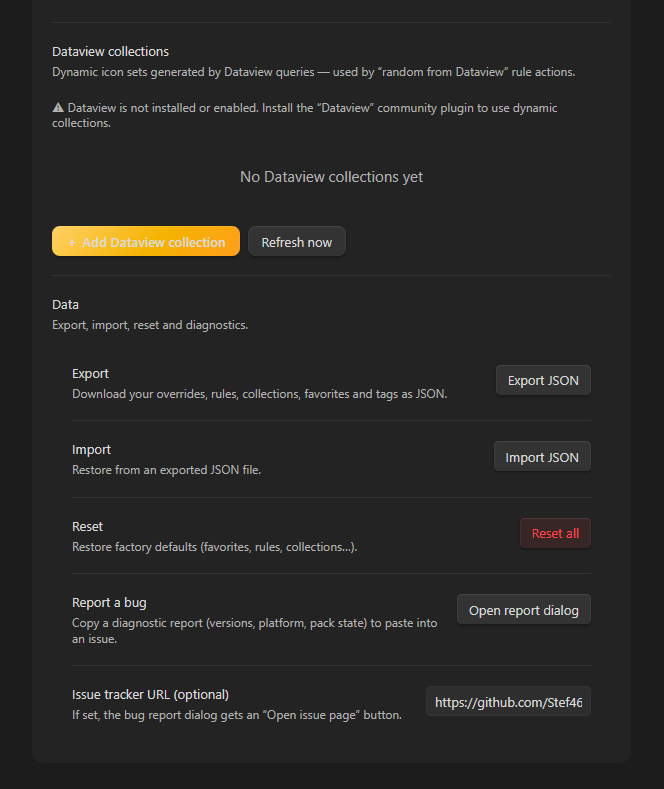 |
| Settings — Colors | Settings — Dataview collections | Settings — Soundscapes |
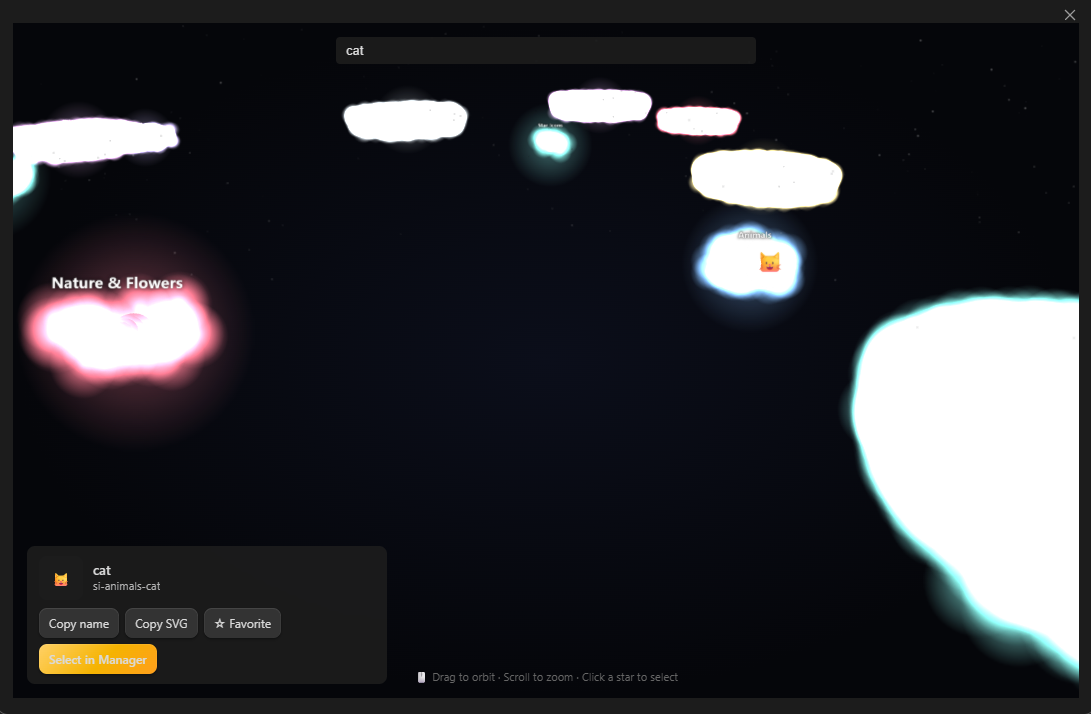
Icon Galaxy — browse the whole library as an interactive 3D universe
✨ Features
🗂️ Icon Collection Manager (the hub)
A dedicated sidebar view — the place to browse your icons.
- 103,676 icons, offline after first load — pack data ships with the repo
and manual installs; when a pack file is missing (Obsidian's community
installer only downloads
main.js,styles.cssandmanifest.json) it is fetched once from a CDN and cached locally, so everything works offline afterwards. Packs load on demand:main.jsstays small, only the packs you enable are read, and every icon carries style tags (outline,filled,bold,color,brand…) so searching 100k icons never feels like 100k near-duplicates.- Core — on by default (26,932 icons): Material Symbols (7,798) · Tabler (5,130) · Remix Icon (3,078) · Bootstrap (2,078) · Lucide (2,025) · OpenMoji Color (1,718) · Phosphor (1,512) · Unicons (1,215) · Tabler Filled (1,054) · Boxicons (814) · Heroicons (324) · Animals (94) · Science (47) · Nature & Flowers (31) · Star Icons (14)
- Extended — opt-in in Settings (76,744 more): Material Outlined (7,798) · Material Sharp (7,798) · MDI (7,638) · Hugeicons (6,005) · Twemoji 🎨 (4,009) · Simple Icons (3,453) · MingCute (3,336) · Fluent Emoji 🎨 (3,145) · Phosphor Bold/Fill/Light/Thin/Duotone (7,560) · Carbon (2,763) · TDesign (2,364) · Font Awesome (2,274) · OpenMoji Mono (1,860) · Iconoir (1,682) · VSCode Icons 🎨 (1,595) · Line Awesome (1,544) · Ionicons (1,357) · Pixelarticons (1,306) · Teenyicons (1,200) · Majesticons (1,045) · Jam (940) · Ant Design (846) · Gravity UI (799) · Octicons (743) · Circle Flags 🎨 (718) · Boxicons Solid/Logos (820) · Eva (490) · Radix Icons (342) · Heroicons Solid (324) · Feather (286) · Unicons Solid/Mono/Thinline (704) 🎨 = full-color pack (keeps its own colors; the tint palette does not apply)
- Search with fuzzy matching across names, tags and styles
- Filter by pack, or by your own tags
- Collections: drag icons in, reorder with drag & drop, rename, delete
- Favorites and recently used strips in the picker
- Detail panel: big preview, tags editor, collection membership, copy name/SVG, apply to the active note
🎛️ Rules engine that explains itself
Rules run top-to-bottom and the first enabled match wins — but unlike other plugins, you always know why an icon is there.
- Conditions: file name · file path · extension · folder · tag · property · heading · and the system clock (day of week + time window)
- Match all or any conditions
- Actions: set an icon · random icon from a collection · use Obsidian's default
- Live preview: watch matching files appear as you build the rule
- Drag & drop reordering, enable/disable per rule
- Icon source tooltips: hover any file to see which icon applies and which rule decided it
- Status bar indicator shows the active note's icon + source
📐 Priority that's predictable
Manual override > Rules (in order) > File-type default > Global default
🖱️ Apply icons everywhere
- File explorer: files and folders
- Tab headers of open notes
- Above the note title (reading view, optionally edit mode)
- Right-click any file → Set icon… / Copy icon name / Remove icon override
- Command palette commands + a ribbon button
- Manual overrides, file-type defaults (
.md,.pdf, …) and a global default
🎨 Color palette
Applied icons can be tinted, not just reshaped: pick a color from the preset palette (or any custom color) in Settings → Colors, per file type, per rule (in the rule editor), per manual override (via Set icon… / Set icon color…), and from the Icon Manager. The tint follows the same priority as the icon itself (override > rules > file type > default) and recolors stroke/fill packs (Lucide, Tabler, Material, …); full-color packs like OpenMoji/Twemoji and OS emoji keep their own colors.
🌈 Icon Aurora
A subtle animated nebula backdrop that glows behind the Icon Manager grid
and the icon picker, gently shifting hue and tinted to the active pack's
color (auto-switches as you filter by pack). Respects prefers-reduced-motion.
📊 Dataview integration
Turn any Dataview query into a dynamic icon collection: in
Settings → Dataview collections write a DQL query whose rows carry icon ids
(LIST icon FROM #project, TABLE icon FROM "notes", …) and pick the
frontmatter property that holds them. Rules can then use Random from
Dataview actions — each file gets a deterministic icon drawn from the query's
current results, refreshed automatically on vault changes (Dataview itself is
optional; rules fall through gracefully until it's installed). The Icon
Manager lists your Dataview collections and lets you browse their live
results. Combine with the color palette for fully dynamic, color-coded
explorers.
🔊 Icon Soundscapes
Every icon can sound like itself. Turn on Soundscapes in
Settings → Soundscapes and the Icon Manager / icon picker play short
Web-Audio sounds — a subtle blip on hover, the icon's own voice on click
(star → twinkle ✨, trash → crash 🗑️, bell → ding 🔔), and a transition
sound when a file's icon changes automatically (e.g. a rule starts matching).
Choose a synthesis pack (8-bit, Cinematic, Minimal), adjust the
intensity from subtle to pronounced, toggle hover/click/change sounds
individually, and override any sound with your own .mp3/.wav file
(Settings → Soundscapes → Custom sounds). Preview icons' sounds from the Icon
Manager's detail panel or its 🔊 toolbar button. Soundscapes default to off —
no unexpected audio until you enable it.
🌌 Icon Galaxy (3D)
Browse your whole icon library as an interactive 3D universe: every icon is a glowing star orbiting its pack's planet along the galaxy's spiral arms (stars are tinted by pack). Open it from the Icon Manager's 🌌 Galaxy button or the Open Galaxy View (3D) command:
- Drag to orbit, scroll/pinch to zoom (OrbitControls with damping)
- Hover a star for its name · click to select it (syncs to the Manager's detail panel; copy name/SVG, favorite, or jump back)
- Search — the camera flies to the matching star
- Cinematic look: UnrealBloom neon glow, glowing constellation lines that link icons sharing a collection or tag, a soft nebula haze, and a gentle auto-orbit that pauses while you drag
- Ambient starfield, additive glow sprites, pack-colored planets with labels, and a slow galaxy rotation. Rendered with the bundled Three.js engine; requires WebGL.
🧰 And more
- Pack on/off toggles (instantly shrinks search space)
- Export / import your whole configuration as JSON
- Settings reset, keyboard-navigable icon picker, dark/light theme aware
- No runtime dependencies beyond the Obsidian API and the bundled Three.js engine (MIT) used by the Galaxy View — the plugin itself ships standalone; the icon data comes from many third-party icon libraries (each with its own license, see Licenses & trademarks) and is bundled or fetched on demand and cached locally
🎨 Custom icons and SVG support
Star Icons allows users to import SVG files, paste SVG markup, define custom tags, copy icon names or SVG code, and organize personal icons in the “My Icons” pack. Imported SVGs are normalized to a 24×24 viewBox when necessary. Custom icons can be favorited, added to collections, assigned to files and folders, and used in rules like bundled icons.
⚡ Dynamic pack loading
Icon packs are loaded on demand. Only enabled packs are mounted into the icon index, keeping startup time and search performance responsive even when the full library contains tens of thousands of icons.
🚀 Getting started
From the community plugin store
- Settings → Community plugins → Browse → search "Star Icons" → Install → Enable.
Manual install (from source)
- Download
main.js,manifest.jsonandstyles.cssfrom the latest release. - Copy them into
<vault>/.obsidian/plugins/star-icons/. - Reload Obsidian and enable Star Icons — any missing pack is downloaded
on demand and cached into
packs/. For a fully offline install, also copy thepacks/folder from the repo into the plugin folder.
Development
npm install
npm run build:icons   # regenerate src/data/generated/*.json from node_modules packs
npm run dev           # watch mode (esbuild + packs/ copy)
npm run build         # production build -> main.js + packs/
npm test              # rule engine unit tests
📖 Rules deep-dive
| Condition | What it checks | Example |
|---|---|---|
| File name | the note's basename | contains "journal" |
| File path | full vault-relative path | starts with "Projects/" |
| Extension | the file type | is in "md, pdf, png" |
| Folder | the parent folder | is in "Daily Notes/2025" |
| Tag | tags from frontmatter/inline | equals "todo" |
| Property | any frontmatter property | status equals "active" |
| Heading | headings inside the note | starts with "Chapter" |
| Time | day of week + 24h window | Mon–Fri, 09:00–17:00 |
Rules are evaluated in order; the first enabled rule whose conditions match wins. Drag rules to reorder, toggle them off without deleting, and use the live preview to sanity-check before saving.
💡 Tip: combine a
folderrule with a random action and a collection of 20 icons — every project folder gets its own rotating icon.
🧭 Philosophy
- Library first. Icons are content. Tag them, collect them, curate them.
- Transparency. Every icon on screen can explain its own provenance.
- Offline after first sync. Missing pack data is fetched once and cached in the plugin folder; after that there's no waiting and no network needed.
- Native feel. Icons follow Lucide's design guidelines (24×24, 2px stroke, round caps) so they sit naturally inside Obsidian.
📦 Icon packs
Core — on by default (26,932 icons)
| Pack | Count | Style | Source |
|---|---|---|---|
| Material Symbols | 7,798 | rounded (base+fill) | Google Fonts (Apache 2.0) |
| Tabler | 5,130 | outline | tabler.io/icons (MIT) |
| Remix Icon | 3,078 | line + fill | remixicon.com (Remix Icon License v1.0) |
| Bootstrap Icons | 2,078 | filled | icons.getbootstrap.com (MIT) |
| Lucide | 2,025 | stroke | lucide.dev (ISC) |
| OpenMoji Color | 1,718 | full-color emoji | openmoji.org (CC BY-SA 4.0) |
| Phosphor | 1,512 | regular | phosphoricons.com (MIT) |
| Unicons | 1,215 | line | iconscout.com/unicons (IconScout Simple License) |
| Tabler Filled | 1,054 | filled | tabler.io/icons (MIT) |
| Boxicons | 814 | regular | boxicons.com (MIT) |
| Heroicons | 324 | outline | heroicons.com (MIT) |
| Animals | 94 | system emoji | rendered with your OS emoji font |
| Science | 47 | system emoji | rendered with your OS emoji font |
| Nature & Flowers | 31 | system emoji | rendered with your OS emoji font |
| Star Icons | 14 | custom | original (MIT) |
Extended — opt-in in Settings (76,744 icons)
| Pack | Count | Style | Source |
|---|---|---|---|
| Material Outlined | 7,798 | outlined | Google Fonts (Apache 2.0) |
| Material Sharp | 7,798 | sharp | Google Fonts (Apache 2.0) |
| MDI | 7,638 | filled + outline | Material Design Icons (Apache 2.0) |
| Hugeicons | 6,005 | stroke | hugeicons.com (MIT) |
| Twemoji | 4,009 | full-color emoji | twemoji (CC BY 4.0) |
| Simple Icons | 3,453 | brand logos | simpleicons.org (CC0) |
| MingCute | 3,336 | line + fill | mingcute.com (Apache 2.0) |
| Fluent Emoji | 3,145 | full-color flat | fluentui-emoji (MIT) |
| Carbon | 2,763 | filled | carbondesignsystem.com (Apache 2.0) |
| TDesign Icons | 2,364 | line + filled | tdesign.tencent.com (MIT) |
| Font Awesome Free | 2,274 | solid + regular | fontawesome.com (CC BY 4.0 · OFL 1.1 · MIT) |
| OpenMoji Mono | 1,860 | monochrome emoji | openmoji.org (CC BY-SA 4.0) |
| Iconoir | 1,682 | stroke + solid | iconoir.com (MIT) |
| VSCode Icons | 1,595 | file types + folders (color) | vscode-icons (MIT) |
| Line Awesome | 1,544 | line (incl. brands) | icons8.com/line-awesome (MIT) |
| Phosphor Bold | 1,512 | bold | phosphoricons.com (MIT) |
| Phosphor Fill | 1,512 | fill | phosphoricons.com (MIT) |
| Phosphor Light | 1,512 | light | phosphoricons.com (MIT) |
| Phosphor Thin | 1,512 | thin | phosphoricons.com (MIT) |
| Phosphor Duotone | 1,512 | duotone | phosphoricons.com (MIT) |
| Ionicons | 1,357 | base + outline + sharp | ionicons.com (MIT) |
| Pixelarticons | 1,306 | pixel | pixelarticons.com (MIT) |
| Teenyicons | 1,200 | outline + solid | teenyicons.com (MIT) |
| Majesticons | 1,045 | line + solid | majesticons.com (MIT) |
| Jam Icons | 940 | filled (+ -f variants) | jam-icons.com (MIT) |
| Ant Design | 846 | outlined/filled/twotone | ant.design (MIT) |
| Gravity UI Icons | 799 | stroke + fill | gravity-ui.com/icons (MIT) |
| Octicons | 743 | filled | primer.style/octicons (MIT) |
| Circle Flags | 718 | round country flags (color) | hatscripts.github.io/circle-flags (MIT) |
| Boxicons Solid | 665 | solid | boxicons.com (MIT) |
| Eva Icons | 490 | outline + fill | akveo.github.io/eva-icons (MIT) |
| Radix Icons | 342 | filled (15×15) | radix-ui.com/icons (MIT) |
| Heroicons Solid | 324 | filled | heroicons.com (MIT) |
| Unicons Monochrome | 298 | monochrome | iconscout.com/unicons (IconScout Simple License) |
| Feather | 286 | stroke | feathericons.com (MIT) |
| Unicons Thinline | 216 | thinline | iconscout.com/unicons (IconScout Simple License) |
| Unicons Solid | 190 | solid | iconscout.com/unicons (IconScout Simple License) |
| Boxicons Logos | 155 | logos | boxicons.com (MIT) |
Total: 103,676 icons (26,932 core + 76,744 extended).
Licenses & trademarks
Every bundled pack keeps its original license and copyright, and any required
credit line stays visible here. The complete per-pack inventory — sources,
versions, attribution requirements and compliance notes — is maintained in
THIRD-PARTY-NOTICES.md, with full license texts in
licenses/.
| Pack(s) | License | Attribution | Modifications |
|---|---|---|---|
| Twemoji | CC BY 4.0 | ⚠️ Credit line required | Mark modifications if applicable |
| Font Awesome Free | CC BY 4.0 (icons) · OFL 1.1 (fonts) · MIT (code) | ⚠️ Credit line required | Check logo and trademark restrictions |
| OpenMoji Color / Mono | CC BY-SA 4.0 | Attribution + share-alike | Share adaptations under the same license |
| Material Symbols (base, Outlined, Sharp) · MDI · MingCute · Carbon | Apache 2.0 | Keep license + copyright notices | Preserve notices |
| Lucide | ISC | Keep copyright notice | Preserve notice |
| Remix Icon | Remix Icon License v1.0 | Keep a license copy when redistributing the set | Custom license — review terms |
| Unicons (all styles) | IconScout Simple License | Not required (encouraged) | Attribute the creator when republishing edited assets |
| Tabler · Tabler Filled · Bootstrap · Phosphor (all weights) · Ionicons · Line Awesome · Ant Design · Boxicons (all styles) · Octicons · Eva · Heroicons · Fluent Emoji · Hugeicons · Iconoir · TDesign · Gravity UI · Feather · Radix Icons · Jam · Pixelarticons · Teenyicons · Majesticons · Circle Flags · VSCode Icons | MIT | Keep copyright notice | — |
| Simple Icons | CC0 | None required | — |
| Animals · Nature & Flowers · Science | OS emoji font | None required | Rendered with your system emoji font; no font is redistributed |
| Star Icons (custom) | MIT (original) | None required | — |
Brand icons are trademarks of their respective owners. Their inclusion does not imply sponsorship, endorsement, affiliation, or ownership by Star Icons. This applies especially to Simple Icons and the "brands" packs (Boxicons Logos, Line Awesome brands, Octicons), which contain logos of GitHub, Google, Microsoft, Apple, Docker, OpenAI and others — an icon license does not grant trademark rights.
The Animals, Nature & Flowers and Science packs render Unicode emoji with your system's emoji font; Star Icons does not redistribute emoji font files, so the applicable license is your operating system's font license.
🤝 Contributing
- Report bugs & request features via GitHub issues — the plugin has a built-in Report a bug dialog (
Ctrl+P→ "Star Icons: Report a bug…") that copies a diagnostic report for you. - Add icons: edit
src/data/packs/star.ts(24×24 stroke-style SVGs) and open a PR. - Add packs: permissively licensed icon sets published as
@iconify-json/<prefix>data packages only need one entry in theICONIFY_SETStable at the top ofscripts/build-icon-data.mjs(plus the pack id insrc/types.tsand a shell insrc/data/icons.ts); for anything else, add a builder function and re-runnpm run build:icons.
Star Icons is open source (MIT) — star on GitHub and like the plugins it learns from (Iconize, Iconic, AutoIcons).
📜 License
The Star Icons source code and original Star Icons assets are licensed under
the MIT License — see LICENSE.
Third-party icon packs are not relicensed under MIT. Each bundled pack remains
under its original license. See THIRD-PARTY-NOTICES.md
and the in-app Licenses and Attribution section for details.
Brand icons and logos are trademarks of their respective owners. Their inclusion does not imply sponsorship, endorsement, affiliation, or ownership by Star Icons.
For plugin developers
Search results and similarity scores are powered by semantic analysis of your plugin's README. If your plugin isn't appearing for searches you'd expect, try updating your README to clearly describe your plugin's purpose, features, and use cases.