Survey Log
approvedby jannik-el
Create timestamped survey log entries with location tags via a fast, keyboard-only modal with autocomplete. - This plugin has not been manually reviewed by Obsidian staff.
Survey Log



An Obsidian plugin for fast event logging while out on survey tasks — timestamped, location-tagged entries you can capture in seconds, whether via a keyboard shortcut on desktop or by tapping on mobile.
Trigger the command (assign a hotkey, or tap it on mobile), nudge the pre-filled timestamp if needed, pick a location from an autocompleting list, optionally add a note (with suggestions from your own past entries) — and a clean, tagged log line lands in your active note:
- 13:47Z #JettyNorth Started transect
- 13:52Z #JettyNorth Water sample taken
- 14:31Z #Pier4
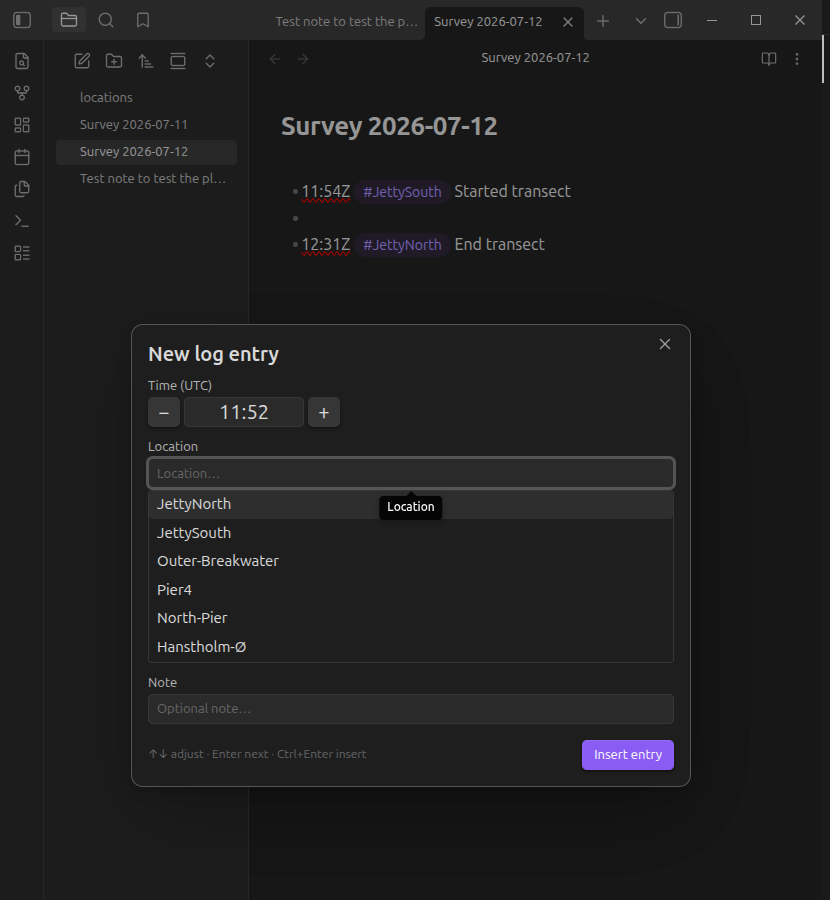
Locations are inserted as normal Obsidian tags (default), so every entry for a location is findable through the tag pane, search, or Dataview — or as wikilinks ([[Outer Breakwater]]) if you prefer each location to be a note with a backlinks list of all its entries.
Locations you type that aren't in your list yet are appended to the locations file automatically (toggleable).
Usage
-
Create a locations note in your vault (default path:
locations.md), one location per line:# Survey locations <- "#" lines are ignored JettyNorth JettySouth Outer Breakwater <- becomes #Outer-Breakwater Pier4 -
Assign a hotkey to Survey Log: Create log entry (Settings → Hotkeys).
-
Open the note you want to log into, hit the hotkey, and:
- Time — pre-filled with the current time (
HH:mm).↑/↓= ±1 minute,Shift+↑/↓= ±10 minutes, or type over it. On mobile use the+/−buttons. - Location — pre-filled with your last-used location (fully selected: plain
Enterreuses it, typing replaces it). Suggestions filter as you type;↑/↓+Enter/Tabto pick. Unknown locations are allowed and sanitized into valid tags. - Note — optional free text. Suggestions come from note texts of your previous entries, most frequent first;
↑/↓to highlight,TaborEnterto accept the suggestion (a secondEnterthen inserts), orEscto dismiss the suggestions and keep what you typed. Ctrl/Cmd+Enterinserts from anywhere in the modal;Esccancels.
- Time — pre-filled with the current time (
Settings
| Setting | Description | Default |
|---|---|---|
| Timezone | UTC timestamps get a Z suffix (13:47Z) so entries are self-describing | UTC |
| Locations file | Vault path of the note listing your locations | locations.md |
| Location style | Tag (#JettyNorth) or wikilink ([[JettyNorth]]) | Tag |
| Tag prefix | Optional prefix, e.g. loc/ → #loc/Pier4 (tag style only) | (empty) |
| Auto-add new locations | Append unknown locations to the locations file on insert | On |
| Insert position | End of note, or at the cursor | End of note |
| Note suggestions from | Whole vault or current note only | Whole vault |
| Pre-fill last-used location | Reuse the previous location with a single Enter | On |
Installation
Manual
Download main.js, manifest.json, and styles.css from the latest release into <vault>/.obsidian/plugins/survey-log/, then enable the plugin in Settings → Community plugins.
From source
git clone <this repo>
cd survey-log-obsidian-plugin
npm install
npm run build
Copy (or symlink) the repo folder to <vault>/.obsidian/plugins/survey-log/ — the folder name must be exactly survey-log.
Development
npm install
npm run dev     # esbuild watch mode
npm test        # vitest unit tests (pure logic: time math, parsing, ranking)
npm run lint    # eslint
npm run build   # type check + production bundle
Use a dedicated dev vault with the Hot-Reload plugin for a fast feedback loop. Note that changes to manifest.json require an app restart; source changes only need a plugin reload.
Releases are fully automated: every push to main runs tests + build, bumps the patch version (manifest.json, versions.json, and package.json via npm version / version-bump.mjs), tags it, and publishes a GitHub release with main.js, manifest.json, and styles.css attached. For a minor or major bump instead, include #minor or #major in the commit message. Tags carry no v prefix (Obsidian convention, enforced via .npmrc).
License
For plugin developers
Search results and similarity scores are powered by semantic analysis of your plugin's README. If your plugin isn't appearing for searches you'd expect, try updating your README to clearly describe your plugin's purpose, features, and use cases.