Tag & Word Cloud
approvedby Johannes Theiner
Show a cloud of your tags, words, or links.
Tag, Word & Link Cloud
Plugin for Obsidian




With this plugin you can create a tag, link or word cloud in your notes.
To do this create a codeblock with the language set to either tagcloud, wordcloud or linkcloud.
You can configure your cloud using a YAML syntax.
Tag Cloud

Displays all tags that fit your selection.
Examples
Show all tags in the entire vault
```tagcloud
```
Show all tags in the current file
```tagcloud
source: file
```
Show all tags from a folder/file.
⚠️ Requires Dataview
```tagcloud
source: query
query: Folder/File
```
Show all tags that show up together with our tag.
⚠️ Requires Dataview
```tagcloud
source: query
query: '#yourTag'
```
Show all tags from notes that link to note.
⚠️ Requires Dataview
```tagcloud
source: query
query: '[[Other note]]'
```
Options
| Name | Description | Possible Values |
|---|---|---|
| query | Requires Dataview, requires source to be set to query | A valid Dataview Source |
| exclude | exclude certain tags from the tagcloud | an array of tags |
All other options from here still apply
Word Cloud
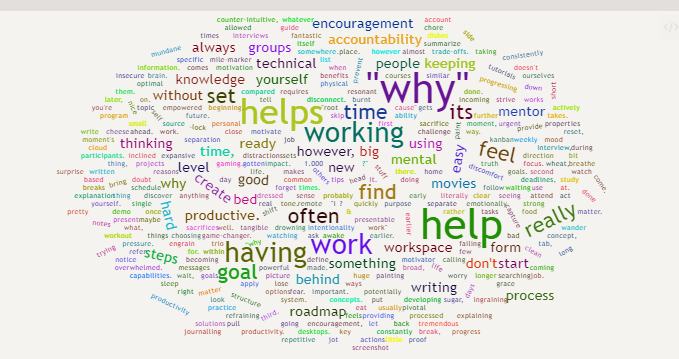
a wordcloud displays all words in your vault/note.
⚠ Word distribution will only be calculated when loading a vault and by running the
Recalculate Word Distributioncommand.This is because the calculation is computationally expensive and takes some time.1
Examples
Show all words in the entire vault
```wordcloud
```
Show all words in the current file
```wordcloud
source: file
```
Show all words using a folder/file
```wordcloud
source: file
query: 'Folder/File'
```
Options
| Name | Description | Possible Values | Default |
|---|---|---|---|
| stopwords | Remove all stopwords from the result | true/ false | true |
All other options from here still apply
Link Cloud
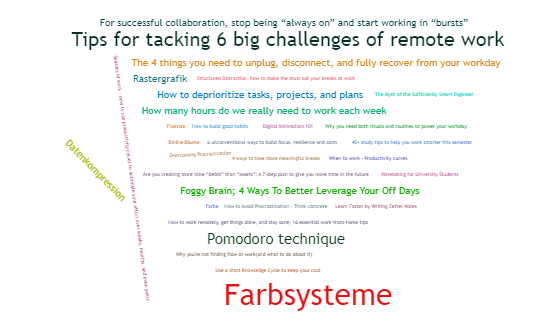
A link cloud displays all links in your vault.
This cloud can only be generated vault wide.
Examples
Show all links
```linkcloud
```
Show all links to existing files
```linkcloud
type: resolved
```
Show all links to non-existing files
```linkcloud
type: unresolved
```
Options
| Name | Description | Possible Values | Default |
|---|---|---|---|
| type | Which type of links to show | resolved, unresolved, both | resolved |
The following options also apply.
General Options
The following options are supported for all clouds.
| Name | Description | Possible Values | Default |
|---|---|---|---|
| shape | What shape to draw | circle, cardioid, diamond, square, triangle-forward, triangle, pentagon, star | circle |
| source | where are the tags/words coming from? | file, vault, query(only supported in tagcloud) | vault |
| weight | factor by wich the size of a word is multiplied | any positive integer | 2 |
| shrinkToFit | Adjust word weight to make it fit | true/false | true |
| minCount | Minumum number of occurances | any positive integer | 0 |
| maxDepth | Only show the X most used elements(if two elements have the same number of occurrences only one will be counted) | any positive integer (increasing this number may result in the cloud not showing, as only so many elements can be rendered) | 25 |
| background | Background color | a hexadecimal RGB value | background color from the chosen theme |
| width | Width of canvas | in pixels (the px is omitted) | line width |
| height | Height of canvas | in pixels (the px is omitted) | width / 2 |
| fontFamily | font used to display | any valid font-family | |
| fontWeight | font weight | normal, bold, or a number | normal |
| minFontSize | minumum font size | any number | 0 |
| minRotation | the minimum rotation the text should rotate | number (in rad) | - pi / 2 |
| maxRotation | the maximum rotation the text should rotate | number (in rad) | pi / 2 |
| ellipticity | degree of 'flatness' | number | 0.65 |
| shuffle | produce a different looking result each time? | true/false | true |
| rotateRatio | Rotation Probability | Number as percentage (so 1.0 is 100%) | 0.1 |
Known issues
- In some specific scenario the calculated width off the used
canvaselement is 0. The plugin will fall back to a value of 500, which depending on the size of your obsidian window, might look strange.
Credits
- Built using wordcloud2.js
- and stopword
- as well as the Dataview API
- With help from the code of Tag Wrangler
- Some Code taken from the Word Count Dashboard for Dataview
Footnotes
-
On a high-powered computer with a Vault that contains ~12.000 this takes 15 minutes. ↩
For plugin developers
Search results and similarity scores are powered by semantic analysis of your plugin's README. If your plugin isn't appearing for searches you'd expect, try updating your README to clearly describe your plugin's purpose, features, and use cases.