Task list
approvedby ted-marozzi
Enable better task management via lists.
Task list
A simple obsidian plugin enabling better task management via lists.
Features
Create lists with task states
Simply start an ordered or unordered list and then add one of the following directives, :to-do, :doing, :paused or :done.
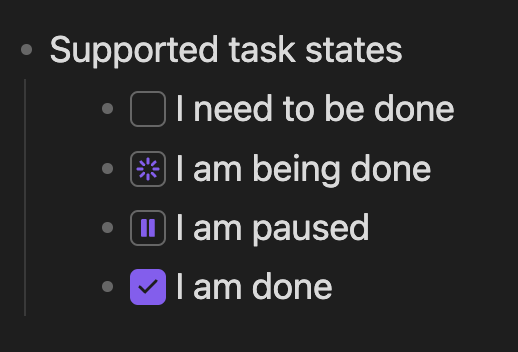
- Supported task states
	- :to-do I need to be done
	- :doing I am being done
	- :paused I am paused
	- :done I am done
These will render the directives as interactive task state boxes like so:
Sort lists according to its status
Sorts can be triggered via the "Sort lists" command, the context menu (Option + click or right click) on a task state box or the context menu on the editor.
Lists will be sorted according to this sort order:
- :doing First, as your attention is needed
- :paused Second, as you may need to review it
- :to-do Third, as you can pick this up when the above is done
- :done Last, as your attention isn't needed
Change the states of a task list item
-
Click a task state box to cycle to the next state
-
Use the context menu on a task state box to mark a different state
Project values
-
Performance focused, a lot of care is taken to ensure task-list doesn't slow down obsidian
-
Markdown compatability, task-list extends markdown but doesn't break it, your documents will still render outside of this plugin, with a readable task state and easy to remember directives
Installation
Install the lastest release
Build from source
- Clone this repo to
./vault/.obsidian/plugins - Run
npm run build - Start obsidian
- Navigate to Settings > Community plugins
- Enable the "Task list" plugin
Sponsor me
If you like this software please consider sponsoring me here ❤️
For plugin developers
Search results and similarity scores are powered by semantic analysis of your plugin's README. If your plugin isn't appearing for searches you'd expect, try updating your README to clearly describe your plugin's purpose, features, and use cases.