TikToken Tokenizer
approvedby s3ga1ov
Displays the token count of the active note in the status bar using TikToken - This plugin has not been manually reviewed by Obsidian staff.
TikToken Tokenizer Plugin
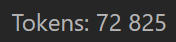
This plugin for Obsidian displays the token count for the currently active note in the status bar. It uses the js-tiktoken library, JavaScript port of OpenAI's tiktoken with the o200k_base encoding shared by gpt-4o and the gpt-5 family.
How it works
When you open a note or edit its content, the plugin recalculates the number of tokens and updates the status bar. A 150 ms debounce keeps Obsidian responsive while you type. Tokenization runs entirely in JavaScript with no WebAssembly or network calls, so it works on both desktop and mobile.
Tokenizer modes
The plugin ships two modes, selectable in Settings → Community plugins → TikToken Tokenizer:
- GPT-4o / GPT-5 (exact) — default. Uses the
o200k_baseencoding shared bygpt-4oand thegpt-5family. This is the actual tokenizer OpenAI uses, so the count is exact. - Claude (approximate) — see below for methodology.
About the "Claude (approximate)" mode
Anthropic does not publish an offline tokenizer for Claude 3 or later — the only exact way to count Claude tokens is the /v1/messages/count_tokens API, which requires an API key and a network round-trip per call. This plugin keeps everything local, so for Claude it offers an approximation rather than an exact count.
Methodology. Before Claude 3, Anthropic used a custom BPE tokenizer with vocabulary on the order of 100K. Of publicly available encodings, OpenAI's cl100k_base (GPT-3.5 / GPT-4 family) is the closest analogue. On top of the raw cl100k_base count this mode applies a fixed +15% safety margin (Math.ceil(count × 1.15)), so the displayed number is intentionally a slight over-estimate — better to be pleasantly surprised than to blow past your context window.
Use it for budgeting your context window. If Anthropic publishes an official offline tokenizer for Claude 3+, this mode will switch to the exact implementation.
Installation
From the Community Plugin list
- Open Obsidian and go to
Settings→Community plugins. - Click
Browseand search for "TikToken Tokenizer". - Click
Install, thenEnable.
Manual Installation
- Download
main.jsandmanifest.jsonfrom the latest release. - Create a new folder in your vault's plugins directory:
YourVault/.obsidian/plugins/tiktoken-tokenizer. - Copy both files into the new folder.
- Reload Obsidian.
- Go to
Settings→Community plugins, find "TikToken Tokenizer", and enable it.
For Developers
Building the plugin
- Clone the repository:
git clone https://github.com/S3ga1ov/tiktoken-tokenizer.git - Navigate to the repository folder:
cd tiktoken-tokenizer - Install the dependencies:
npm install - Run the build script:
npm run build
This produces main.js in the project root.
License
This plugin is licensed under the MIT License.
For plugin developers
Search results and similarity scores are powered by semantic analysis of your plugin's README. If your plugin isn't appearing for searches you'd expect, try updating your README to clearly describe your plugin's purpose, features, and use cases.