TodoApp Blocks
approvedby Max Dvorkin
Embed a Todoist-like local-first task app inside any Obsidian note. - This plugin has not been manually reviewed by Obsidian staff.
TodoApp Blocks
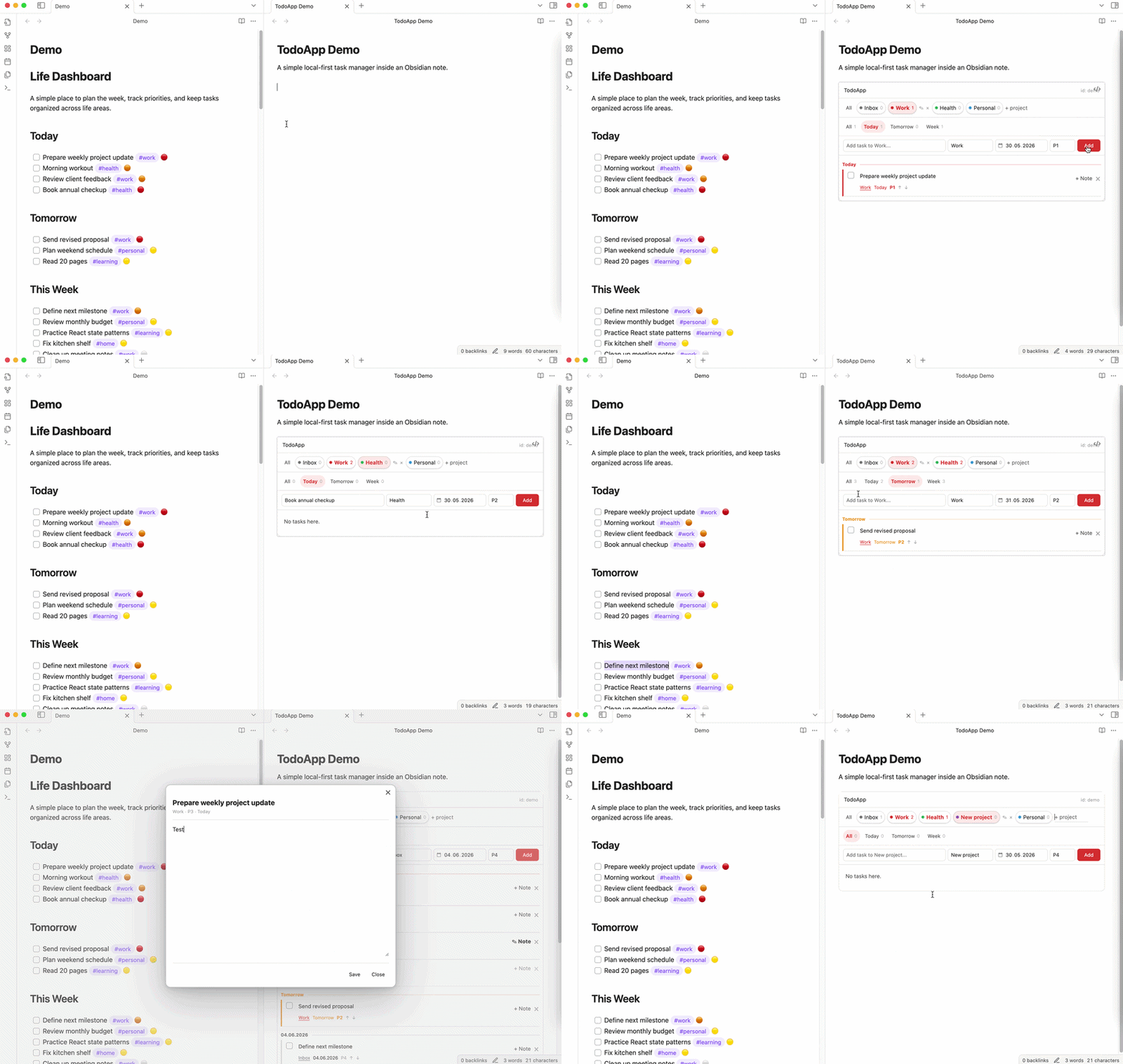
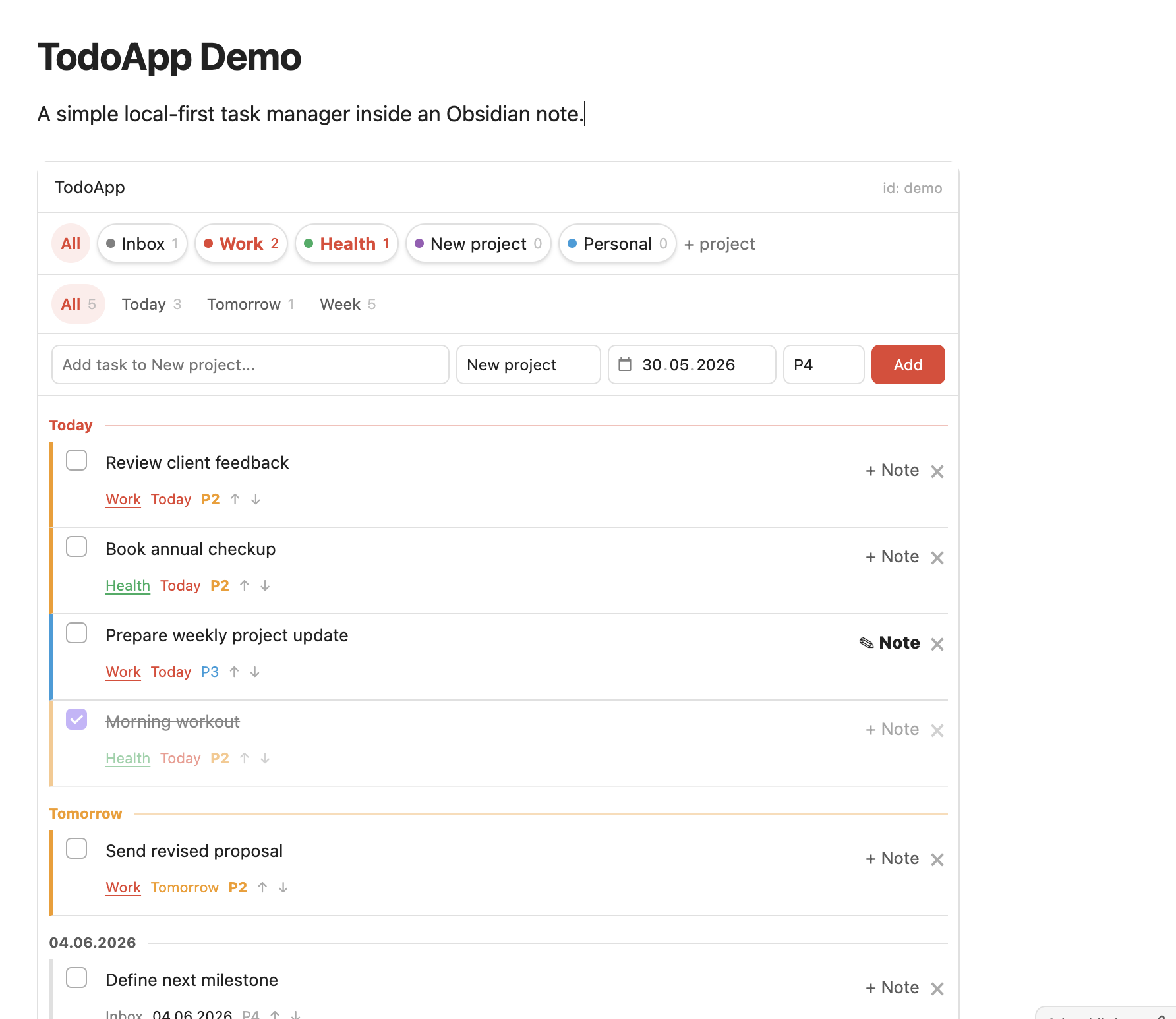
A Todoist-like task app embedded inside any Obsidian note.
TodoApp Blocks lets you add a clean, local-first task manager to any note with one simple code block:
```todoapp
id: life
```
No templates. No Dataview queries. No external account.
Just projects, dates, priorities, task notes, and a focused Todoist-style workflow inside your Obsidian vault.
Why TodoApp Blocks?
Obsidian is great for notes, but task management often requires too much setup: custom templates, tags, queries, plugins, and personal conventions.
TodoApp Blocks is built around a simpler idea:
Drop a block into a note and get a full task app instantly.
It is designed for people who want the convenience of Todoist while keeping their data private and local inside Obsidian.
Features
- Embed a task app inside any note
- Create multiple independent task spaces by
id - Projects with task counters
- Today, Tomorrow, Week, and All views
- Priorities from P1 to P4
- Inline task editing
- Task completion with strikethrough
- Task notes in a focused popup
- Local JSON storage inside your vault
- Markdown task notes stored as regular files
- No cloud, no sync service, no account
Quick start
Add this to any Obsidian note:
```todoapp
id: life
```
Open the note in Reading mode and start adding tasks.
You can create multiple task apps by changing the id:
```todoapp
id: work
```

```todoapp
id: personal
```

```todoapp
id: project-alpha
```
Each app keeps its own projects, tasks, priorities, and notes.
How data is stored
TodoApp Blocks is local-first.
Task data is stored in your vault as JSON:
.todoapp/<id>.json
Task notes are stored as regular Markdown files:
TodoApp Notes/<id>/
Your data stays in your vault. TodoApp Blocks does not require a Todoist account, API key, external server, or cloud sync.
Use cases
TodoApp Blocks works well for:
- Personal dashboards
- Daily planning notes
- Project pages
- Work/personal task separation
- Lightweight GTD-style workflows
- Private local task management
- Replacing external todo apps for simple workflows
Example
# Life Dashboard

```todoapp
id: life
```
# Startup Dashboard

```todoapp
id: startup
```
# Writing Projects

```todoapp
id: writing
```
Privacy
TodoApp Blocks is designed to be private by default.
- No telemetry
- No analytics
- No external requests
- No account required
- No third-party task service
- Data is stored locally in your Obsidian vault
Current limitations
TodoApp Blocks is intentionally simple.
It currently does not include:
- Recurring tasks
- Notifications
- Calendar sync
- Todoist sync
- Natural language date parsing
- Collaboration
The goal is to keep the core experience fast, focused, and easy to use.
Installation
Manual installation
- Download the latest release.
- Copy these files into your vault:
.obsidian/plugins/todoapp/
  main.js
  manifest.json
  styles.css
- Restart Obsidian.
- Enable TodoApp Blocks in Community Plugins.
Community plugin
TodoApp Blocks is intended for submission to the Obsidian Community Plugin directory.
Development
npm install
npm run dev
For production:
npm run build
License
MIT
For plugin developers
Search results and similarity scores are powered by semantic analysis of your plugin's README. If your plugin isn't appearing for searches you'd expect, try updating your README to clearly describe your plugin's purpose, features, and use cases.