slate
unlistedby Real-Fruit-Snacks
A minimal Todoist-like task manager using local Markdown files.
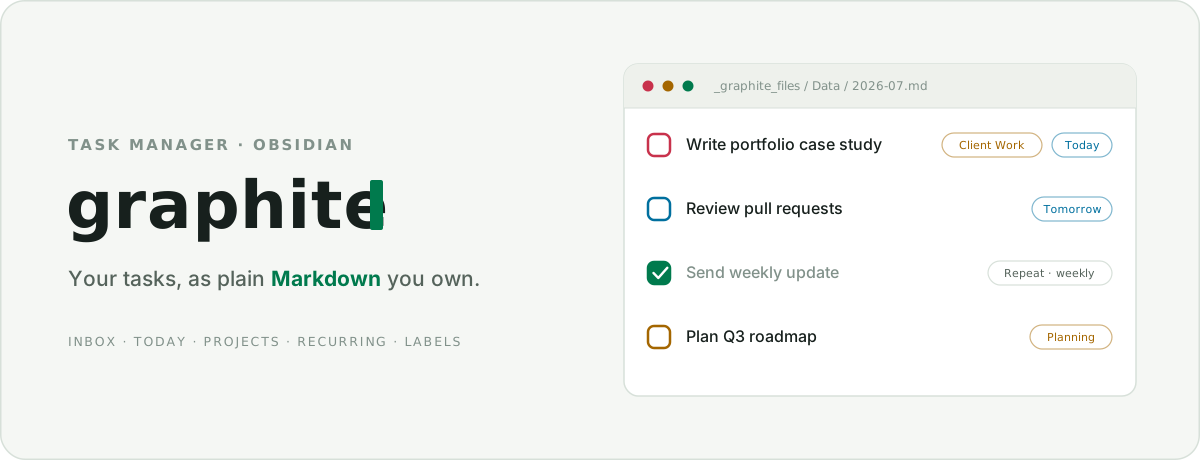
A calm, Todoist-like task manager for Obsidian — every task is a line in a plain Markdown file you own. No account, no external service, no database. Just your notes.



Overview
Graphite sits between lightweight checkbox plugins and heavy task-note systems: structured enough to run your day, small enough to stay quiet. Tasks live entirely inside your vault as human-readable Markdown, organized into one file per month — so your task history is greppable, portable, and yours forever.
Graphite is not a Todoist integration. It never connects to Todoist or any external service.
Features
- Views — Inbox, Today (with an Overdue section), Upcoming, Projects, Filters & Labels, Activity (with a 26-week heatmap), Completed, and Search.
- Tasks — titles, descriptions, projects, priorities (P1–P4), due dates, deadlines, labels, and file attachments with inline image previews.
- Sub-tasks — nested under any task, with an inline completion counter and quick complete.
- Recurring tasks — daily, weekly (multi-weekday), weekdays, monthly, yearly, and custom rules; calendar- or completion-based.
- Quick capture — add from the board, a full-screen mobile composer, or the command palette (with
#labeland//projectinline tokens). - Daily Notes — surface a day's completed tasks in a panel or a
graphite-completedcode block. - Confirm before delete — task and sub-task deletions always ask first.
- Theme-driven — colors, surfaces, and accents inherit from your active Obsidian theme; the UI speaks the Terminal Workbench design language.
- Private — no telemetry, no network calls, no account.
Installation
Community plugins (recommended)
- Open Settings → Community plugins → Browse.
- Search for Graphite, install, and enable it.
BRAT (latest pre-release)
- Install the BRAT plugin from Community plugins.
- Run BRAT: Add a beta plugin and enter
Real-Fruit-Snacks/Graphite. - Enable Graphite in Settings → Community plugins.
Manual
- Download
main.js,manifest.json, andstyles.cssfrom the latest release. - Copy them into
<your-vault>/.obsidian/plugins/graphite/. - Reload Obsidian and enable Graphite in Settings → Community plugins.
Getting started
- Run
Graphite: Openfrom the command palette (or click the ribbon icon). - Click + Add task, or press the Quick Add hotkey, and give it a title.
- Add a date, project, label, priority, or repeat rule. Tasks with no project land in Inbox.
Commands
| Command | Default hotkey |
|---|---|
Graphite: Open | — |
Graphite: Quick Add Task | Ctrl/Cmd + Shift + A |
Graphite: Show Completed Tasks for Active Daily Note | — |
Graphite: Insert Completed Tasks Block in Active Daily Note | — |
Graphite: Normalize Labels | — |
Graphite: Migrate old task file | — |
Inline tokens
While typing a task title, use #label to attach a label and //project to set the project.
How a task is stored
Graphite keeps task data in a configurable folder (default _graphite_files/), one Markdown file per month, with attachments beside them:
_graphite_files/
├─ Data/
│  └─ 2026-07.md
└─ Attachments/
   └─ <task-id>/
Each task is a Markdown list item with key:: value metadata:
- [ ] Write portfolio case study draft
  id:: task-example
  created:: 2026-07-05
  due:: 2026-07-08
  deadline:: 2026-07-10
  project:: Client Work
  priority:: P2
  description:: Keep it short and visual.
  labels:: writing, portfolio
Tasks without a project omit project:: and appear in Inbox. Completed tasks use [x] with a completed:: date. Graphite reads and writes only its own data folder, and preserves any lines or properties it doesn't recognize — so hand-editing is safe.
Architecture
src/
├─ main.ts          Plugin lifecycle, commands, events, Daily Notes
├─ taskStore.ts     In-memory task state + queued Markdown persistence
├─ parser.ts        Markdown → tasks (preserves unknown content)
├─ serializer.ts    Tasks → Markdown (non-destructive round-trip)
├─ repeatUtils.ts   Recurring-task scheduling
├─ views/           Board view, detail modal, composer, project/label modals
└─ ui/              Shared components (themed dropdown, buttons, icons, popover)
- Non-destructive storage — the parser keeps a document of raw + task blocks, so edits never clobber surrounding content or unknown metadata.
- Serialized writes — task writes run through a queue and reconcile only the files they touch, so rapid, cross-file edits can't race or drop data.
- Theme-driven styling — namespaced
.graphite-*CSS with tokens mapped to Obsidian's theme variables; monospace "manifest" labels for structural chrome.
The pure data layer (parser, serializer, recurring math, sorting, store) is covered by a Vitest suite.
Development
npm install
npm run dev      # watch build
npm run test     # data-layer test suite
npm run verify   # tests + typecheck + production build (pre-commit gate)
To auto-copy each build into a vault's plugin folder, set the GRAPHITE_PLUGIN_DIR environment variable or a gitignored .plugin-target file to that folder's path.
Contributing
Bug reports and feature requests are welcome in Issues. If you're opening a pull request, run npm run verify first.
Credits
Graphite is a fork of the belki task manager by Yasin Aribuga, rebuilt and extended under the Terminal Workbench design language.
License
MIT — see LICENSE. Copyright © Yasin Aribuga (original belki project) and Real-Fruit-Snacks (Graphite fork).
For plugin developers
Search results and similarity scores are powered by semantic analysis of your plugin's README. If your plugin isn't appearing for searches you'd expect, try updating your README to clearly describe your plugin's purpose, features, and use cases.