People Metadata
unlistedby Adar Bahar
A personal tool for managing and looking up people metadata within your notes. Create company profiles, add person details, and get instant previews with company colors and logos.
Obsidian People Metadata
I built People Metadata to make names in my Obsidian notes more useful. It shows people, companies, roles, and other details without leaving the note.
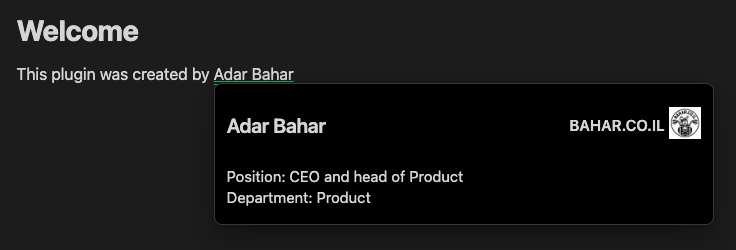
Key features
- Details on hover. Move the pointer over a name to see the person's details.
- People and companies. Store people in plain Markdown files, grouped by company.
- Company colors and logos. Each company can have a color and a logo. If a logo does not load, the plugin shows initials.
- Add a person form. Add people through a form. You do not need to write the metadata by hand.
- Automatic setup. The plugin creates the People folder when it is missing, and it adds a template to new files.
- Metadata context. Limit a note to the metadata files that you choose.
- Desktop and mobile. The plugin is not limited to desktop Obsidian.
Installation
The plugin is not yet in the Obsidian Community Plugins directory. Install it manually.
Requirements: Obsidian 1.5.12 or later.
- Open the latest release.
- Download
main.js,manifest.json, andstyles.css. - In your vault, create the folder
.obsidian/plugins/people-metadata/. Copy the three files into it. - In Obsidian, open Settings → Community plugins. If the plugin list is locked, enable community plugins first.
- Enable People Metadata in the list of installed plugins.
Quick example
This example uses fictional people.
- Run the Add a person command.
- Enter the details. Set the full name to
Maya Lopez, the job title toProduct Lead, the department toOperations, and the description toOwns the autumn launch plan.In Choose company, select Create a new company. - Select Save. The plugin creates
Lopez-Company.mdin the People folder, with Maya Lopez in it. - In another note, type
Maya Lopez. The plugin underlines the name. - Move the pointer over the name. The preview shows the details of Maya Lopez.
How metadata works
The plugin stores people in plain Markdown files in the People folder. Each file is a note in your vault. There are two file types:
- Consolidated: one company, with many people. The file name is the company name.
- Atomic: one person in each file.
The def-type property sets the file type. This is a short consolidated file:
---
def-type: consolidated
color: "blue"
---

# Maya Lopez
Position: Product Lead
Department: Operations

Owns the autumn launch plan.
For the full rules, the template, the color names, the logo fallback, and metadata context, see Metadata format.
Settings and advanced features
In Settings → People Metadata, you can set:
- People folder. You can also right-click a folder in the file explorer and select Set as people folder.
- Auto-register new files. Adds the template to new files in the People folder.
- Default people file type. The type for files that have no
def-typeproperty. - Popover settings. The trigger, the dismiss behavior, the size and the background color of the hover preview.
- Divider. The line that separates person entries. You can use a dash (
---) or an underscore (___).
The plugin adds these commands. You can assign hotkeys to them:
- Add a person opens the form.
- Preview person under cursor shows the preview for the name under the cursor.
- Refresh people reads the metadata files again.
Right-click an underlined name to see these options:
- Go to definition opens the person's entry.
- Edit definition opens the entry for editing.
- Add a person opens the form.
Troubleshooting
The plugin does not work
- Set the People folder. Right-click a folder and select Set as people folder.
- Run Refresh people.
- Check that each metadata file has the correct
def-typeproperty.
A name is not detected
- Check that the
# Nameline matches the name in your note. The match ignores upper and lower case. - Run Refresh people.
- Check that the file is in the People folder.
Company colors do not show
- Check the
colorproperty in the frontmatter of the company file. - Use a color name or a hex code. The metadata format page lists the names.
- Run Refresh people.
Documentation, feedback, and contributions
- Metadata format: the full rules, templates and edge cases.
- Color guide: every color name, with a preview.
- Issues: report bugs or request features.
- Discussions: ask questions and share ideas.
I welcome feedback. If you find a bug or have an idea, open an issue.
To contribute code:
- Fork the repository.
- Create a feature branch.
- Make your changes.
- Open a pull request.
For a major change, open an issue first to discuss it.
License and acknowledgments
People Metadata is licensed under the MIT License. See LICENSE.
Built for the Obsidian community. It comes from the need for better people and company management in personal knowledge bases.
For plugin developers
Search results and similarity scores are powered by semantic analysis of your plugin's README. If your plugin isn't appearing for searches you'd expect, try updating your README to clearly describe your plugin's purpose, features, and use cases.