Recipe Table
unlistedby Asgarrrr
Renders recipes as nested Cooking for Engineers tables.
Recipe Table
An Obsidian plugin that renders a recipe as a nested table, in the style Cooking for Engineers uses: ingredients down the left, operations merging left to right until the finished dish.
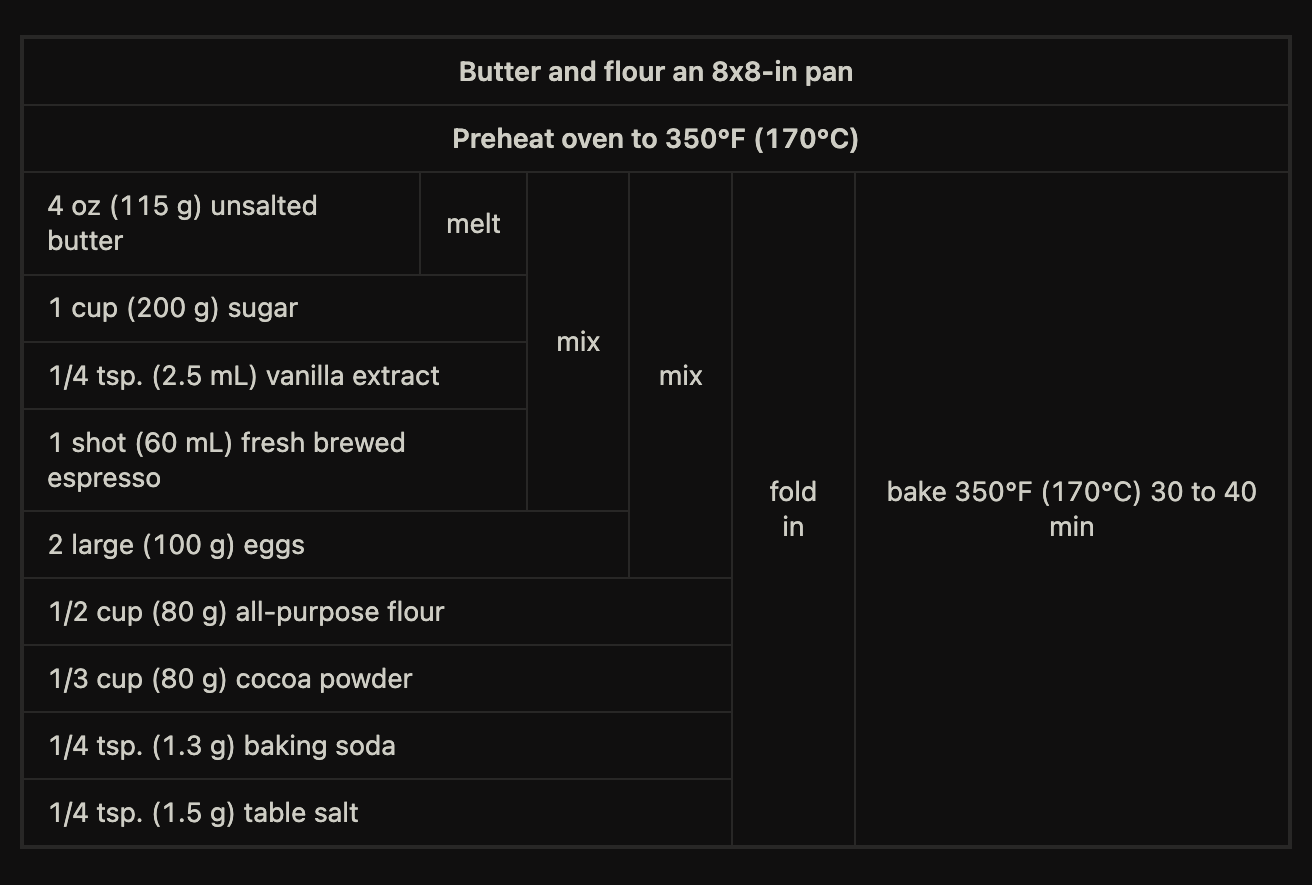
A recipe written as prose hides its shape. The same recipe as a table shows at a glance what combines with what, and in which order — which things wait, and which happen together.
Writing a recipe
Write a recipe code block, top to bottom, in the order you actually cook. No
indentation, no nesting. Three rules:
- a line starting with
-is an ingredient, and becomes a row - a line starting with
>is a preparation step, rendered full width on top - any other line is an operation: it takes the result of the operation before it, plus the ingredients listed beneath it
```recipe
> Butter and flour an 8x8-in pan
> Preheat oven to 350°F (170°C)

melt
- 4 oz (115 g) unsalted butter

mix
- 1 cup (200 g) sugar
- 1/4 tsp. (2.5 mL) vanilla extract
- 1 shot (60 mL) fresh brewed espresso

mix
- 2 large (100 g) eggs

fold in
- 1/2 cup (80 g) all-purpose flour
- 1/3 cup (80 g) cocoa powder
- 1/4 tsp. (1.3 g) baking soda
- 1/4 tsp. (1.5 g) table salt

bake 350°F (170°C) 30 to 40 min
```
Quantities stay in the ingredient text. The plugin never parses them, so write them however you like — fractions, ranges, two unit systems at once.
Blank lines are for you, not the parser. An operation with no ingredients under
it, like bake above, simply carries the previous result forward.
Recipes with more than one component
Most recipes are a single chain. When two components run in parallel, a
## name line opens a section. Chaining stays inside a section, and an
operation pulls in other sections by name.
A reference adds to the chain rather than replacing it. Below, pour on top
consumes both the glass it already filled with ice and milk, and the coffee
frothed separately:
```recipe
## coffee
froth till butter dissolved
- 1 lungo, hot
- 1 tsp butter
- 0.5 oz (15 ml) maple syrup
- pinch of salt

## assembly
combine
- ice
- 3-4 oz (90-120 ml) milk of choice

pour on top (coffee)

sprinkle
- pinch of salt
```
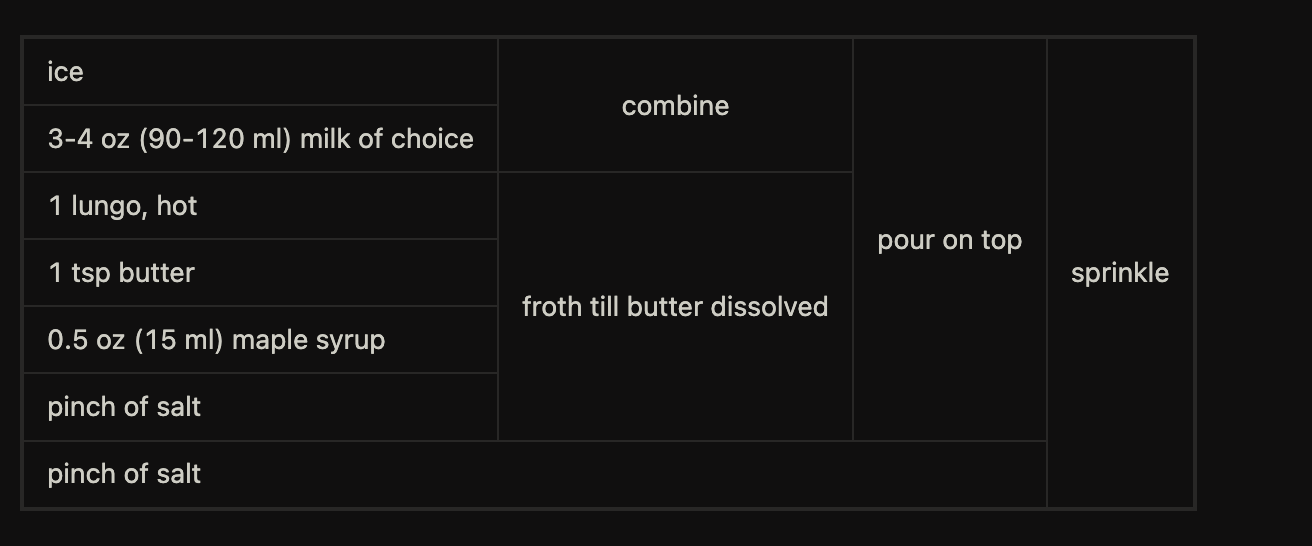
Each section other than the last must be used exactly once. A section nobody uses is an ingredient you forgot, and the plugin says so instead of quietly dropping it.
Starting from a recipe you pasted
Restructuring a recipe into a tree is the real cost of this format, and it is work only you can do — you have to know that the eggs go in after the sugar. What the plugin can remove is the retyping.
Paste a recipe, select it, and run Scaffold a recipe block from the selection from the command palette. It fences the block, strips list markers and numbering, drops section headings, and sorts lines into steps and ingredients. The result always parses, so you get a table immediately and refine it from there.
It does not try to guess which step consumes which ingredient. A line like "pour in 3-4 oz of your milk" carries a quantity and is still a step, so any heuristic sure enough to build the tree would sometimes build it wrong without saying so.
Looking an ingredient up
Click an ingredient to search your vault for it. The query drops the quantity,
so 400 g of minced beef searches for "minced beef" and turns up every other
recipe using it.
This needs no setup, which is the point — it works on the vault you already have rather than on one where you have patiently written a note per ingredient. The query lands in the search box editable, because the plugin is guessing at where the quantity ends and loosening a guess should cost one keystroke.
If you do keep ingredient notes, a link works too: cell text goes through
Obsidian's own markdown renderer, so - 250 g of [[Mascarpone]] gives a real
link with a hover preview. Clicking a link follows it rather than searching.
Cooking mode
Click any operation or preparation step to grey it out and keep your place while you cook. Cells are reachable by keyboard and respond to Enter and Space. On touch devices the tappable cells grow to a 44px target.
The state lives only as long as the rendered table. It is never written to your notes and never persisted, so it resets when the note re-renders and leaves no trace in your vault or your git history.
When a block is wrong
A malformed block never breaks the note. It renders a message in place of the table, naming the line:
Ingredient at line 4 has no operation above it.
Section "sauce" is never used.
Unknown section "psata" at line 12.
Note that a trailing group in parentheses is only read as a list of sections
when at least one name inside is one. rest (30 min) and
bake 350°F (170°C) 30 to 40 min stay literal text.
A complete example
Lasagne uses everything at once: two preparation steps, three components built separately, an assembly step that consumes two of them plus fresh ingredients, and two operations sharing a column because they sit at the same depth in different branches.
```recipe
> Preheat the oven to 350°F (180°C)
> Butter a baking dish

## ragù
fry
- 1 onion, diced
- 1 carrot, diced
- 2 tbsp olive oil
- 400 g minced beef

simmer 45 min uncovered
- 400 g crushed tomatoes
- 150 ml red wine
- salt, pepper, bay leaf

## béchamel
whisk off the heat
- 50 g melted butter
- 50 g flour
- 600 ml milk
- 1 pinch of nutmeg

## assembly
layer (ragù, béchamel)
- 250 g lasagne sheets

scatter over
- 80 g grated parmesan

bake 35 min at 350°F (180°C)
```
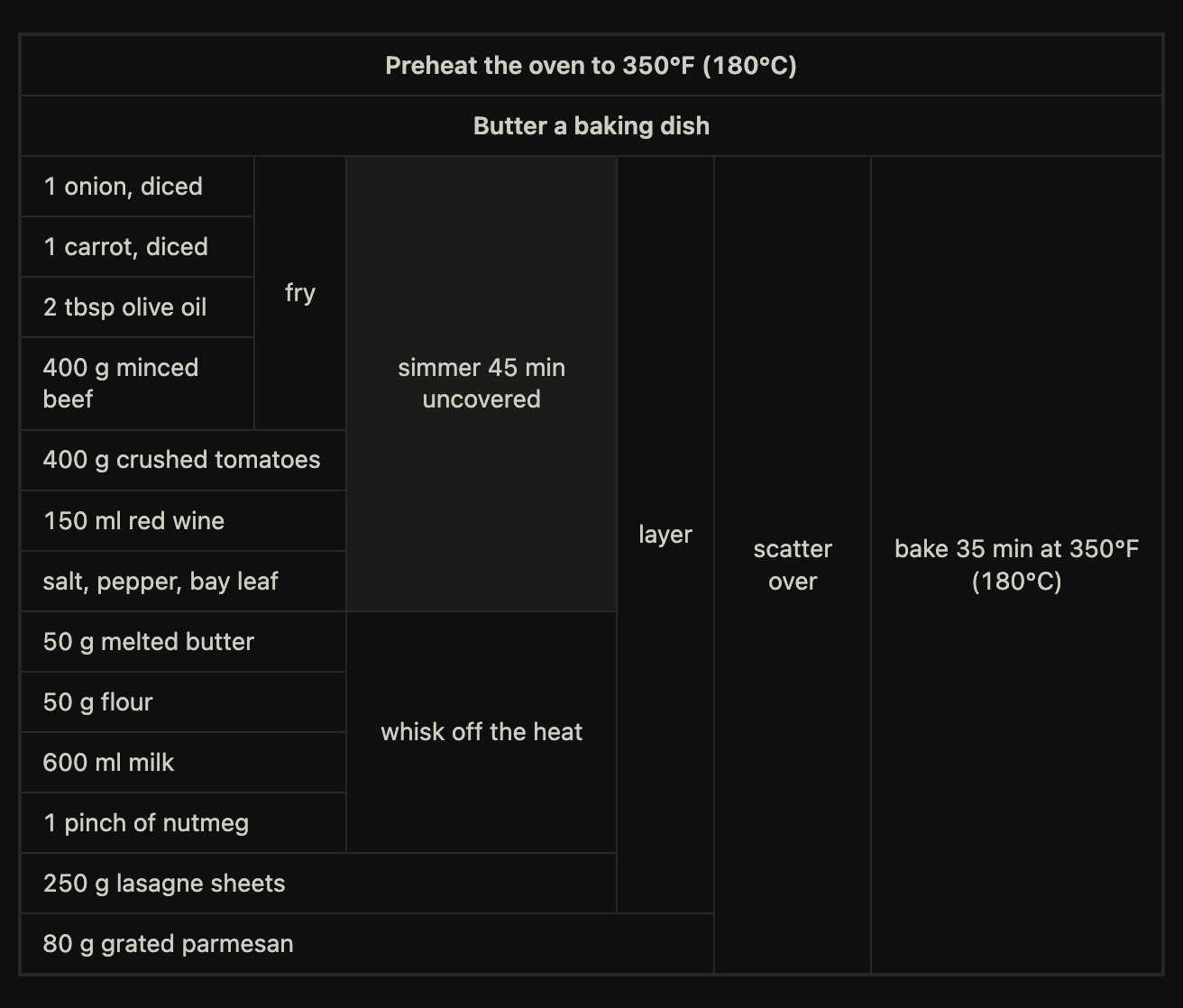
Read it right to left and the structure falls out: simmer and whisk sit in
the same column without touching, because the ragù owns the top rows and the
béchamel the ones below. layer then spans both, plus the pasta sheets it adds
itself.
Install
Not yet in the community plugin list. To install manually, download main.js,
manifest.json and styles.css from a
release into
<vault>/.obsidian/plugins/recipe-table/, then enable the plugin in
Settings → Community plugins.
Development
bun install
bun run dev        # build, watch, hot reload
bun test
bun run type-check
bun run lint
parse, layout and scaffold import neither Obsidian nor the DOM, and
render and cooking use plain DOM, so everything but the plugin entry point
is unit-tested. The golden grids in tests/layout.test.ts were derived by hand
from the original Cooking for Engineers table.
docs/design/recipe-table.md explains the tree-to-grid algorithm and why the
syntax reads in cooking order rather than as a nested outline.
Licence
0BSD. See LICENSE.
For plugin developers
Search results and similarity scores are powered by semantic analysis of your plugin's README. If your plugin isn't appearing for searches you'd expect, try updating your README to clearly describe your plugin's purpose, features, and use cases.