Bases Masonry View
unlistedby Andrew Martin
Adds a natural-height masonry layout to Obsidian Bases.
Bases Masonry View
Bases Masonry View adds a natural-height masonry card layout to Obsidian Bases. It is designed for note-based collections: each Base entry remains a note, while a configurable note property supplies the card's local image.
This makes it useful for clipping libraries, visual research, recipes, films, people, products, reference boards, and other collections where images have different aspect ratios.
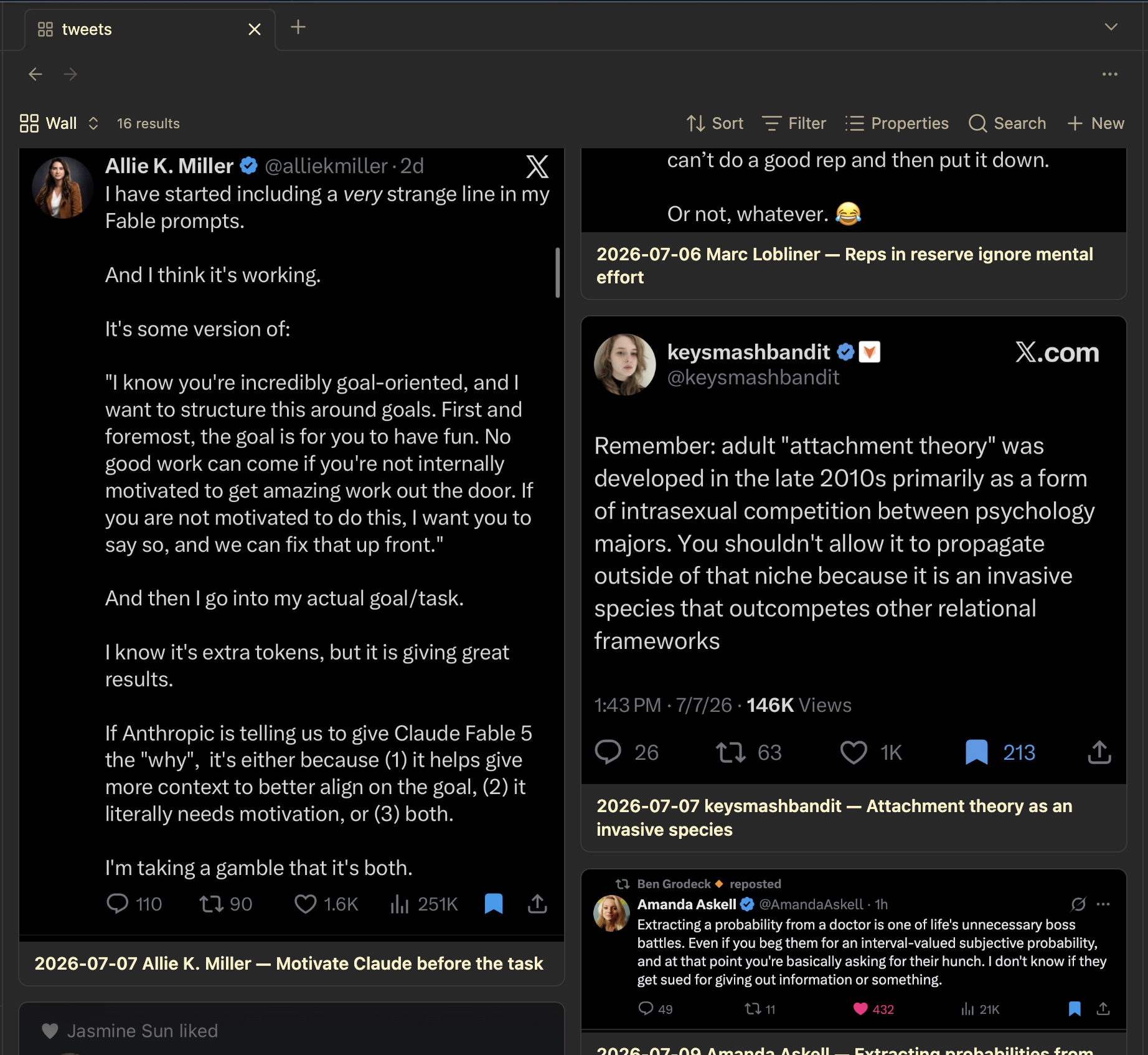
Features
- Natural-height cards placed into the currently shortest column
- Responsive columns based on a configurable minimum card width
- A configurable property for each note's local image
- Optional note titles
- Native Bases filters, sorting, grouping, and limits
- Click, modifier-click, middle-click, keyboard navigation, hover previews, and context menus
- Local images only: no remote requests, accounts, or telemetry
- Desktop and mobile support
Unlike photo-gallery plugins that treat image files themselves as the Base entries, Bases Masonry View displays notes and uses one of their properties as the image. Clicking a card opens the note.
Requirements
- Obsidian 1.12.0 or later
- The Bases core plugin enabled
Installation
Community plugins
Once the plugin is accepted into the community directory:
- Open Settings → Community plugins.
- Search for Bases Masonry View.
- Install and enable it.
Manual or BRAT installation
For manual installation, copy main.js, manifest.json, and styles.css from a release into:
<vault>/.obsidian/plugins/bases-masonry-view/
For beta testing with BRAT, add this repository's GitHub URL and enable Bases Masonry View in Community plugins.
Usage
- Create or open a Base whose entries are Markdown notes.
- Add a view and choose Masonry as its layout.
- In the view options, choose the note property containing the local image.
- Adjust the minimum card width, gap, and title visibility if desired.
The selected property can contain a local wikilink, image embed, Markdown image link, Obsidian image value, or list whose first value identifies a local image.
Example configuration:
- type: masonry
  name: Wall
  image: image
  minCardWidth: 400
  gap: 12
  showTitle: true
  order:
    - file.name
Remote URLs and non-image files are intentionally ignored. Cards with missing images display a local placeholder.
Privacy and security
The plugin operates entirely through Obsidian's local APIs. It makes no network requests, collects no telemetry, requires no account, and does not access files outside the vault.
Development
The project intentionally has no npm dependencies. The source modules under src/ are bundled into the self-contained main.js required by Obsidian:
npm run check
npm run check rebuilds main.js and runs the complete automated test suite. See CONTRIBUTING.md for the test-vault workflow.
Known limitations
- The view loads the local image resources selected by the Base. Very large galleries containing many high-resolution images may use substantial memory; use the Base's
limitoption when appropriate. - The masonry algorithm preserves the Base's entry sequence while placing each successive card in the currently shortest column. Its visual reading order therefore depends on the preceding card heights.
- Only the first value of a list-valued image property is used.
Support
Please use GitHub Issues for reproducible bugs and focused feature requests. Include the Obsidian version, platform, a minimal Base configuration, and the image-property format involved.
License
For plugin developers
Search results and similarity scores are powered by semantic analysis of your plugin's README. If your plugin isn't appearing for searches you'd expect, try updating your README to clearly describe your plugin's purpose, features, and use cases.