Review Reminder
unlistedby TONY Duan
Schedule recurring reviews for any note, with four review depths and a sidebar panel.
Review Reminder
English · 简体中文
Spaced review for Obsidian notes, at four depths, with a finite end.
Why this exists
AI can retrieve almost any fact in seconds, which makes it tempting to stop learning things outright. But retrieval is not capability. Judgment runs on what is already in your head — you cannot evaluate an answer, spot a confident mistake, or ask the next good question about a subject you merely have bookmarked. The better you get at working with these tools, the more this bites: reviewing AI output well requires knowing enough to tell plausible from correct.
At the same time, the cost of saving something "for later" has collapsed to zero. Vaults balloon with clipped articles and generated summaries nobody opens twice. Collecting feels like learning and isn't. The bottleneck moved from access to internalisation, and almost none of our tools moved with it.
This plugin handles the second half of that loop. It schedules a finite number of returns to a note — spaced according to forgetting-curve research, denser for what matters more — and then gets out of the way. Not a permanent backlog that guilts you. A bounded, deliberate investment in the small set of things you actually want to think with.
Design
Intervals are grounded in spacing-effect research, and notes graduate out of the queue once a cycle finishes, so the review list never grows without end. All state lives in each note's own frontmatter — no external database, nothing breaks when you rename or move a file.
Most existing spaced-repetition plugins are built for flashcards: you drill a card forever because you want that fact for life. Notes are different. A book note reviewed eight times across eight months has either been internalised or turned out not to matter — either way it should stop taking up space. And practically, a list that only ever grows is a list people start ignoring. Graduation is what keeps the queue trustworthy.
Review modes
| Mode | Review days (day N after adding) | Passes | Then | Good for |
|---|---|---|---|---|
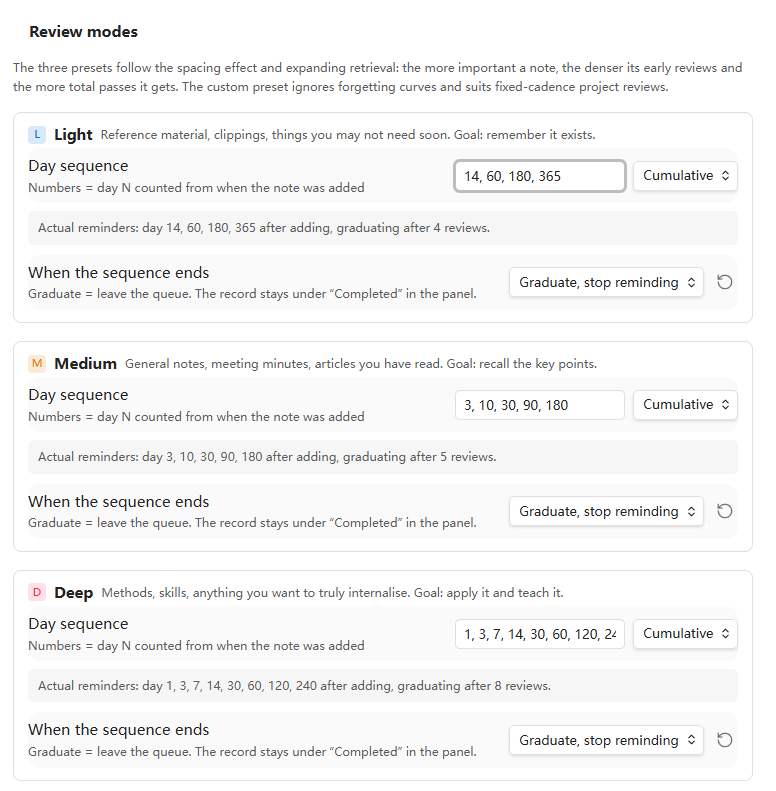
| Light | 14, 60, 180, 365 | 4 over 1 year | graduates | Reference material, clippings, things you may not need soon |
| Medium | 3, 10, 30, 90, 180 | 5 over 6 months | graduates | General notes, meeting minutes, articles you have read |
| Deep | 1, 3, 7, 14, 30, 60, 120, 240 | 8 over 8 months | graduates | Methods, skills, anything you want to truly internalise |
| Custom | every 7 days by default | unlimited | repeats | Fixed-cadence project reviews, OKRs, weeklies |
Every note carries its own mode in frontmatter, so you can mix all four across your vault.
How the presets were derived
The spacing effect. Cepeda et al. (2006), a meta-analysis of 254 studies, found the optimal gap between reviews scales with how long you want to retain something — roughly 10–30% of the target retention interval. To remember something for a year, you space reviews in months, not days.
Expanding retrieval. Landauer & Bjork (1978) showed expanding intervals beat uniform ones for long-term retention. Multipliers of 2–3× are where practice has converged; Anki's default ease factor is 2.5.
Importance changes density, not the multiplier. Deep review uses a smaller multiplier (≈2×) to buy denser early coverage and more total passes (8). Light review uses a larger one (≈3.5×) to stay cheap (4 passes). The difference between tiers is deliberate.
An honest caveat. All of the above concerns memorising. The original studies measured recall of word pairs and facts, not "reading a note again". The specific day counts here are reasoned extrapolation, not experimental results. Real effectiveness depends heavily on what you actually do during a review — rereading is far weaker than closing the note and writing down the key points from memory. Treat the presets as a starting point and tune them; every sequence is editable in settings.
Why Custom is different
Project retrospectives, OKRs and weeklies are driven by a fixed cadence, not by forgetting. Friday is Friday. So the Custom preset ignores forgetting curves entirely, defaults to a plain 7-day interval, and never graduates.
Two ways to count
Each preset independently chooses how to read its numbers:
- Cumulative — numbers mean day N counted from when the note was added. The three presets use this, because that is how memory research states its intervals.
- Interval — numbers mean days between consecutive reviews. Custom uses this.
Settings show a live preview under each preset, spelling out the actual reminder days so you never have to do the arithmetic yourself.
Cumulative sequences must be strictly increasing; duplicate or out-of-order numbers are sorted and de-duplicated automatically, and the preview tells you what it did.
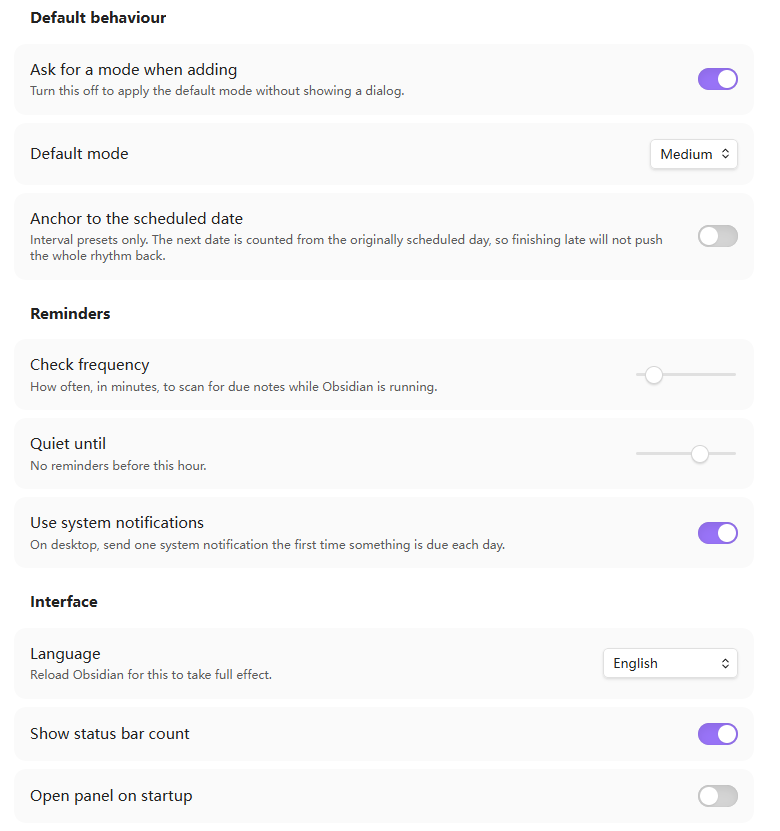
Anchor to the scheduled date (interval presets only): by default the next date is counted from the day you actually marked the review complete, so being late pushes the whole rhythm back. Turn this on to count from the originally scheduled day instead — better for strict weekly cadences.
Installation
Via BRAT (recommended, auto-updates)
- Install and enable BRAT (Beta Reviewers Auto-update Tester) from the community plugin browser
- Run
BRAT: Add a beta plugin for testing - Enter
https://github.com/Duan-hub824/obsidian-review-reminder
Manually
Download main.js, manifest.json and styles.css from Releases and drop them into:
YourVault/.obsidian/plugins/review-reminder/
Then enable it under Settings → Community plugins.
Usage
Open the sidebar panel from the calendar icon in the left ribbon, or via the Open review panel command.
Adding a note. Use Add to review plan… and pick a depth from the dialog — each option shows the actual days it will remind you. Prefer no dialog? Turn off "Ask for a mode when adding" in settings, or bind a key to one of the direct commands like Add to review plan: Deep.
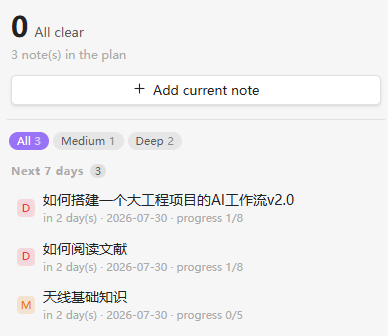
The panel groups notes into Overdue / Today / Next 7 days / Later, with a filter row to narrow by mode. Each row shows a coloured badge for its depth and its progress through the cycle (progress 3/8). Hover a row for a ✓ button to mark the review complete, and a ⋯ menu to change mode, postpone, or remove.
Completed notes collect in a collapsed "Completed" section at the bottom. From there you can add one back to the plan (optionally at a different depth, starting a fresh cycle) or wipe its record entirely.
Frontmatter
---
review-mode: deep            # light | medium | deep | custom
review-start: 2026-07-27     # date added; the anchor for cumulative counting
review-next: 2026-07-28      # next review date
review-last: 2026-07-27      # last review date
review-count: 0              # reviews completed
review-done: 2027-03-24      # graduation date; present + no review-next = finished
review-schedule: 5, 20, 90   # optional per-note override
---
Resolution order: review-schedule > review-mode > the default mode in settings.
The override exists so a single note can break the rules without you creating a whole new preset — a quarterly OKR can just declare review-schedule: 90.
Language
The interface ships in English and Simplified Chinese, following your Obsidian language setting. You can force one in settings. Adding a locale means appending one object to LOCALES at the top of main.js; pull requests are welcome.
Limitations
Reminders only fire while Obsidian is running. The plugin lives inside the Obsidian process, so nothing arrives when the app is closed — due notes simply accumulate and greet you at next launch. If you need reminders regardless, drive them externally: a cron job scanning frontmatter, or exporting an .ics feed to your phone's calendar.
System notifications are desktop-only (guarded by Platform.isDesktopApp); mobile falls back to in-app notices.
Scanning walks the whole vault on each check and redraws the panel in full. Imperceptible at a few thousand notes; past ten thousand, raise the check interval.
Development
There is no build step — it is plain JavaScript. Symlink the repo into your vault so edits show up on reload:
git clone https://github.com/Duan-hub824/obsidian-review-reminder.git
cd YourVault/.obsidian/plugins/
ln -s /path/to/obsidian-review-reminder review-reminder
Run Reload app from the command palette after each change.
License
MIT — see LICENSE.
Note on authorship
This plugin was written with AI assistance. The design decisions behind it — the four-tier model, the graduation mechanic, the cumulative/interval split — came out of iteration and human judgement about what a review workflow should actually do. The interval parameters draw on published spacing research, with the caveat about extrapolation noted above.
Screenshots
The sidebar panel groups notes by urgency and shows each one's progress through its cycle:
Adding a note prompts for a depth, with the actual reminder days shown up front:
For plugin developers
Search results and similarity scores are powered by semantic analysis of your plugin's README. If your plugin isn't appearing for searches you'd expect, try updating your README to clearly describe your plugin's purpose, features, and use cases.