Treepane
unlistedby fougaser
Minimal single-pane file tree for Obsidian's left sidebar.
🌳 Obsidian Treepane
A calm, focused file explorer for Obsidian.




Folders and files in one tree. Drag paths straight into your terminal. No dual‑pane, no date groupings, no ceremony.
Why another explorer?
Obsidian's built‑in file explorer is fine but minimal. The popular community alternative — Notebook Navigator — is powerful but dual‑pane and opinionated in ways that don't suit every workflow. Obsidian Treepane is what's left when you strip back to first principles:
- A single scrollable column.
- Folders and files interleaved, VS Code style.
- Notes expose a preview and a modified‑date.
- Drag a file anywhere — including an embedded terminal — and get the absolute path.
That's it. No search, no tags view, no properties browser, no pinned section. The plugin is ~550 lines of vanilla TypeScript, zero runtime dependencies, builds to a ~20 KB bundle.
✨ Features
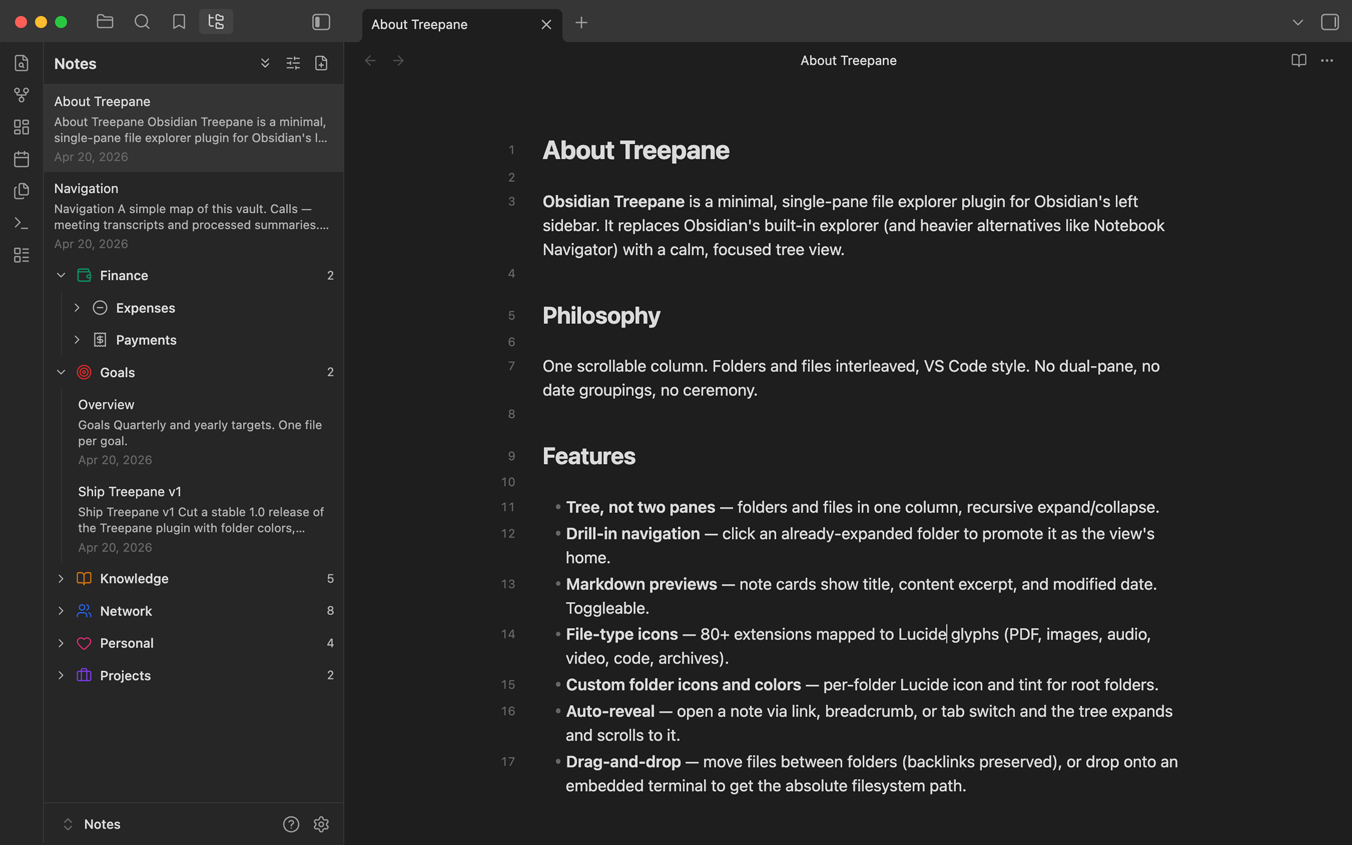
| 🌲 | Tree, not two panes. Folders and files in one column, recursive expand/collapse. |
| 🎯 | Drill‑in navigation. Click an already‑expanded folder to promote it as the view's home. |
| 🔖 | Markdown previews. Note cards show title, content excerpt, and modified date. Toggleable. |
| 🏷️ | File‑type icons. 80+ extensions mapped to Lucide glyphs (PDF, images, audio, video, code, archives…). |
| 🔃 | Auto‑reveal. Open a note via link, breadcrumb, or tab switch — the tree expands its ancestors and scrolls to it. |
| ✊ | Drag‑and‑drop. Drop one file onto another folder to move it (backlinks preserved). Drop onto a terminal for the absolute filesystem path. |
| 🧭 | Header controls. Back to home, expand/collapse all, appearance, new note — always one click away. |
| 🗂️ | Configurable home. Point the tree at any folder as its default root via settings. |
| 🌓 | Theme‑aware. Inherits your Obsidian theme's colors and typography; no hard‑coded palette. |
📸 Screenshots
Add your own after cloning — place under
docs/and link here.
docs/tree-default.png— tree collapsed, root view.docs/tree-expanded.png— nested folders expanded, a note selected.docs/drag-to-terminal.png— dragging a file into an embedded terminal.
🚀 Installation
Manual (current)
git clone https://github.com/fougaser/obsidian-treepane.git
cd obsidian-treepane
npm install
npm run build
Then, from your vault:
mkdir -p <your-vault>/.obsidian/plugins/obsidian-treepane
ln -s "$PWD/main.js"       <your-vault>/.obsidian/plugins/obsidian-treepane/main.js
ln -s "$PWD/manifest.json" <your-vault>/.obsidian/plugins/obsidian-treepane/manifest.json
ln -s "$PWD/styles.css"    <your-vault>/.obsidian/plugins/obsidian-treepane/styles.css
In Obsidian: Settings → Community plugins → Obsidian Treepane → toggle on. A new sidebar icon appears on the left.
Community Plugin store
Not yet. Once the plugin stabilizes, it will be submitted to the Obsidian community catalog.
🧑💻 Usage
The header
┌──────────────────────────────────────────────┐
│  ←   My Vault              ⇕   ⇱   ✏        │
└──────────────────────────────────────────────┘
| Icon | What it does |
|---|---|
← | Return to the default root (only shown when you've drilled in elsewhere). |
| Title | Name of the current view root. |
⇕ Chevrons | Expand every descendant folder, or collapse them all. |
⇱ Sliders | Toggle title / description / date visibility and choose 1 or 2 preview rows. |
✏ File‑plus | Create Untitled.md inside the current view root and open it. |
Folder interactions
- Chevron click → toggle expand / collapse.
- Name click, collapsed → expand the folder.
- Name click, already expanded → drill in. That folder becomes the tree's new root for the session, and its
index.md(if any) opens in a new tab. - Right click →
New note·New folder·Rename·Delete·Reveal in Finder.
File interactions
- Click → open in the current tab.
- Drag onto a folder row → move (internally, via
fileManager.renameFileso backlinks update). - Drag onto an external pane (terminal, etc.) → drop sets
text/plainto the absolute filesystem path. Terminals that accept text drops, including most embedded Obsidian terminal plugins, insert the path at the cursor. - Markdown files: no file‑type icon, no
.mdextension in the name — just the basename and its preview. - Non‑markdown files: type icon on the left, extension preserved in the name.
Auto‑reveal
Whenever the active file changes — you click an internal link, activate a tab, or use Obsidian's breadcrumb— Treepane expands every ancestor folder of that file and scrolls the corresponding row into view.
⚙️ Settings
Settings → Obsidian Treepane
| Setting | Default | What it controls |
|---|---|---|
| Default root folder | Vault root | The folder the ← button returns to. Leave empty for the vault root. Supports folder‑path autocomplete. |
All appearance toggles (title / description / date visibility, preview rows) are managed from the header's sliders button and persist automatically.
🧱 Architecture
Deliberately small. The whole plugin is five TypeScript files:
src/
├── main.ts              Plugin lifecycle, data persistence, settings tab wiring
├── view.ts              FileTreeView — render loop, expand state, auto‑reveal
├── icons.ts             Extension → Lucide icon lookup (~80 extensions)
├── dnd.ts               Delegated drag‑and‑drop (internal move + abs‑path payload)
├── menu.ts              Right‑click context menu (new / rename / delete / reveal)
├── appearanceModal.ts   Show‑title / show‑description / show‑date / preview‑rows toggles
└── settingsTab.ts       Plugin settings UI (default root picker)
No React, no list virtualization. A full tree rebuild runs on every vault event — coalesced through requestAnimationFrame. At ~100‑200 folders, 4 levels deep, the rebuild is sub‑millisecond; the code stays legible.
🛣️ Roadmap
- Keyboard navigation (arrow keys,
F2rename,Delete,Enter). - Inline rename (instead of modal).
- Multi‑select with shift/cmd click.
- Search filter across visible rows.
- Submit to the Obsidian community plugin catalog.
🧑🔧 Development
git clone https://github.com/fougaser/obsidian-treepane.git
cd obsidian-treepane
npm install
npm run dev   # esbuild watch — rebuilds on src/** changes
Pair with the community Hot Reload plugin for near‑instant in‑Obsidian reloads:
touch <your-vault>/.obsidian/plugins/obsidian-treepane/.hotreload
Production build:
npm run build
TypeScript strict is on. No tests ship yet — contributions welcome.
🖥️ Compatibility
- Desktop only. The plugin uses desktop‑specific APIs (
FileSystemAdapter.getFullPath,app.showInFolder). - Obsidian 1.5.0+. Relies on
AbstractInputSuggestand modern event APIs.
📜 License
MIT © fougaser.
For plugin developers
Search results and similarity scores are powered by semantic analysis of your plugin's README. If your plugin isn't appearing for searches you'd expect, try updating your README to clearly describe your plugin's purpose, features, and use cases.