Neuron Brain 3D
unlistedby Ícaro Borges
A 3D graph of your vault shaped like a brain, with neural impulses and thought waves. No external libraries, no network access.
Neuron Brain 3D
A 3D graph view for Obsidian that arranges your vault inside a brain-shaped volume and animates it like living neural tissue.
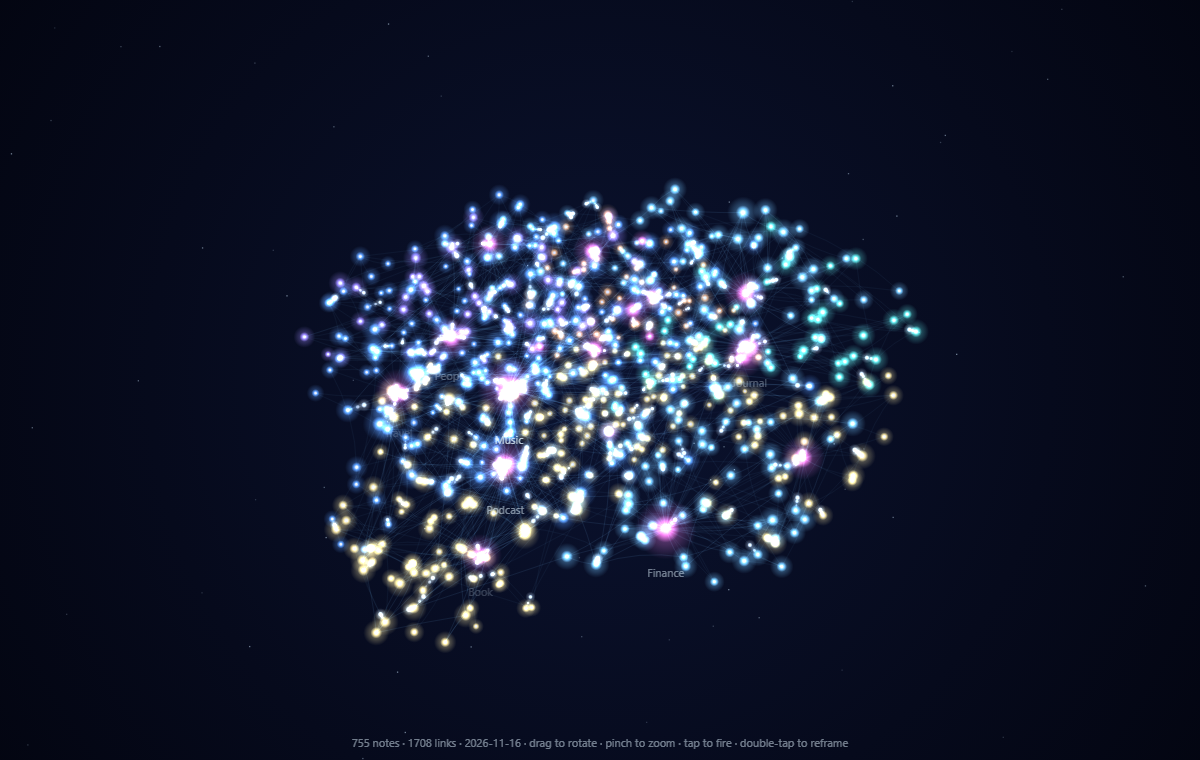
Demo vault with invented notes.
- Notes fill two hemispheres, temporal lobes, cerebellum and brain stem. Notes that are linked stay close together.
- Electrical impulses travel along the links; a note lights up when a signal reaches it.
- Every few seconds a hub fires and the signal cascades through its neighbours ("thought waves").
- On open, the graph settles as a free cloud and then morphs into the brain.
- One colour per top-level folder. Hover a note to see its title and highlight its links; click to open it.
- No third-party libraries, no network access, read-only: it never modifies your notes.
It also ships two optional command-line tools: one exports the brain as a single HTML file for your phone, the other creates hub notes so loose notes become connected.
Install
Manual install (the plugin is not in the community catalogue yet):
- Download
main.js,manifest.jsonandstyles.cssfrom this repository. - Put them in
<your vault>/.obsidian/plugins/neuron-brain-3d/. - In Obsidian: Settings → Community plugins → enable Neuron Brain 3D.
- Click the brain icon in the left ribbon, or run the command Open the 3D brain.
Desktop only.
Controls
| Action | Result |
|---|---|
| Drag | Rotate |
| Scroll | Zoom |
| Hover a note | Show title, highlight its links, fire a small wave |
| Click a note | Open it in a new tab |
| Double-click empty space | Reframe the whole brain |
Settings
- Brain shape: turn off for a free 3D cloud.
- Auto-rotate and Thought waves.
- Excluded folders: one per line. Either a path prefix (
Archive/Old) or a folder name skipped anywhere (node_modules).
Tools (optional, need Node.js 18+)
Connect loose notes
A brain needs connections. If most of your notes are unlinked dots, this creates one hub note per folder (folder → subfolders → notes) and a central hub:
node tools/generate-hubs.js "/path/to/vault" --out=Hubs
Everything is written inside the Hubs folder, which is wiped and rebuilt on every run. Your own notes are never edited. The script refuses to run if the output folder already exists and it did not create it.
Export for your phone
node tools/export-mobile.js "/path/to/vault" brain.html --names=none
Produces one self-contained HTML file: drag to rotate, pinch to zoom, tap a note to fire a wave.
The file contains node positions, links and, depending on --names, titles. It never contains note contents.
--names | What is embedded |
|---|---|
none (default) | No titles at all |
folders | Titles of the hub notes only |
all | Every note title. Titles can be private, so think before sharing this file. |
How the brain shape works
- A plain 3D force layout runs first (repulsion, springs along links, gravity), so linked notes cluster.
- The brain volume is the union of seven ellipsoids. A Halton sequence samples exactly one evenly spread point per note inside it.
- Notes are matched to points by recursive median splits along x, y and z, so neighbours in the free layout stay neighbours inside the brain.
Rendering is plain Canvas 2D with additive blending and pre-rendered glow sprites.
Limitations
- The force layout compares every pair of notes, so very large vaults (roughly 5,000+ notes) take longer to settle.
- From the front or the top the shape reads as two lobes rather than a detailed brain; the side view is the recognisable one.
- Some identifiers and comments in the source are in Portuguese.
License
MIT
Neuron Brain 3D (português)
Um grafo 3D para o Obsidian que organiza o seu cofre dentro de um volume em forma de cérebro e o anima como tecido neural vivo.
- As notas preenchem dois hemisférios, lobos temporais, cerebelo e tronco. Notas ligadas ficam próximas.
- Impulsos elétricos percorrem as ligações; a nota acende quando o sinal chega.
- De tempos em tempos um núcleo dispara e o sinal se espalha em cascata ("ondas de pensamento").
- Ao abrir, o grafo se organiza como uma nuvem e depois se transforma no cérebro.
- Uma cor por pasta principal. Passe o mouse para ver o título; clique para abrir a nota.
- Sem bibliotecas de terceiros, sem acesso à internet, somente leitura: nunca altera as suas notas.
Instalação
- Baixe
main.js,manifest.jsonestyles.cssdeste repositório. - Coloque em
<seu cofre>/.obsidian/plugins/neuron-brain-3d/. - No Obsidian: Configurações → Plugins da comunidade → ative Neuron Brain 3D.
- Clique no ícone de cérebro na barra da esquerda.
Ferramentas opcionais (Node.js 18+)
Ligar as notas soltas com uma nota-núcleo por pasta (tudo fica dentro da pasta Hubs, que é refeita a cada execução; as suas notas nunca são alteradas):
node tools/generate-hubs.js "/caminho/do/cofre" --out=Hubs
Gerar um arquivo único para abrir no celular (só posições, ligações e, se você pedir, títulos; nunca o conteúdo das notas):
node tools/export-mobile.js "/caminho/do/cofre" brain.html --names=none
Licença
MIT
For plugin developers
Search results and similarity scores are powered by semantic analysis of your plugin's README. If your plugin isn't appearing for searches you'd expect, try updating your README to clearly describe your plugin's purpose, features, and use cases.