Health Connect & Readiness Dashboard
unlistedby Alex Jarecki
Seamlessly sync sleep, HRV, readiness, and nutrition from Google Health & Fitbit into daily notes and render an instant visual dashboard.
Health Connect & Biometrics Dashboard for Obsidian
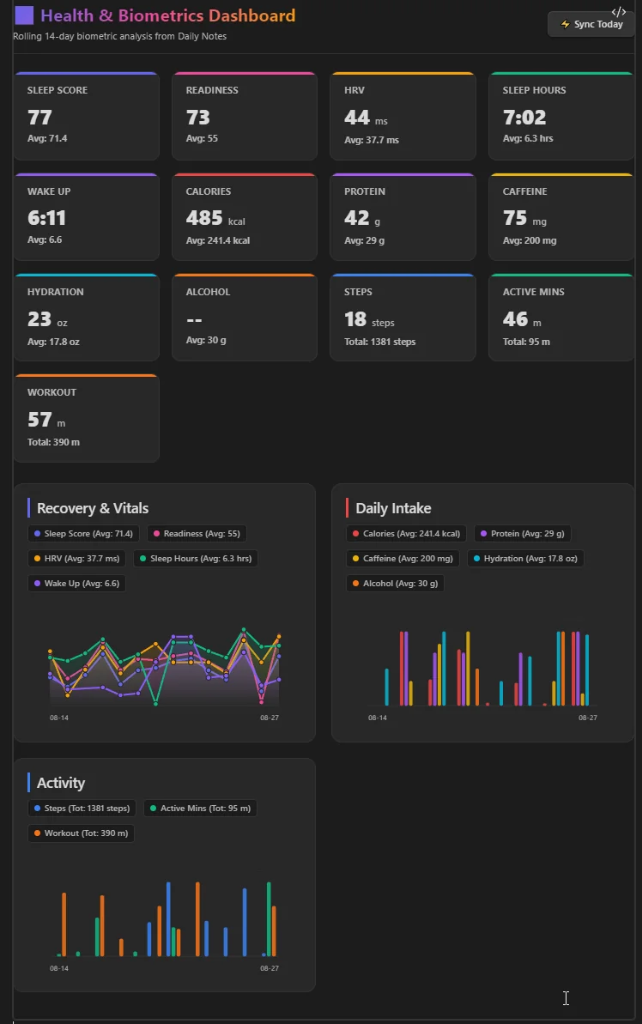
A sleek, privacy-first Obsidian plugin that automatically syncs and visualizes Sleep, HRV, Readiness, Workouts, Hydration, and Nutrition from Google Health, Fitbit, Apple Health, or manually logged daily notes directly into responsive health-dashboard charts and KPI cards.



✨ Features
- ⚡ Automated & Manual Tracking: Sync biometrics automatically from Google Health, Fitbit, and Apple Health, or chart your own manually tracked habits, mood, and health scores in Daily Notes.
- 📊 Responsive Visual Dashboard: Embed
health-dashboardanywhere in your vault to render interactive KPI cards, rolling averages, total intake calculations, tooltips, and smooth zero-dependency SVG sparklines, multi-line trends, and grouped bar charts matching your theme. - 📝 Supported Data Formats: The dashboard parses data from YAML frontmatter (
Key: Value), inline Dataview fields (Key:: Value,- [ ] Key:: Value), and bullet lists (- Key: Value). - 🧮 Custom Calculated Metrics: Define new metrics using spreadsheet-style mathematical formulas combining existing variables (e.g.
(protein * 4) + (carbs * 4) + (fat * 9)or(HRV / 60) * (Sleep_hours / 8) * 100) with an optional toggle to write results back to your daily note frontmatter. - 🏋️ Smart Workout Parsing: Automatically parses exercise sessions (e.g.
Strength Training (8m), Strength Training (14m)) into aggregated durations, chartable minutes, and detailed hover tooltips. - 🥗 Food & Beverage Quick Logger: Built-in visual logger with custom servings, presets, and local registry management that posts nutrition records directly to Google Health API and keeps your daily frontmatter synchronized.
- 🔒 100% Local & Private: Direct secure OAuth 2.0 communication between Obsidian and Google Cloud APIs / local Apple Health drops. Zero middleman servers, telemetry, or external subscriptions.
- 🗺️ Fully Configurable Field Mappings: Map incoming biometrics to any custom YAML frontmatter or inline property names in your vault.
🔄 How Syncing Works
This plugin supports flexible syncing pipelines for both Android/Fitbit and Apple Watch/iPhone ecosystems:
1. 🌐 Universal Cloud Sync (Google Health, Health Connect, Fitbit & Apple Watch) — Recommended
- How it works: Connects directly to the Google Health v4 REST API (
health.googleapis.com) using your own free, personal Google OAuth 2.0 client. - 📱 Android & Wear OS: Native sync with Pixel Watch, Samsung Galaxy Watch, Fitbit, Garmin, and any wearable connected to Android Health Connect / Google Health.
- 🍏 iPhone & Apple Watch: Simply install the free Google Health / Google Fit app on your iPhone and allow it to sync with Apple Health. All your Apple Watch sleep, heart rate, workouts, and steps automatically sync to your Google Health cloud backend and flow straight into Obsidian!
- What it syncs:
- Sleep & Recovery: Sleep duration (
Sleep_hours), Sleep Score (Sleep_score), Sleep Stages (Deep, REM, Light, Awake), Wake-up time (wake_up), Bedtime. - Vitals & HRV: RMSSD Heart Rate Variability (
HRV), Resting Heart Rate (resting_heart_rate), Blood Oxygen (spo2), Respiratory Rate (respiratory_rate), Skin Temperature. - Activity & Fitness: Steps (
steps), Active Zone Minutes (active_minutes), Calories Burned (calories_burned), Distance, Floors Climbed, and Workouts (workout). - Body Measurements: Weight (
weight), Body Fat % (body_fat), BMI. - Nutrition & Hydration: Calories (
calories), Protein (protein), Carbs (carbs), Fat (fat), Hydration (hydration), Caffeine (caffeine).
- Sleep & Recovery: Sleep duration (
- Bi-directional Nutrition: Built-in visual Food Logger writes meal entries directly to Google Health and updates your active daily note frontmatter in real time.
2. 📂 Local Apple Health JSON Ingestion — Optional Offline Path
- How it works: For privacy-focused users who prefer a 100% local, offline workflow without a Google account. Set up an iOS Shortcut to export health metrics to a vault drop folder (
00_Imports/Health/). - Hands-Free Ingestion: A real-time vault watcher automatically detects incoming JSON files, parses the metrics into your Daily Notes, and safely archives the processed files into
00_Imports/Health/Archive/.
📦 Installation via BRAT (Beta Testing)
- Install the BRAT (Obsidian42 - BRAT) plugin from Obsidian Community Plugins.
- In Obsidian Settings, go to BRAT > Add Beta plugin.
- Enter the repository URL:
https://github.com/jare0014/obsidian-health-connect - Click Add Plugin, then enable Health Connect & Readiness Dashboard under Installed Plugins.
🚀 Quick Setup Guide
Connecting your Google Account requires a free personal Google Cloud Project (takes ~3 minutes):
Part 1: Create GCP Project & Enable Health API
- Open the Google Cloud Console.
- Click the project dropdown at top-left → New Project → Name it
Obsidian-Health→ Click Create. - Go to APIs & Services > Library, search for Google Health API (v4 REST API), and click Enable.
Part 2: Configure OAuth Consent Screen & Scopes
- Go to APIs & Services > OAuth consent screen.
- Select Audience / User Type: External → Click Create / Next.
- Enter an App Name (e.g.
Obsidian Health Connect) and your email for Developer & Support contact. - Under Scopes, click Add or Remove Scopes and enable:
https://www.googleapis.com/auth/googlehealth.sleep.readonlyhttps://www.googleapis.com/auth/googlehealth.health_metrics_and_measurements.readonlyhttps://www.googleapis.com/auth/googlehealth.activity_and_fitness.readonlyhttps://www.googleapis.com/auth/googlehealth.nutrition.readonlyhttps://www.googleapis.com/auth/googlehealth.nutrition.writeonly
- Under Test users, click + Add Users and enter your personal Gmail address.
(Tip: Click Publish App on the OAuth overview so your refresh token never expires after 7 days).
Part 3: Create OAuth Client ID & Connect
- Go to APIs & Services > Credentials → Click + Create Credentials > OAuth client ID.
- Application type: Web application.
- Name:
Obsidian Client. - Authorized redirect URIs:
http://localhost:8092. - Click Create → Click Download JSON (or copy the Client ID and Client Secret).
- Open Obsidian Settings > Health Connect & Readiness, paste the Client ID/Secret or the full downloaded JSON into the box, and click Connect Google Account.
- Approve the permissions in your browser. The status badge will switch to
🟢 Connected!
📊 Dashboard Usage
Add this codeblock anywhere in your Daily Notes, Weekly Reviews, or Health Dashboard note:
```health-dashboard
```
Custom Date Ranges & Options
You can override rolling windows or filter specific date ranges:
```health-dashboard
days: 30
excludeWeekends: true
```
Or filter with exact start/end dates:
```health-dashboard
from: 2026-08-01
to: 2026-08-19
```
🥗 Food & Beverage Logger
- Quick Modal Access: Open via ribbon icon 🍎 or command palette:
Health Connect: Quick Log Food / Beverage. - Item Presets & Servings: Select an item (e.g. Americano, Espresso, Water, Protein Shake) and adjust quantity.
- Google Health API Sync: Clicking Log to Google Health writes the nutrition event directly to the Google Health v4 REST API and updates your active daily note frontmatter in real time.
- Custom Food Registry: Manage custom items, calories, protein, caffeine, and volume presets in the Manage Registry tab.
🧮 Custom Calculated Metrics (Formula Builder)
Want to create composite health scores or compute macro calories from separate fields? Use the built-in Formula Builder in settings:
- Spreadsheet-Style Math: Write standard arithmetic formulas (e.g.,
(protein * 4) + (carbs * 4) + (fat * 9)or(HRV / 60) * (Sleep_hours / 8) * 100). - Clickable Variable Chips: Quick-insert detected variables into your formula.
- Frontmatter Writeback:
- Display Only: Calculated on the fly when rendering the
health-dashboardcodeblock. - Write to Note: Automatically saved into your daily note frontmatter during sync!
- Display Only: Calculated on the fly when rendering the
🍏 Apple Health & iOS Shortcuts Ingestion
If you track your health, nutrition, or workouts on an iPhone or Apple Watch, you can automatically sync your daily Apple Health data into Obsidian via Apple Shortcuts and cloud sync (iCloud Drive, Obsidian Sync, Google Drive, or OneDrive):
- In plugin settings, turn on Enable Apple Health Ingestion.
- Specify your drop folder (e.g.
00_Imports/Health). - In the iOS Shortcuts app on your iPhone:
- Create a Shortcut querying daily samples: Dietary Protein, Dietary Energy, Steps, Sleep Analysis, HRV, Water.
- Combine them into a JSON dictionary:
{ "date": "2026-08-23", "protein": 140, "calories": 2200, "steps": 10500, "hydration": 80, "Sleep_hours": 7.8, "HRV": 65 } - Save the file as
Health_YYYY-MM-DD.jsoninto your synced drop folder. - Set an iOS Automation to run nightly at 11:59 PM.
- When Obsidian opens or syncs the file, the plugin automatically parses the metrics, updates today's Daily Note frontmatter, and safely archives the processed JSON file!
⌨️ Command Palette Actions
Open the Obsidian Command Palette (Ctrl/Cmd + P) to trigger any of the following actions:
| Command | Description |
|---|---|
Health Connect: Sync Today's Google Health Biometrics | Immediately syncs today's sleep, HRV, steps, and workouts into today's daily note. |
Health Connect: Backfill & Sync Last 14 Days Biometrics | Queries the past 14 days from Google Health API and backfills missing historical daily notes. |
Health Connect: Quick Log Food / Beverage | Opens the visual food logger modal to log meals, caffeine, hydration, or custom macros. |
Health Connect: Scan & Ingest Apple Health Drop Folder (JSON) | Manually scans your configured drop folder for any pending Apple Health JSON drops. |
☕ Support the Project
If this plugin helps you maintain healthy habits and quantified-self insights, consider supporting future development:

📄 License
MIT License © 2026 Alex Jarecki
For plugin developers
Search results and similarity scores are powered by semantic analysis of your plugin's README. If your plugin isn't appearing for searches you'd expect, try updating your README to clearly describe your plugin's purpose, features, and use cases.