Macros
approvedby jamescliffordspratt
Nutrition and food tracker for your notes. Log meals, calories, macros and micronutrients. Search foods by name or barcode via FatSecret, USDA & Open Food Facts. Chart your diet & weight loss.
Macros Plugin for Obsidian
The Macros Plugin brings powerful nutrition tracking to your Obsidian vault. It integrates with multiple food databases including FatSecret, USDA FoodData Central, and Open Food Facts to search foods, generate nutrition markdown files, and dynamically render interactive macro tables and visualizations.
🎬 Demo
🔍 Searching for Food
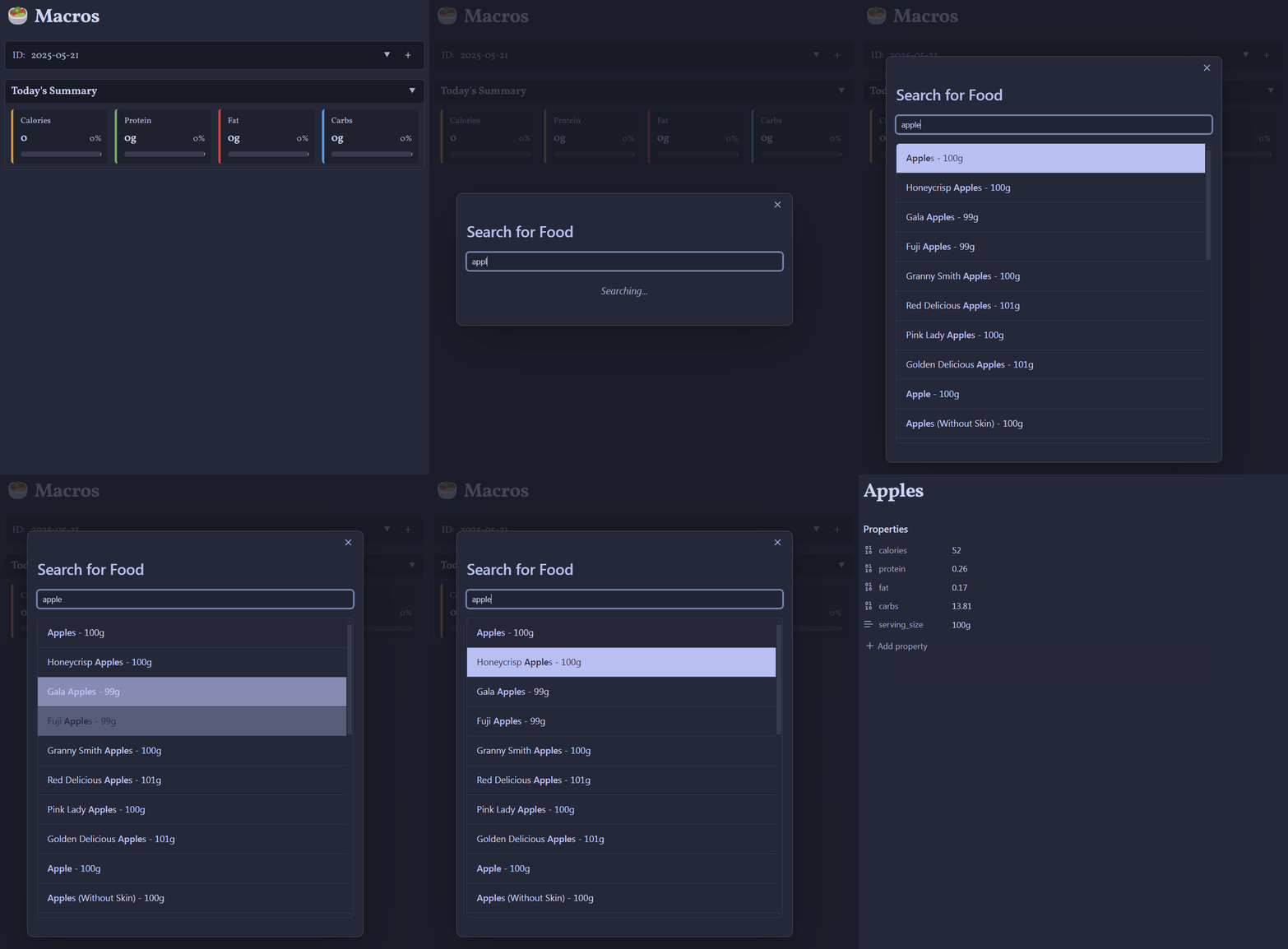
🍎 Creating and Visualizing Macros

✨ Features
🥑 Food Management
- Multi-source food search with intelligent data aggregation:
- FatSecret API - Comprehensive commercial food database
- USDA FoodData Central - Government-verified nutritional data including Foundation Foods
- Open Food Facts - Community-driven database with 2.8M+ products worldwide
- No API key required for Open Food Facts (free and open source)
- Smart prioritization - Foundation Foods > USDA SR Legacy > High-quality Open Food Facts > FatSecret
- Barcode scanning support - Search products by UPC/EAN codes (via Open Food Facts)
- Live food search with real-time suggestions and fuzzy matching
- Manual food entry for custom items not in databases
- Markdown food files with comprehensive nutritional data (calories, protein, fat, carbs, plus optional micronutrients)
- Custom serving sizes with automatic nutritional scaling
- Energy unit flexibility - display in kcal or kJ with automatic conversion
- Multi-language support - Open Food Facts provides localized product names in 25+ languages
🍽️ Meal & Group System
- Meal templates for quick reusable meal groups
- Quick group creation via the "Add to Macros" modal - create ad-hoc meal collections on the fly
- Unified syntax - both templates and groups use
meal:syntax for consistency - Meal composition analysis with nutritional breakdowns
- Timestamp tracking - Record when meals/foods were consumed (
@HH:MMformat) - Comments & annotations - Add notes to any item using
// commentsyntax
📊 Macro Tracking & Visualization
- Interactive macro tables (
macros) with collapsible sections - Pie chart visualizations (
macrospc) with customizable colors - Multi-day aggregation (
macroscalc) to combine multiple macro blocks - Daily targets tracking with progress indicators and remaining/exceeded notifications
- Dashboard views with summary cards and progress bars
📈 Advanced Metrics & Analytics
- Customizable dashboard metrics with organized categories:
- Totals & Averages - Daily and aggregate nutritional summaries with per-day breakdowns
- Macro Ratios - Caloric distribution percentages showing P/F/C split
- Trends - Automatic rolling averages calculated based on your date range
- Extremes - Identify highest and lowest consumption days across tracked periods
- Adherence & Streaks - Track consistency with configurable tolerance levels (e.g., ±10%)
- Flexible display options - Show/hide tables and charts independently in macroscalc views
- Interactive configuration - Customize which metrics appear via settings modal (⚙️ icon)
- Streak tracking - Monitor current streaks and longest streaks for meeting targets
- Adherence percentages - See what percentage of days you hit your targets
🧪 Micronutrient Tracking
- Vitamins & minerals beyond macros - track nutrients such as vitamin A, C, and D, calcium, iron, potassium, sodium, fiber, sugar, saturated fat, and cholesterol
- Automatic micronutrient data - pulled from USDA FoodData Central and FatSecret when available
- Manual micronutrient entry - add custom nutrient values per food in the manual entry modal
- Micronutrient tables (
macrosmicro) - render per-nutrient totals for any macros block - Personalized targets - recommended values based on your profile, organized into Vitamins, Minerals, and Other
- Custom targets - override any recommended value or reset everything back to recommendations
- Upper-limit awareness - flags nutrients with a suggested upper limit
🏷️ Food Tolerance & Dietary Tracking
- Tolerance indicators - Mark foods with severity levels (🟡, 🟠, 🔴) and symptoms
- Visual icons - Quick identification of foods with intolerances in all tables
- Context menu management - Right-click (desktop) or long-press (mobile) to add/edit tolerances
- Persistent tracking - Tolerance data saved across sessions and synced with your vault
- Symptom notes - Record specific reactions and symptoms for each food
⏰ Meal Timing & Timestamps
- Timestamp tracking - Record when foods/meals were consumed using
@HH:MMformat - Visual indicators - Clock icons (⏰) display consumption times throughout your tables
- Flexible formatting - Add timestamps to individual items or entire meals
- Pattern analysis - See when you typically eat and identify eating patterns
- Example formats:
meal: Breakfast @08:30- Oatmeal @08:45meal: Snacks @15:00 // Pre-workout
💬 Comments & Annotations
- Inline comments - Add notes to any food item or meal using
// commentsyntax - Context menu access - Right-click (desktop) or long-press (mobile) to add, edit, or remove comments
- Visual indicators - Speech bubble icons (💬) show items with comments
- Persistent storage - Comments saved with your nutritional data in markdown
- Multiple use cases:
- Cooking methods:
Chicken Breast // Grilled, no oil - Meal context:
meal: Lunch // Ate at office cafeteria - Dietary notes:
- Almonds // Raw, unsalted
- Cooking methods:
📱 Mobile-Optimized Experience
- Long-press interactions - Hold any food item for 500ms to access full context menu
- Haptic feedback - Subtle vibrations confirm actions on supported devices
- Unified context menus - Consistent experience across desktop and mobile platforms
- Responsive design - Optimized layouts adapt to phone and tablet screens
- Touch-friendly controls - Larger tap targets and intuitive swipe gestures
- Visual feedback - Clear indicators during long-press with CSS animations
🌍 Localization & Accessibility
- Multi-language support - Currently English, Spanish, and Chinese (more coming!)
- Automatic language detection - Based on your Obsidian interface language
- Cultural adaptation - Proper date formats, number formatting, and dietary terminology
- Open Food Facts localization - Product names in 25+ languages including French, German, Italian, Portuguese, Japanese, Korean, Russian, and Arabic
- Accessibility features - Tooltips, keyboard navigation, and screen reader support
⚙️ Advanced Features
- Multiple API sources - FatSecret, USDA, and Open Food Facts with intelligent fallbacks
- Barcode support - Search by UPC/EAN codes for quick product identification
- Data quality filtering - Set minimum quality thresholds for Open Food Facts results
- Macro templates - Pre-configured target templates (Keto, Mediterranean, Athlete, etc.)
- Developer mode with debug logging and advanced options
- Real-time updates - All macro blocks refresh automatically when data changes
- Rename tracking - Automatically update references when food files are renamed
- Responsive design - Optimized for both desktop and mobile use
🌍 Localization
The Macros plugin supports multiple languages and welcomes translation contributions!
- 🇺🇸 English – Complete ✅
- 🇪🇸 Spanish – AI-generated, needs native speaker verification ⚠️
- 🇨🇳 Chinese (zh-CN) – Complete ✅ – Thanks to @Moyf
- 🇫🇷 French, 🇩🇪 German, 🇮🇹 Italian, 🇯🇵 Japanese, 🇰🇷 Korean and 30+ more languages – Contributors needed 🔍
Want to help translate?
- 📖 Read our Localization Guide
- 🤝 All Obsidian-supported languages are welcome
- 🏆 Contributors will be credited in the plugin
📦 Installation
Via Obsidian Community Plugins (Recommended)
- Open Obsidian Settings → Community Plugins
- Disable Safe Mode (if not already disabled)
- Click "Browse" and search for "Macros"
- Install and enable the Macros plugin
Manual Installation
- Download the latest release from GitHub
- Extract the files to your vault's plugins folder:
VaultFolder/.obsidian/plugins/macros/ - Reload Obsidian and enable the plugin in Settings → Community Plugins
🚀 Quick Start
1. Configure Data Sources (Optional)
The plugin works out of the box with Open Food Facts (no API key required), but you can add more sources:
Open Food Facts (Enabled by default)
- No configuration needed! Just start searching.
- Access to 2.8M+ products worldwide
- Multi-language support with 25+ languages
- Barcode scanning capability
FatSecret API (Optional)
- Register for free FatSecret API credentials
- Add your API key and secret in plugin settings
- Enables additional commercial food database
USDA FoodData Central (Optional)
- Register for free USDA API key
- Add your API key in plugin settings
- Provides government-verified nutritional data and Foundation Foods
2. Add Your First Food
- Use the ribbon icon (🍎) or command palette
- Choose "Live Search" to search across all enabled databases
- Try "Manual Entry" for custom items
- New: Scan barcodes or enter UPC/EAN codes to find products instantly
- The plugin creates a
.mdfile with nutritional data
3. Create a Macro Table
Add this code block to any note:
```macros
id: today

# Add individual items
Chicken Breast: 200g
Rice: 150g

# Or create meals with timestamps and comments
meal: Breakfast @08:00 // High protein start
- Eggs: 100g
- Oatmeal: 50g
- Blueberries: 75g

# Quick groups work the same way
meal: Afternoon Snacks @15:00 // Pre-workout fuel
- Apple
- Almonds: 30g
- Protein Bar
```
Features:
- Click + to add foods using live multi-source search
- Use the "Create Group" tab in the modal to quickly create ad-hoc meal collections
- Right-click any item to add comments or mark tolerances
- Add timestamps with
@HH:MMformat to track meal timing - Add comments with
// your notefor cooking methods or context - Both meal templates and quick groups use the same
meal:syntax
4. Visualize with Charts
Create beautiful pie charts:
```macrospc
id: today
```
5. Aggregate Multiple Days
Combine multiple macro blocks with powerful analytics:
```macroscalc
ids: 2025-01-15, 2025-01-16, 2025-01-17
```
Click the ⚙️ icon in the dashboard to customize displayed metrics!
🎥 Full Video Tutorial
Watch the complete walkthrough on YouTube:
⚙️ Advanced Usage
Multi-Source Food Search
The plugin intelligently searches across multiple databases:
-
Search Priority: Results are automatically prioritized:
- USDA Foundation Foods (highest quality, government-verified)
- USDA SR Legacy (comprehensive nutrient data)
- Open Food Facts High Quality (verified community data)
- FatSecret (commercial database)
- Open Food Facts Medium/Low Quality
- USDA Branded Foods
-
Smart Deduplication: Automatically removes duplicate entries across databases
-
Barcode Search: Enter a UPC/EAN code to instantly find products
- Supports EAN-13, UPC-A, EAN-8, and ITF-14 formats
- Automatically tries multiple databases
- Example: Search for
5449000000996(Coca-Cola barcode)
Energy Units
Switch between kilocalories (kcal) and kilojoules (kJ) in settings. All values throughout the interface are automatically converted, including:
- Dashboard displays
- Table cells
- Tooltips
- Targets
- Pie chart labels
Meal Templates & Quick Groups
Meal Templates (Reusable)
Create permanent meal templates for frequently eaten combinations:
- Go to Settings → Meal Templates
- Click "Add meal template"
- Select foods and customize serving sizes
- Use the template in any macro table with one click
Quick Groups (Ad-hoc)
Create one-time meal collections on the fly:
- Click the + button in any macro table
- Select the "Create Group" tab in the modal
- Name your group and add items
- The group is saved directly in your macro block using
meal:syntax
Both methods use the same meal: syntax in your markdown files:
```macros
id: today

# From a saved template
meal: My Breakfast Template

# Or a quick group created on the fly
meal: Morning Snacks @10:30
- Apple: 150g
- Greek Yogurt: 200g
- Granola: 30g

# Both support timestamps and comments
meal: Lunch @13:00 // Meal prep from Sunday
- Chicken: 200g
- Rice: 150g
- Broccoli: 100g
```
Multi-Day Tracking with Advanced Analytics
Use date-based IDs for automatic organization:
```macroscalc
ids: 2025-01-15, 2025-01-16, 2025-01-17
```
Customize Your Dashboard:
Click the ⚙️ icon to enable/disable metrics:
- Totals & Averages - See aggregate and per-day averages across your selected period
- Macro Ratios - Visualize your P/F/C caloric distribution as percentages
- Trends - Automatic rolling averages (window size adapts to your date range)
- Extremes - Find your highest/lowest consumption days for each macro
- Adherence - Track consistency with customizable tolerance (e.g., ±10%)
- Current streak - consecutive days within tolerance
- Longest streak - your best performance period
- Adherence percentage - overall consistency rate
- Display Options - Toggle table and chart visibility independently
Adherence Tracking Example:
Set custom tolerances for each macro (e.g., Calories ±10%, Protein ±10%, Fat ±15%, Carbs ±15%) to track how consistently you hit your targets. The plugin calculates your current streak and shows your longest streak period.
Micronutrient Tracking
Track vitamins and minerals alongside your macros. Micronutrient values are pulled automatically from USDA FoodData Central and FatSecret when available, and you can add or override them manually in the food entry modal.
Render per-nutrient totals for any macros block with a macrosmicro code block:
```macrosmicro
id: today
```
Set your targets in Settings → Micronutrients: each nutrient shows a recommended value based on your profile (organized into Vitamins, Minerals, and Other), and you can enter custom targets or reset everything back to the recommendations.
Custom Serving Sizes
All foods support custom serving sizes with automatic nutritional scaling:
- Use grams:
Chicken: 200g - The plugin remembers preferences
- Suggests appropriate portions
- Click any quantity to edit inline
Macro Templates
Quick-start with pre-configured nutrition targets:
- Keto - 70% fat, 25% protein, 5% carbs
- Low Carb - 40% protein, 40% fat, 20% carbs
- Mediterranean - 45% carbs, 35% fat, 20% protein
- Balanced - 40% carbs, 30% protein, 30% fat
- High Protein - 50% protein, 25% carbs, 25% fat
- Athlete - 55% carbs, 25% fat, 20% protein
- Cutting - 45% protein, 30% carbs, 25% fat
- Bulking - 45% carbs, 30% protein, 25% fat
Access templates in Settings → General → Nutrition Targets.
🛠️ Settings & Configuration
Storage
- Storage Folder – Where nutritional data files are saved (default: "Nutrition")
Daily Targets
- Set your daily goals for calories, protein, fat, and carbohydrates
- Use pre-configured templates or customize your own
- Choose between kcal/kJ for energy display with dual-input conversion
- Progress bars and indicators show your progress toward goals
Display Options
- Summary Rows – Show/hide totals, targets, and remaining values
- Cell Percentages – Display percentage of daily targets in table cells
- Tooltips – Rich hover information (can be disabled)
- Energy Unit – Switch between kcal and kJ with automatic conversion throughout
- Tab Order – Customize the order of tabs in the "Add to Macros" modal (drag and drop)
- Meal Templates
- Individual Foods
- Create Group
Food Sources
Configure which databases to use for food search:
Open Food Facts (No API key required)
- Enable/disable the source
- Language preference (auto-detect or specify: en, fr, de, es, it, pt, zh, ja, ko, ru, ar)
- Data quality filter (all/medium/high) - set minimum quality threshold
- Access to 2.8M+ products worldwide
- Barcode scanning support
FatSecret API
- Enable/disable the source
- API key and secret configuration
- Test connection feature
USDA FoodData Central
- Enable/disable the source
- API key configuration
- Test connection feature
- Prioritizes Foundation Foods and SR Legacy data
Charts & Colors
- Customize pie chart colors for protein, fat, and carbohydrates
- Live preview shows changes in real-time
Meal Templates
- Create, edit, and manage reusable meal combinations
- Support for custom serving sizes per item
- Quick-add to any macro table
Micronutrients
- Set targets for vitamins, minerals, and other nutrients
- Recommended values based on your profile, grouped into Vitamins, Minerals, and Other
- Enter custom targets or reset all back to recommendations
- Nutrients with a suggested upper limit are flagged
Food Tolerances
- Track food intolerances and sensitivities
- Mark severity levels with visual indicators
- Record symptoms and reactions
- View all tracked tolerances
- Remove individual tolerances or clear all
Advanced Options
- Developer Mode – Enable detailed logging for troubleshooting
- Rename Tracking – Automatically update food references when files are renamed
- Follow renames in macro blocks
- Auto-confirm or prompt for confirmation
- Backup before rename operations
- Case-sensitive matching option
- Include aliases in rename operations
💡 Tips & Best Practices
Effective Tracking
- Use date-based IDs (YYYY-MM-DD) for automatic chronological organization
- Add timestamps to understand eating patterns:
meal: Breakfast @08:00 - Use comments to track cooking methods:
Chicken Breast // Grilled, no oil - Mark food tolerances to avoid problematic ingredients
- Search by barcode for packaged foods to get exact nutritional data
Finding the Best Data
- Open Food Facts works without API keys - great for international products
- USDA provides the most accurate data for whole foods (Foundation Foods)
- FatSecret has extensive commercial product coverage
- Try barcode search for packaged items: faster and more accurate
- Higher quality sources are automatically prioritized in results
Working with Meals & Groups
- Create meal templates for combinations you eat regularly (e.g., "Standard Breakfast")
- Use quick groups via the modal for one-time or occasional combinations
- Both use the same
meal:syntax - choose based on reusability needs - Add timestamps and comments to both templates and groups
- Customize serving sizes for each item in the collection
Mobile Usage
- Long-press (500ms) any food item to access full context menu
- Rotate device to landscape for better table visibility
- Use the context menu to quickly add/edit comments without typing
- Haptic feedback confirms actions on supported devices
Analytics
- Use
macroscalcto compare week-over-week or month-over-month trends - Set realistic adherence tolerances (±10-15%) to track consistency without being too strict
- Enable only the metrics you find valuable to reduce visual clutter
- Use the trends metric to smooth out day-to-day variations
- Check extremes to identify patterns in your highest/lowest consumption days
Organization
- Create meal templates for frequently eaten combinations
- Use quick groups for ad-hoc or occasional meal collections
- Organize food files in subfolders by category (proteins, carbs, snacks)
- Use consistent naming conventions for easy searching
- Add comments to document preparation methods and meal context
🗺️ Roadmap
Recently Completed ✅
- Micronutrient tracking (vitamins & minerals) with personalized targets and
macrosmicrototals - Multi-source food database with FatSecret, USDA, and Open Food Facts
- Barcode scanning support via Open Food Facts
- Advanced metrics system with customizable dashboard
- Adherence tracking with streak calculations and tolerance settings
- Food tolerance indicators with severity levels and symptom tracking
- Timestamp support for meal timing analysis
- Comment system for annotations and notes
- Enhanced mobile experience with long-press interactions and haptic feedback
- Quick group creation via Add to Macros modal
- Multi-language support via Open Food Facts (25+ languages)
- Macro templates for quick target configuration
Short Term
- Imperial units support (cups, tablespoons, ounces) for serving sizes
- Export functionality (CSV, PDF reports) for nutrition data
- Meal plan templates for weekly planning and prep
- Recipe builder with ingredient scaling and nutritional analysis
Long Term
- AI-powered meal suggestions based on nutritional targets and preferences
🤝 Contributing
We welcome contributions from the community!
🌍 Translations
Help make the plugin accessible worldwide:
- See our Localization Guide
- All Obsidian-supported languages welcome
- Native speaker verification always needed
- Open Food Facts already provides multi-language support for product names
🐛 Bug Reports & Feature Requests
- Open an issue on GitHub
- Include your Obsidian version, plugin version, and steps to reproduce
- Feature requests are welcome with use case descriptions
- Check existing issues before creating duplicates
💻 Code Contributions
- Fork the repository and create a feature branch
- Follow the existing code style and include tests
- Submit a pull request with a clear description
- All contributions will be reviewed and credited
📄 License
MIT License - feel free to modify and distribute.
🆘 Support & Community
Getting Help
- 📖 Check the documentation
- 🐛 Report bugs on GitHub
- 💬 Join discussions in the community forum
API Requirements
- Open Food Facts - No API key required! Works out of the box with 2.8M+ products
- FatSecret - Optional, requires free API credentials from FatSecret Platform
- USDA - Optional, requires free API key from USDA FoodData Central
The plugin does not include default API keys for privacy and usage limit reasons.
Privacy & Data
- All data is stored locally in your Obsidian vault
- API calls to food databases only occur during searches
- No personal data is transmitted or stored externally
- Your nutritional data never leaves your device
- Open Food Facts is open source and respects user privacy
☕ Support My Work
If you find this plugin helpful and want to support its development:

🙏 Acknowledgments
Contributors
- Translations: Contributors welcome!
- Chinese (zh-CN) – @Moyf
- Code: See all contributors
Special Thanks
- Open Food Facts - For providing a free, open-source nutritional database with 2.8M+ products
- FatSecret Platform - For providing commercial nutritional data API
- USDA FoodData Central - For providing government-verified nutritional data
- Obsidian Team - For the excellent plugin ecosystem
- Community - For feedback, testing, and feature suggestions
Data Sources
This plugin uses nutritional data from:
- Open Food Facts - Open Database License (ODbL)
- FatSecret Platform API - Commercial API
- USDA FoodData Central - Public domain
Crafted with ❤️ for Obsidian users who love food and data.
Last updated: 2026-06-30
For plugin developers
Search results and similarity scores are powered by semantic analysis of your plugin's README. If your plugin isn't appearing for searches you'd expect, try updating your README to clearly describe your plugin's purpose, features, and use cases.