Film Library
unlistedby kiozet
Add movies and TV shows to your vault by IMDb link: metadata from IMDb, Wikidata and (optionally) OMDb. Pairs with Dataview dashboards.





🎬 Film Library for Obsidian
A personal film library inside your vault: posters, one-click ratings, a ranking and statistics. Paste an IMDb link and a note with the title, year, director, genres, cast and poster is created for you. Everything lives in plain markdown files with frontmatter: no database, no subscription.
English and Russian are both supported: the pages, the dialogs and the notes the plugin creates follow the plugin's Language setting (auto / English / Русский). See Languages.
✨ Features
- Add by IMDb link:
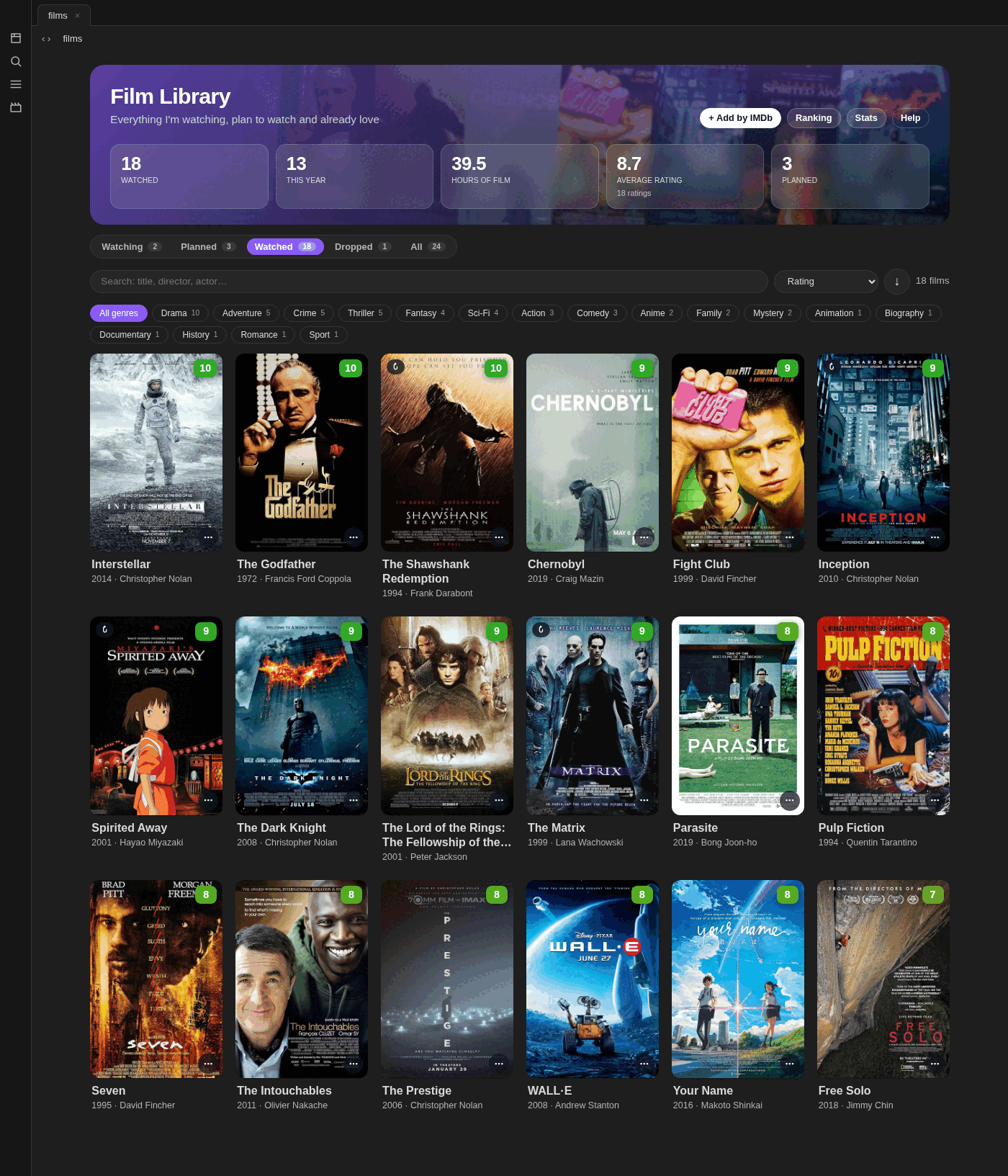
https://www.imdb.com/title/tt1375666/or justtt1375666. Data comes from IMDb, Wikidata, Wikipedia (and optionally OMDb). - Home: hero with stats, tabs (Watching / Planned / Watched / Dropped / All), search, genre chips, sorting, poster grid. Tab and filters are remembered.
- Rate on hover: hover a poster, click a number 1-10. Rating sets the status to "Watched" and fills the watch date.
- Ranking: ranked list of watched films with filters for genres ("any of" / "all of"), director, country, decade and format.
- Statistics: poster top, rating distribution, views per month and year, rankings of genres, directors, actors, countries and formats.
- Dark and light themes: colors come from Obsidian CSS variables and follow your theme.
- Mobile friendly: responsive layout; on touch screens the overlay opens with a "..." button.
- Non-destructive: the plugin only creates notes and fills empty fields; your ratings, statuses and dates are never touched.
📸 Screenshots
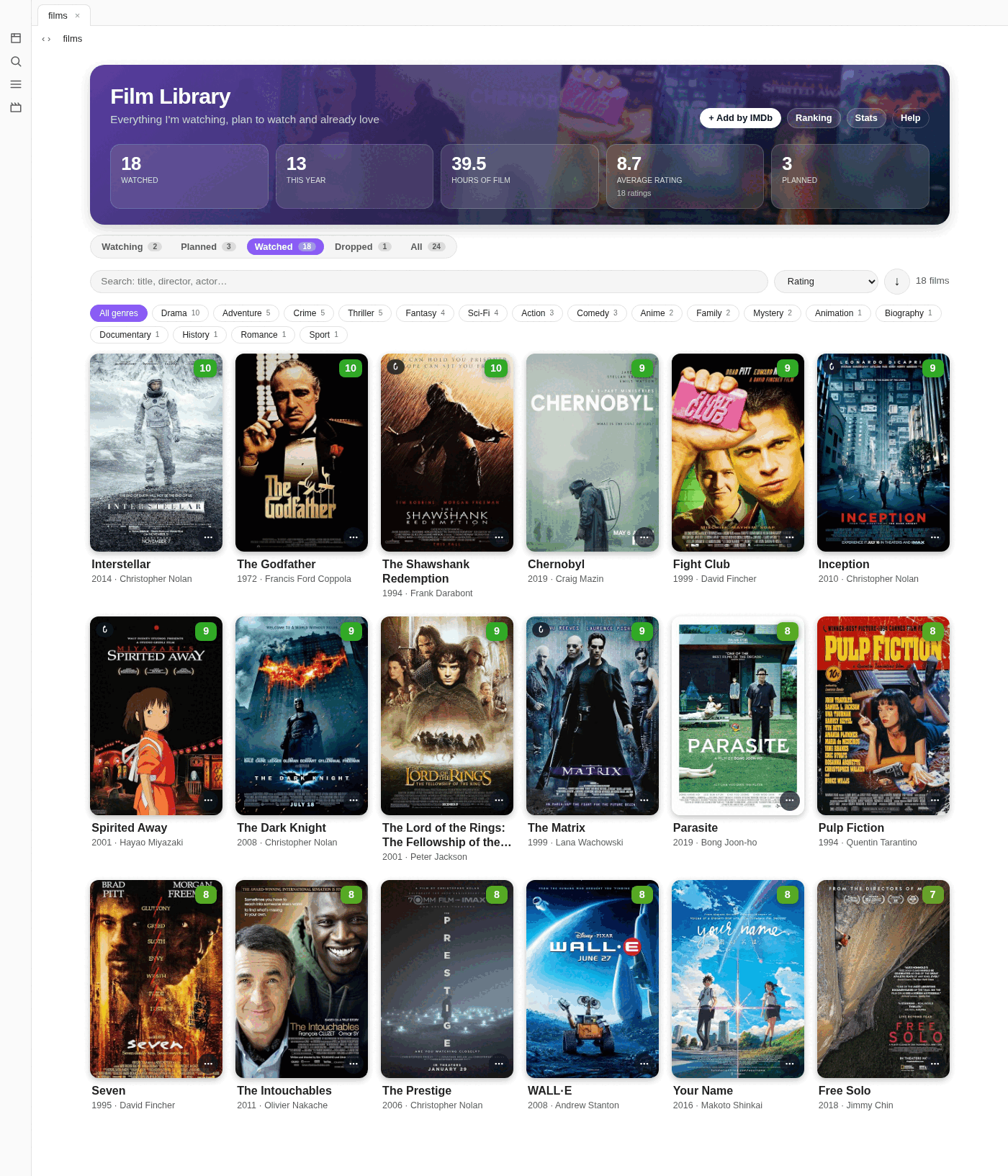 Home, light theme | 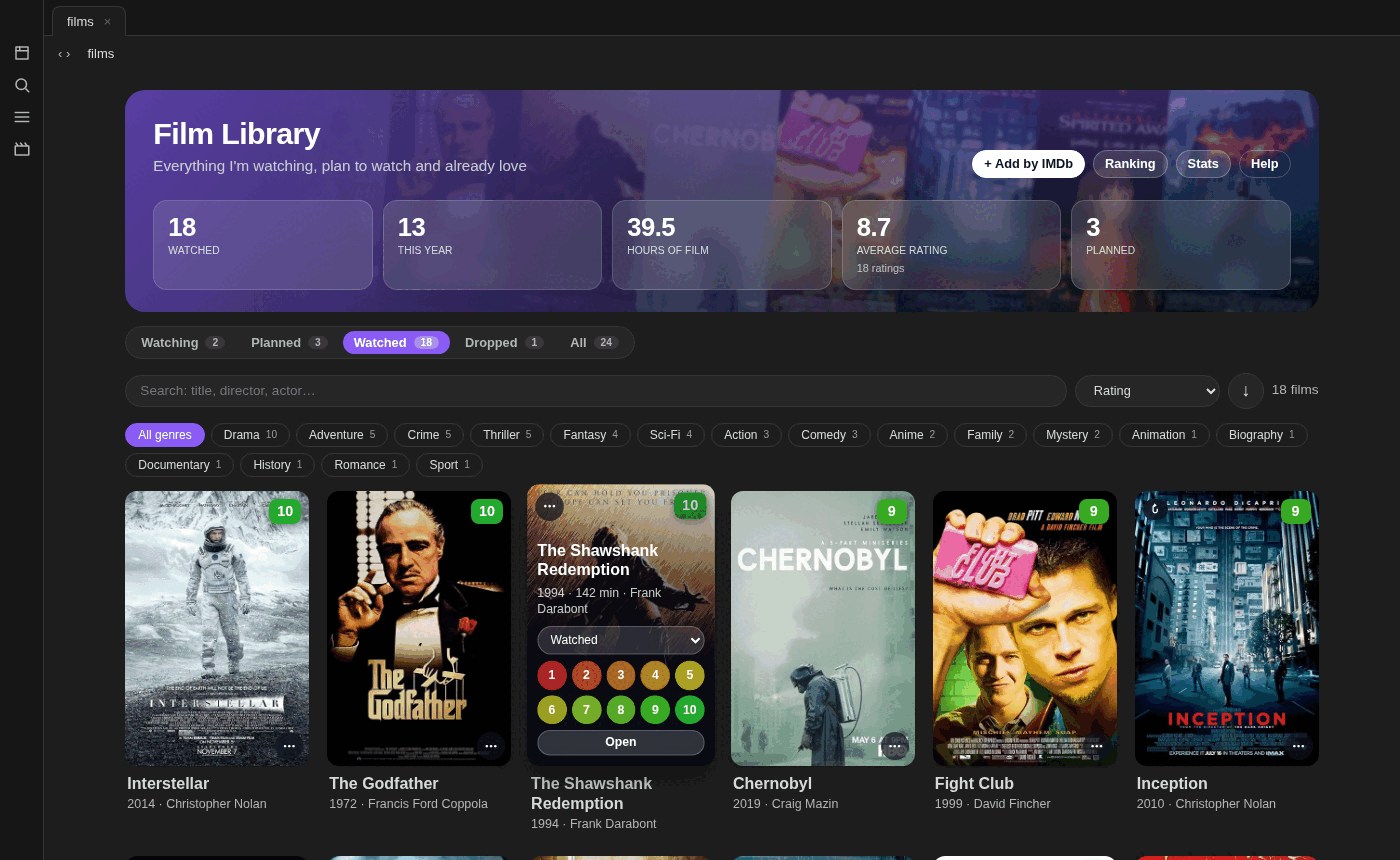 Rating and status in one click (poster hover) |
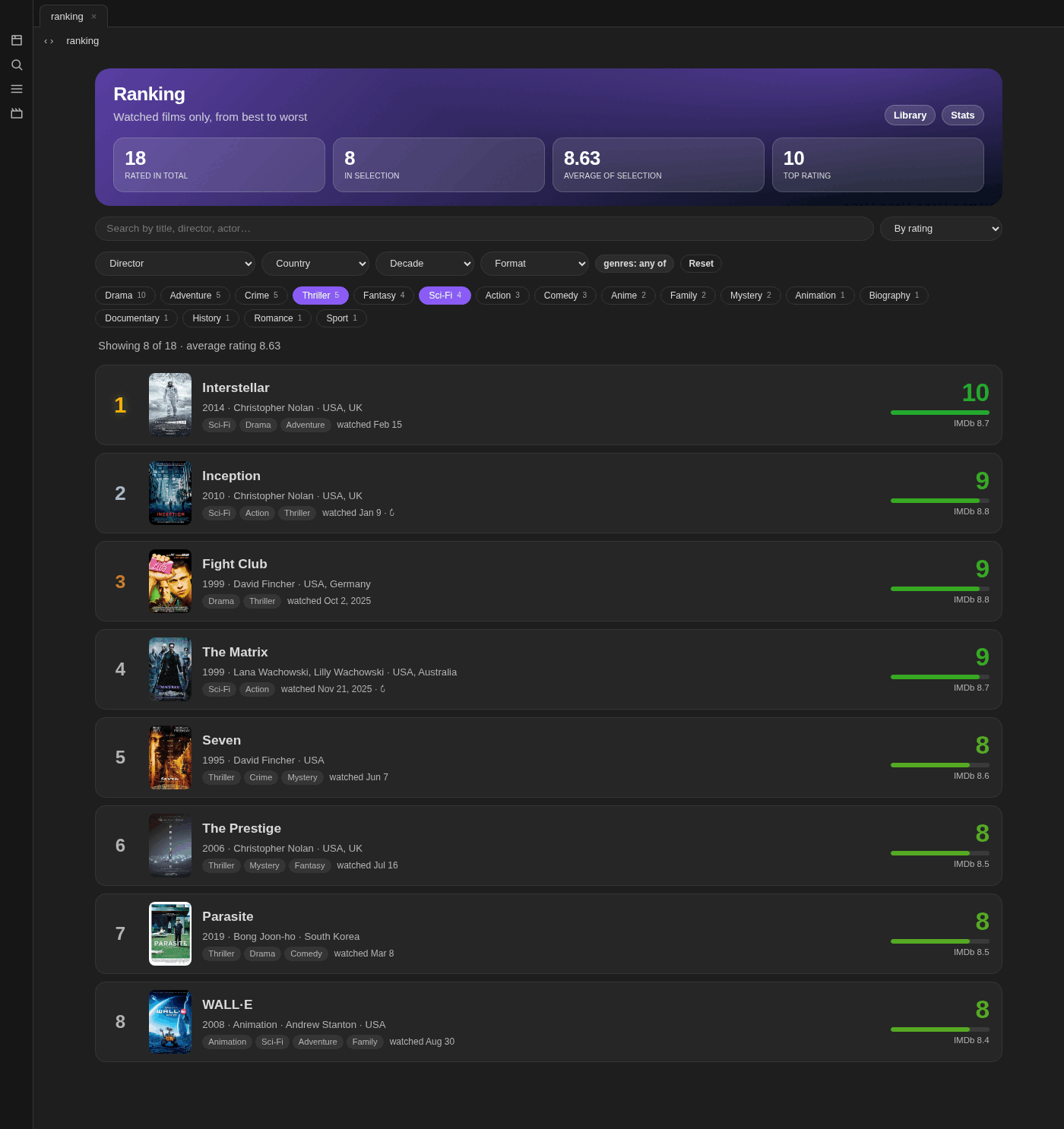 Ranking with "Thriller" and "Sci-Fi" genres selected | 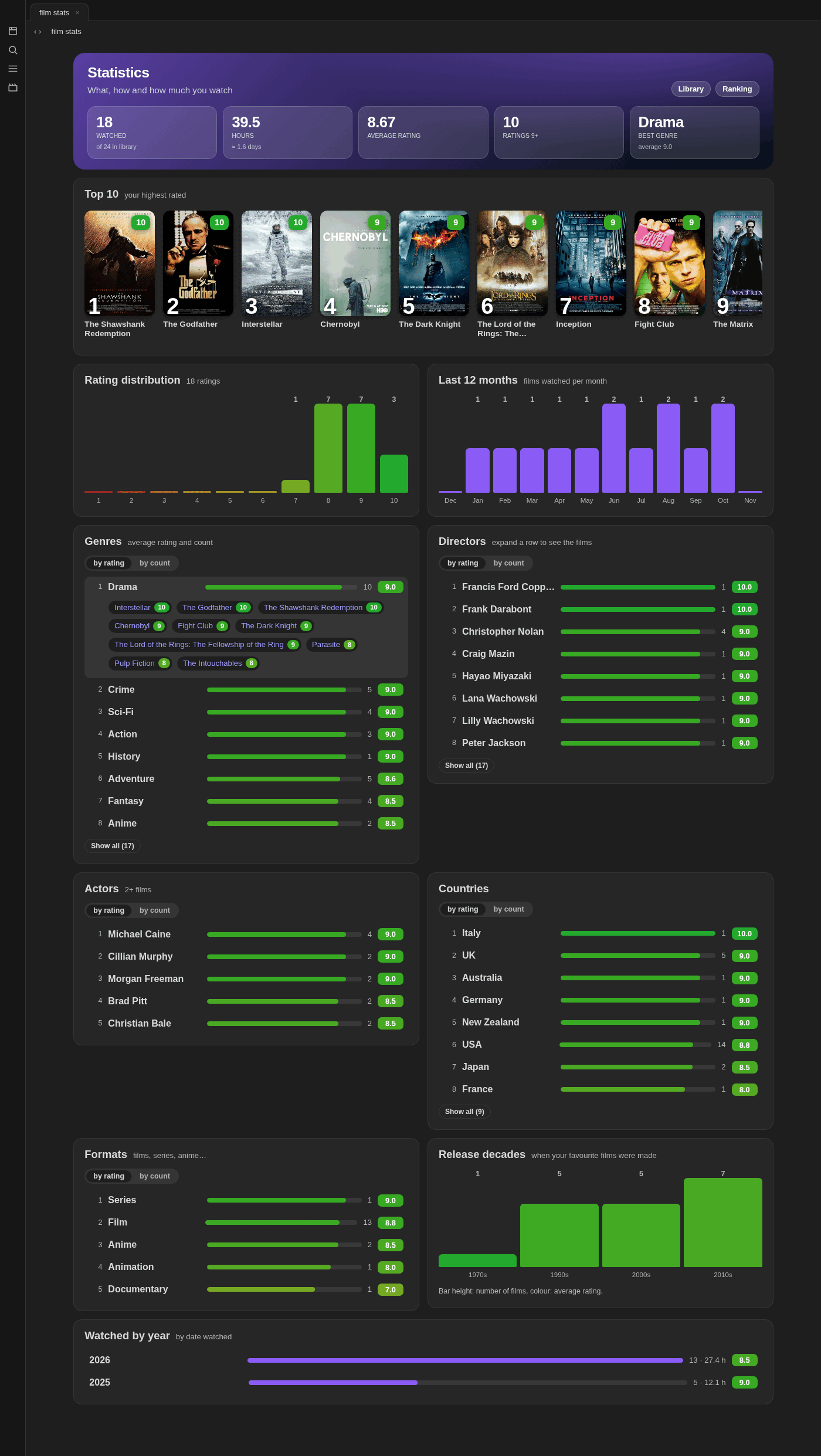 Statistics |
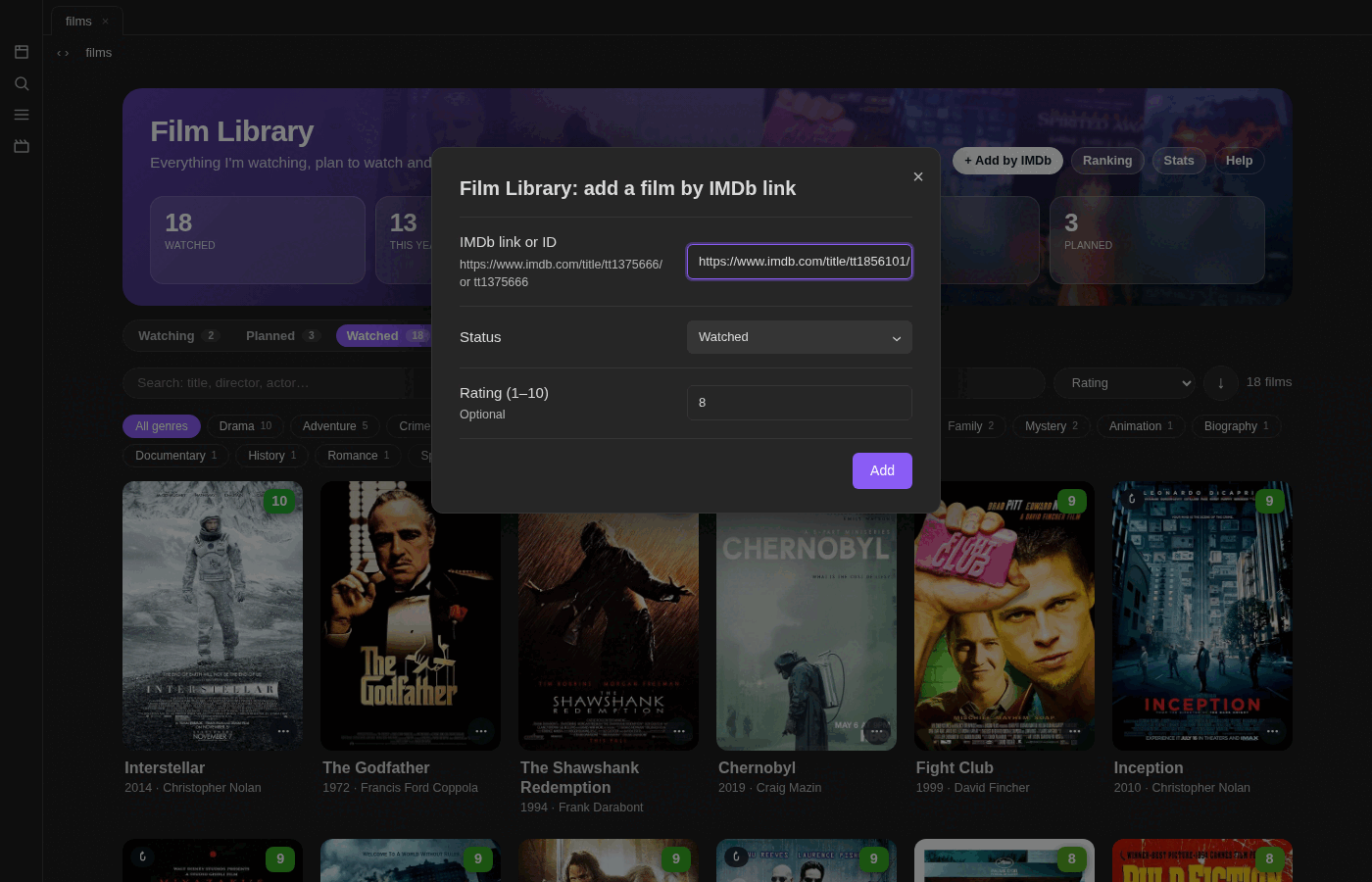 Add by IMDb link | 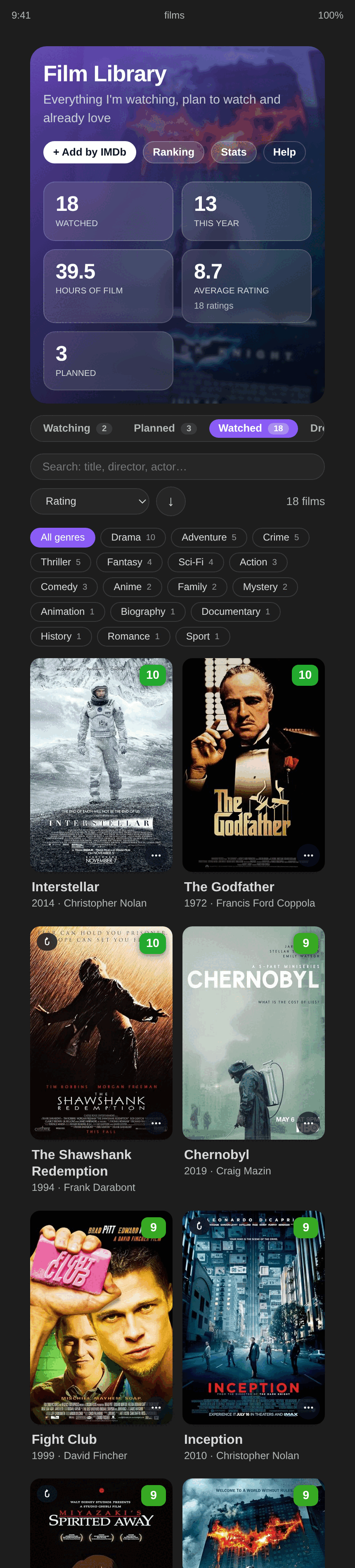 Mobile width |
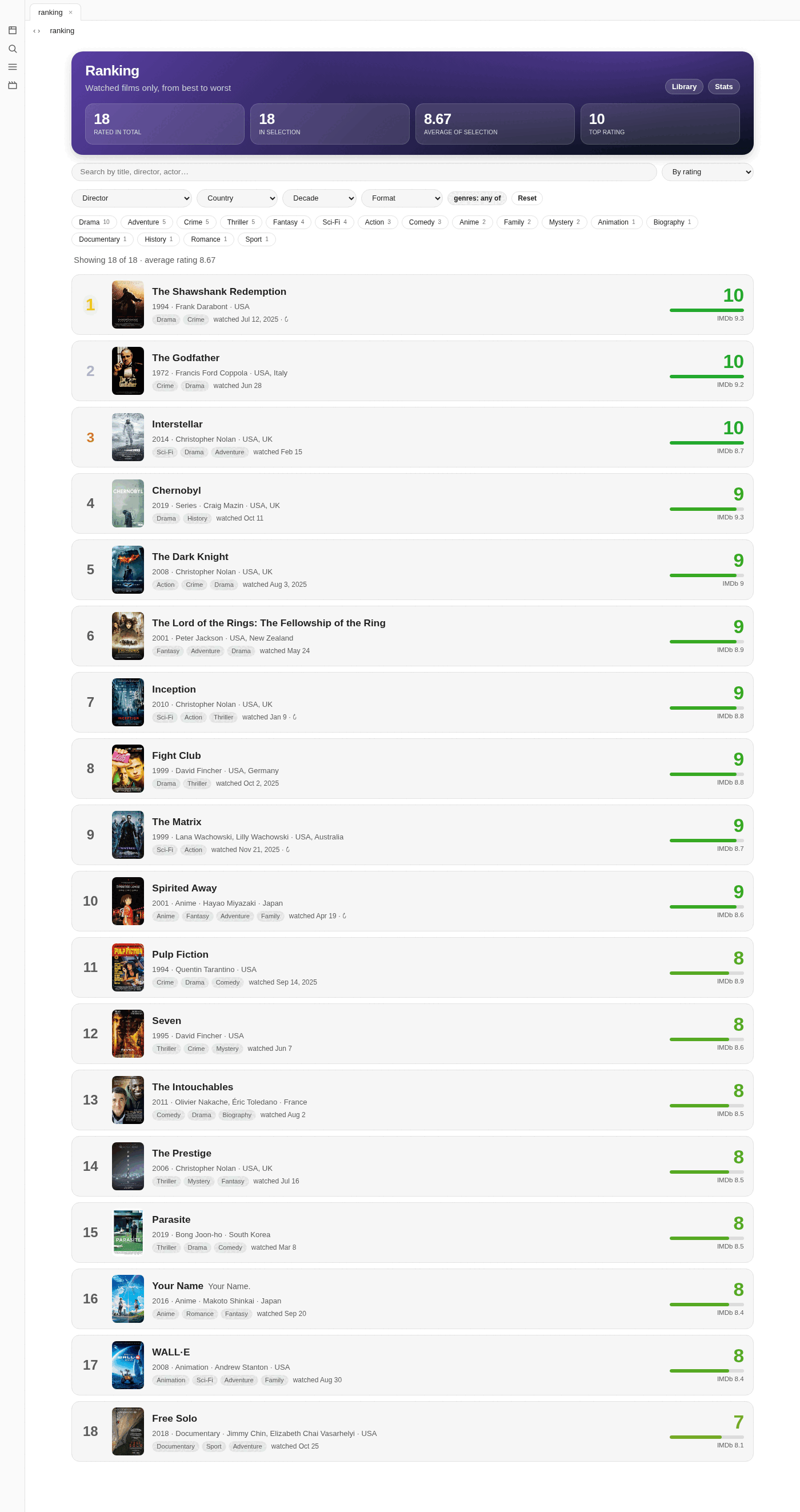 Ranking, light theme | 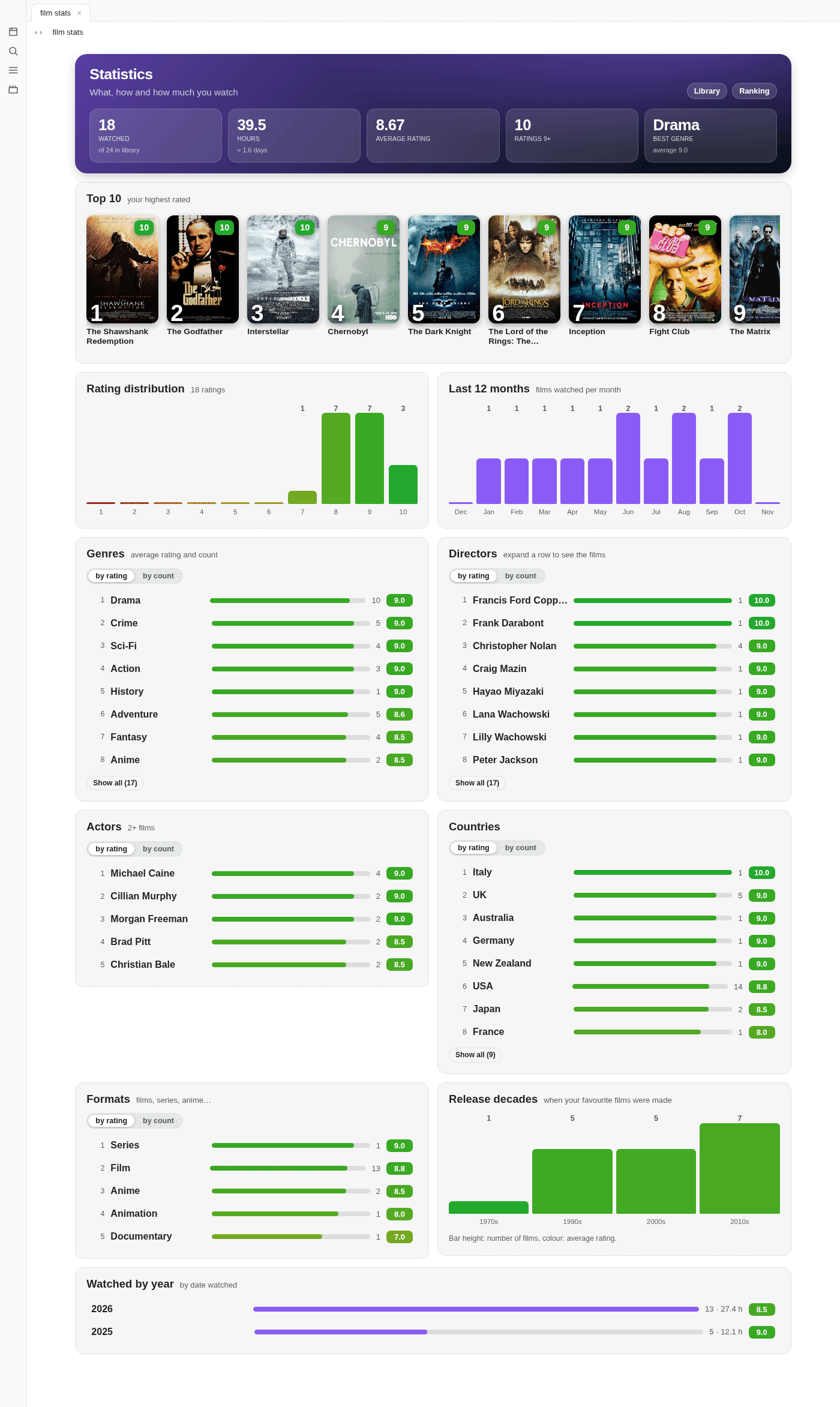 Statistics, light theme |
Screenshots use a demo set of 24 well-known films (folder
vault/films); ratings and watch dates are made up. Russian-language screenshots are in the Russian README. In the screenshots the ranking page file is namedranking.md(the repository ships it asрейтинг.md; the file can be renamed freely, see FAQ).
🚀 Quick start
Requirements
- Obsidian 1.4+ (desktop and mobile).
- Dataview with Enable JavaScript Queries turned on (Settings → Dataview). The screens are
dataviewjsblocks. - Restricted mode off (Settings → Community plugins).
1. Install the plugin
With BRAT: Add Beta plugin → kiozet/obsidian-film-library.
Manually: download main.js, manifest.json, styles.css into <vault>/.obsidian/plugins/film-library/. Restart Obsidian (or hit refresh in the plugin list) and enable Film Library.
The plugin adds films; styles.css carries the styling of all screens. No separate CSS snippet is needed.
2. Copy the library pages
Copy the contents of vault/ into your vault root:
vault/
├── films/                 # pages, scripts and demo films
│   ├── films.md           # home            (fl-view: home)
│   ├── рейтинг.md         # ranking         (fl-view: rating), may be renamed
│   ├── film stats.md      # statistics      (fl-view: stats)
│   ├── README.md          # in-vault help   (fl-view: help)
│   ├── scripts/           # lib.js, home.js, rating.js, stats.js
│   └── *.md               # 24 demo films with English keys (delete them once you add your own)
└── templates/
    ├── film.en.md         # note template, English keys
    └── film.md            # note template, Russian keys
You can rename or nest the films folder anywhere: pages load scripts relative to their own location (<page folder>/scripts/). If you move it, set the same folder in the plugin settings ("Films folder") so new notes are created next to the pages.
Open films.md in reading view (or Live Preview) and you are done. To remove the demo films, delete films/*.md except films.md, рейтинг.md, film stats.md and README.md.
➕ Adding a film
- Press + Add by IMDb on the home page, use the clapperboard ribbon icon, or run
Film Library: Add film by IMDb link. - Paste a link (
m.imdb.comand barett1375666work too) and pick a status; for "Watched" you can rate right away. - The note is created in the films folder, and the home page (
films.md) is opened, or focused if already open, on the tab matching the new film's status; search and genre filters are reset and the new card is briefly highlighted. If the film already exists, its note opens instead. To open the new film's note as before, enable the "Open the film note after adding" plugin setting; it is off by default.
Update current film from IMDb fills only empty fields of the open note (by its IMDb property). Rating, status and watch date are never changed.
Manually: Templates / Insert template → film.en (or film for Russian keys). The Type: "[[film]]" property is required.
🧾 Note properties
Each property has an English and a Russian name; either works and both can be mixed in one library (see Languages).
| English key | Russian key | Description |
|---|---|---|
Title, Original title, Year | Название, Оригинальное название, Год | title, original title, year |
Director, Country | Режиссёр, Страна | string, comma-separated for several values |
Genres, Cast, Tags | Жанры, Актёры, Теги | lists |
Runtime | Длительность | minutes |
Type | Тип | required "[[film]]": how pages find films |
Format | Формат | Film / Series / Animation / Documentary / Anime (Фильм / Сериал / Мультфильм / Документальный / Аниме) |
Poster | Постер | image URL (2:3); a gradient with the title is shown without it |
IMDb, Kinopoisk | IMDb, Кинопоиск | links |
IMDb rating | Рейтинг IMDb | number (filled with an OMDb key or by hand) |
Status | Статус | Want to watch / Watching / Watched / Dropped (Хочу посмотреть / Смотрю / Просмотрен / Брошен) |
Watched | Дата просмотра | YYYY-MM-DD |
Rating | Оценка | number 1-10 (8.5 allowed) |
Rewatch | Пересмотр | true / false |
Recommended by | Рекомендовал | who recommended it (optional) |
Added | Добавлен в базу | date added, YYYY-MM-DD or DD.MM.YYYY |
Note body: "Plot", "Why I want to watch it", "Thoughts", "Quotes" (Russian: "Сюжет", "Почему хочу посмотреть", "Впечатления", "Цитаты"). An empty status means "planned" (or "watched" if there is a rating).
A note counts as a film when its Type (or Тип) property links to a note named film, wherever the template lives. The template itself and templates/ folders are excluded.
Genres and countries are matched across languages (Drama and Драма are one genre), and statuses and formats in either language are understood. Aliases Directors, Genre, Countries, Duration and Actors are accepted too. When you rate a film or change its status on the home page, the plugin writes back using that note's own keys and status wording, so an English note stays English.
🏆 How rating and filters work
- Rating sets the status to "Watched" and the watch date (if empty). Clicking the same rating again clears it.
- Ranking order: by rating; ties are broken by higher IMDb rating, then by later watch date. You can also sort by watch date or year.
- Genre chips on the ranking page have two modes, "any of" and "all of" (toggle next to the chips). Director, country, decade, format and search combine with genres.
- Home remembers tab, sorting, search and genres between sessions.
🌐 Languages
- Setting: Settings → Film Library → Language / Язык: Auto (follows the Obsidian interface language: Russian gives Russian, anything else gives English), English or Русский. It switches the library pages (labels, dates such as
Feb 15, numbers such as8.7vs8,7, plurals), the dialogs and notices, and the notes the plugin creates. Pages pick the change up the next time they are opened; command names update after restarting Obsidian. - New notes: in English mode the plugin writes English keys and values (
Status: Want to watch,Genres: Drama, ...) and asks Wikidata and Wikipedia for English labels and summaries; in Russian mode it writes the original Russian schema with Russian labels. Templates:vault/templates/film.en.mdandvault/templates/film.md. - Mixed libraries: notes in both languages can live together. Genres, countries, statuses and formats are normalized when read, and shown in the language you picked (
Драмаappears asDramain English mode). Titles, names and your own text are shown as written. - Adding another language means adding one block to the
I18Ndictionary inscripts/lib.js(andTRinmain.js).
🎨 Customization
- Statistics thresholds and list sizes: the
CFGconstant at the top ofvault/films/scripts/stats.js. - Colors and sizes: all styling is in
styles.css, classes prefixedfl-. The accent comes from--interactive-accent, so it follows your theme. Card variables (--fl-r,--fl-card,--fl-gold, ...) are declared on.fl-root. - Rating color (red to green) is computed by
ratingColorinscripts/lib.js. - Service pages use the
fl-pageclass (cssclassesin frontmatter): it widens the page and hides the properties block. They are identified by anfl-viewproperty (home,rating,stats,help).
🌐 Data sources and limitations
| Source | Provides |
|---|---|
| IMDb suggestion API | title, year, poster, top cast |
| Wikidata (SPARQL) | title, genres, directors, countries, runtime, Kinopoisk link, cast, in the chosen language (English or Russian) |
| Wikipedia (English or Russian, by language) | short description for the plot section |
| OMDb (optional) | IMDb rating, full plot, fallback data; needs a free key in plugin settings |
Limitations:
- Public, unofficial endpoints are used; when they are down (HTTP 5xx) some fields stay empty and the plugin warns you. Retry, or fill the note later with the update command.
- Genres are mapped to a short list (English or Russian); rare subgenres are dropped. If Wikidata does not know a film, there is no localized title or genres; the IMDb title is used.
- Posters are loaded from IMDb/Amazon servers, so you need internet. Any URL can be set by hand.
- IMDb rating is filled only with an OMDb key or by hand.
- Kinopoisk is a link only, no data.
❓ FAQ
The page is empty or shows code. Enable Dataview → Enable JavaScript Queries and open the note in reading view.
I renamed the films folder. Fine: pages load scripts from their own folder. Just update the folder in plugin settings.
Scripts are not found. scripts/ must sit next to the home, ranking and statistics pages.
Can I rename рейтинг.md (or the other pages)? Yes, to anything, e.g. ranking.md. The pages find each other through the fl-view property in their frontmatter (home, rating, stats, help), so keep that line. Without it the old default names (films, рейтинг, film stats, README) are used.
A film does not show on the home page. Check that the frontmatter has Type: "[[film]]" (or Тип: "[[film]]").
Does it work on mobile? Yes; on touch screens the rating panel opens with the "..." button. Adding by IMDb works in mobile Obsidian too.
Without Dataview? No: the screens are built on dataviewjs. The plugin itself (adding films) works without it.
📄 License
MIT © 2026 kiozet. Film titles, posters and data belong to their owners and sources (IMDb, Wikidata, Wikipedia); this project is not affiliated with them.
For plugin developers
Search results and similarity scores are powered by semantic analysis of your plugin's README. If your plugin isn't appearing for searches you'd expect, try updating your README to clearly describe your plugin's purpose, features, and use cases.