Tahoe Run
unlistedby Krishnan Adaikkappan
Run code in your notes like a Jupyter notebook: Python with a debugger and variables view, plus MATLAB, R, Julia, JavaScript, C/C++, Swift, Rust, Go and more. Plots, Jupyter export, and Python on iPhone and iPad (beta).
Tahoe Run
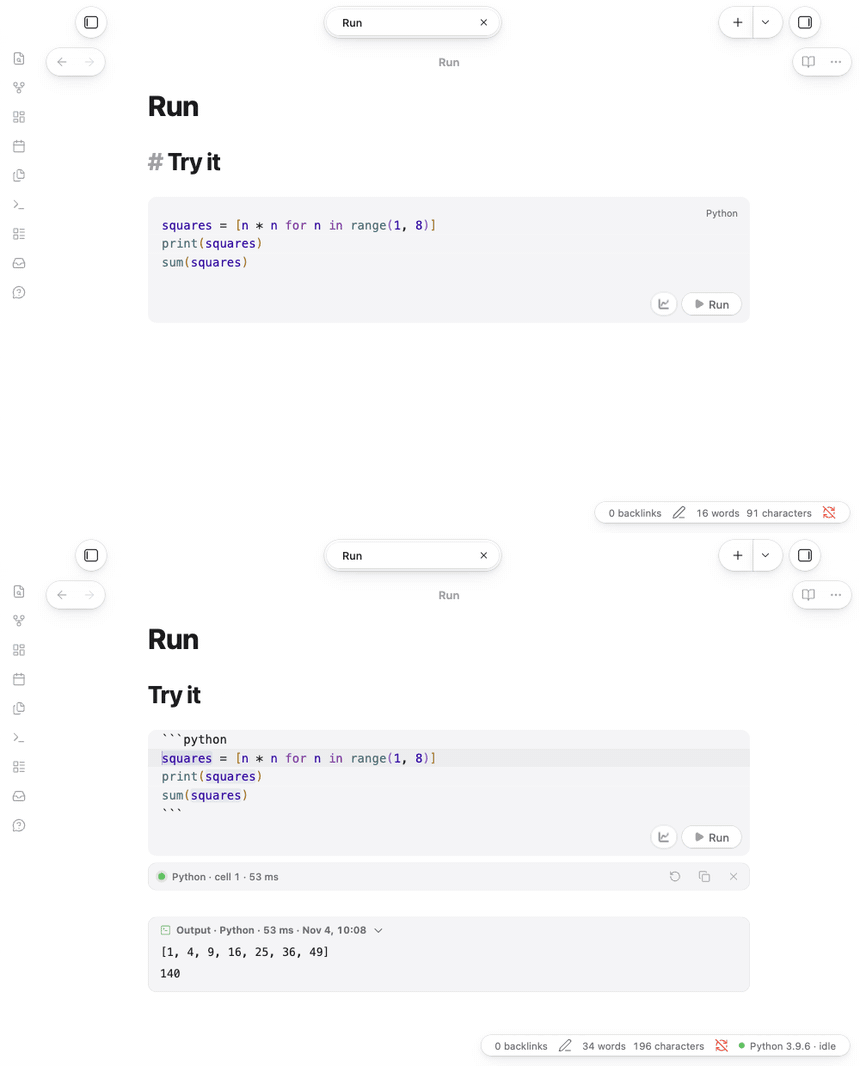
Run the code in your notes, like a notebook. Python gets a live kernel with a real debugger and a variables view, MATLAB runs in a session of your own MATLAB, and C, C++, Swift, JavaScript and twenty-odd other languages run with the tools you have installed. The output, plots included, appears right under the block. Python also runs on iPhone and iPad (beta).
Install: in Obsidian, open Settings → Community plugins → Browse, search for “Tahoe Run”, then Install and Enable. (Directory page)
| Platform | Status | Tested on | Known limits |
|---|---|---|---|
| macOS | Supported | macOS 27, Obsidian 1.13 or later | None known |
| iPhone and iPad | Beta, Python only | Obsidian's mobile mode on a Mac, not yet a real device | A running block can't be stopped; no debugger, input() or pip |
| Windows | Python tested; the rest untested | Windows 11 with WSL 2 (Ubuntu): Python kernels in WSL and with Windows' own Python | Stop restarts a kernel running Windows' own Python (one in WSL stops like on a Mac); MATLAB has to be on your PATH or set in settings |
| Linux | Untested | Not yet | Written to work; MATLAB has to be on your PATH or set in settings |
- Click where a line's number is for a breakpoint, run, and step through the loop while the variables update.
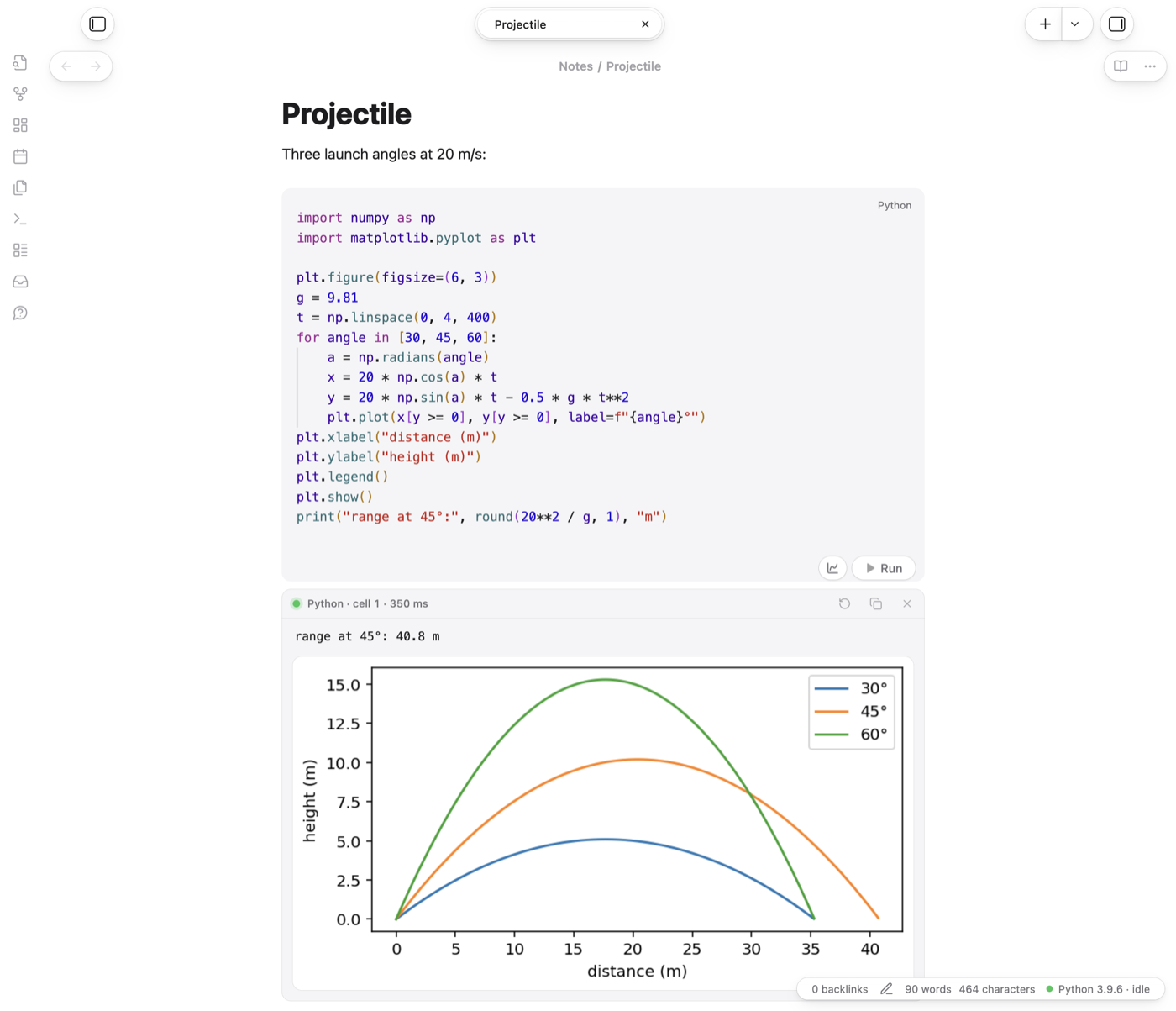
plt.show()puts the plot under the block;FuncAnimationbecomes a looping GIF.- No module named 'cv2'? The output offers to install it into the note's Python and runs the block again.
Highlights
- A Python notebook in your notes. Blocks in a note share one Python session, so variables, imports and functions carry over, and a bare expression on the last line shows its value.
- A real debugger. Click where a line's number is (or press ⌘\ / Ctrl+\) for a breakpoint, run, and step over, into and out of your code from the output card.
- A variables view, like MATLAB's Workspace, with sheets for lists, arrays, DataFrames, dicts and MATLAB matrices, structs and tables.
- MATLAB with your own MATLAB and its licence: one session per note, figures under the block, and
drawnowloops as animations. - Plots and animations under the block: Matplotlib figures,
FuncAnimationas looping GIFs, and progress bars that update in place. - Rich output, like Jupyter. A DataFrame as a block's last line, or
display(df), is a table; a Plotly figure (fig.show()) is an interactive chart, offline; and anything with an HTML, Markdown or LaTeX form shows that way: SymPy expressions as maths,df.styleas styled HTML, IPython'sHTML,MarkdownandMath. It all appears in order among the printed lines. - Input.
input(),getpass()andsys.stdinin Python ask in a field under the block, and C, Java, Go and the other languages' programs read what you type there too. - Values in the text. Write
`$total`anywhere in a note and it shows whattotalholds in the note's Python, updated after each run: "The mean is`$mean`." Attributes and indexes work too (`$df.shape`,`$scores['test']`); nothing is called. - Packages: when a block fails with No module named 'cv2', the output offers to install
opencv-pythoninto the note's Python, then runs the block again. - Jupyter: export a note as a
.ipynbnotebook (with its outputs and plots), a.pyscript with# %%cells or a.mscript with%%sections, and import notebooks and scripts as notes. - Explain this error: a model explains a failed block and suggests a fix you can apply.
Languages
Python, MATLAB, GNU Octave, JavaScript, TypeScript (through npx tsx), Swift, C, C++, Objective-C, Java, Kotlin, C#, Go, Rust, Ruby, PHP, Perl, Lua, R, Julia, Haskell, Bash, Zsh, AppleScript and SQLite. Any of them whose tools are installed works; the settings show which were found, and each language's command can be changed. The PATH comes from your login shell, so Homebrew tools are found. Compiled languages are built first.
If you try it on Windows, Linux or a real iPhone or iPad, I'd like to hear how it went: open a discussion.
Using it
- Run: the ▶ Run capsule on a block, or Run code block at cursor, Run all code blocks in note and Stop all running code from the command palette. Assign hotkeys in Settings → Hotkeys.
- Run all runs the note's blocks top to bottom and stops at the first one that fails, like a notebook. A block whose first line is
#| eval: false(or%| eval: falsein MATLAB) is skipped. - ⇧Enter runs a block and moves to the next one, or starts a new block below the last, as in Jupyter.
- Saved output: each run's output (and its plots, as image attachments) is written into the note in an Output callout under the block, so it's still there next time. Running again replaces it; clearing it moves its images to the trash. You can turn this off.
- Errors link to their lines. Click line 3 or main.cpp:3:14 in an error to jump to that line of the block.
- Hover a name in a Python or MATLAB block to see its value in the running session (in the debugger, the paused function's).
Python
- Kernel: one live Python per note, with restart and interrupt commands. Idle kernels stop after 30 minutes (adjustable).
- Choose Python for this note… lists the Pythons on your computer (virtual environments near the note and in
~/.virtualenvs, conda, pyenv, Homebrew, python.org, and on Windows the ones in WSL) and can make a new virtual environment. To use a venv that isn't listed, paste its folder or its Python into the picker. The choice is kept for this computer only, so a synced vault can use a different Python for the same note on each computer. A note'spython:property still works, as the choice on computers where that Python exists and nothing else was chosen. - Python on this computer (in the settings) sets the Python that notes use when they have none of their own, kept per computer like the choices above.
- Debugger: only blocks with breakpoints are traced, so code runs at full speed until it reaches one. Step into goes into functions defined in earlier blocks; library code is stepped over. While paused, the variables view and hover values show the paused function's variables. Keys: F6 over, F7 into, F8 out, ⌃⌘Y continue.
Windows and WSL
On Windows, Python can run in Windows or in WSL, the Linux alongside it, so the virtual environments you made in WSL work, as in VS Code's WSL mode.
- A Python whose path starts with
/(/home/you/envs/main/bin/python,/mnt/c/Users/you/project/env/bin/python,/usr/bin/python3) or\\wsl.localhost\…runs in WSL. So does a command written aswsl:python3. - Run Python in WSL (Settings → Tahoe Run → Python on this computer) makes a plain command like
python3WSL's too, and you can choose the WSL distribution there. - Choose Python for this note… lists WSL's Pythons (
/usr/bin/python3, venvs in WSL's home folder, conda and pyenv) alongside Windows' own. A venv made in WSL inside a Windows folder (C:\…\project\env, with abinfolder) can be pasted by its Windows path. - In WSL the debugger, input(), plots, rich output and Stop work as on a Mac, and pip installs go into the WSL Python. With Windows' own Python, Stop restarts the kernel instead (Windows has no Ctrl-C to send it).
MATLAB
Write ```matlab blocks and press Run. On a Mac, Tahoe Run finds the newest MATLAB in Applications; elsewhere it uses matlab from your PATH. The first block waits about 10 seconds while MATLAB starts; after that, blocks run in milliseconds and share their variables. At most two notes keep a session at once, since each MATLAB uses about a gigabyte. Turn off MATLAB session per note to run each block with matlab -batch instead. ```octave blocks run with GNU Octave if it's installed.
Python on iPhone and iPad (beta)
Python blocks also run on iPhone and iPad, with Pyodide (Python 3.14 built for the web), inside Obsidian and offline. Download it once in Settings → Tahoe Run → Python on iPhone and iPad (about 13.5 MB); it goes into the plugin's folder, so a synced vault brings it to your other devices. numpy, matplotlib and the other packages built for Pyodide download the first time a block imports them, and stay. Each note keeps its own variables, plots show under the block, and hover values and the variables view work. On a phone or tablet there's no debugger, input() or pip, and a running block can't be stopped until it ends.
This part is in beta: it has been tested in Obsidian's mobile mode on a Mac, not yet on a real iPhone or iPad. Use it on this computer too runs a note exactly as a phone would.
Explain this error
When a block fails, its output gets an Explain button: a model reads the code and the error, explains what went wrong and suggests a fix, with Apply fix. Choose the model in the settings, or leave it on Automatic, which tries them in this order:
- Apple Intelligence, on a Mac with macOS 26 or later and Apple Intelligence on: free and on-device. A small helper is built with Xcode's command line tools the first time, so those need to be installed.
- Ollama: free and local, if Ollama is running with a model.
- Claude, through Anthropic's API, if you've added an API key (stored in Obsidian's secure storage, not in the vault). Pay-as-you-go, usually well under a cent per answer.
- Copy prompt: copies a ready-made prompt for any chat app.
Complexity checker
Check complexity of code block at cursor times a Python function (or a whole program that reads its input) on growing inputs and reports O(1) to O(2ⁿ) with a log-log chart.
Coming from Execute Code
Execute Code and Tahoe Run do the same core job: a Run button on fenced code blocks, which runs the code with the tools installed on your computer and shows the output under the block. Both read plain ```python, ```js and similar blocks, so most notes work in either.
The same: a Run button on each block, Run all for a note, Python blocks sharing one session per note, plots under the block, an input field for programs that ask for it, output you can save into the note, and a changeable command or path for each language.
What Execute Code does that Tahoe Run doesn't:
- Languages Tahoe Run doesn't run, such as Dart, Groovy, Lean, Maxima, OCaml, Prolog, Racket, Scala, Zig, Wolfram Mathematica, LaTeX, PowerShell and Batch.
- Notebook Mode for JavaScript as well as Python.
- Magic commands (
@vault_path,@note_path,@show(...),@html(...)), global code injection per language,{pre}/{post}blocks and labelled blocks you canimport. ```run-python-style blocks.
What Tahoe Run adds: a Python debugger and variables view, MATLAB sessions, Python on iPhone and iPad (beta), Jupyter import and export, and installing a missing package from the error.
Switching: existing blocks run as they are. Arguments such as {label='x'} are ignored, ```run-python blocks need the run- removed, and Execute Code's saved output isn't read by Tahoe Run. Turn Execute Code off while you try Tahoe Run, so each block has one Run button.
Disclosures
- It runs programs on your computer: your Python, MATLAB, compilers and other language tools, with your user account's permissions, when you run a block. Only run code you trust. A Python kernel or MATLAB session keeps running for a note until it's idle for 30 minutes, you restart it or Obsidian quits.
- Network use, only when you ask for it:
- Python on iPhone and iPad: Pyodide is downloaded from cdn.jsdelivr.net when you press Download in the settings, and its packages from the same place when a block first imports them. Pyodide's own files are checked against SHA-256s pinned in the plugin, and each package against the SHA-256 in Pyodide's package list, before they're kept.
- Installing a missing package runs
pip, which downloads from PyPI, after you confirm. - Explain with Claude sends the failing block's code and output to Anthropic's API (api.anthropic.com) with your API key. Apple Intelligence runs on your Mac, and Ollama on your own computer (localhost), so with those your code doesn't leave it.
- Files outside your vault: runs use temporary folders in your system's temp folder. Choose Python… → New environment creates it in
~/.virtualenvs(in WSL's home folder for a WSL Python). On Windows, finding Pythons runs a short script in WSL that lists them. Python settings are kept under this computer's name (its hostname) in the plugin's settings, so each computer that opens a synced vault has its own. The Apple Intelligence helper is kept in~/Library/Caches/tahoe-run. To list your Pythons, it looks in the usual places they're installed. - Clipboard: it writes to the clipboard only when you press a Copy button (an output, a sheet as Markdown or CSV, or a prompt for a chat app). It never reads the clipboard.
- Rich output (HTML and Plotly charts from your code) is shown in sandboxed frames: they can't reach your vault, Obsidian or the network. Plotly's own script comes from the plotly package installed in your Python.
- No telemetry, ads or accounts. Claude needs your own Anthropic API key, only if you choose it.
The Tahoe family
Tahoe is a set of plugins and a theme that work on their own and fit together.
| Tahoe Run | Run the code in your notes, like a notebook: Python with a debugger and variables view, MATLAB, and ~25 other languages. | this one |
| Tahoe Math | A calculator in your notes: type an expression ending in = and the answer appears. | available |
| Tahoe | A clean, Mac-like theme, in light and dark. | available |
| Tahoe Code | An IDE in your code blocks: suggestions, checking as you type, quick fixes, go to definition, formatting and AI edits. | available |
| Tahoe Glass | Real refraction for the Tahoe theme's glass, and header cards on settings pages. | available |
| Tahoe Organize | Keep a growing vault tidy: inbox triage, smart folders, colored tags, link suggestions, vault health, literature notes and text from images. | available |
| Tahoe Intelligence | On-device AI for your notes: ask your notes, related notes, distilling permanent notes and more. | available |
Better together
- With Tahoe Code: Python and MATLAB blocks get suggestions from the running session (a data frame's real columns, a struct's fields), and ⌘I on an equation writes it as a function that Tahoe Run then runs and checks.
- With Tahoe Math: quick sums stay in the prose around your code, with no block needed.
- With Tahoe: Tahoe Run uses Obsidian's own colours and controls, so its capsules and output cards look native in Tahoe (or any theme).
- With Tahoe Glass: the ▶ Run capsules get the theme's glass, with real refraction.
Feedback
Questions are welcome in Discussions, and bugs and ideas in Issues. If Tahoe Run is useful to you, a star helps others find it.
Credits
Contributors:
- Stanley Hoo: Python in WSL on Windows, Python settings kept per computer, and kernels that say why they didn't start (#1).
Third-party code included in Tahoe Run, with its licences, is listed in THIRD_PARTY_NOTICES.md.
Tahoe Run is an independent project. It isn't affiliated with, or endorsed by, Apple, MathWorks, Jupyter or Anthropic.
License
MIT © 2026 Krishnan Adaikkappan
Building from source
npm ci
npm run build     # writes main.js
Releases are built by GitHub Actions: push a tag that matches the version in manifest.json, then publish the draft release it creates.
For plugin developers
Search results and similarity scores are powered by semantic analysis of your plugin's README. If your plugin isn't appearing for searches you'd expect, try updating your README to clearly describe your plugin's purpose, features, and use cases.