MakesPDF
unlistedby Jason Galea
Export notes to accessible, archival-quality PDFs (PDF/A-2A and PDF/UA-1) using the makespdf.com API.
MakesPDF
Export an Obsidian note to a typeset, accessible PDF using the makespdf.com API.
Obsidian's built-in export prints the rendered view. This plugin sends the note's markdown to a layout service that produces a tagged PDF: real heading structure, alt text on figures, table headers, and reading order. Output is PDF/A-2A + PDF/UA-1 compliant, which is what accessibility and archival requirements generally ask for.
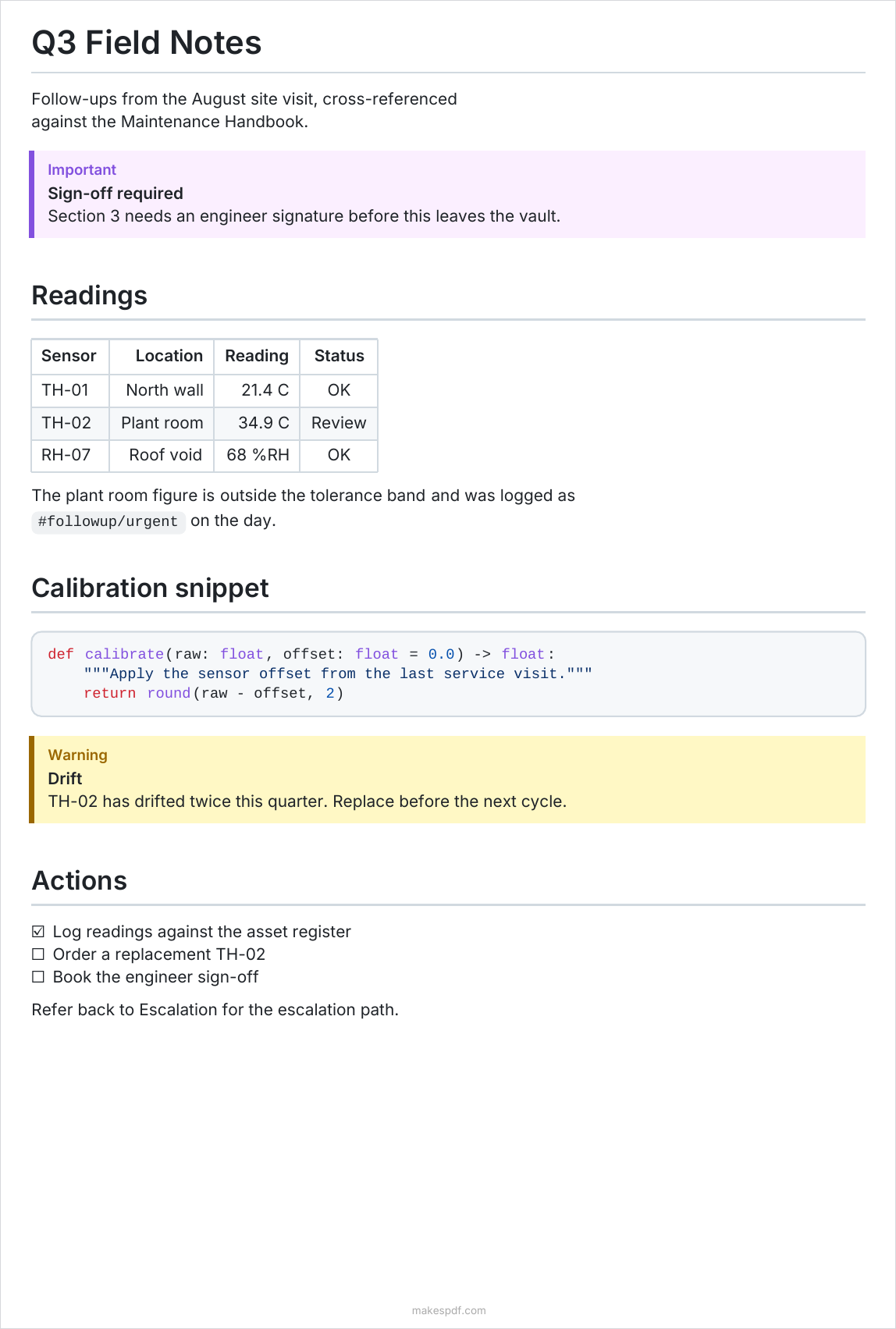
A note containing callouts, wikilinks, a table, a code block, and task items, exported with the default settings.
Network use and privacy
This plugin sends note content to a remote server. It cannot work offline.
- When you run an export, the note's markdown is POSTed to
https://makespdf.com/api/v1/mdand the resulting PDF is written back into your vault. The request identifies the plugin and its version in theX-MakesPDF-Clientheader. - Embedded local images are read from your vault and inlined into that same
request. Embedded notes (
![[note]]) are inlined too, so their contents are sent as well. - Feedback is sent only when you send it. Send feedback (command and
settings button) and the Report problem link on an export error POST to
https://makespdf.com/api/v1/feedback(on your configured API URL). A feedback request contains the message you type, the kind you picked (problem, idea or praise), the plugin name and version, and your API key if one is set, so the feedback is linked to your account. Without a key, or if the server rejects it, feedback is sent anonymously. Report problem also sends a few facts about the failed export: the HTTP status, the server's error code if it returned one, your page size setting, and the size in bytes of the export request (the note plus any embedded notes and inlined images). Feedback never includes the note's text, its path, or your vault name. The service stores your message with a daily-salted hash of your IP address and your country code, and keeps it until the makesPDF team deletes it. Your IP address is also used, unhashed, for rate limiting. Please don't paste note content into the message. - Nothing else is transmitted. No analytics or telemetry are collected by the plugin.
- The endpoint you talk to is configurable. Point API URL at your own deployment if you do not want to use the hosted service.
- Uploaded source and rendered output are retained by the service for 7 days so you can re-download them, then deleted. See the makespdf.com privacy policy.
Account and cost
No account is required. Without an API key the plugin uses a free anonymous path, which is rate limited by IP (60/hour, 200/day) and capped at 20 pages per export.
Adding an API key from a makespdf.com account raises those limits and removes the page cap. Exports made with a key draw on that account's render credits (1 credit per 10 pages), less any free page allowance currently in effect.
Usage
- Command palette: "Export current note to PDF"
- Ribbon icon: the PDF export button in the left sidebar
The PDF is written into your vault, next to the note, or into the folder set in Output folder. Re-exporting overwrites the previous file.
Output paths are relative to the vault root. PDFs are created through Obsidian's
vault API, so they cannot be written outside the vault: a path like
~/Downloads is not expanded and is rejected rather than creating a folder
named ~ in your vault.
What gets converted
Obsidian-specific syntax is translated to GitHub Flavored Markdown before export:
| Obsidian | Becomes |
|---|---|
[[Page]], [[Page|Alias]] | plain text (Page, Alias) |
![[note]], ![[note#Heading]] | the referenced content, inlined (max 3 levels deep) |
![[image.png|400]] | a sized image |
==highlight== | <mark> (the API does not yet paint a highlight, so the text renders plain) |
%%comment%% | removed |
#tag, #nested/tag | inline code |
> [!tip], > [!danger] and other callouts | the closest GFM alert |
trailing ^block-id | removed |
Code blocks are syntax highlighted, tables keep their alignment, and footnotes, task lists, and Mermaid diagrams render natively.
Settings
| Setting | Default | Description |
|---|---|---|
| API key | empty | Optional. Raises rate limits and removes the 20-page cap. |
| API URL | https://makespdf.com | Point at your own deployment if self-hosting. |
| Page size | A4 | A3, A4, A5, Letter, or Legal |
| Font family | Inter | Inter or Noto Sans |
| Font size | 10 | Points, 6 to 24 |
| Output folder | empty | A folder inside your vault. Empty saves the PDF alongside the note. |
| Send feedback | - | Opens the feedback form. See Network use and privacy for what it sends. |
Development
npm install
npm run dev        # watch build with inline sourcemaps
npm run build      # production build
npm run typecheck
npm test
To test against a local API service, run the makesPDF app and set API URL to
http://localhost:8788.
To load the plugin into a vault, symlink the repo into the vault's plugin folder and enable it under Settings, Community plugins:
ln -s /path/to/makespdf-obsidian-plugin \
  /path/to/your-vault/.obsidian/plugins/makespdf
License
MIT. See LICENSE.
For plugin developers
Search results and similarity scores are powered by semantic analysis of your plugin's README. If your plugin isn't appearing for searches you'd expect, try updating your README to clearly describe your plugin's purpose, features, and use cases.