Lovpen
unlistedby Mark Shawn
All-in-one content distribution platform for Obsidian. Publish content to WeChat, Zhihu, XiaoHongShu, Twitter and more, with perfect format preservation and rich customization options.

 Lovpen
Format once, publish everywhere
WeChat · Zhihu · XiaoHongShu · Twitter · arXiv



Lovpen transforms Markdown into professionally formatted content across Web, Desktop, Obsidian, and agent workflows.
Products
| Product | Entry |
|---|---|
| Web | pen.lovstudio.ai |
| Mable | mable.lovstudio.ai for adaptive Markdown table layouts and PNG export |
| Desktop | Download the signed macOS package from the latest GitHub Release |
| Obsidian | Install through BRAT or download obsidian-lovpen.zip from the latest Release |
| Agent Skill | Download lovpen-agent-skill.zip from the latest Release and install the extracted lovpen folder |
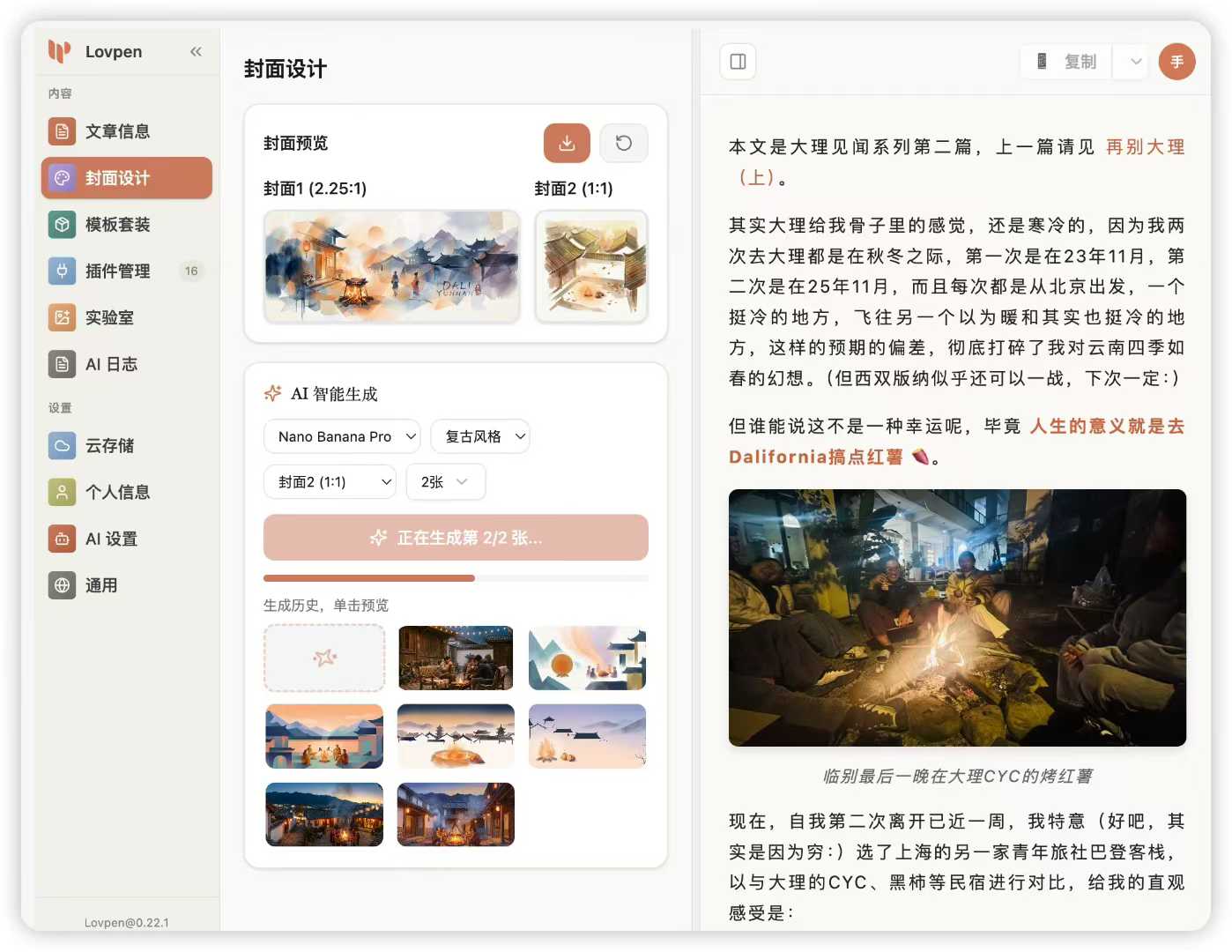
Features
Real-Time Rendering
- Zero-Delay Sync: Instant editor-to-preview updates
- Single Rendering Path: No double-rendering or visual jumps
- Smart Caching: Intelligent plugin result caching
Content Formatting
- 35+ Themes: Minimalist, academic, and creative styles
- Code Highlighting: 20+ syntax themes with line numbers
- Smart Layout: Auto-numbering H2 headings, intelligent spacing
- Mable Table Layout: Height-and-density weighted Markdown table layouts with browser-auto comparison, reusable profiles, Caption/Logo branding, and PNG export
- Adaptive Links: Platform-specific conversion (footnotes for WeChat)
Multi-Platform
- One-Click Publishing: Simultaneous distribution
- Live Preview: Real-time formatting updates
- Draft Management: Save and manage drafts
Customization
- Handlebars Templates: Full template system
- CSS Variables: Dynamic theme customization
- Plugin Architecture: Extensible processing pipeline
Installation
Web
Open pen.lovstudio.ai without installing anything.
Desktop
Download the signed macOS DMG from the latest Release.
Obsidian via BRAT
Add this repository in BRAT:
markshawn2020/lovpen-obsidian
Obsidian manually
curl -L https://github.com/markshawn2020/lovpen-obsidian/releases/latest/download/obsidian-lovpen.zip -o obsidian-lovpen.zip
unzip obsidian-lovpen.zip -d /path/to/vault/.obsidian/plugins/
Agent Skill
Download and extract lovpen-agent-skill.zip, then install the included lovpen directory with your Agent Skills-compatible client. The Skill uses Lovpen's real renderer and reports the generated artifact size and SHA-256.
Development
git clone https://github.com/markshawn2020/lovpen-obsidian
cd lovpen-obsidian
pnpm install
pnpm build
Usage
- Open Preview:
Cmd/Ctrl+P→ "Lovpen: Preview" - Customize: Select theme, adjust settings
- Distribute: Copy or auto-publish to platforms
Platform Setup
WeChat Official Account
- Get credentials from WeChat MP Platform
- Configure AppID, AppSecret, Verification Token in settings
Zhihu
- Login to Zhihu in browser
- Copy cookie from DevTools → Settings
XiaoHongShu
- Login to XiaoHongShu web
- Extract cookie with
web_sessiontoken
Twitter/X
- Create app at Twitter Developer Portal
- Generate all tokens and add to settings
arXiv
Export a single PDF from the copy menu, then submit it through arXiv.
Configuration
| Setting | Description | Default |
|---|---|---|
| Code Line Numbers | Show in code blocks | ✅ |
| H2 Auto-Numbering | Add "01.", "02." prefixes | ✅ |
| Link Conversion | Convert to footnotes | Non-WeChat |
| CSS Inline | Inline styles for compatibility | ✅ |
Custom Themes
Add to .obsidian/plugins/lovpen/themes/:
/* my-theme.css - must scope under .lovpen-renderer */
.lovpen-renderer {
  --primary-color: #2c3e50;
  --font-body: 'Inter', sans-serif;
}
Architecture
lovpen-obsidian/
├── agent-harness/     # Agent Skill CLI and verification harness
├── packages/
│   ├── api/           # Shared Supabase client and generated types
│   ├── cli/           # Workspace command router
│   ├── desktop/       # Tauri desktop application
│   ├── obsidian/      # Core plugin (TypeScript, Obsidian API)
│   ├── frontend/      # UI (React 19, TailwindCSS 4, Jotai)
│   ├── web/           # Standalone Vite web application
│   └── shared/        # Common utilities
└── assets/
    ├── themes/        # 35+ built-in themes
    └── highlights/    # 20+ code styles
Tech Stack
- Core: TypeScript, Obsidian Plugin API
- UI: React 19, Jotai, Radix UI, TailwindCSS 4
- Processing: Marked, Highlight.js, Handlebars
- Build: Turbo, ESBuild, Vite
Development
pnpm install              # Install dependencies
pnpm download-highlights  # Fetch theme assets
pnpm dev                  # Start dev mode
pnpm check                # Type checking
Roadmap
- Real-time editor-renderer sync
- Official Obsidian Community Plugin listing
- Medium, Dev.to integration
- AI-powered content optimization
- Scheduled publishing
Support
License
MIT © Mark Shawn
For plugin developers
Search results and similarity scores are powered by semantic analysis of your plugin's README. If your plugin isn't appearing for searches you'd expect, try updating your README to clearly describe your plugin's purpose, features, and use cases.