Music Session PDFs
unlistedby Mi-As
Lets create a music session and generates all files necessary for musician and audience.
Music Session PDFs
An Obsidian plugin to manage a worship song database and generate ready-to-use PDFs for a session: a lyrics PDF for participants and a merged sheet-music PDF (in the chosen key per song) for the leader's tablet.
Works on both desktop and mobile.
How it works
Your song database lives directly in your Obsidian vault as regular notes. This plugin reads that data to let you build a setlist, save it as a session note, and generate PDFs from it.
Song notes
Each song is a single Markdown file with frontmatter and lyrics combined:
---
preferred key: C
language: DE
level: 01 kann ich
tags:
  - "#worship"
sheet:
  - "[[Song Name.pdf|Chord Numbers]]"
  - "[[Song Name-chords-G.pdf|Chords G]]"
---
[Verse 1]
...
preferred key— the key you'd default to when adding the song to a setlist.sheet— a list of wikilinks to PDF files, each with an alias:Chords <Key>(e.g.Chords G) is treated as a key-specific sheet.- Any other alias (e.g.
Chord Numbers) is treated as key-independent and used as a fallback when no exact key match exists.
Folders
Three folders hold your data, all configurable in Settings → Music Session PDFs:
| Setting | Default | Contents |
|---|---|---|
| Lyrics folder | Lyrics | One note per song (frontmatter + lyrics) |
| Sheets folder | Sheets | Sheet-music PDFs referenced from song notes |
| Sessions folder | Sessions | Generated session notes; PDFs go in a PDFs subfolder |
Folders are created automatically on plugin load if missing.
Usage
-
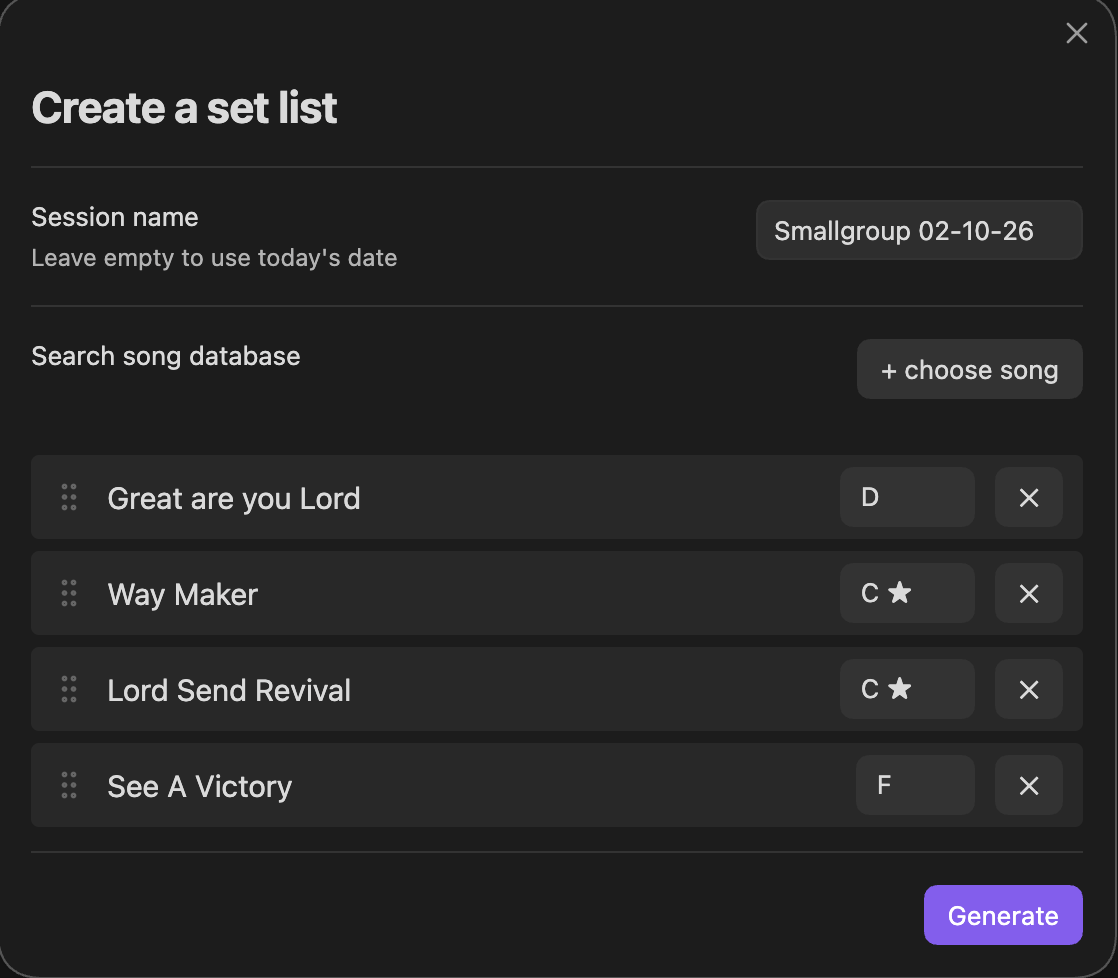
Click the ribbon icon (or run Create set list from the command palette) to open the setlist builder.
-
Click Generate to save a session note.
-
Right-click the session note in the file explorer:
- Generate lyrics PDF — one page per song, sized for reading on a phone.
- Generate sheet PDF — merges the original sheet-music PDFs for each song's chosen key (falling back to "Chord Numbers" if the exact key isn't available; songs with no sheet at all are skipped with a notice, the rest of the PDF is still generated).
- Edit music session - edit songs and key from a existing setlist
Both generated PDFs are saved to Sessions/PDFs/ and linked back into the session note's frontmatter (lyrics_pdf, sheet_pdf).
Session notes
A generated session note looks like:
---
date: 2026-08-01
generated: true
lyrics_pdf: "[[Sessions/PDFs/Session 2026-08-01 - Lyrics.pdf]]"
sheet_pdf: "[[Sessions/PDFs/Session 2026-08-01 - Sheets.pdf]]"
---

> [!warning] This file is auto-generated. Do not edit — changes will be lost on regeneration.

- [[Great are you Lord]] key: D sheet: [[Sheets/Great are you Lord.pdf]]
- [[Way Maker]] key: C sheet: [[Sheets/Way Maker-chords-C.pdf]]
The resolved sheet per song is frozen at generation time — regenerating the setlist re-resolves it, but editing the song database afterward won't silently change a past session.
Installation (mobile + desktop)
This plugin isn't published to the Community Plugin store, so install it via BRAT (works identically on desktop and mobile):
- Install BRAT from the Community Plugins store.
- In BRAT, choose Add Beta Plugin and enter this repository.
- BRAT installs the latest GitHub release and can auto-update on future releases.
Known limitations
- Sheet-music PDFs are merged as-is (original pages copied); the plugin does not transpose chords.
For plugin developers
Search results and similarity scores are powered by semantic analysis of your plugin's README. If your plugin isn't appearing for searches you'd expect, try updating your README to clearly describe your plugin's purpose, features, and use cases.