CyberSec Pulse
unlistedby Nasuhii
Minimalist Cybersecurity Threat Radar, Breaking Feeds & 1-Click Vault Note Clipper.
★ 1 starsUpdated 23d agoMIT
CyberSec Pulse
Minimalist cybersecurity threat radar, live wire feed, and 1-click vault note clipper for Obsidian.



Features
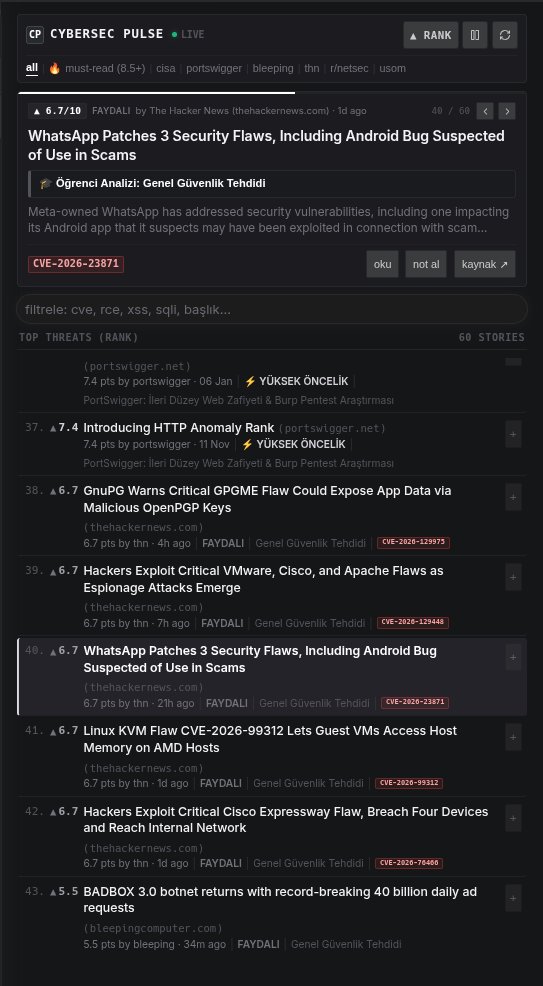
- Threat Wire & Rank View: Sequential headline rotator with live progress bar, smart hover-to-pause, and synchronized chronological feed.
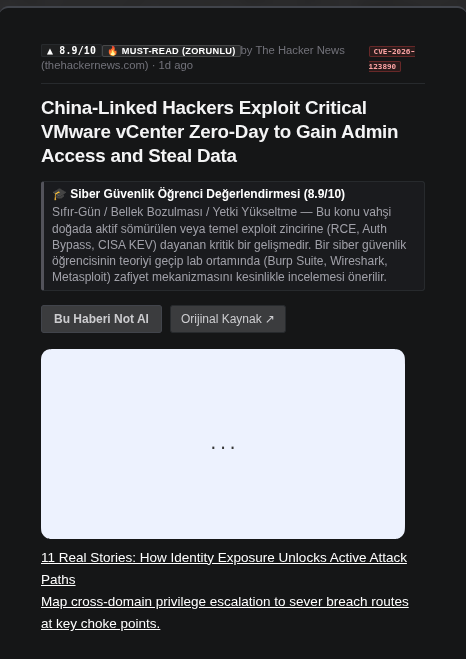
- In-App Reader: Distraction-free modal reader with automatic CVE detection and priority scoring.
- 1-Click Note Clipper: Saves articles as structured Markdown notes with YAML frontmatter, CVE tags, and Anki flashcards.
- 6 Intelligence Feeds: CISA KEV, BleepingComputer, The Hacker News, PortSwigger Research,
/r/netsec, and USOM. - Search & Filter: Instant filtering by source or CVE ID (e.g.,
CVE-2026-).
Installation
Option 1: BRAT (Recommended)
- Install and enable Obsidian42 - BRAT from Community Plugins.
- Open Settings -> BRAT -> Add Beta plugin.
- Enter
https://github.com/Nasuhii/cybersec-pulseand click Add Plugin. - Enable CyberSec Pulse under Community plugins.
Option 2: Manual / Git Clone
cd /path/to/vault/.obsidian/plugins
git clone https://github.com/Nasuhii/cybersec-pulse.git cybersec-pulse
Or download main.js, manifest.json, and styles.css from Releases into .obsidian/plugins/cybersec-pulse/, then reload and enable the plugin in Obsidian.
Settings
Configure under Settings -> CyberSec Pulse:
| Setting | Default | Description |
|---|---|---|
| Save Folder | Areas/CyberSecurity/Haberler | Destination directory for clipped notes |
| Rotation Interval | 300 sec | Interval between headline transitions |
| Max Items per Feed | 15 | Number of items fetched per source (5–30) |
| Auto Full Content | Enabled | Extracts full article body into the reader and saved notes |
| Feed Toggles | All ON | Enable or disable individual intelligence sources |
License
For plugin developers
Search results and similarity scores are powered by semantic analysis of your plugin's README. If your plugin isn't appearing for searches you'd expect, try updating your README to clearly describe your plugin's purpose, features, and use cases.