PiperObs v2
unlistedby Nicolas Venosa
Local TTS with karaoke highlight, Pomodoro timer, 5 color themes, and offline voice synthesis.
🔊 PiperObs v2
Local TTS with karaoke highlight, Pomodoro timer, 5 color themes, and offline voice synthesis.


✨ Features
- 🎙️ Local TTS — Synthesize speech offline using Piper TTS. No internet required after setup.
- 🎨 Karaoke Highlight — Words are highlighted in real-time as they are spoken (editor mode only).
- 🍅 Adaptive Pomodoro — Auto-adjusts focus/break sessions based on document length.
- 🎭 5 Color Themes — Gold, Cyan, Magenta, Green, Orange. Switch anytime.
- 🎤 Voice Manager — Download, delete, and switch voices on the fly.
- 🎚️ Volume & Speed — Independent controls for playback volume (0-100%) and speed (0.75x - 1.5x).
- 🎯 Focus Mode — Dims everything except the active line while reading (editor mode only).
- 🌐 Multi-language — Supports Spanish (AR, ES, MX), Portuguese, English, and more.
- 📱 MiniPlayer — Floating playback bar with waveform animation and progress.
- ⚡ Gapless Playback — Web Audio API for smooth, uninterrupted reading.
📸 Screenshots
Sidebar — Controles principales
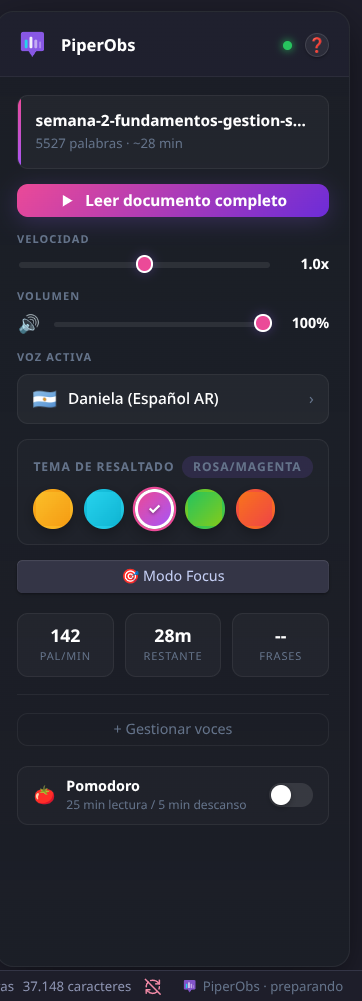 Panel lateral con velocidad, volumen, selector de voz, temas, focus mode y pomodoro
MiniPlayer — Reproducción flotante
 Barra flotante con waveform animado, controles de reproducción y progreso
Karaoke — Resaltado de palabras
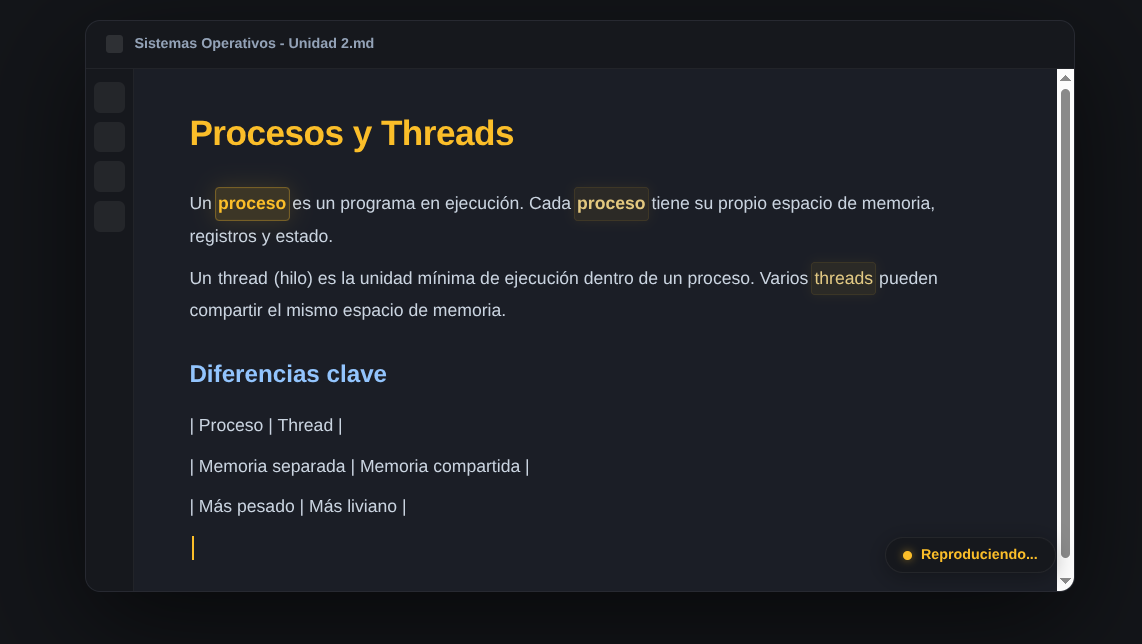 Modo edición: palabras resaltadas en tiempo real mientras se lee
📦 Installation
From Obsidian Community Plugins (Recommended)
- Open Settings → Community Plugins
- Turn on Safe Mode off
- Click Browse and search for "PiperObs"
- Click Install, then Enable
Manual Installation
- Download the latest release:
main.js,styles.css, andmanifest.json - Create a folder
.obsidian/plugins/piperobs-v2/in your vault - Copy the three files into that folder
- Enable the plugin in Settings → Community Plugins
🚀 First Use
- Open the PiperObs sidebar (right panel)
- Click "Leer documento completo" or use the command palette (
Ctrl+P→ "Read document") - The plugin will automatically download Piper binary and the default voice on first run
- Enjoy your local TTS!
🎛️ Controls
| Feature | Shortcut / Control |
|---|---|
| Read document | Ctrl+P → "Leer documento" |
| Pause / Resume | Ctrl+P → "Pausar/Reanudar" |
| Stop | Ctrl+P → "Detener" |
| Speed | Slider in sidebar (0.75x - 1.5x) |
| Volume | Slider in sidebar (0% - 100%) |
| Voice | Dropdown in sidebar |
| Theme | Color circles in sidebar |
| Focus Mode | Button in sidebar or Command Palette |
| Pomodoro | Toggle in sidebar |
🎤 Supported Voices
PiperObs includes a curated catalog of voices. You can download additional voices from the Voice Manager (+ Gestionar voces).
Included by default:
es_AR-daniela-high— Español Argentina (femenina)
Available to download:
es_ES-davefx-medium— Español España (masculina)es_ES-carlfm-x_low— Español España (masculina, ligera)es_MX-claude-high— Español México (femenina)pt_BR-faber-medium— Portugués Brasil (masculina)en_US-lessac-medium— English US (masculina)en_US-amy-medium— English US (femenina)
And 30+ more languages available via the Piper voice repository.
⚙️ Settings
| Setting | Description | Default |
|---|---|---|
| Data Directory | Where Piper binaries and voices are stored | .obsidian/piperobs-data |
| Default Voice | Voice used for reading | es_AR-daniela-high |
| Volume | Playback volume (0-100%) | 85% |
| Playback Rate | Speech speed | 1.0x |
| Karaoke Highlight | Highlight words while reading | On |
| Auto Magic | Suggest voices by language | On |
| Pomodoro | Enable timer during reading | Off |
| Karaoke Theme | Color theme for highlights | Gold |
🖥️ Requirements
- Obsidian v1.5.0 or later
- Desktop only (Linux, macOS, Windows)
- ~150MB free space for Piper binary + default voice
- Internet connection only for downloading Piper and voices (first time)
🛠️ Development
git clone https://github.com/Nicovenosa/piperobs-v2.git
cd piperobs-v2
npm install
npm run build
For development with hot-reload:
npm run dev
🗺️ Roadmap
- Streaming synthesis (no temp files)
- Mobile support (if Piper releases mobile binaries)
- Custom pronunciation dictionary
- Export audio to file
- Voice preview before download
🤝 Contributing
Contributions are welcome! Please open an issue or PR on GitHub.
📄 License
MIT License — see LICENSE for details.
🙏 Credits
- Piper TTS by Rhasspy / Michael Hansen
- Obsidian by Dynalist
- Built with ❤️ by Nicolas Venosa
⭐ Star this repo if you find it useful!
For plugin developers
Search results and similarity scores are powered by semantic analysis of your plugin's README. If your plugin isn't appearing for searches you'd expect, try updating your README to clearly describe your plugin's purpose, features, and use cases.