Tasks Sync
unlistedby 이게대체MERGE
Sync your tasks with any other task manager
Obsidian Task Sync
A plugin that helps you synchronize your Obsidian tasks with various task management platforms.
Contributors
- enk0de (임지훈)
- dmstjdhdh (김용우)
- hong-sile (홍혁준)
- parkjanghan (박장한)
Features
- Bi-directional task synchronization
- Support for multiple task platforms
- Command palette integration for task management
- Real-time status updates
- Markdown-friendly task format
Supported Platforms
Currently supported platforms:
Coming soon:
- Microsoft To Do
- Want to add your favorite platform?
Getting Started
- Install the plugin
- Choose your preferred task platform
- Follow the platform-specific setup guide
- Start syncing your tasks!
Installation
This guide explains how to download and install a published release of Task Sync into your own Obsidian vault — no development or build setup required.
1. Download the Release
- Visit the Releases Page of the repository.
- Download the latest
obsidian-tasks-sync.zipfile under Assets.
2. Install into Obsidian
- Open your Obsidian Vault.
- Locate the
.obsidian/plugins/folder in your vault’s directory. - Extract the contents of the zip file into a subfolder named
obsidian-tasks-sync.
/YourVault/
└── .obsidian/
    └── plugins/
        └── obsidian-tasks-sync/
            ├── main.js
            └── manifest.json
- Restart Obsidian or go to Settings → Community Plugins and enable
Task Sync.
3. Authorize Your Task Platform
If you're using Google Tasks or Todoist:
- Go to Settings → Obsidian Tasks Sync
- Input your Client ID and Client Secret
- Click Connect to [Platform] and follow the login flow
🔒 Each user must register their own credentials for Google or Todoist due to quota and security reasons.
4. Start Using the Plugin
Use the Command Palette (Cmd+P or Ctrl+P) to:
Turn into Google TaskSync from Remote
Tasks will be synced in both directions once authorized.
Optional: Customize or Update
- You can replace the plugin folder with a newer release anytime.
- For developers, see the Development Guide if you'd like to build from source.
How to use
Creating Task
- Write your task in Obsidian using the standard checkbox format
- Use the command palette (Cmd/Ctrl + P) and select "Turn into Google Task" or "Turn into Todoist Task"
- The task will be created on the selected platform and synced automatically
Syncing Changes
- From Obsidian to Remote:
- Check/uncheck the checkbox
- Edit the task content
- Changes are automatically synced to the remote platform
- From Remote to Obsidian:
- Make changes in Google Tasks or Todoist
- Changes will be reflected in your Obsidian notes
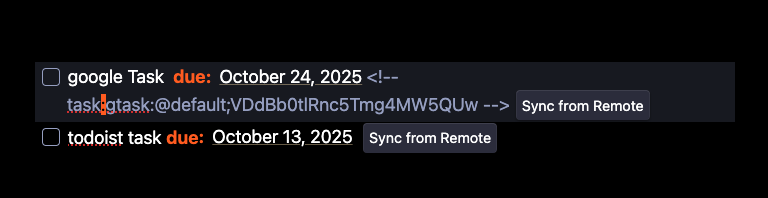
- "Sync from Remote" button appears when remote changes are detected
Contributing
welcome contributions! Whether you want to:
- Add support for a new task platform
- Fix bugs or improve existing features
- Enhance documentation
Check out our Contributing Guide to get started.
Task Format
- [ ] Task Title <!--platform:taskId:additional-info-->
See platform-specific documentation for detailed format information.
Documentation
- Contributing Guidelines
- Supported Platforms:
Dependecies
MIT License
Runtime Dependencies
- @codemirror/state (v6.5.2) - https://github.com/codemirror/state
- @codemirror/view (v6.37.1) - https://github.com/codemirror/view
- @doist/todoist-api-typescript (v5.0.0) - https://github.com/Doist/todoist-api-typescript
- es-toolkit (v1.38.0) - https://github.com/toss/es-toolkit
Development Dependencies
- @types/node (v16.11.6) - https://github.com/DefinitelyTyped/DefinitelyTyped
- @typescript-eslint/eslint-plugin (v5.29.0) - https://github.com/typescript-eslint/typescript-eslint
- @typescript-eslint/parser (v5.29.0) - https://github.com/typescript-eslint/typescript-eslint
- @vitest/coverage-c8 (v0.33.0) - https://github.com/vitest-dev/vitest
- @vitest/coverage-istanbul (v3.2.2) - https://github.com/vitest-dev/vitest
- @vitest/ui (v3.1.3) - https://github.com/vitest-dev/vitest
- builtin-modules (v3.3.0) - https://github.com/sindresorhus/builtin-modules
- esbuild (v0.17.3) - https://github.com/evanw/esbuild
- eslint (v8) - https://github.com/eslint/eslint
- eslint-config-prettier (v10.1.5) - https://github.com/prettier/eslint-config-prettier
- eslint-plugin-prettier (v5.4.0) - https://github.com/prettier/eslint-plugin-prettier
- husky (v9.1.7) - https://github.com/typicode/husky
- obsidian (latest) - https://github.com/obsidianmd/obsidian-api
- prettier (v3.5.3) - https://github.com/prettier/prettier
- tslib (v2.4.0) - https://github.com/Microsoft/tslib
- typescript (v4.7.4) - https://github.com/Microsoft/TypeScript
- vitest (v3.1.3) - https://github.com/vitest-dev/vitest
- zod (v3.25.47) - https://github.com/colinhacks/zod
Apache License 2.0
Runtime Dependencies
- google-auth-library (v9.15.1) - https://github.com/googleapis/google-auth-library-nodejs
Development Dependencies
- @google-cloud/tasks (v6.1.0) - https://github.com/googleapis/google-cloud-node
- googleapis (v149.0.0) - https://github.com/googleapis/google-api-nodejs-client
BSD-3-Clause License
Development Dependencies
- @semantic-release/changelog (v6.0.3) - https://github.com/semantic-release/changelog
- @semantic-release/commit-analyzer (v13.0.1) - https://github.com/semantic-release/commit-analyzer
- @semantic-release/exec (v7.1.0) - https://github.com/semantic-release/exec
- @semantic-release/git (v10.0.1) - https://github.com/semantic-release/git
- @semantic-release/github (v11.0.3) - https://github.com/semantic-release/github
- @semantic-release/npm (v12.0.1) - https://github.com/semantic-release/npm
- @semantic-release/release-notes-generator (v14.0.3) - https://github.com/semantic-release/release-notes-generator
- conventional-changelog-conventionalcommits (v9.0.0) - https://github.com/conventional-changelog/conventional-changelog
- semantic-release (v24.2.5) - https://github.com/semantic-release/semantic-release
For plugin developers
Search results and similarity scores are powered by semantic analysis of your plugin's README. If your plugin isn't appearing for searches you'd expect, try updating your README to clearly describe your plugin's purpose, features, and use cases.