Obsidian Chat
unlistedby Omar Shahine
Agentic AI chat assistant that reads, edits, and creates notes through natural conversation
Obsidian Chat
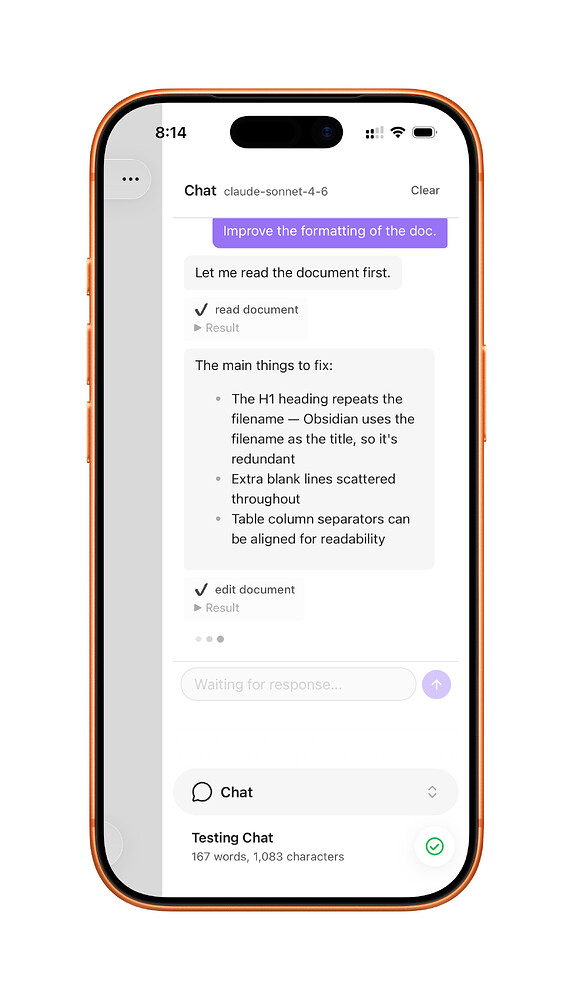
An agentic AI chat plugin for Obsidian. Two providers, best models, no bloat.
Philosophy
Existing AI plugins for Obsidian are overcomplicated, break on mobile, or require a dozen settings to configure. Obsidian Chat takes the opposite approach: pick a provider, enter your API key, and start talking. The AI reads your notes, makes edits, creates files, and asks clarifying questions, all through a simple chat interface.
Mobile is a first-class citizen, not an afterthought.
Providers
| Provider | Default Model | Features |
|---|---|---|
| Anthropic | Claude Sonnet 4.6 | Adaptive thinking, web search, prompt caching |
| OpenAI | Codex 5.3 | Responses API, reasoning, web search |
That's it. Two providers. The best models. Fetch the full model list from the API with the refresh button if you want something different.
What the AI can do
The chat assistant has 14 tools that map directly to Obsidian's Vault API:
- read_document / read_file: Read any note in your vault
- edit_document: Find-and-replace, insert, or replace content
- search_vault: Search filenames and content
- create_file: Create new notes with suggested paths
- rename_file: Rename or move files (updates all links)
- delete_file: Move files to trash
- list_files: Browse vault structure
- open_document: Navigate to a file in the editor
- get_properties: Read YAML frontmatter as structured data
- set_properties: Update frontmatter properties (uses Obsidian's native API)
- get_backlinks: Find all notes that link to a given document
- get_current_datetime: Get the current date and time in the user's locale
- ask_user: Ask you a question when something is ambiguous
The AI reads before it edits, prefers surgical find-and-replace over full rewrites, and acts on your confirmations without re-asking.
Selection scope
Select text in a note, right-click, and choose "Send selection to Chat". The selection appears as a pill above the input. The AI works only within that selection, leaving the rest of the document untouched. Dismiss the pill to go back to full-document mode.
Install
Via BRAT (recommended for now)
- Install BRAT from Community Plugins
- In BRAT settings, click "Add Beta plugin"
- Enter:
omarshahine/obsidian-chat - Enable the plugin in Community Plugins
Manual
- Download
main.js,manifest.json, andstyles.cssfrom the latest release - Create
<vault>/.obsidian/plugins/obsidian-chat/ - Copy the files there
- Enable in Community Plugins
Setup
- Open Settings > Obsidian Chat
- Pick Anthropic or OpenAI
- Enter your API key (stored per-provider in your OS keychain via SecretStorage, never synced)
- Click the refresh icon next to Model to load available models
- Open the chat from the ribbon icon, command palette, or context menu
Commands
| Command | Description |
|---|---|
| Open chat | Open the chat sidebar |
| New chat | Start a new session, leaving existing ones intact |
| Chat about this note | Send the active note to chat (editor required) |
| Send selection to Chat | Send selected text with scoped context |
| Copy conversation transcript | Export the active session's conversation to clipboard |
| Clear conversation | Empty the active session (keeps the session) |
Chat sessions
Multiple conversations can be open at once. Each keeps its own transcript and its own agent state, so context never carries between them.
- New chat starts a session; existing ones keep their history.
- Once more than one session exists, a dropdown appears in the chat header to switch between them. Sessions are named after their first message.
- Sessions are not scoped to a note — a chat can range across the whole vault, which is the point of the plugin. "Chat about this note" and "Send selection to Chat" start a new session rather than interrupting the one you are in.
- Switching is blocked while a response is streaming, so a reply always lands in the conversation that asked for it.
- The 20 most recently used sessions are kept; older ones are dropped.
Context menus
- File explorer: Right-click any markdown file > "Chat about this note"
- Editor: Right-click selected text > "Send selection to Chat"
- Ribbon icon: Right-click for quick actions menu
Design decisions
| Decision | Why |
|---|---|
| Two providers only | Simplicity. Anthropic and OpenAI cover the best models. |
| No streaming | Obsidian's requestUrl() doesn't support it. Required for mobile. |
| Conversation persistence | Chat history survives Obsidian restarts. Stored locally in chat-state.json, never synced. |
| No vault indexing | Linear search capped at results limit. Avoids mobile memory issues. |
| Svelte 5 UI | Compiles away to vanilla JS. Reactive state without React's runtime overhead. |
| Right sidebar on mobile | Slides in from the edge, keeping your document underneath. |
| Per-device API keys | Stored in OS keychain via SecretStorage. Never synced, never in data.json. |
Development
git clone https://github.com/omarshahine/obsidian-chat.git
cd obsidian-chat
npm install
npm run dev    # Watch mode
npm run build  # Production build
Symlink into your vault for testing:
ln -s /path/to/obsidian-chat /path/to/vault/.obsidian/plugins/obsidian-chat
License
MIT
For plugin developers
Search results and similarity scores are powered by semantic analysis of your plugin's README. If your plugin isn't appearing for searches you'd expect, try updating your README to clearly describe your plugin's purpose, features, and use cases.