Agent Threads
unlistedby Rick Bowman
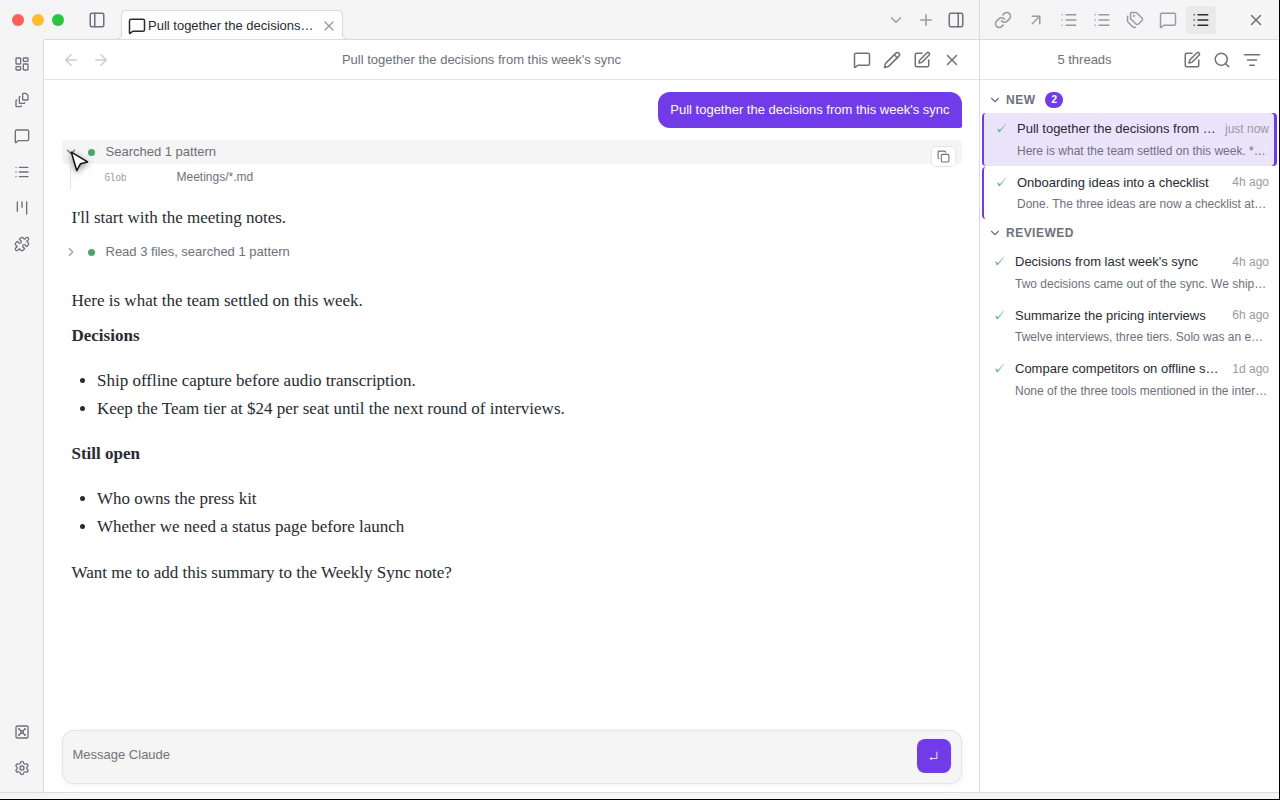
Multi-agent Claude Code and OpenAI Codex sessions in Obsidian and Geode.
Agent Threads
Run many Claude Code, Codex, OpenCode and Antigravity agents in parallel, right inside your notes. A free, open-source plugin for Geode and Obsidian. Every thread is its own agent session with streaming replies, visible tool calls and inline permission prompts, and everything stays local in your vault.





Why Agent Threads
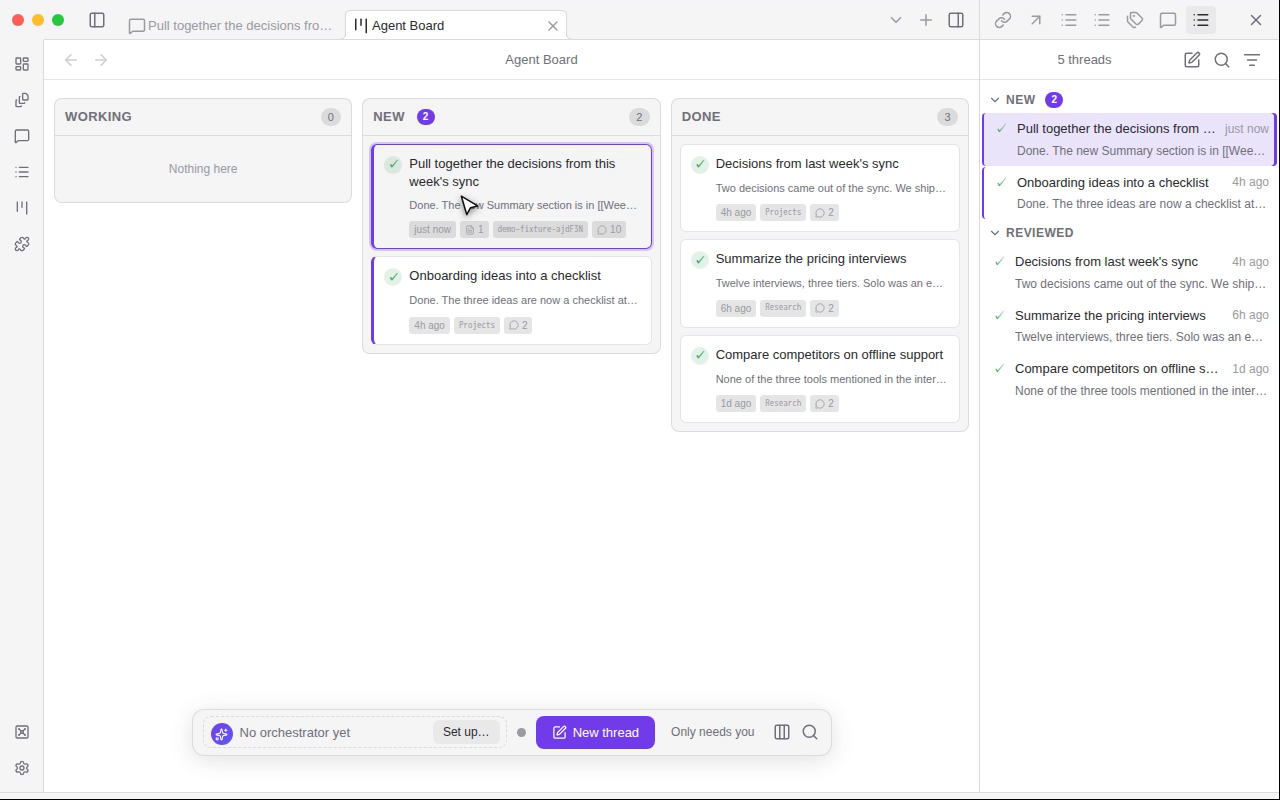
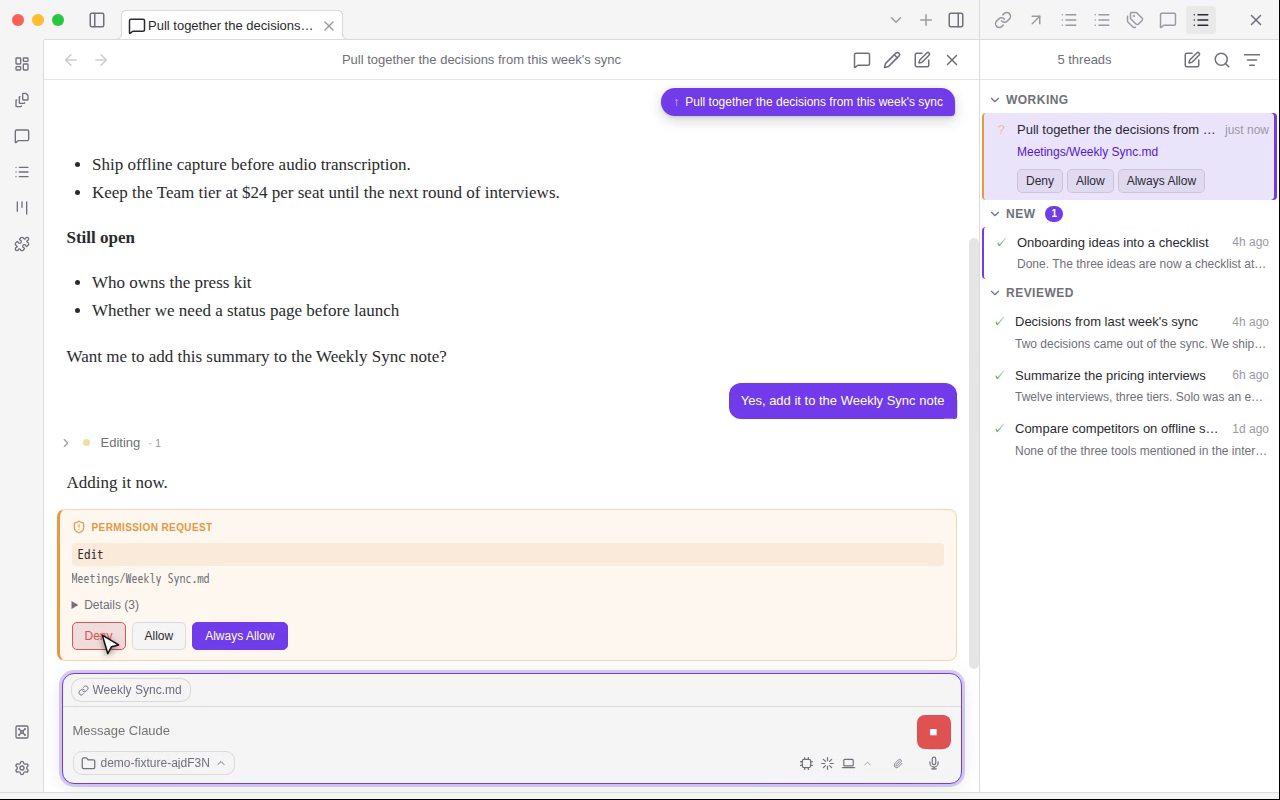
- Parallel by default. Run as many sessions as you like at once. The Agents List shows what each thread is doing and whether it needs you.
- Bring your own agent. Claude Code, OpenAI Codex, OpenCode or Google Antigravity drive a thread, picked per install in Settings.
- Agent Board. See every thread as a card, grouped by status or by project, from idle to running to waiting to done.
- Sub-agents you can follow. A pill in the composer counts background agents. Open the tree and read any agent's activity timeline.
- You stay in control. Claude and Codex ask before they write files or run commands, inline in the conversation. Plan Mode lets you approve a plan first.
- Codex network access has a shared default and thread overrides. The local Codex default starts Off; each thread can choose Use default, On, or Off. Existing explicit choices are preserved. The filesystem sandbox stays in place and Plan mode stays network-disabled.
- Local-first, in your vault. Threads live next to your notes and link to them. No account, no hosted service in the middle.
- Goals, loops and schedules. Pin a goal with
/goal, or re-run a prompt with/loop 10m <prompt>.
Quick start
Agent Threads runs in Geode and in Obsidian. You also need at least one agent CLI installed and signed in, see Prerequisites.
In Geode (easiest). Agent Threads is in Geode's supported-plugin catalog.
brew install --cask rbcodelabs/geode/geode
Open a vault. On the first-run onboarding screen, the Recommended: Agent Threads card installs and enables it with one click. Later, go to Settings → Community plugins, find Agent Threads in the supported catalog and choose Install.
In Obsidian, via BRAT.
- Install BRAT from Community Plugins.
- In BRAT settings choose Add Beta Plugin and enter
rbcodelabs/agent-threads. - Enable Agent Threads in Settings → Community Plugins.
Manual install.
- Download the latest release from GitHub Releases.
- Extract it into
<vault>/.obsidian/plugins/claude-threads/for Obsidian, or<vault>/.geode/plugins/claude-threads/for Geode. - Enable Agent Threads in Settings → Community Plugins.
Upgrade compatibility: the repository, plugin ID, install folder, saved command IDs, workspace view types, and
claude_threadsMCP namespace retain their historical names so existing installations, hotkeys, layouts, and automations continue to work.
Then open the Agents List, press New thread, type what you want and hit Enter.
What you get
| Conversations | Streaming Markdown, tool-call pills and groups, persistent sessions, auto-named tabs, thread summaries, compressed view |
| Many agents at once | Agents List, Agent Board, sub-agent tree, Projects with shared context, message queue |
| Control | Inline permission cards, Plan Mode, cancel and restore, Always Allow rules, MCP elicitation |
| Vault integration | @ file mentions, clickable wikilinks, chat about or watch a note, edited-files focus, Skills Manager |
| Automation | /goal, /loop, scheduled runs, Claude Code skills and slash commands, MCP servers (including OAuth ones) |
| Reach | Remote daemons, a local container daemon, mobile remote access, push-to-talk voice input, an agent browser, and Web Viewer viewport presets (Fill, Desktop, Tablet, Mobile) with Pick-to-Thread element feedback (Geode desktop) |
The complete list is in the feature reference.
Prerequisites
- Geode, or Obsidian v1.0.0+.
- At least one agent harness, installed and signed in:
- Claude Code CLI (auto-detected in the usual install locations; Amazon Bedrock is supported).
- OpenAI Codex CLI: select OpenAI Codex in Settings → Agent → Agent harness.
- OpenCode (desktop only), with a provider configured: select OpenCode in the same setting.
- Antigravity CLI (
agy, desktop only), signed in once: select Antigravity in the same setting.
Sign-in, Bedrock and per-harness details are in Prerequisites and harness setup. For Codex running in the managed container, see Local daemon harnesses for the installed version and update controls.
Documentation
| Guide | What is in it |
|---|---|
| Usage guide | Tabs, slash commands, Agents List, Agent Board, permissions, MCP, remote access, projects |
| Feature reference | Every feature, in detail |
| Settings reference | Every setting |
| Agent tools reference | The MCP tools agents can call, and the peer-plugin API |
| Agent workspace | Sub-agents, capability matrix and recovery behavior |
| Building and releasing | Build from source, tests, release process |
Vote on upcoming features at the public roadmap.
Contributing
Issues and PRs are welcome. See CONTRIBUTING.md and Building and releasing to build from source. Good places to start are open issues labeled good first issue.
If Agent Threads is useful to you, a star helps other people find it.
License
For plugin developers
Search results and similarity scores are powered by semantic analysis of your plugin's README. If your plugin isn't appearing for searches you'd expect, try updating your README to clearly describe your plugin's purpose, features, and use cases.