Claudo
unlistedby Romain Gilliot - Motion Live
An interface to call the Claude API directly in Obsidian.
Claudo
A tool that lets you call the Claude API directly to modify your documents in Obsidian that is context aware.
Manual installation as a user without using Obsidian's Community Platform.
If you don't give a fuck about modifying the plugin code, you don't need to build it yourself. I've left the built files in the dir so you can install them easily. To do it, you need your vault path.
Let's imagine it's /home/my-vault
Now you need to find your plugin folder in it.
It's simple, just add to the path /.obsidian/plugins/
In our example, it would be /home/my-vault/.obsidian/plugins/
Now you create a new folder called claudo in it.
And from this repo you copy 2 files into it:
manifest.jsonmain.js
And you're done with the installation.
- To activate it, open
Obsidian, go to your Vault Settings ->Community plugins - Turn off
Restricted Modeif it's not done yet. - The
Claudoplugin should appear in your list, you just have to toggle it on.
Annnd, you're good!
How to use it
Getting your api-key from Anthropic
To use this plugin you need an api-key from Anthropic (the company behind the LLM Claude).
To get it, you need:
- To create an account on Anthropic
- Once connected, in the Dashboard Page, click on
API Keys - Click on the
+ Create Keybutton - Give it a name and validate by clicking on
Add - The website will prompt you with an insanely long list of characters, this is your key. Copy paste it somewhere safe.
Ok now, that this fucking shit show is done, you're ready to have some fun.
Configure the plugin
For the plugin to work, you need to give it your api-key.
- To do this, just go to your Vault Settings and click on
Claudo. - Then, just copy paste your key in the first field.
After this, you need to give it your python executable path.
(Obviously, you'll need to install python first if you don't have it yet)
And then, just put your /path/to/your/python-installation in the last field.
You're good to go!
How do you use it?
Freaking Simple.
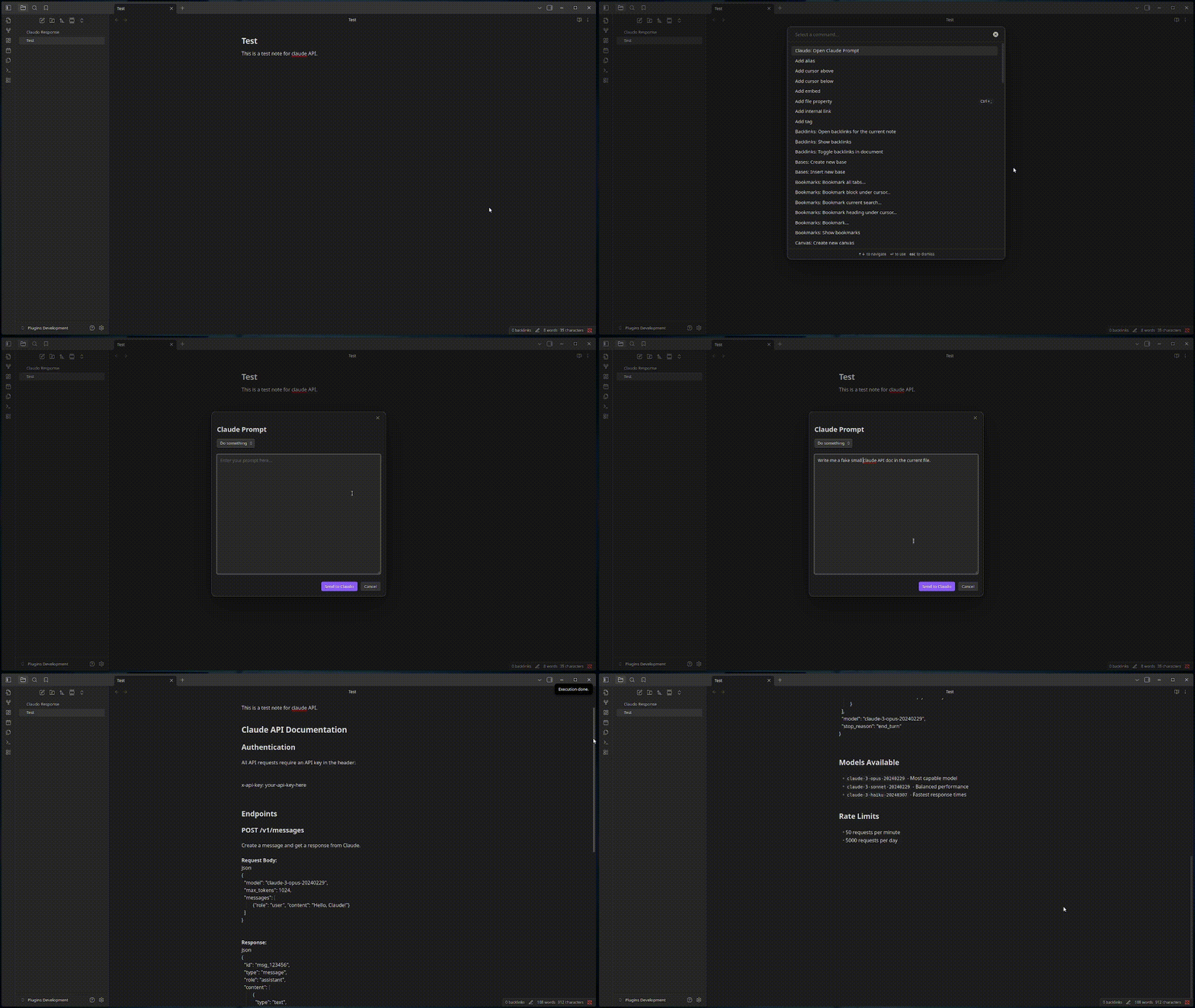
- Press
Ctrl Pto open theCommand Paletteand search forClaudo. - There is only one command (for now), so click on it.
- You'll see a Window Prompt that just appeared
- You can set the first option to
Do somethingorRespond - You type your prompt in the text area below
- And you validate with the button
Send to Claude...
What's the Do something option?
It will execute your prompt into your vault. For example, you can ask: Remove the paragraph about cats in my current document. And it will do it.
[!note] Claude has for now only the context of your current document name, content and your vault filepath. It does not know about the other documents or your vault hierarchy. That being said, these features are planned.
[!warning] The execution uses
pythonunder the hood. (see thepythonfield in the settings) And it can virtually do anything. So don't come crying if you ask it to delete all your files and that is what you've got.There is also provoke major security risks, so deal with it like a grown man.
What's the Respond option?
It will create a file in your vault called Claude Respond.md which contains the answer to your prompt.
[!note] Once again, keep in mind that Claude has for now only the context of your current document name, content and your vault filepath. It does not know about the other documents or your vault hierarchy.
How can I change the Anthropic Model?
Go into the Claudo settings and below your api key, you can choose the model that fits you best.
Building it as a developer
If you want to build the plugin to be able to modify it and make it your own, this is for you.
Go into your vault plugin path: /your/vault/path/.obsidian/plugins/
Run git clone to clone this repo:
cd /your/vault/path/.obsidian/plugins
git clone https://github.com/Rrominet/obsidian-ai
Now go into the created directory obsidian-ai:
cd ./obsidian-ai
Install npm if you don't have it:
Debian/Ubuntu/Mint:
sudo apt update
sudo apt install npm
Fedora:
sudo dnf install npm
CentOS/RHEL 8+:
sudo dnf install npm
CentOS/RHEL 7:
sudo yum install npm
Arch/Manjaro:
sudo pacman -S npm
openSUSE:
sudo zypper install npm
Alpine:
apk add npm
Gentoo:
sudo emerge -av net-libs/nodejs
Or use the "proper" way using Node Version Manager (nvm) that works across all distros:
curl -o- https://raw.githubusercontent.com/nvm-sh/nvm/v0.39.0/install.sh | ```bash
nvm install node
And run the classic npm commands to build any Typescript project:
npm install
npm run dev
You should be good to start coding.
Why Claudo ?
Because "Claudo" means homeless in French and I found it hilarious.
For plugin developers
Search results and similarity scores are powered by semantic analysis of your plugin's README. If your plugin isn't appearing for searches you'd expect, try updating your README to clearly describe your plugin's purpose, features, and use cases.