Third Brain
unlistedby Yueyue
Reconnect scattered notes through source-grounded fragments and explained associations.
Third Brain
An Obsidian plugin that turns notes into searchable fragments. Enter an idea, see why a passage matches, and open it in the original note.
Demo — desktop only. Try local excerpt search in a test vault. AI-assisted extraction and cross-domain connections are experimental.
Download demo 0.3.7 · Getting started · 简体中文
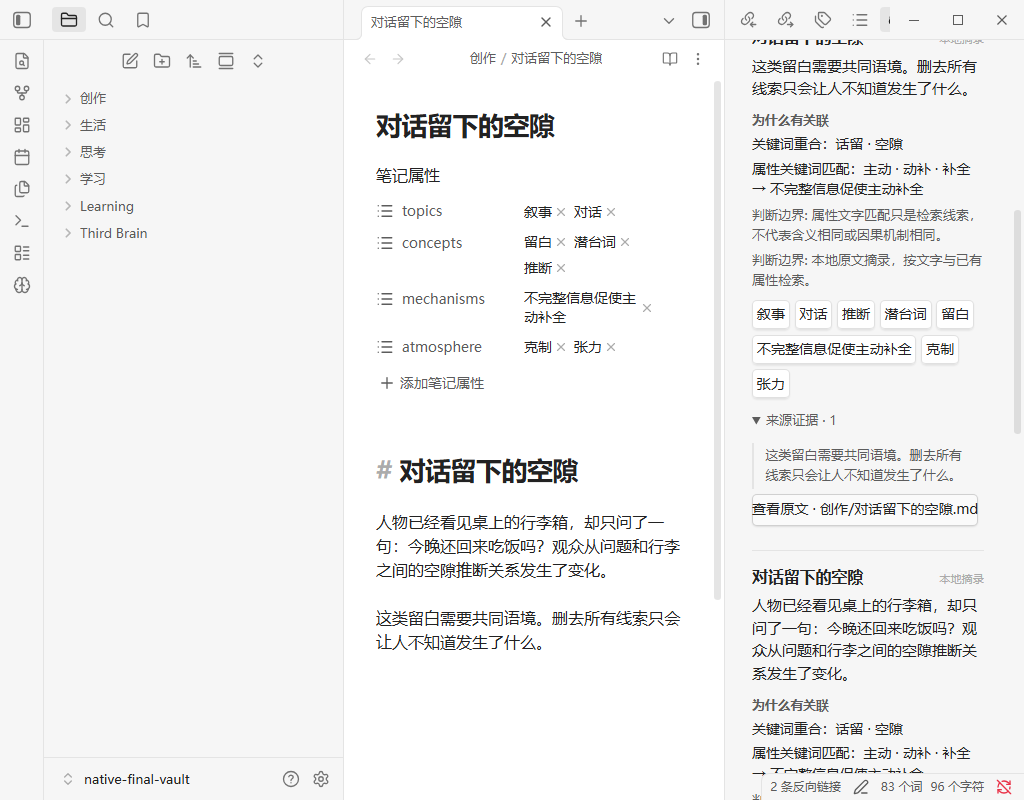
Screenshot from an earlier build, using sample notes in local mode.
Install
Requires desktop Obsidian 1.11.5+. This is a demo release; it is not listed in Community plugins yet. Try it in a test vault first.
- Download third-brain-0.3.7.zip and extract it. Use the plugin ZIP, not the source-code archive.
- Put
main.js,manifest.json,styles.cssandLICENSEin your vault's.obsidian/plugins/third-brain/folder. Do not add another folder level. - Restart Obsidian, enable Third Brain in Settings → Community plugins, and open the brain icon in the ribbon.
No Node.js or API key is needed for local mode. Download checks and installation help.
Usage
- Click Refresh notes to build the index.
- Type an idea and click Find connections. To use your selection or current draft instead, click Use current note, review the filled-in idea, then click Find connections.
- Read the matching passages, expand Source evidence, and click Open original.
For a quick trial, copy the sample notes into your test vault and search for 留白 or Change one variable at a time.
Features
- Index Markdown and Canvas text. Generated fragments are saved to
Third Brain/Fragments; original notes are not rewritten. - Show matching reasons and source quotations. Changed or missing sources invalidate old results.
- Explore topics, concepts, mechanisms and fragment types from the result cards. Open a fragment to follow its saved links to related fragments.
- Adjust association breadth with Low, Medium or High. High can show separate indirect suggestions, with quotations from both notes. These are suggestions, not proof that two ideas mean the same thing.
- Refresh manually, daily or weekly while Obsidian is open. Reuse unchanged notes rather than processing them again.
Search modes
| Mode | How it works | Setup |
|---|---|---|
| Local excerpts — default | Extracts passages and matches text or existing note attributes. It does not infer meaning. | None; works offline. |
| Local model | Uses a model to edit fragments and interpret searches. | Your own local OpenAI-compatible service. |
| Cloud model | Sends eligible note text and submitted searches to your chosen provider. | HTTPS endpoint, model, API key and explicit consent. |
How connections work
Search compares text and attributes stored on fragments. Medium allows shared-mechanism matches; High can also suggest material one existing mechanism link away, with quotations from both notes. It does not treat an indirect link as a direct match.
For example, the sample dialogue and music notes both declare 不完整信息促使主动补全. At Medium, selecting that mechanism finds both notes without a model call. These sample labels are supplied in note properties, not inferred by live AI.
Model modes can infer labels, but automatic cross-domain discovery is experimental and can miss valid links. Source quotations establish where an excerpt came from; they do not validate a model's interpretation.
Privacy
Cloud processing is off by default. Notes marked privacy: local or privacy: private are excluded from cloud requests, including their derived labels. The plugin does not collect clicks, dwell time or a typing history.
Generated files and history are not encrypted and may be included in vault sync or backups. Removing a source does not guarantee that every old excerpt is erased. See Privacy before enabling a cloud model.
Current status
Local search is available without a model. AI quality and real provider compatibility are not yet validated for general use; correct source citations do not guarantee a useful connection. This demo's complete native Obsidian click flow still needs testing. See testing status.
Development
Requires Node 22.12+ and npm.
git clone https://github.com/Yueyue673/obsidian-third-brain.git
cd obsidian-third-brain
npm ci --ignore-scripts
npm run build
Copy dist/main.js, dist/manifest.json, dist/styles.css and dist/LICENSE to the plugin folder. Development checks are listed in Contributing. npm run demo opens a browser test app with sample notes, not Obsidian or a live model.
Architecture · Compatibility · Troubleshooting · Changelog · Security
License
MIT. See third-party notices for dependencies.
For plugin developers
Search results and similarity scores are powered by semantic analysis of your plugin's README. If your plugin isn't appearing for searches you'd expect, try updating your README to clearly describe your plugin's purpose, features, and use cases.