Memo Flow
unlistedby Zovo314
Capture and browse local Markdown memos in a chronological waterfall.
Memo Flow


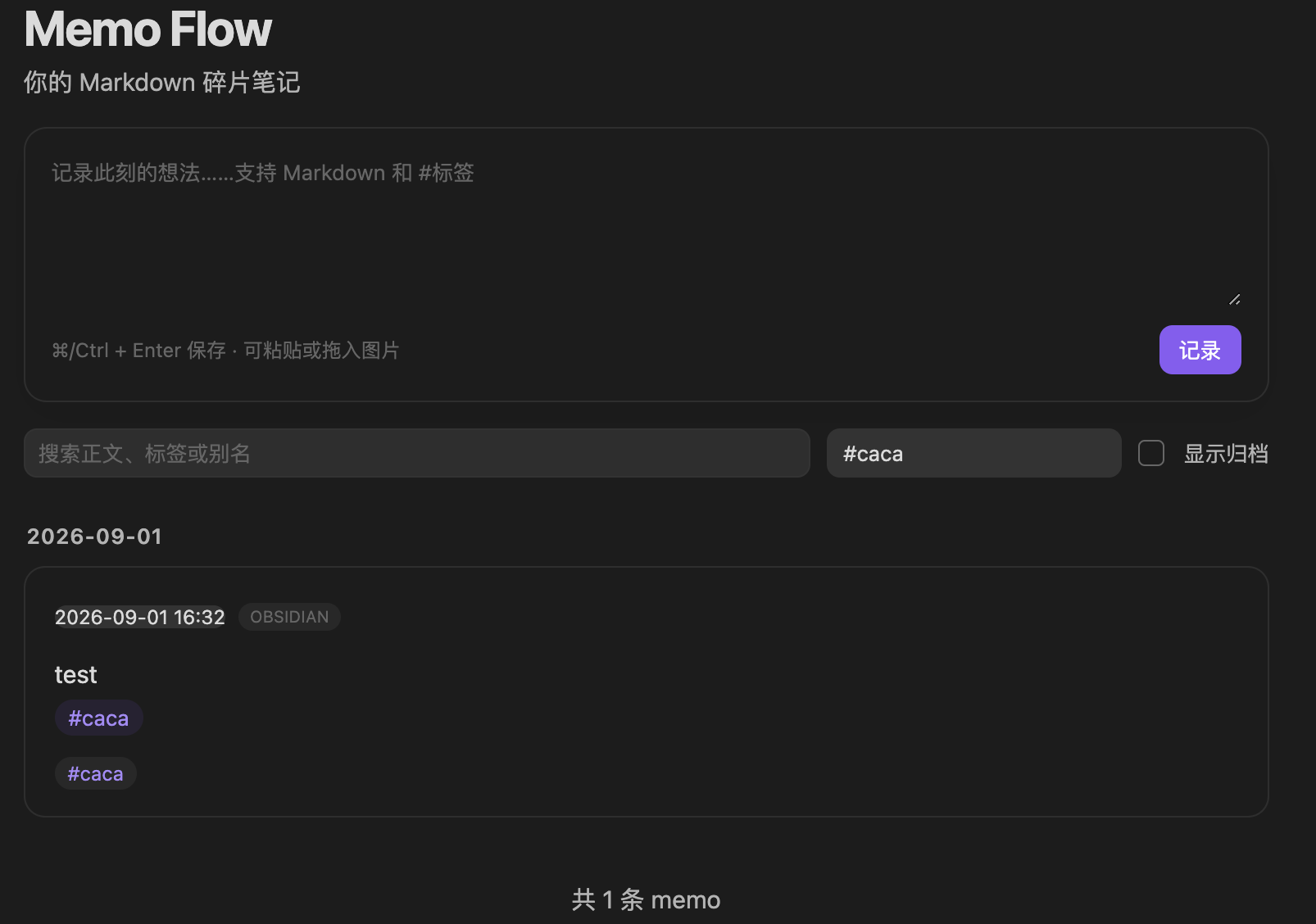
Memo Flow is a local-first, Markdown-native memo waterfall for Obsidian. Capture a thought without choosing a folder, then browse, search, tag, pin, archive, and revisit it from one chronological feed.
Why Memo Flow?
- Plain Markdown — every memo is an ordinary
.mdfile in your Vault. - Local first — no server, account, telemetry, ads, or network requests.
- Desktop and mobile — built with Obsidian Vault APIs and tested on macOS and iPhone.
- iCloud friendly — one file per memo reduces cross-device write conflicts.
- AI readable — local tools such as Codex and Claude Code can work with the files after you grant Vault access.
- No lock-in — disabling or removing the plugin never makes your notes unreadable.
Features
- Quick capture from the waterfall or Command palette.
Cmd/Ctrl + Enterto save.- Markdown rendering,
#tags, and image paste or drag-and-drop. - Chronological feed grouped by date with progressive loading.
- Full-text search and tag filtering.
- Edit, pin, archive, open, link, and move memos to the Obsidian trash.
- Optimistic conflict protection when a file changes on another device.
- Content-addressed image attachments to avoid duplicates.
- Optional dependency-free flomo HTML export importer.
Interface language: version 0.1.0 currently uses a Simplified Chinese interface. English localization is planned for a future release.
Installation
Community plugins
Memo Flow is not yet listed in the Obsidian Community directory. This section will be updated after approval.
BRAT
After the first GitHub release is available:
- Install and enable BRAT.
- In BRAT settings, select Add Beta plugin.
- Enter
Zovo314/obsidian-memo-flow. - Enable Memo Flow in Settings → Community plugins.
Manual installation
- Download
main.js,manifest.json, andstyles.cssfrom the latest release. - Create
<YourVault>/.obsidian/plugins/memo-flow/. - Copy the three files into that folder.
- Reload Obsidian and enable Memo Flow in Settings → Community plugins.
Usage
Open Memo Flow from the ribbon icon or run Memo Flow: 打开瀑布流 from the Command palette. Type a memo in the composer and press Cmd/Ctrl + Enter.
By default, data is stored under:
Memos/
├── Entries/YYYY/MM/memo-*.md
├── Assets/
├── Imports/
└── AI-GUIDE.md
You can change the root folder in the plugin settings. See the memo schema for the on-disk contract.
Import a flomo offline export
The optional Python importer converts the official flomo HTML export into Memo Flow Markdown files. It defaults to a read-only preview, preserves timestamps and tags, copies local attachments, and records an idempotent import manifest.
Preview first:
python3 tools/import_flomo.py \
  --source "/path/to/flomo@account-export" \
  --vault "/path/to/YourVault" \
  --dry-run
Apply only after reviewing the counts:
python3 tools/import_flomo.py \
  --source "/path/to/flomo@account-export" \
  --vault "/path/to/YourVault" \
  --apply
The importer never modifies the source export. Re-running the same import skips unchanged records. If both the source and local memo may have changed, it reports a conflict instead of overwriting the file.
Filesystem disclosure: the optional importer is a separate command-line tool. It reads only the export folder passed with
--sourceand writes only the Vault passed with--vault. It makes no network requests and sends no data anywhere.
Memo Flow is an independent project and is not affiliated with or endorsed by flomo.
Privacy and permissions
The Obsidian plugin:
- accesses files only inside the active Vault through Obsidian APIs;
- does not access files outside the Vault;
- does not make network requests;
- does not collect client- or server-side telemetry;
- does not install or update itself or its dependencies;
- does not require an account or paid service.
See Data and privacy for details.
Development
Requirements: Node.js 18 or later and Python 3.10 or later.
npm install
npm run check
The build produces main.js. For development, copy or clone the project into .obsidian/plugins/memo-flow/, run npm run dev, and reload the plugin after changes.
Contributing and support
- Read CONTRIBUTING.md before opening a pull request.
- Report bugs and request features in GitHub Issues.
- Report security issues according to SECURITY.md.
- Release history is documented in CHANGELOG.md.
License
MIT © 2026 Zovo314
For plugin developers
Search results and similarity scores are powered by semantic analysis of your plugin's README. If your plugin isn't appearing for searches you'd expect, try updating your README to clearly describe your plugin's purpose, features, and use cases.