Vinyl Catalog Tools
approvedby iart0s
Manage your vinyl collection: table/cards view, Discogs CSV import, and export. - This plugin has not been manually reviewed by Obsidian staff.
★ 12 stars↓ 202 downloadsUpdated 4mo agoMIT
vinyl-catalog-tools
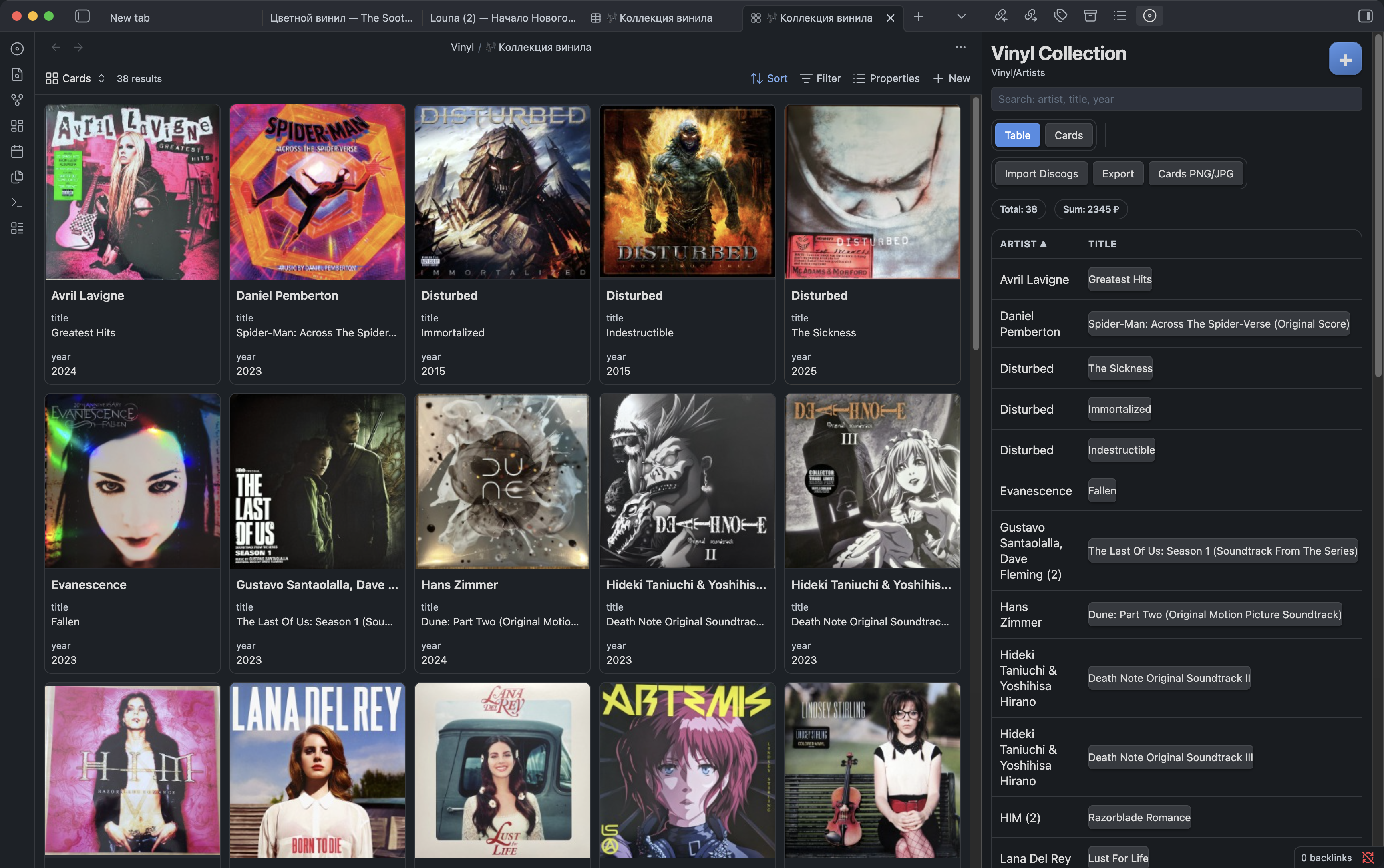
Manage your vinyl collection in Obsidian: add records, browse in table/cards view, import Discogs CSV, and export collection data or images.
Features
- Add new vinyl record cards with optional cover URL download
- Table view with sorting, search, open-note action, and hide action
- Cards view with cover previews
- Discogs CSV import (
release_id, upsert mode, cover backfill) - Export collection to
CSV,Markdown, or.base - Export card grid to
PNG/JPEG:- single image or multi-file grid
- custom columns/rows for multi-file mode
- aspect ratio options:
1:1,16:9,21:9 - light or dark theme
- RU/EN interface localization (
Auto,RU,EN)
Commands
Vinyl: Add recordVinyl: Open collectionVinyl: Initialize foldersVinyl: Create .base fileVinyl: Import Discogs data
Screenshot
Default Paths
- Collection folder:
Vinyl - Records folder:
Vinyl/Artists - Covers folder:
Vinyl/covers - Mobile image export folder:
<Collection folder>/exports
All paths are configurable in plugin settings.
Quick Start
- Enable Community Plugins in your vault.
- Enable
Vinyl Catalog Tools. - Run
Vinyl: Initialize folders. - (Optional) Run
Vinyl: Import Discogs data. - Run
Vinyl: Open collection.
Notes
- Discogs import works from local CSV only (no token required).
- On mobile, exported card images are saved into vault (
<Collection folder>/exports). - Hidden records are marked with frontmatter
hidden: true.
Say Thanks
If this plugin saves you time and you want to support development:


For plugin developers
Search results and similarity scores are powered by semantic analysis of your plugin's README. If your plugin isn't appearing for searches you'd expect, try updating your README to clearly describe your plugin's purpose, features, and use cases.