by luke-evan
Write your WakaTime project, language, editor and category stats into your LifeOS daily note.
↓ 40 downloadsUpdated 14d agoMIT
WakaTime Box for LifeOS
Writes your WakaTime stats into your LifeOS daily note — automatically.
Usage
- Put an empty
wakatimecode block into your LifeOS daily note template:
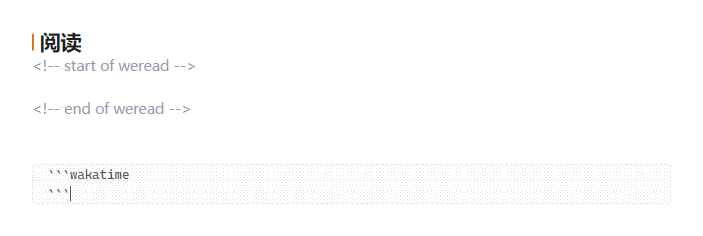
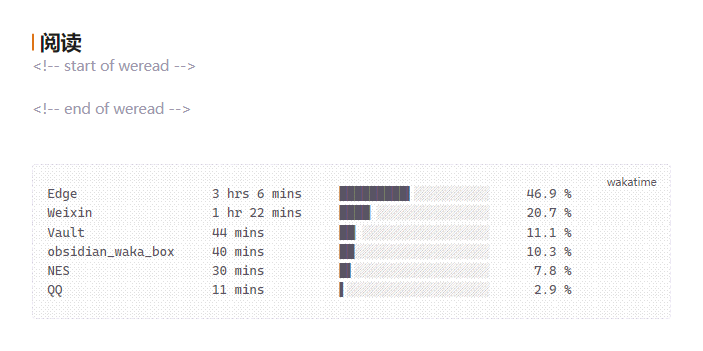
- That's all. Whenever LifeOS creates a daily note, the box is filled and kept up to date (on note creation, once per hour, or on demand):
Requirements
- Obsidian 1.13.0 or newer (older Obsidian versions keep the last compatible release automatically)
- LifeOS enabled, with Periodic Notes turned on (the plugin reads LifeOS settings to find the daily note, and never creates notes itself)
- A WakaTime account; paste your API key into the plugin settings
Install
- Obsidian community plugins (once published): Settings → Community plugins → search for WakaTime Box for LifeOS → Install; updates then come from the GitHub releases automatically.
- BRAT (before publication / beta channel): add
Luke-Evan/obsidian-wakatime-box-lifeosin the BRAT settings, then enable WakaTime Box for LifeOS. BRAT installs and updates the plugin straight from the GitHub releases. - Manual: download
main.jsandmanifest.jsonfrom the latest release into<vault>/.obsidian/plugins/wakatime-box-lifeos/, then enable the plugin.
Settings & commands
- Display data: projects, languages, editors or categories — the six biggest entries of the day.
- Sync now: buttons for today and yesterday; the same actions exist as commands, so you can bind hotkeys to them in Settings → Hotkeys (search for WakaTime).
- Copy the stats of any date to the clipboard command, for weekly notes or reports.
Credits & license
Fork of simonla/obsidian_waka_box (MIT); the daily note layout follows LifeOS. Licensed under MIT.
For plugin developers
Search results and similarity scores are powered by semantic analysis of your plugin's README. If your plugin isn't appearing for searches you'd expect, try updating your README to clearly describe your plugin's purpose, features, and use cases.