Wechatian
approvedby laruence
WeChat messaging bridge: send and receive messages, attachments, and articles between WeChat and your vault - This plugin has not been manually reviewed by Obsidian staff.
Wechatian


Your WeChat, inside your vault.
Wechatian is an Obsidian plugin that bridges WeChat and your vault through Tencent's official ilink bot gateway — no unofficial protocol hacks, no self-hosted relay. Messages you receive become searchable notes; your AI assistant can WeChat you by dropping a file into a folder.
直接打通微信到你的知识库
Wechatian 是一个 Obsidian 插件,通过腾讯官方 ilink 机器人网关打通微信与你的知识库——走官方协议,无需自建中转站。收到的消息自动变成可搜索的笔记;AI 助理只需往文件夹里丢一个文件,就能给你发微信。
Why
Your most important conversations happen on WeChat — but they're trapped in the app: unsearchable, unlinkable, lost when you switch phones. Wechatian pulls them into your knowledge base:
- Inbox on autopilot — messages, photos, documents, and article links received on WeChat are written into your vault as Markdown, automatically. Searchable, linkable, permanently yours.
- AI that reaches you — a long task finished? A decision needed? Your agent writes one file and you get a WeChat notification. Reply one line, it reads it back from the vault.
- Official channel — runs on the WeChat-approved ilink bot gateway; no modified clients, no self-hosted relay.
- Local by design — messages are written only to your vault. Nothing is uploaded, stored, or analyzed anywhere else.
Features
- Inbox — incoming WeChat messages become daily conversation notes (
<inbox>/YYYY-MM-DD.md, received + sent in one timeline); media decrypted intoattachments/; links fetched in full as markdown article notes, grouped by official account - Outbox — a file-based send channel: drop an
.md(sent as text, markdown supported) or an image / video / document ≤100MB (sent as an attachment) intooutbox/ - Agent-ready — the plugin maintains an
Agent.mdin the inbox folder teaching any AI assistant the outbox protocol; see Agent.md in this repo for the full guide - QR login — scan once; the plugin binds to the scanning account and only accepts messages from it
- Configurable paths — inbox / attachments / articles / outbox folders are all settable
- Receipt replies — once a message is recorded, a confirmation is sent back over WeChat (where the image/file/article was saved); toggle in settings, follows the UI language
- Trilingual UI — English / 简体中文 / 繁體中文 (follows Obsidian by default)
Install
Community store (recommended): Obsidian → Settings → Community plugins, search Wechatian, install and enable.
From a release: copy main.js, manifest.json, styles.css from the latest release into <vault>/.obsidian/plugins/wechatian/ and enable (assets are CI-built and signed: gh attestation verify main.js --owner laruence).
From source:
git clone https://github.com/laruence/wechatian.git && cd wechatian
npm install
OBSIDIAN_PLUGIN_DIR=/path/to/vault/.obsidian/plugins/wechatian npm run build
Via AI agent: hand it this repo and say "Read the README and install Wechatian into my vault."
Quick start
Five steps, about five minutes:
-
Open Obsidian → Settings → Wechatian. A QR code appears in the login section.
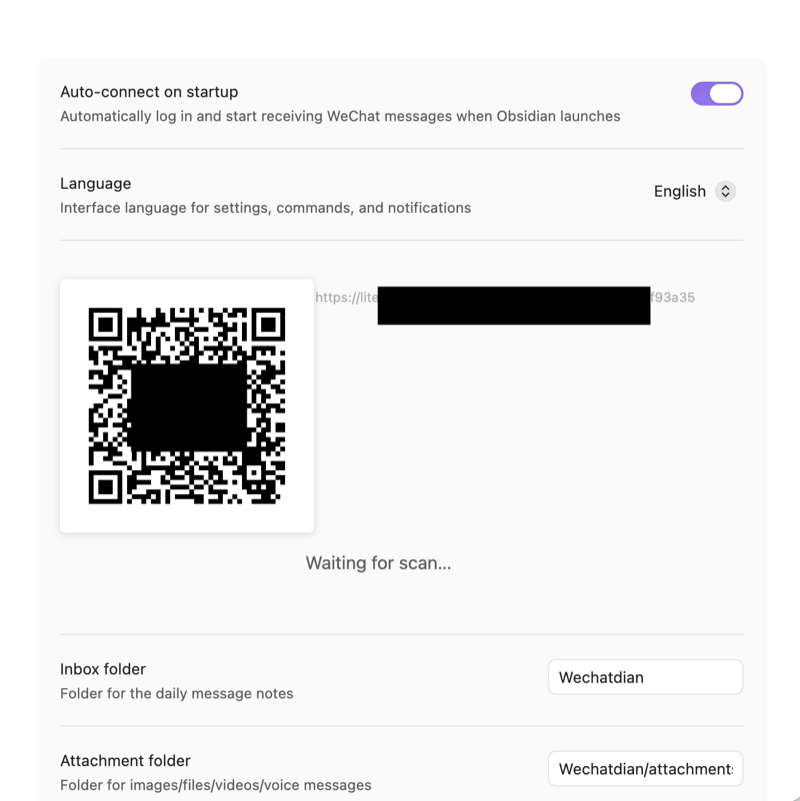
Desktop: the settings page opens with a QR code. -
Scan it with WeChat and confirm — a bot contact appears in your contacts, and the plugin reports the login:
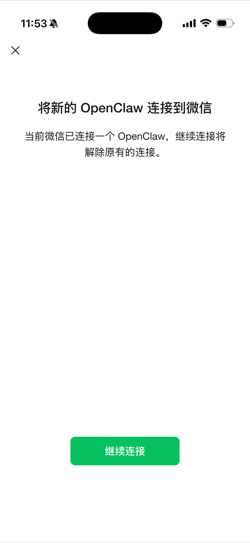
Phone: confirm the new connection.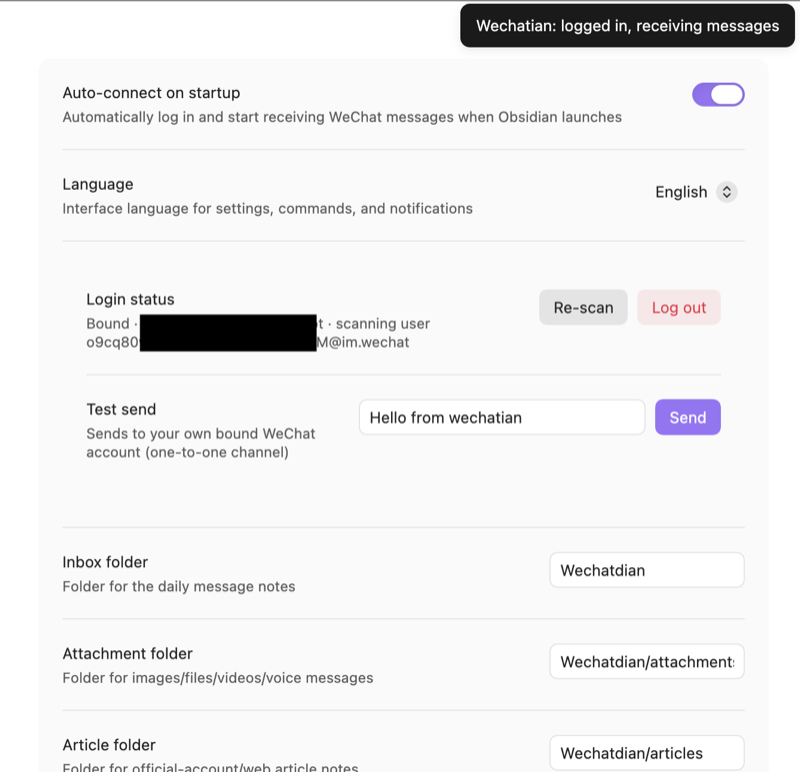
Desktop: "logged in, receiving messages". -
Try Send now and it fails — the gateway issues the send credential only after the bound account has messaged the bot:
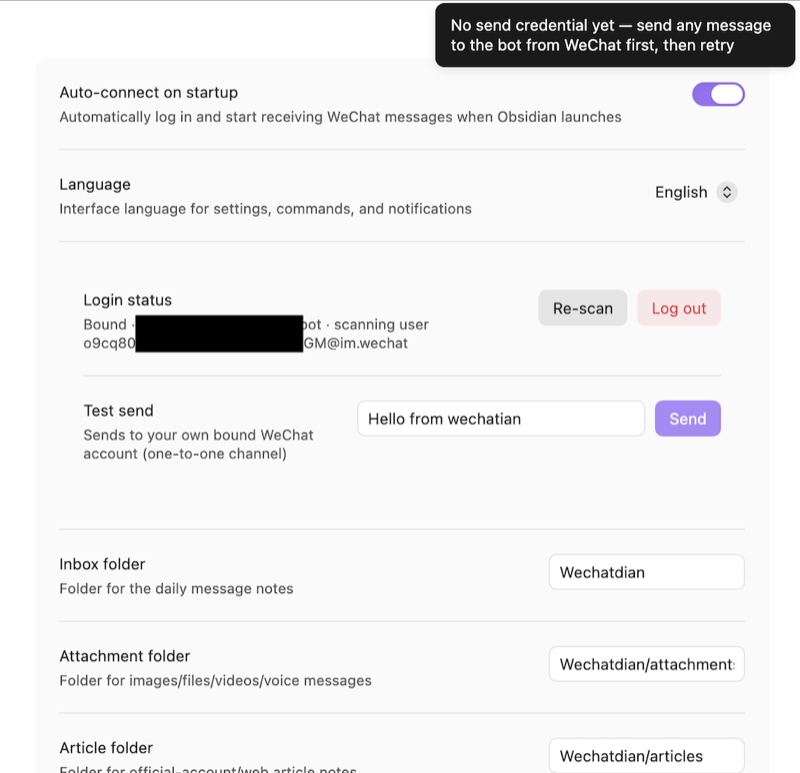
Desktop: sending stays locked until you message the bot once.So you send the bot a message from WeChat — "Hello".
-
The desktop receives it — and with that, the outbound direction unlocks:
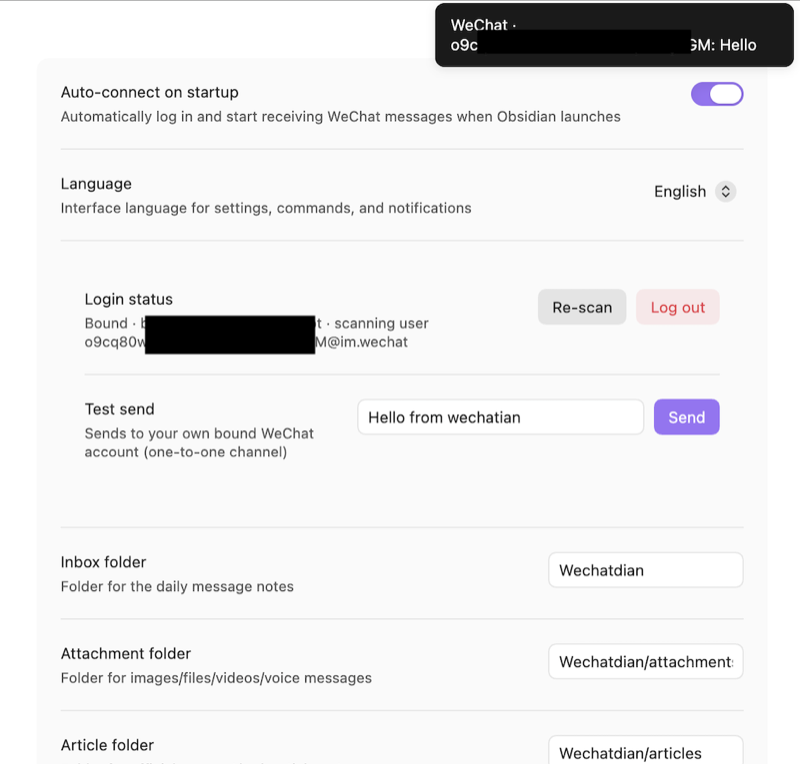
Desktop: your "Hello" arrives — outbound unlocked. -
Back in settings, hit Send — the desktop confirms the send, and the phone receives the bot's reply:
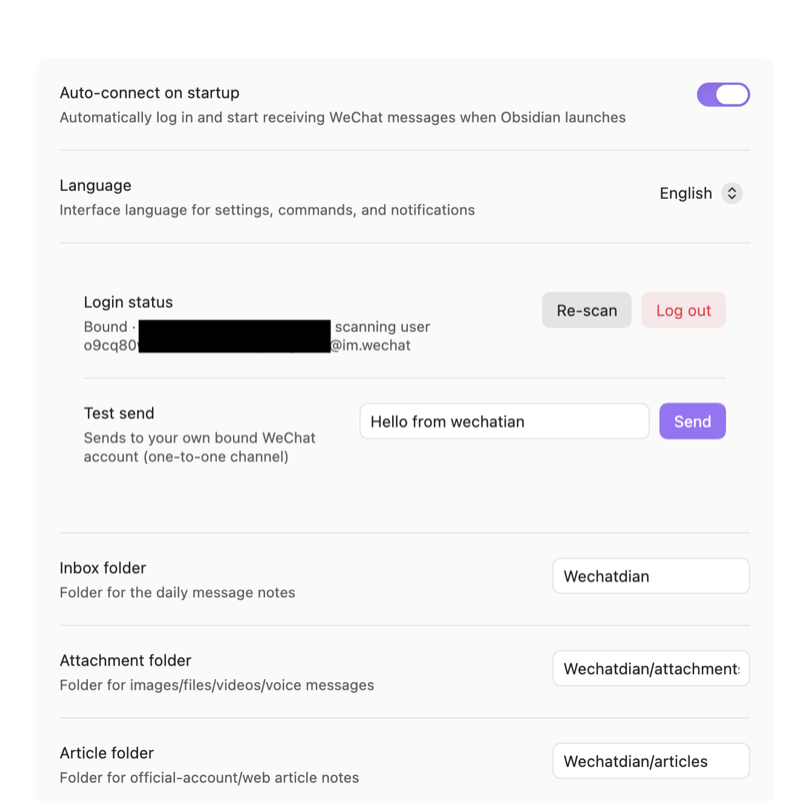
Desktop: bound, Test send ready.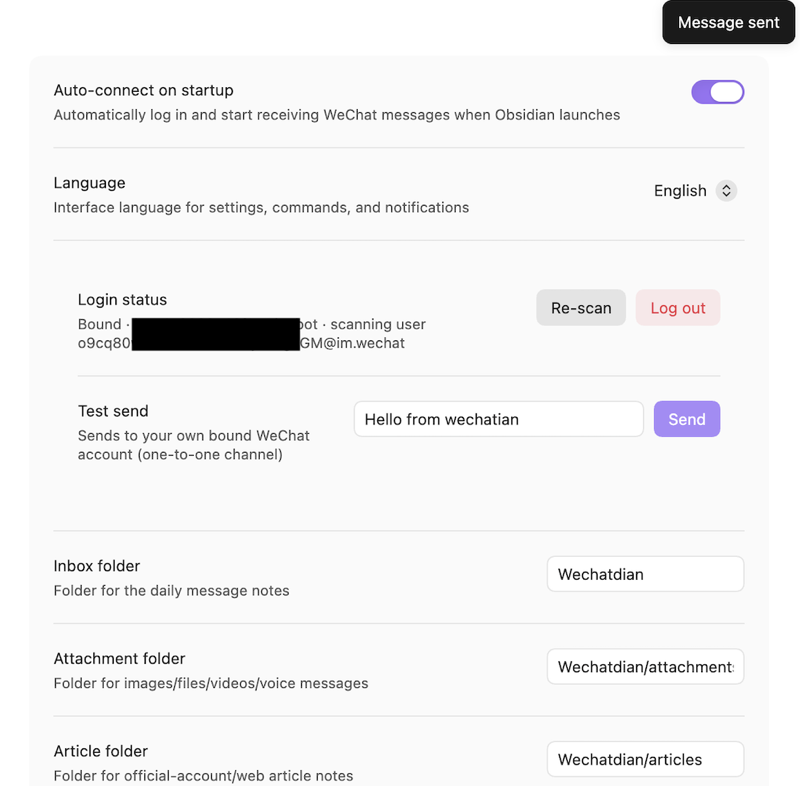
Desktop: "Message sent" — the send went out.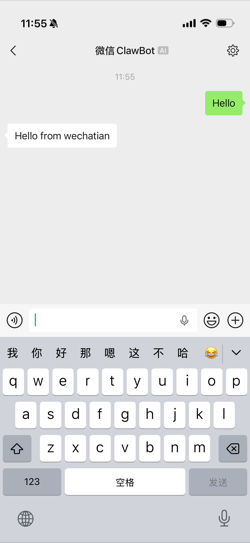
Phone: the bot replies "Hello from wechatian".When that message lands on your phone, you're done — the bridge is live in both directions.
Usage
Wechatian/              # inbox folder (all paths configurable)
├── Agent.md            # instructions for AI agents (plugin-maintained)
├── 2026-08-17.md       # daily conversation note (received + sent)
├── attachments/        # media
├── articles/           # full-text article notes, grouped by account
│   └── <account>/      # one folder per official account (optional)
│       ├── 2026-08-17 Some title.md
│       └── assets/     # the article's own images
└── outbox/             # write a file here to send it
All paths are configurable in settings.
Receiving
- Messages land in the daily note, timestamped and marked received/sent.
- Media (photos, videos, files, voice) is decrypted into
attachments/and embedded in the daily note. - Article links are fetched in full and saved as markdown notes under
articles/, grouped into a subfolder per official account (toggleable). The article's own images go into anassets/subfolder alongside the note; non-account links stay flat with images inarticles/assets/.
Sending
Write one file into outbox/. No API, no recipient — it's a one-to-one channel to your own bound WeChat:
Write into outbox/ | Result |
|---|---|
notify.md | content sent as a text message (markdown supported — headings, lists, bold, code blocks) |
chart.png, report.pdf … | sent as an attachment (image / video / document, ≤100MB) |
A "Message sent" toast confirms delivery; the message is also recorded in the daily note.
The plugin picks files up on its next poll (~30–60 s). Judge the result by the file:
- File gone = sent — recorded in today's conversation note (media gets a copy in
attachments/and is linked) - File still there = failed — an
.mdgets a trailing<!-- Wechatian send failed: ... -->comment; media gets a<name>.wechatian-failed.mdsidecar explaining why
For AI agents
This is the half that makes Wechatian more than a backup tool: agents read the plugin-maintained <inbox>/Agent.md, learn the outbox protocol, and start notifying you — task done, question to settle, nothing more. See Agent.md for the full protocol (sending, result judging, reading replies, rate limits). Never call any API; the file channel is the whole interface.
FAQ
What if my computer is offline? No problem. Messages sent to the bot while you're offline are held by the gateway, and Wechatian picks them up automatically the next time you open Obsidian. One caveat: how long the gateway keeps messages isn't documented — treat very old offline messages as best-effort.
Why can't it send messages right after I scan the QR? The gateway issues the send credential only after the bound account has sent the bot at least one message. Send any message to the bot from WeChat once (step 3 above) and sending unlocks.
Does it receive images, videos, and files?
Yes — media arrives decrypted in attachments/ and is embedded in the daily note. Links to articles are additionally fetched in full as markdown notes under articles/ (grouped by official account), with the article's images in an assets/ subfolder alongside the note.
Why didn't a forwarded article/file arrive? Known gateway limitation: the bot can't receive forwarded articles or files. Send the original link or the file itself instead.
Does it work on Obsidian mobile? The plugin runs on desktop only. But the notes it writes are plain Markdown — sync your vault (iCloud / Git / Obsidian Sync) and read the full history on your phone.
Good to know
- Rate limit — the gateway throttles proactive sends; this is a notification/decision channel, not a chat tool
- Offline catch-up — messages sent while the computer is offline are picked up automatically next time Obsidian starts (gateway retention period is undocumented)
- One device per account — concurrent long polling from multiple devices competes for the message stream; run the plugin on one machine
- No forwarding — see FAQ above
- Privacy & security — messages live only in your vault; only the QR-scanning account is accepted
Ideas
- AI notification channel — the headline use case: your agent pings you on WeChat when long work finishes, you steer it back with one reply
- Personal CRM — conversations with key contacts land in your vault automatically; add tags, link them to project notes
- Journal byproduct — daily notes double as a searchable timeline of your day's conversations
- Any tool can send — the outbox is just a folder: scripts, shortcuts, cron jobs — anything that can write a file can WeChat you
Testing
npm test # builds, then runs the node:test suite (scripts/unit-test.js)
Unit tests (tests/unit.ts) cover the crypto layer, import pipeline (fake in-memory vault), outbox flush paths, receipt-reply assembly, failure classification, and i18n dictionary parity. CI runs lint, typecheck, tests, and build.
中文说明
微信 ↔ Obsidian 双向桥接插件:收消息自动入 vault,agent 往发件箱丢个文件就能给你发微信。走腾讯官方 ilink 机器人网关,数据只落本地。
Wechatian 把微信变成 vault 的双向通道:
- 收:消息实时写入每日对话笔记(收发同一时间线);媒体解密存
attachments/;链接全文抓取成 markdown 文章笔记存articles/(按公众号分子目录,可关闭),文章配图存各文章目录下的assets/ - 发:往
outbox/丢文件——.md作为文本消息发送(支持 markdown),图片/视频/文档(≤100MB)作为附件发送 - Agent:插件在收件箱目录维护
Agent.md,AI 助手读完即学会发件协议——长任务跑完、需要拍板时主动给你发微信;完整指南见 Agent.md - 扫码登录:扫一次即绑定该账号,只接收该账号的消息;路径全部可配置;界面中(简/繁)英三语
快速上手(约五分钟):
- Obsidian → 设置 → Wechatian,登录区出现二维码
- 微信扫码确认,通讯录里出现一个 bot 联系人
- 先在微信里给 bot 发任意一条消息——网关只在绑定账号发过消息后才下发发送凭证,这一步解锁发送方向
- 状态栏显示"微信已连接",双向通道就绪
注意事项:网关对主动消息限流(通知/拍板渠道,不是聊天工具);同一账号只在一台设备运行插件(多设备长轮询会抢消息流);bot 收不到转发的文章和文件,请发原始链接或文件本身。电脑离线也没关系——离线期间发给 bot 的消息会在下次打开 Obsidian 时自动抓取(网关保留多久暂不明确)。
安装方式与英文版相同:社区市场搜索 Wechatian;或从 release 复制三个文件到 .obsidian/plugins/wechatian/;或 npm run build 从源码构建。
License
For plugin developers
Search results and similarity scores are powered by semantic analysis of your plugin's README. If your plugin isn't appearing for searches you'd expect, try updating your README to clearly describe your plugin's purpose, features, and use cases.