by Rohit Girdhar
Switch notes and the file tree between Git worktrees in the same window, and inspect changes and Markdown previews.

Worktree Switcher
Switch Obsidian's notes and file tree between Git worktrees in the same window. Inspect changed files, read diffs, and preview Markdown.
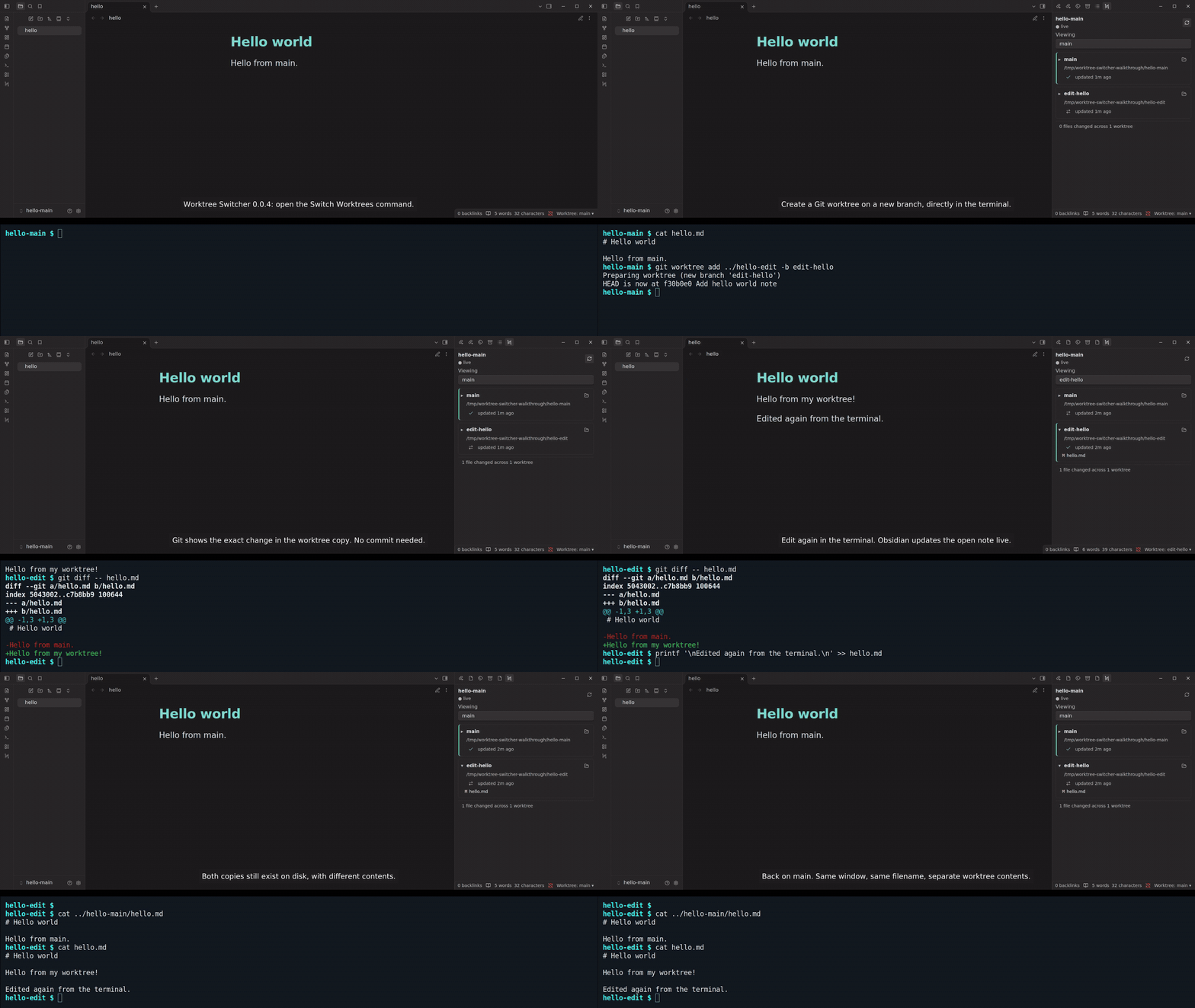
Watch the terminal and Obsidian demo.
Recorded with Worktree Switcher 0.0.4 and Obsidian 1.14.4. Open Switch Worktrees,
create a worktree in the terminal, and edit hello.md. Switch Obsidian to see the
new contents, inspect the diff and Markdown preview, and watch another terminal
edit update the note live. Switching back shows main's original text.
Install and update
Requires desktop Obsidian 1.14.4 or later and Git on PATH.
- Download
main.js,manifest.json, andstyles.cssfrom the release page. - Copy all three into
<vault>/.obsidian/plugins/worktree-switcher/. - Enable Worktree Switcher in Settings → Community plugins.
Community directory listing. Availability in Obsidian depends on directory review and publication.
For automatic updates before directory availability, use
BRAT to add
rohitgirdhar/obsidian-worktree-switcher, select Latest version, and enable
its update checks at startup. Manual installations require downloading each release.
Use
Open a vault inside the main checkout of a Git repository. Create worktrees with
Git or another tool, for example git worktree add ../hello-edit -b edit-hello.
Each worktree must contain the vault at the same relative path.
Open Worktree Switcher: Switch Worktrees from the command palette, or click the Worktree Switcher ribbon icon. Click a worktree's two-arrow icon to switch; a check marks the current worktree. The panel picker and status-bar picker also switch. Expand a row to open its changed-file diff or Markdown preview.
Notes and the file tree change in place. Settings and plugins stay in the vault you originally opened. Normal edits write to the worktree you are viewing. Hidden files are omitted from change lists unless enabled in plugin settings.
The plugin only runs read-only Git queries. It does not create worktrees, commit, push, merge, delete worktrees, or create pull requests. For unrelated histories, the change list compares the worktree against its own HEAD.
Recovery and compatibility
If another tool deletes the current worktree, choose a surviving worktree from the status bar. The original vault's settings folder must remain available.
Open text buffers can be saved under the original vault's
.obsidian/worktree-recovery/ folder before their tabs are cleared. A notice gives
the file path. Custom hidden configuration folders are supported. Recovery files
contain note text; copy it to the intended note yourself. This does not restore
externally deleted files, and non-text editors must be saved separately.
Same-window switching uses private Obsidian desktop adapter and metadata APIs. The plugin checks compatibility before switching, but a newer Obsidian version meeting the minimum is not a guarantee. Other plugins may cache the original vault path and need additional support.
Verified on 2026-10-21 with Obsidian 1.14.4 on Linux: fresh installation, same-window switching, changed note contents, preserved worktree edits, and unchanged Git refs. Graphical macOS and Windows verification remains outstanding. Automated tests run on Linux and macOS. Graphical editor-buffer recovery remains unverified because Obsidian may close deleted files' tabs before switching.
To list and switch worktrees, the plugin reads Git metadata and note files in the
configured repository, including worktrees outside the open vault. It enumerates
vault paths to refresh Obsidian's file tree. If the active worktree is deleted,
it can write open text buffers to .obsidian/worktree-recovery/ in the original
vault. Previews stay inside the selected worktree. Folder icons ask the operating
system to reveal that worktree. The plugin has no telemetry or network requests.
Markdown rendering uses Obsidian's normal renderer and plugin behavior.
Previews reject paths and symlinks that resolve outside the selected worktree. Git diff disables external diff and text-conversion commands.
Git runs as a child process with fixed arguments. The plugin only requests read-only status, diff, log, revision, merge-base, and worktree-list operations; it does not run a command shell or perform Git writes. Diff output disables external diff and text conversion. These operations still use the operating-system permissions of Obsidian and are not isolated by a separate sandbox.
Development
Node.js 20 or later. No runtime or build dependencies.
npm ci
npm test
npm run check
npm run build
dist/ contains the runtime files, LICENSE, NOTICE, installation ZIP, and
SHA256SUMS for local packaging. GitHub releases contain only main.js,
manifest.json, and styles.css, with GitHub artifact attestations. A manual
workflow run only attests a rebuild after checking those three files against the
existing release. Verify a downloaded asset with:
gh attestation verify main.js --repo rohitgirdhar/obsidian-worktree-switcher
License
MIT. Derived from Worktree Viewer
by Sebastian Winkler. Sebastian Winkler's copyright notice is preserved alongside Rohit Girdhar's
notice for this project's changes. Local installation ZIPs include NOTICE
and LICENSE; main.js also carries the complete license.
For plugin developers
Search results and similarity scores are powered by semantic analysis of your plugin's README. If your plugin isn't appearing for searches you'd expect, try updating your README to clearly describe your plugin's purpose, features, and use cases.