by Rohith A
Markdown tables as living databases. Rich UI with full Obsidian markdown rendering, [[wikilinks]], Alt+Click editing, sort, filter, formula columns, Kanban/Gallery/Calendar views, export, schema inference and more.
ZiBase
Markdown tables as living databases — for Obsidian.

ZiBase turns an ordinary markdown table into a rich, interactive database view: sortable/filterable columns, Kanban/Gallery/Calendar layouts, drag-and-drop, formula columns, and inline editing — all while your data stays as plain, portable markdown. No extra files, no proprietary format, no lock-in.
Built from scratch under ZIYAL (ழியல்).
Screenshots
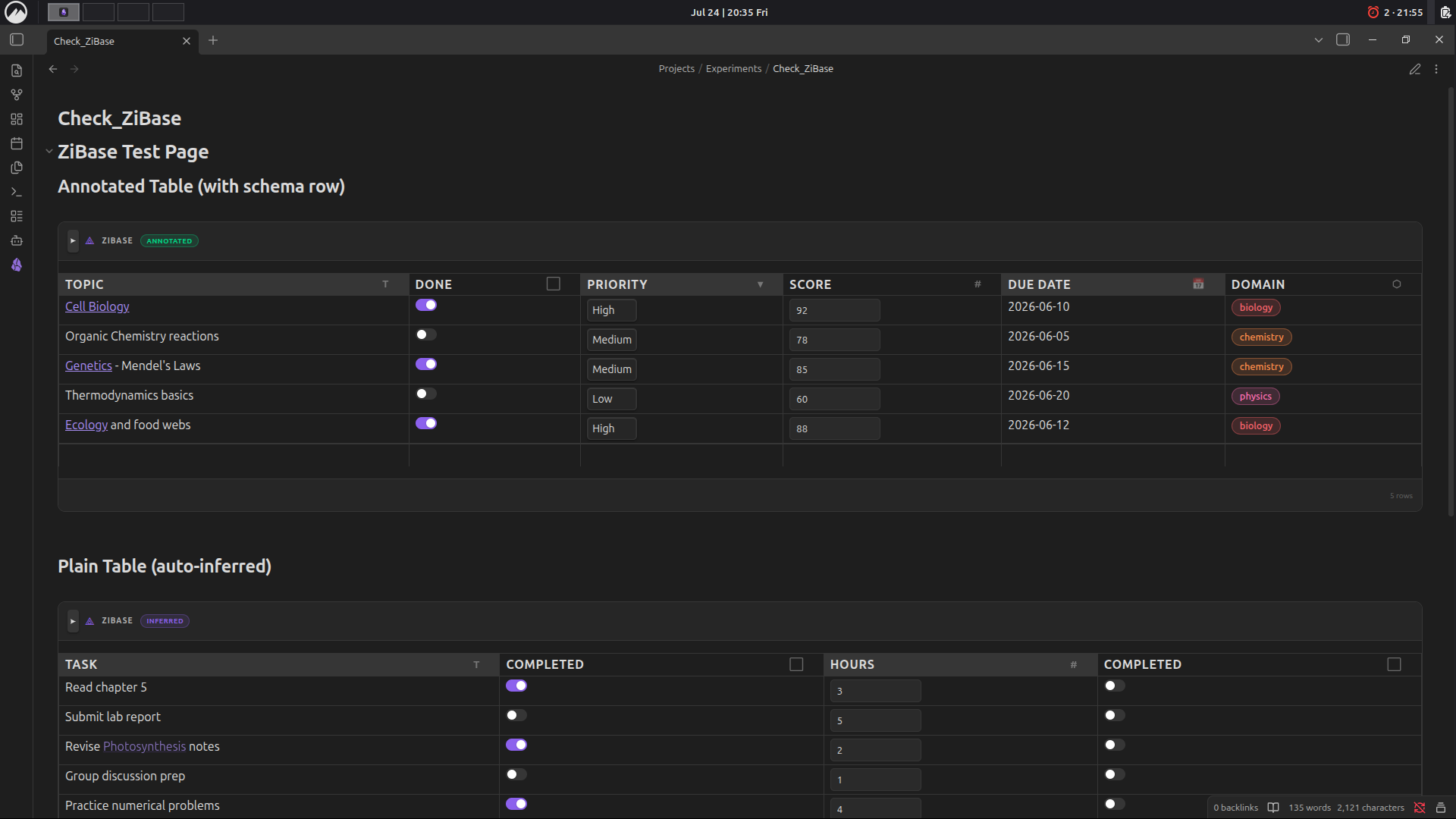 Annotated table with custom column types (Toggle, Select, Number, Date, Label) and auto-inferred plain table.
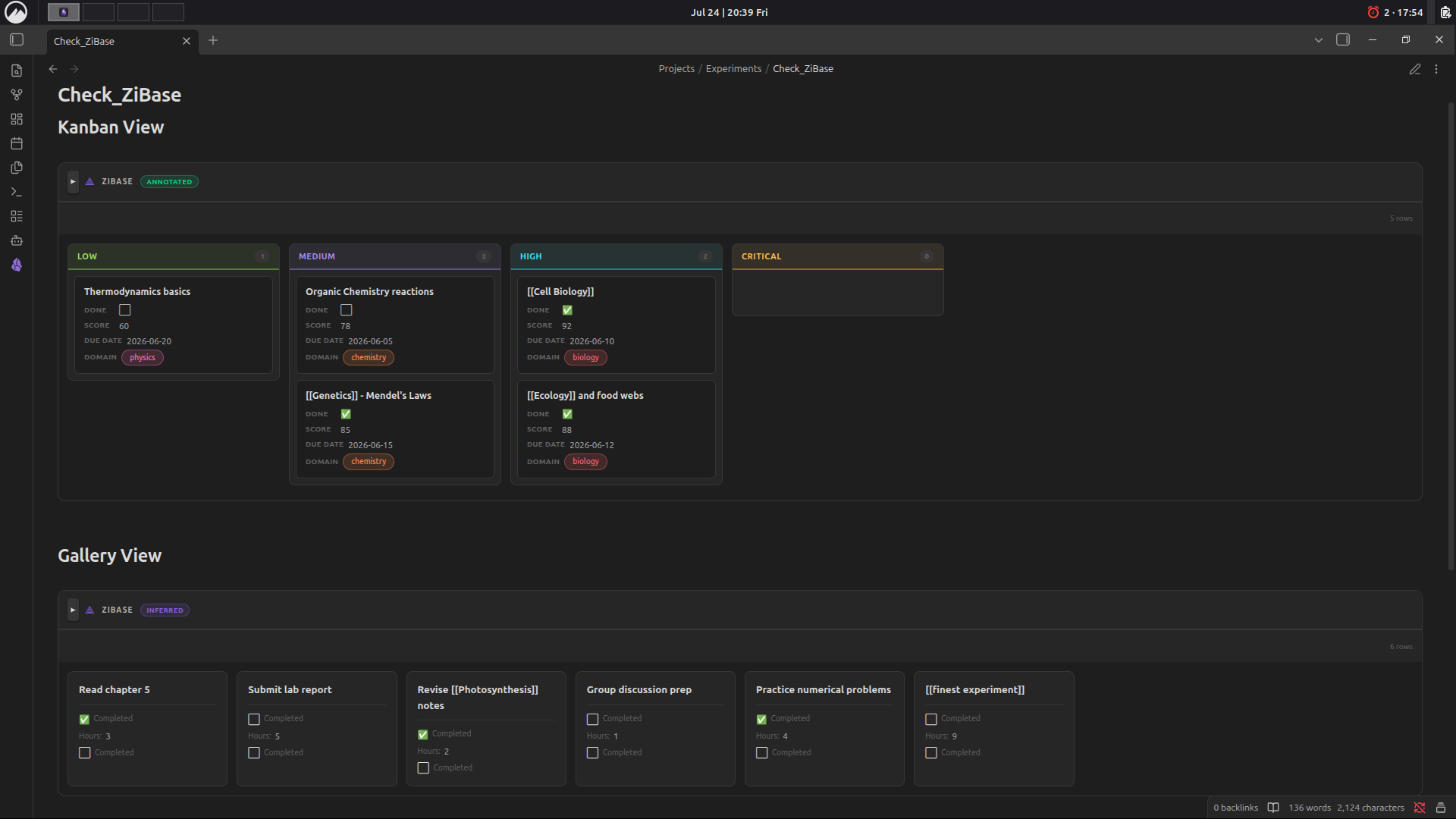 Kanban view grouped by priority, and Gallery view for quick card-based browsing.
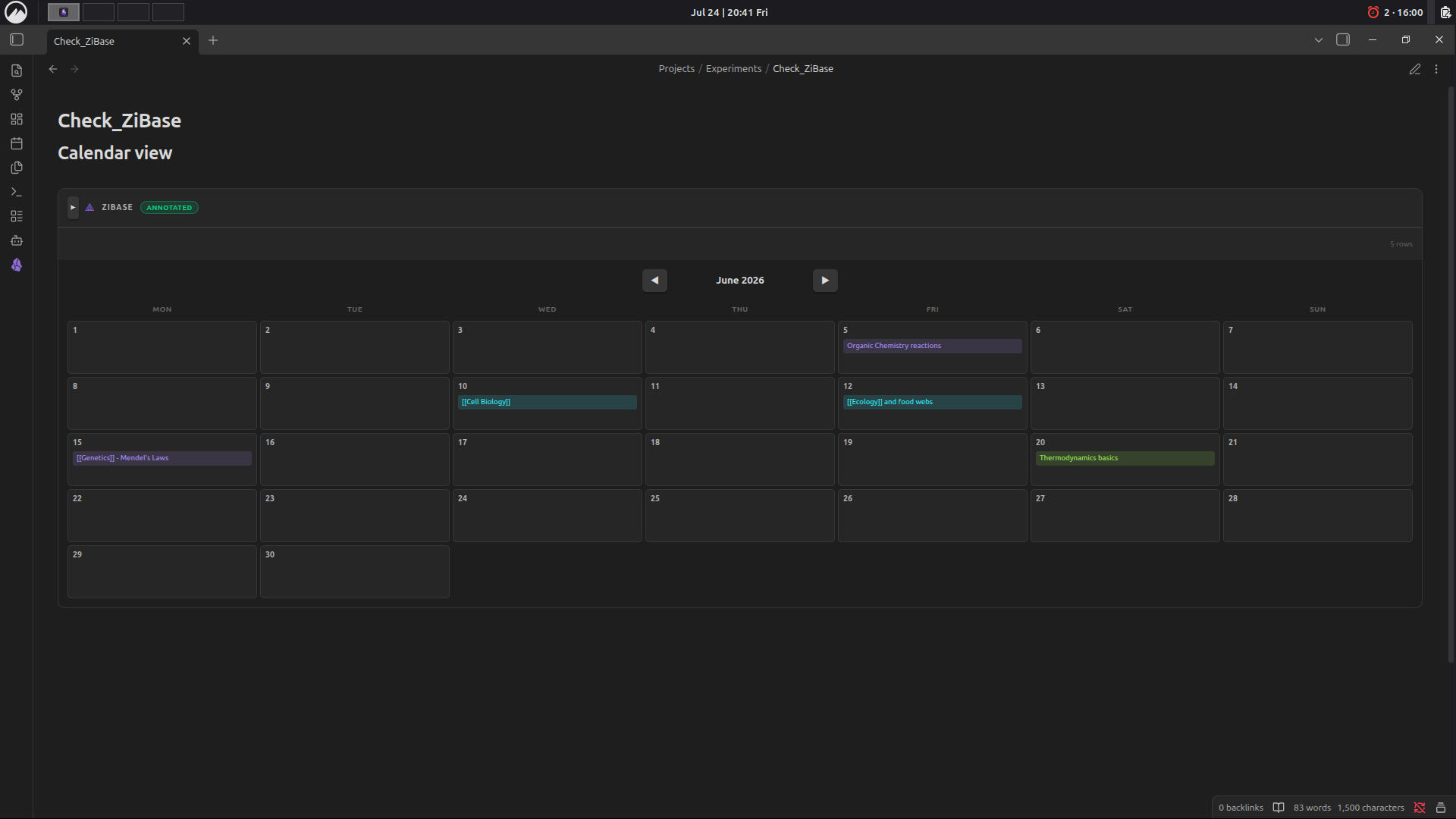 Calendar view automatically generated from a Date column.
Features
- 📊 Multiple views — Table (default), Kanban, Gallery, and Calendar, switchable per-table
- 🖊️ Inline editing — Alt+Click any cell to edit in place, even rendered links/wikilinks
- 🧮 Formula columns — reference other columns by name (e.g.
Price * Qty), noeval(), powered by a safe recursive-descent expression parser - 🏷️ Typed columns — Text, Toggle, Select, Label, Number, Date, Formula
- 🔍 Schema inference — works on plain tables with zero setup; auto-detects column types from content
- 🗂️ Kanban view — group by any Select/Label column, drag cards between lanes
- 📌 Zero extra files — everything lives in the markdown table itself, using HTML-comment annotations Obsidian already ignores in Reading View
Installation
- Open Settings → Community Plugins in Obsidian
- Disable Safe Mode (if prompted) and click Browse
- Search for ZiBase and click Install, then Enable
(Manual install: copy manifest.json, main.js, and styles.css into <vault>/.obsidian/plugins/zibase/, then enable it from Community Plugins.)
Usage Guide
1. Start with any markdown table
ZiBase renders any table in Reading View — even a plain one with no annotations. Column types are auto-inferred from the header name and content (e.g. a column named status becomes a Select column; done/completed become a Toggle; tag/tags/category/label become Label columns).
| Task                  | Completed | Hours | Category   |
| ---------------------- | --------- | ----- | ---------- |
| Read chapter 5         | true      | 3     | Study      |
| Submit lab report      | false     | 5     | Assignment |
2. Add an explicit schema row for full control
For precise typing, add a schema row as the 3rd line of the table (right after the header separator), with one annotation comment per column:
| Topic          | Done                        | Priority                               | Score                       | Due Date                  | Domain               |
| -------------- | --------------------------- | --------------------------------------- | ---------------------------- | -------------------------- | --------------------- |
| <!-- zibase: text --> | <!-- zibase: toggle --> | <!-- zibase: select:Low,Medium,High,Critical --> | <!-- zibase: number --> | <!-- zibase: date --> | <!-- zibase: label --> |
| Cell Biology   | true                         | High                                     | 92                            | 2026-06-10                  | biology                |
Available column types:
| Type | Annotation | Notes |
|---|---|---|
| Text | <!-- zibase: text --> | Renders markdown, wikilinks included |
| Toggle | <!-- zibase: toggle --> | true / false → checkbox |
| Select | <!-- zibase: select:Opt1,Opt2,Opt3 --> | Dropdown with fixed options |
| Label | <!-- zibase: label --> | Colored chip, auto-colored per value |
| Number | <!-- zibase: number --> | Right-aligned, sortable numerically |
| Date | <!-- zibase: date --> | YYYY-MM-DD, used for Calendar view |
| Formula | <!-- zibase: formula:Price * Qty --> | Reference other column names directly |
3. Switch views
Add a view annotation on its own line, right before the table (or use the view-switcher icons in the table's toolbar — this writes the annotation for you):
<!-- zibase-view: kanban:Status -->
| Task | Status | Priority |
...
<!-- zibase-view: kanban:ColumnName -->— Kanban board grouped by a Select/Label column<!-- zibase-view: gallery -->— card gallery<!-- zibase-view: calendar -->— calendar grouped by a Date column- No annotation — default Table view
4. Editing
- Alt+Click any cell to edit it in place — works even on rendered links/wikilinks
- Kanban: drag a card between lanes to update its grouping column
- Add row: use the "+ Add row" button at the bottom of the table
- All edits write straight back to the markdown table — your file stays the single source of truth
5. Formula columns
Formula columns reference other column names directly (case-insensitive), no cell syntax like =A1*B2:
<!-- zibase: formula:Price * Qty -->
Notes & Limitations
- Reading View only (Live Preview support not yet available)
- Desktop and mobile compatible (
isDesktopOnly: false)
Feedback / Issues
Please open an issue on the GitHub repo with a minimal example table if you hit a bug — screenshots of Reading View + the raw markdown source are the fastest way to get it fixed.
Support
ZiBase is built solo as a passion project. If it saves you time or makes your Obsidian vault feel a little more alive, consider sponsoring — it genuinely helps with university expenses and keeps the motivation going! 🙏
Completely optional — even a ⭐ star on the repo means a lot!
License
MIT — see LICENSE
For plugin developers
Search results and similarity scores are powered by semantic analysis of your plugin's README. If your plugin isn't appearing for searches you'd expect, try updating your README to clearly describe your plugin's purpose, features, and use cases.