Activity Atlas
approvedby Alek
Visualizes live vault activity as a burst-based timeline with optional read-only Git status. - This plugin has not been manually reviewed by Obsidian staff.
Activity Atlas
A local, live activity timeline for every file in your Obsidian vault.


Activity Atlas turns Obsidian's live file events into compact, readable activity bursts. It is built for large vaults where a flat list of recently edited Markdown notes does not show the whole picture.
Live-only by design: Activity Atlas records changes while Obsidian is open. It does not scan the vault at startup, reconstruct changes made while Obsidian was closed, execute external commands, or use network services.
Screenshots
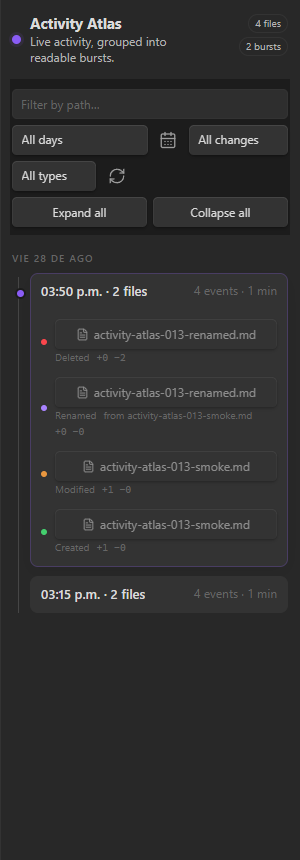
Dark theme
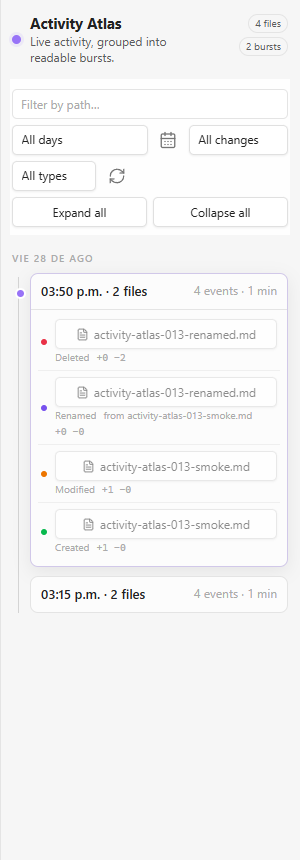
Light theme
Features
- Tracks file creation, modification, rename, and deletion.
- Receives Obsidian's live activity events for every file type; configured text formats additionally receive line-change statistics.
- Groups nearby events into collapsible activity bursts.
- Filters by path, day, operation, and extension.
- Includes a six-week activity calendar with accessible keyboard navigation.
- Coordinates multiple Obsidian instances with a writer lock so only one instance records.
- Uses no network services, telemetry, accounts, or advertising.
Scope and privacy
| Capability | Contract |
|---|---|
| Network requests and telemetry | None |
| Shell commands and external processes | None |
| Vault inventory at startup | None |
| Reading user content | Only the changed text file, when line statistics are enabled for its extension |
| Writing user content | None |
| Changes made while Obsidian is closed | Not observed or reconstructed |
Requirements
- Obsidian 1.13.0 or later on desktop or mobile.
Installation
Community Plugins
Activity Atlas is awaiting its initial Community directory listing. Once it is available:
- Open Settings → Community plugins in Obsidian.
- Select Browse and search for Activity Atlas.
- Select Install, then Enable.
Manual installation
- Download
main.js,manifest.json, andstyles.cssfrom the latest GitHub release. - Create
<vault>/.obsidian/plugins/activity-atlas/. - Copy the three files into that folder.
- Reload Obsidian, then enable Activity Atlas under Community plugins.
Usage
Open Activity Atlas from the ribbon activity icon or run Activity Atlas: Open activity timeline from the command palette.
The timeline updates while Obsidian is open, recording each file event as it happens.
Calendar keyboard controls
When the activity calendar is open:
| Key | Action |
|---|---|
ArrowLeft / ArrowRight | Previous or next day |
ArrowUp / ArrowDown | Previous or next week |
Home / End | Monday or Sunday of the current week |
PageUp / PageDown | Previous or next month |
Shift+PageUp / Shift+PageDown | Previous or next year |
Enter / Space | Select the focused day |
Escape | Close the calendar and return focus to its button |
Settings
| Setting | Default | Description |
|---|---|---|
| Tracked text extensions | Common note, data, code, and web formats | Formats that receive line-change statistics |
| Exclude globs | Empty | Additional paths to ignore; the vault configuration folder is always excluded |
| Large file threshold | 512 KB | Larger text files are tracked without line statistics |
| Live comparison budget | 20 MB | Maximum text kept in memory during the current session to compute line-change statistics; not persisted to disk |
| Retention | 90 days / 50,000 events | Bounds the local activity log |
| Burst window | 10 minutes | Maximum gap between events in one burst |
Local data
Runtime data stays under <vault>/.obsidian/plugins/activity-atlas/:
activity.jsonl— bounded event history, including affected file paths and event metadata.writer.lock— multi-instance writer coordination.data.json— Obsidian-managed plugin settings and local state.
Comparison text used to calculate line statistics is bounded by the live comparison budget, remains in memory for the current session, and is not persisted.
Development
npm ci
npm test
npm run build
The production build writes main.js at the repository root. A release must attach main.js, manifest.json, and styles.css, and its tag must match manifest.json.
CI runs the test suite and production build. Tagged releases publish the three required plugin files with GitHub artifact attestations.
Origin and license
Activity Atlas began as a derivative of Vault Change Feed by tiyukains (@kains2866). The product, interface, and storage contract have since diverged substantially.
- Portions derived from Vault Change Feed are copyright (c) 2026 tiyukains.
- Activity Atlas modifications are copyright (c) 2026 Alek (AlekZen).
The combined work is distributed under the MIT License. MIT permits use, modification, redistribution, sublicensing, and sale, provided both copyright notices and the MIT permission notice remain with copies or substantial portions of the software.
This license grant is separate from Obsidian's Community plugin policy for derivatives, which governs eligibility for the official directory.
The current review state, evidence dates, reminder setup, and fallback procedure are recorded in the Community directory publication runbook.
For plugin developers
Search results and similarity scores are powered by semantic analysis of your plugin's README. If your plugin isn't appearing for searches you'd expect, try updating your README to clearly describe your plugin's purpose, features, and use cases.