Vault Activity Heatmap
unlistedby Andrew Rao
Cross-device contribution heatmap for daily note-taking, with mobile tasks, edit timelines, AI summaries, and customizable panel themes.
Vault Activity Heatmap
Turn your Obsidian writing history into a focused, cross-device contribution dashboard.






Desktop · iOS · Android
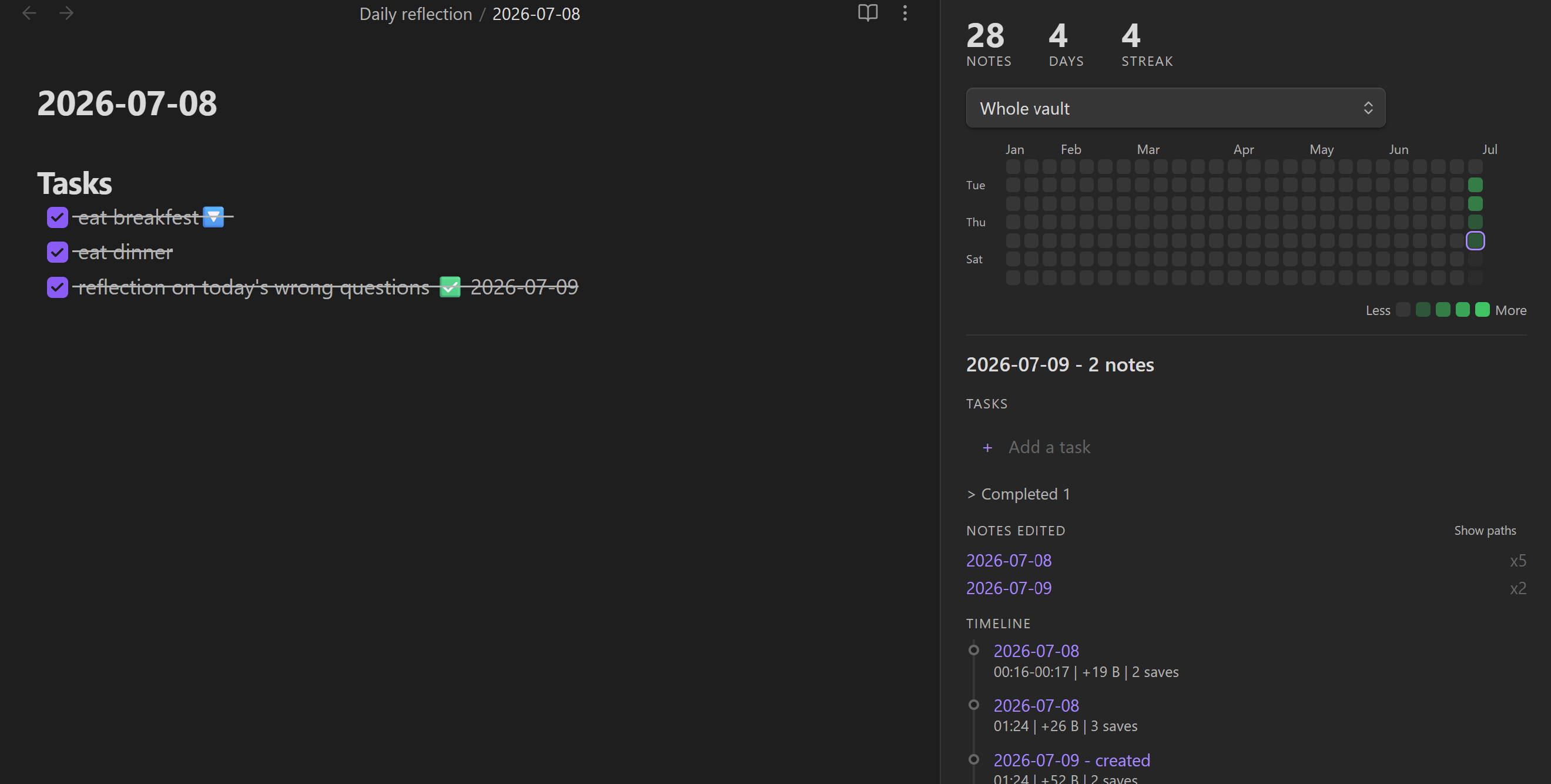
A GitHub-style contribution graph for your Obsidian vault, with daily tasks, edit timelines, AI weekly/monthly summaries, notifications, and panel-only visual themes.
Vault Activity Heatmap turns your note-taking rhythm into a quiet dashboard: touch one note and the day lights up faintly; work across a folder or several notes and the square gets darker. Click a day to review what changed, what you planned, and what still needs attention.
Table of contents
- Features
- Screenshots
- Quick start
- Mobile and sync
- Settings
- Privacy and risk
- Installation
- Support and contributing
- Development
- Roadmap
Features
| Feature | What it does |
|---|---|
| Daily activity heatmap | Shows one square per day, with stronger color for heavier writing days. |
| Folder filtering | View the whole vault or focus on one folder such as daily notes, projects, or research. |
| Markdown activity tracking | Records created/edited notes through Obsidian's vault APIs and supports rename/move events. |
| Day detail panel | Click a square to see tasks, notes edited, and a timestamped edit timeline. |
| Clean note labels | Shows short file names by default, with a one-click "Show paths" toggle when full paths matter. |
| Daily reflection tasks | Add and complete Microsoft To Do-style tasks while keeping markdown checkboxes as the source of truth. |
| Edit sessions | Groups rapid saves into short sessions such as `14:31-14:45 |
| AI summaries | Optional weekly/monthly summaries using your own Anthropic or OpenAI-compatible API key. |
| Notifications | Optional desktop notifications and phone/webhook pings through ntfy or compatible endpoints. |
| Panel themes | Customize only this plugin panel with RGB colors, image backdrops, and looping MP4/WebM video backdrops. |
| Cross-device dashboard | Merge activity from desktop, iOS, and Android through your existing vault sync provider. |
Screenshots
Heatmap and day detail
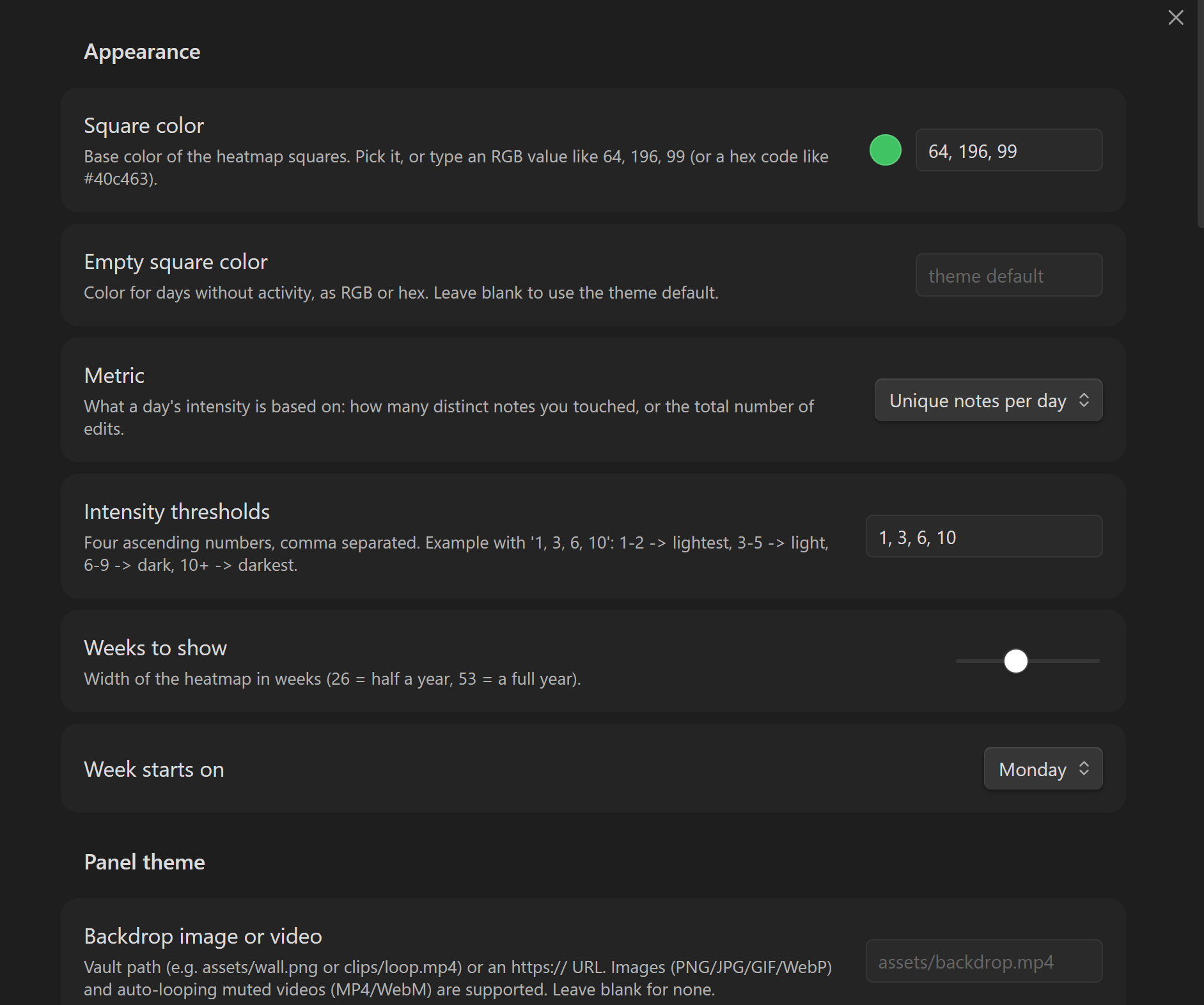
Appearance settings
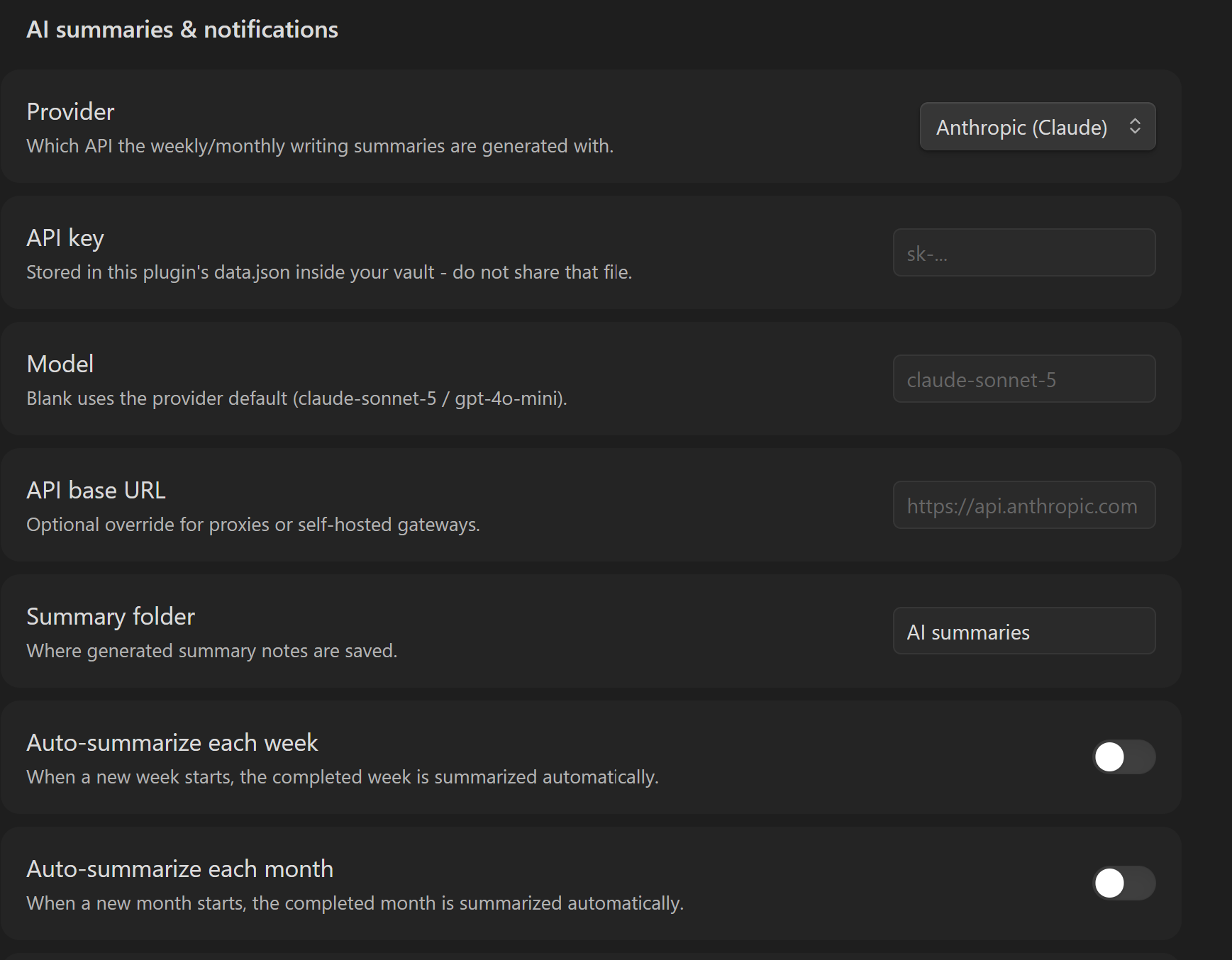
AI summaries and notifications
Quick start
- Open the heatmap from the ribbon calendar icon, or run
Open activity heatmap. - Click a day square to inspect notes, tasks, and edit sessions.
- Right-click a day square, or long-press it on mobile, to add a reflection task.
- Run
Backfill history from existing file datesif you want existing notes to appear immediately. - Optional: configure AI summaries and notifications in the plugin settings.
Mobile and sync
Cross-device dashboard synchronization is available in 1.4.0. Back up the
vault before the first multi-device migration and keep every connected device
on the same plugin version.
| Platform | Interface | Support |
|---|---|---|
| Windows, macOS, Linux | Sidebar panel | Supported |
| iPhone and Android phone | Full-width view with day-detail sheet | Supported |
| iPad and Android tablet | Resizable panel | Supported |
The plugin does not operate a sync server. Its conflict-safe dashboard state is carried by the same provider that synchronizes your vault. Obsidian Sync is the recommended option for Windows/macOS/iOS/Android combinations. Enable active and installed community plugin synchronization on every device.
Local changes are queued within 750 ms and forced to disk within 3 seconds. The open dashboard refreshes as soon as Obsidian reports an external settings change. Network delivery time remains provider-dependent, and mobile operating systems may defer delivery while Obsidian is backgrounded.
See Mobile and cross-device synchronization for setup, limitations, and troubleshooting.
Settings
Tracking
- Choose whether intensity uses distinct notes or total edits.
- Set activity thresholds such as
1, 3, 6, 10. - Exclude folders like templates, archives, or attachments.
- Choose the number of weeks shown and the week start day.
Daily reflection tasks
- Configure the reflection folder.
- Configure the filename date format, such as
YYYY-MM-DD. - Configure the heading where tasks are inserted.
- Toggle task and timeline sections in the detail panel.
AI summaries
AI summaries are optional and require your own API key.
Supported providers:
- Anthropic
- OpenAI-compatible endpoints
The plugin gathers edited-note excerpts and activity stats, then writes weekly or monthly summaries into your vault. It does not upload your whole vault; it only sends the context needed for the requested summary.
API keys and webhook URLs use Obsidian's secure, device-local SecretStorage. Select or create the required secret independently on each device. Neither the secret value nor that device's selected secret identifier is synchronized.
Panel themes
Customize only this plugin panel, without changing your Obsidian theme:
- RGB/hex heatmap square color
- Empty-square color
- Panel text color
- Panel background color
- Image backdrop from a vault path or URL
- Looping muted MP4/WebM backdrop
- Dim and blur controls for readability
Privacy and risk
Vault Activity Heatmap is designed to keep normal tracking local. Network access only happens when you enable features that need it.
| Area | Behavior |
|---|---|
| Local storage | Mergeable metadata is stored in plugin data.json; device preferences and that device's recovery shard stay in vault-scoped local storage. |
| Vault enumeration | The plugin can enumerate vault files for heatmap counts, folder filters, and backfill. |
| Vault reads | The plugin reads note content only for daily task parsing and optional AI summary excerpts. |
| Vault writes | The plugin writes daily reflection tasks and generated summary notes through Obsidian's vault APIs. |
| Network requests | Normal heatmap tracking is local. Remote backdrop URLs, AI summaries, and webhook/phone notifications are opt-in network features. |
| API keys | API keys, webhook URLs, and each device's secret selections use device-local Obsidian storage and are omitted from data.json. |
| Synced metadata | If plugin configuration sync is enabled, the provider receives note paths, timestamps, counts, sessions, and device identifiers. |
| Release provenance | Release assets are built by GitHub Actions and include artifact attestations. |
Ways to keep your risk lower:
- Leave AI summaries disabled unless you need them.
- Use a limited API key for AI summaries instead of a personal all-purpose key.
- Keep webhook/ntfy notification URLs private.
- Exclude private folders that should not appear in activity stats.
- Review
.obsidian/plugins/vault-activity-heatmap/data.jsonbefore sharing your vault; it contains activity metadata but not API secrets. - Install only from the official release assets:
manifest.json,main.js, andstyles.css.
Installation
From Obsidian Community Plugins
Use the direct install link, or install it from:
Settings -> Community plugins -> Browse -> Vault Activity Heatmap
Manual install
- Download the latest release from Releases.
- Copy these files into:
<your vault>/.obsidian/plugins/vault-activity-heatmap/manifest.jsonmain.jsstyles.css
- Restart Obsidian or reload community plugins.
- Enable Vault Activity Heatmap.
- Run Backfill history from existing file dates if you want existing notes to appear immediately.
Support and contributing
Development
Use Node.js 22 and npm, matching the validation workflow. From a clean checkout:
npm ci
npm run dev
npm run test
npm run build
npm run typecheck
Release assets are the three compiled plugin files:
manifest.jsonmain.jsstyles.css
Roadmap
- Additional summary providers
- Optional summary templates
- Optional encrypted dashboard relay research after provider-latency testing
- Native widgets or quick capture only if they justify a future companion app
License
MIT. See LICENSE.
For plugin developers
Search results and similarity scores are powered by semantic analysis of your plugin's README. If your plugin isn't appearing for searches you'd expect, try updating your README to clearly describe your plugin's purpose, features, and use cases.