by Philipp Kats
Visualize your notes and Bases with Vega and Vega-Lite, from simple bar charts to interactive maps, networks, and custom graphics.

Agate
Agate brings Vega and Vega-Lite visualizations to Obsidian. Create charts from Bases views that follow your notes, filters, and groups, or define your own visualizations in an agate code block.
Start with a ready-made chart, then customize it as needed—from simple comparisons to maps, timelines, networks, and dashboards.
Website · Quickstart · Gallery · Guide · Changelog
What would you chart?
If your notes have properties, you already have the data. A few ideas, from sensible to slightly obsessive:
- Learning. One note per practice problem, with a score before and after reading up. See which topics are getting better and which you keep avoiding.
- Board games. Which games on the shelf actually get played, how long a "quick game" really takes, and who keeps winning.
- Reading. Pages per month, ratings by genre, and the books you started in March and never finished.
- Work and side projects. Which meetings eat your Tuesdays, and how many side projects are "in progress" (all of them).
- Recipes. Cooking time against how often you actually make a dish, and the cuisine you keep saving but never cook.
- D&D campaigns. Sessions, NPCs and factions as linked notes: who knows whom, who betrayed whom, and the party's route across the map.
- Travel. Give place notes coordinates and link them from trip notes, and your trips become routes on a globe you can spin (gallery).
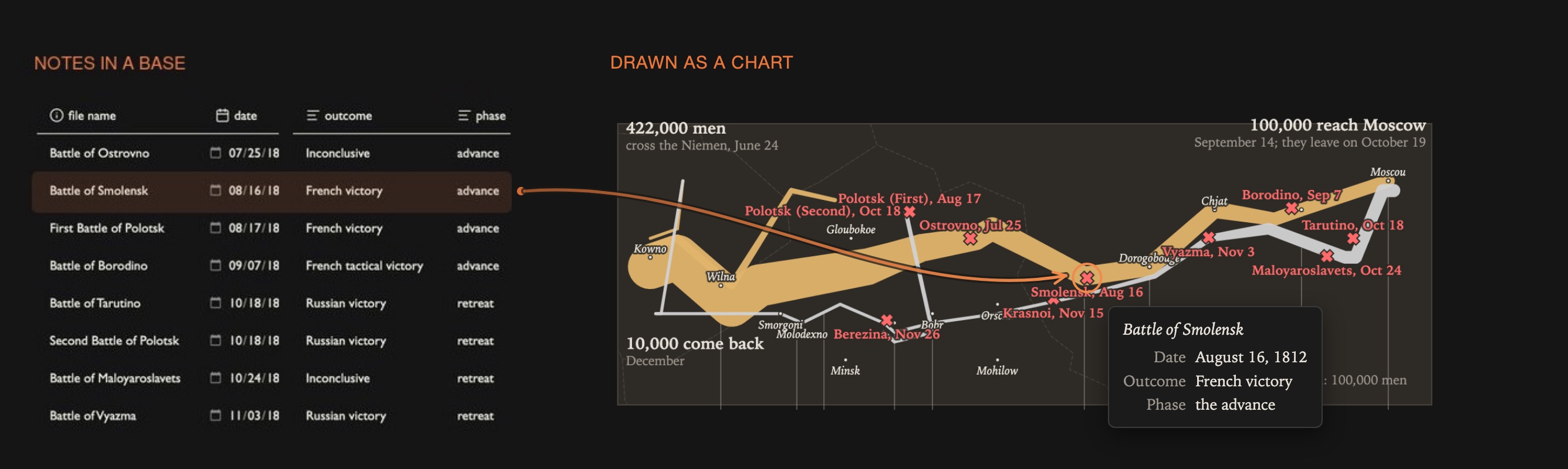
- History. Battle notes with dates, places and outcomes, drawn as Minard's map of Napoleon's 1812 campaign. That's the picture above.
- Habits and mood. A daily note with a few numbers adds up to a year of streaks and slumps.
- The vault itself. How your notes link to each other, and which folders take up the most space.
What it does
- Chart as a Bases view. Add an Agate chart view to any base. It appears wherever a base does: its own tab, embedded in a note (
![[Books.base#Ratings]]), the sidebar, Canvas. The Bases toolbar's filter, sort and grouping drive the chart. - Charts in a note, with an
```agatecode block (or```vega, once enabled in settings): a spec file, rows from a base, or a self-contained spec. - Full support for Vega and Vega-Lite specs, so no option list to outgrow: maps and globes, networks of linked notes, folder sunbursts, timelines, sankeys, linked dashboards.
- Extras on top of plain Vega:
- Per-note data. A note can point to its own CSV, JSON or URL, e.g. a time series for each stock or city note (guide).
- Your vault as data. Links between notes and the folder tree are datasets, so you can draw link graphs, arc diagrams, sunbursts and treemaps that follow the base's filter (guide).
- Click to open. Clicking a point, bar or node opens its note.
- Big numbers. Live totals and averages shown as note text instead of a chart (guide).
- Map tiles under your marks, with API keys kept in Obsidian's secret storage (guide).
- Hatched and dotted fills for print-style charts (guide).
- Looks like your vault: the
autotheme follows your Obsidian theme and light/dark mode, with chart colors made for popular themes (Minimal's color schemes, Catppuccin, Nord, Gruvbox and more, see Themes); Vega's stock themes and your own theme files are there too. - Built with LLMs in mind. Write everything by hand, or let an assistant do it: LLMs know Vega-Lite well, so any of them can create a chart or tailor a custom theme for you.
Install
In Obsidian: Settings → Community plugins → Browse, search for Agate, install and enable it. Needs Obsidian 1.13 or later with the core Bases plugin on. Works on desktop and mobile.
Then follow the quickstart: 26 book notes to a bookshelf chart in about fifteen minutes. The guide covers everything else.
Network use
Agate makes no network requests by default. Everything it draws comes from your vault.
- Load remote data (off by default) lets a spec load data files and images from
http(s)URLs: remote CSV or JSON, map tiles under a route, pictures in image marks. Agate fetches only the URLs written in your specs, from whichever service they name; it sends no other data and has no telemetry. - API keys (Advanced settings) are kept in Obsidian's secret storage and sent only to the one host you allow for each key.
- Copy for Vega editor puts your chart's rows on the clipboard. They leave Obsidian only if you paste them into the online editor yourself.
- Images inside tooltips are an exception: vega-tooltip shows them as ordinary
<img>elements, so a spec that puts an image URL in a tooltip loads it on hover even with Load remote data off.
Making charts
- Pick a recipe: an empty Agate view offers thirteen ready-made charts. Agate asks which property goes where and writes the spec.
- Ask an assistant: Copy prompt for an LLM copies your base's properties, sample rows and Agate's rules for any chat assistant; Paste spec checks the reply and saves it as the view's chart.
- Use the Vega editor: Copy data for Vega editor copies the spec with your base's rows for the online editor; paste the result back the same way.
- With an AI agent that works on your vault (Claude Code and others): give it the
agate-chartskill. It knows Agate's conventions and extras and checks a spec renders before handing it over. Copy theskills/agate-chartfolder into your agent's skills folder, for example~/.claude/skills/. - By hand: specs are plain JSON, or YAML if you prefer. Install the JSON Editor community plugin to edit JSON inside Obsidian (or Code Editor for JSON and YAML); Edit spec on a chart opens its spec beside it, and every save redraws the chart.
Works with
- Vega Visualizations (
```vega/```vega-liteblocks): both plugins can be on. Without it, a setting lets Agate handle those blocks too. - Other plugins can extend Agate through
app.plugins.plugins.agate.api(data schemes, expression functions, themes, spec preprocessors); see ADR 0001, D7.
Known limits are in the guide's troubleshooting section and why-agate.md.
Development
Node 22.12+ (.nvmrc), Obsidian 1.13+.
npm install
make demo            # regenerate the demo vault, build, link the plugin into it
npm run dev          # rebuild main.js on change
make check           # typecheck, lint, tests (what CI runs)
Open demo-vault/ in Obsidian: the gallery's notes plus test notes under tests/ (start with tests/Test guide.md). make help lists every target. Architecture and decisions: docs/adr/; testing: docs/testing.md; backlog: docs/future-features.md; releasing: docs/releasing.md (make release VERSION=x.y.z).
License
MIT. Vega, Vega-Lite and vega-embed are bundled under their own BSD-3-Clause licenses; see THIRD_PARTY_NOTICES.md.
For plugin developers
Search results and similarity scores are powered by semantic analysis of your plugin's README. If your plugin isn't appearing for searches you'd expect, try updating your README to clearly describe your plugin's purpose, features, and use cases.