AIditor
Obsidian plugin. Durable-but-resolvable margin annotations, anchored to blocks — a gloss is literally a marginal note.
Attach a comment to a specific block in a note without mutating the block's prose. The annotation lives with the note durably (survives edits, sync, reopen), can be resolved (archived, not deleted), and can be reopened. Built for self-review of drafts before publishing, and durable marginalia you reread months later.
Not in scope for MVP: multi-user, threading/replies, AI-generated annotations (only the extension point, see below), a global cross-vault annotation browser, export.
Part of the marioverse Obsidian plugin suite.
Privacy: despite the name, AIditor makes no network requests, calls no AI service, and needs no account or API key. Everything stays in your vault (see Storage).
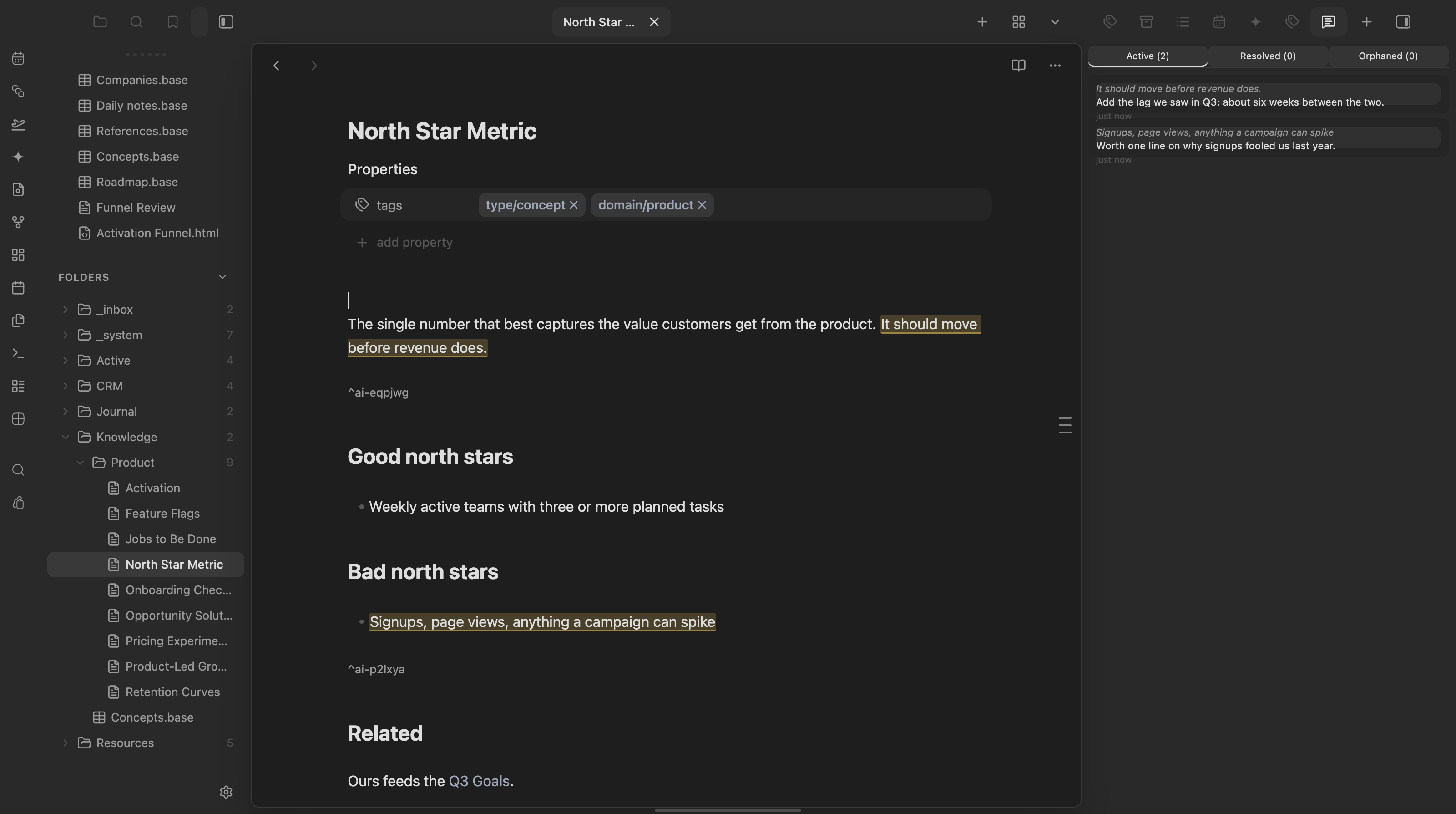
Two annotated blocks, highlighted inline with their block anchors, and the annotations panel on the right.
Anchoring model
Each annotated block gets an Obsidian block reference, ^ai-<6-char-id>, inserted on a standalone line immediately after the block — never inline (inline ^id breaks hr/table rendering). That block-id is the durable anchor: it lives inside the note file itself, so it survives edits and syncs across devices with zero external state.
As cheap insurance, AIditor also stores a text-quote fallback (quote + up to 32 chars of prefix/suffix context, W3C-annotation style). If the ^ai-id line is ever deleted, the annotation becomes orphaned instead of lost — the stored quote lets you re-anchor it to fresh text.
AIditor never touches frontmatter and never uses Obsidian's YAML-rewriting helper (processFrontMatter) — that helper is known to mangle wikilinks in properties, so the block-id marker only ever lands as a plain line in the note body.
Storage
All annotations live in a single central sidecar file:
_system/annotations/store.json
Rationale: this keeps note frontmatter/body clean (only the tiny ^ai-id marker lands in the note itself), it's Obsidian-Sync-friendly, and it avoids per-note-rename fragility — annotations are keyed by their own id + block-id, so a note is still re-locatable by searching for its block-id vault-wide even if notePath goes stale. Single-user, so last-write-wins is an acceptable model; writes are debounced and read-modify-write the whole file.
Lifecycle
Every annotation has a status:
| Status | Meaning |
|---|---|
active | Shown as a gutter marker in Live Preview + in the panel's Active filter. |
resolved | Hidden from the gutter; visible under the panel's Resolved filter; reopenable. |
orphaned | Its anchor block/^ai-id no longer exists in the note; hidden from the gutter; shown under the panel's Orphaned filter with the stored quote so it can be re-anchored (select new text, rebind) or deleted. |
Resolving archives — it does not delete. Deletion is only ever explicit, triggered by the Delete action in the popover. Nothing is ever deleted automatically.
Reading view: Live-Preview-only in the MVP
AIditor's gutter markers and the "+" hover affordance work in Live Preview only. src/reading.ts registers a MarkdownPostProcessor for Reading view, but it is an intentional no-op stub for this release — it does not render markers on rendered Reading-view elements.
This is a documented, scoped decision, not a silent gap: reliably matching Obsidian's rendered DOM elements back to block-id'd blocks (across paragraphs, lists, callouts, tables) is fiddly enough that it's better shipped as a deliberate fast-follow than rushed into MVP. See the TODO block at the top of src/reading.ts for the concrete plan when it's picked up.
AI extension point
AIditor exposes a public method directly on the plugin instance, mirroring the cross-plugin pattern used by Exo's askExo:
app.plugins.plugins.aiditor.addAnnotation({
  notePath: "Active/Projects/foo.md",
  quote: "the exact text to annotate",
  body: "the annotation text",
});
// → Promise<string>  (the new annotation's id)
It locates the quote in the note, stamps a ^ai-id if the block doesn't already have one, and creates an active annotation. This is a stub extension point only — AIditor ships no AI flow, prompt UI, or Exo coupling itself. A future integration (e.g. Exo) can call this to leave AI-authored annotations without any changes to AIditor.
Development
Package manager: pnpm.
pnpm install       # install dependencies
pnpm dev           # esbuild watch mode
pnpm build         # tsc --noEmit (typecheck) + esbuild production bundle
pnpm test          # node --test over src/**/*.test.ts (pure-core unit tests)
pnpm build deploys the built main.js, manifest.json, and styles.css into the target vault's plugin folder (configured via .obsidian-plugin-dir, or the OBSIDIAN_PLUGIN_DIR env var). Building does not enable the plugin — after a build, open Obsidian → Settings → Community plugins and enable AIditor manually.
Commands
- AIditor: Annotate selection — ships with no default hotkey, so it never collides with your existing bindings. Bind one yourself in Settings → Hotkeys → search "AIditor".
- AIditor: Open annotations panel — opens the right-sidebar panel showing Active / Resolved / Orphaned annotations for the currently active note.
Try it
See it running in the Obsidianverse sample vault, a small, fictional vault with the whole plugin suite pre-configured.
For plugin developers
Search results and similarity scores are powered by semantic analysis of your plugin's README. If your plugin isn't appearing for searches you'd expect, try updating your README to clearly describe your plugin's purpose, features, and use cases.