Tandem Comments
approvedby Leon Pawelzik
Google Docs-style comments for Markdown notes. Quote-anchored threads in a fenced block at the end of the file, so your prose stays untouched and AI assistants can read and write them too. - This plugin has not been manually reviewed by Obsidian staff.
Tandem Comments
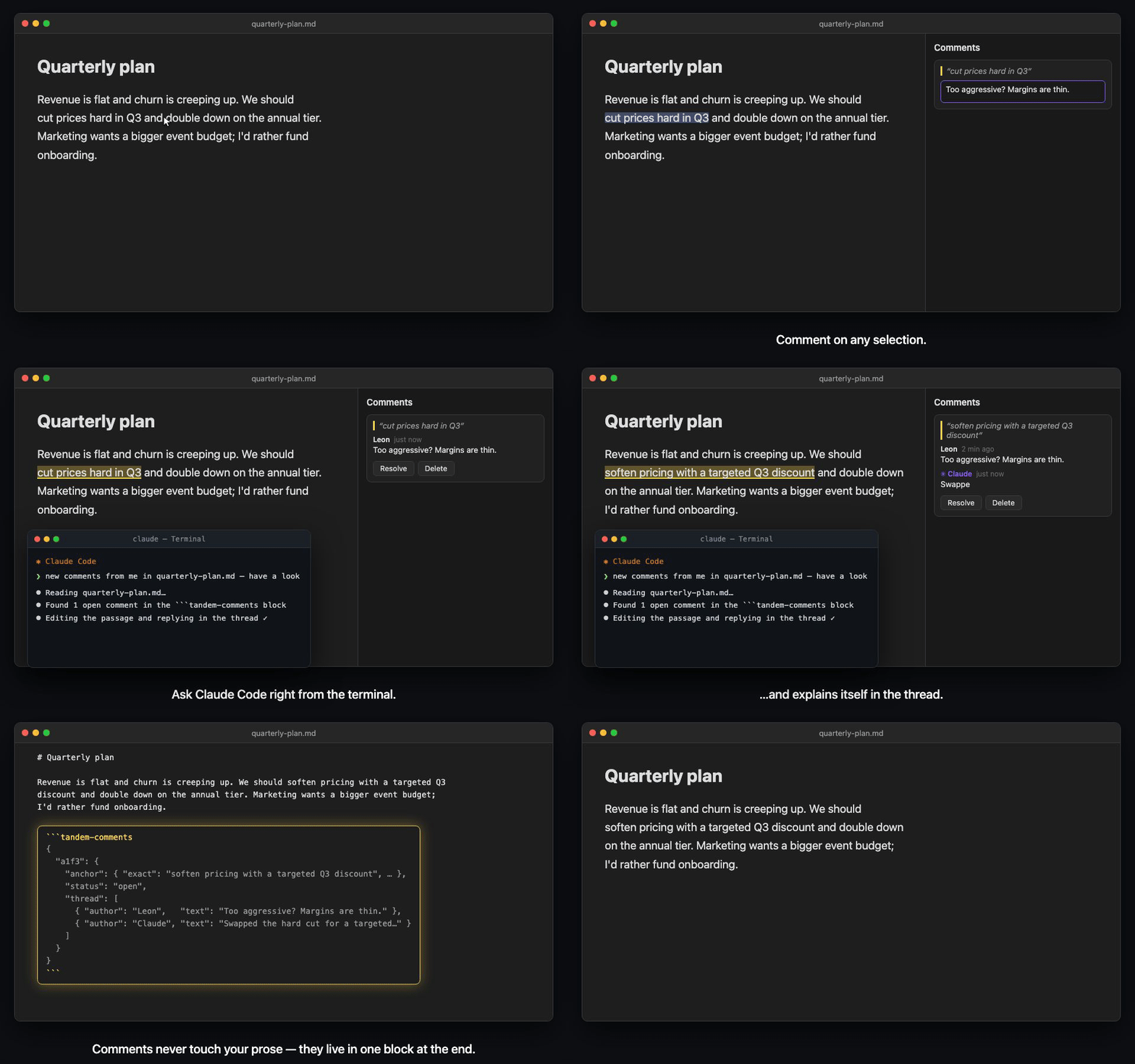
Quote-anchored comments and edit suggestions for Obsidian notes. Review threads live in a single block at the end of the file — your prose stays untouched until you accept a suggestion, and AI assistants can read, write, and act on them with nothing but file access.
Features
- Comment on any selection — via command palette, hotkey, or right-click menu
- Suggest edits — propose a replacement for selected text, then accept or decline it from the sidebar
- Sidebar threads: reply, edit, resolve, reopen, delete, and re-anchor orphaned comments, with configurable sorting, timestamps, and submission shortcuts
- Per-author colors: distinguish participants automatically, with optional exact color overrides, light and dark previews, and contrast warnings
- Live highlights in the editor; click a highlight to jump to its thread
- Live re-anchoring — comments follow your text as you edit; if an anchor's text disappears, the comment becomes orphaned and can be re-attached to a new selection
- Resolve = remove by default, keeping files clean (history mode available in settings)
- Copy & export — copy any comment as Markdown (with or without its quote), or export all of a file's comments to a companion note; name template, scope, and destination are configurable in settings
- Reading view pill — the comment block renders as a compact "💬 N threads" pill that can be hidden in settings
- AI-ready by design — the block is plain, self-describing JSON; the settings tab exports a skill file that teaches Claude Code the format
Installation
Tandem Comments is in the Obsidian community plugin directory: in Obsidian, open Settings → Community plugins → Browse, search for Tandem Comments, then Install and Enable.
Manual install: download main.js, manifest.json, and styles.css from the latest release into <vault>/.obsidian/plugins/tandem-comments/ and enable it in Settings → Community plugins.
How it works
Comments are stored in a fenced code block at the end of the file. The text above it is never modified by commenting — no inline markers, no HTML spans, no IDs in your prose.
Your note text. We should cut prices hard in Q3.

```tandem-comments
// Schema: { "<id>": { anchor:{exact,prefix,suffix,pos?}, status:open|resolved, thread:[{author,ts,text}], suggestion?:{replacement,author,ts,result?} } }
// Anchor = quote from the prose. To locate: search for "exact", disambiguate via prefix/suffix.
{
  "a1f3": {
    "anchor": { "exact": "cut prices hard", "prefix": "We should ", "suffix": " in Q3", "pos": 26 },
    "status": "open",
    "thread": [
      { "author": "Leon", "ts": "2026-06-10T10:24:00Z", "text": "Too aggressive?" }
    ]
  }
}
```
Each comment is anchored by a quote (W3C TextQuoteSelector): the exact text plus a little surrounding context, with a character offset as tie-breaker.
Usage
- Select text in a Markdown note
- Run Add comment or Suggest edit (command palette or right-click)
- Use the sidebar to discuss comments or accept and decline proposed replacements
Edit suggestions
Suggestions use the same quote anchors and discussion threads as comments. The original prose is not changed until you press Accept:
{
  "7c2e": {
    "anchor": {
      "exact": "cut prices hard",
      "prefix": "We should ",
      "suffix": " in Q3.",
      "pos": 26
    },
    "status": "open",
    "suggestion": {
      "replacement": "reduce prices significantly",
      "author": "Claude",
      "ts": "2026-07-23T12:00:00Z"
    },
    "thread": [
      {
        "author": "Claude",
        "ts": "2026-07-23T12:00:00Z",
        "text": "Keeps the recommendation strong without sounding abrupt."
      }
    ]
  }
}
Accepting replaces only the uniquely matched quoted passage. If the passage is missing or matches more than one location, Tandem Comments refuses to apply the change until you re-anchor it. Other uniquely resolved open anchors are rebased through the edit in the same transaction; ambiguous anchors are left unchanged rather than silently bound to one duplicate. The prose edit and suggestion update share one editor transaction, so a single Undo restores both.
Working with AI assistants
Because comments are plain JSON inside the note, an assistant needs no plugin, API, or MCP server — reading and writing the file is enough. Ask it to review a note and it can answer in your comment threads or propose exact replacements as suggestions. You stay in control of when the prose changes.
This shines on long-form writing, where you usually want subtle, surgical changes — not an AI rewrite of the whole piece. Comments pin your feedback to exact passages, and the assistant edits only what you pointed at:
The morning market in Hoi An wakes before the tourists do. Vendors stack
mangosteen into careful pyramids while the river light is still gray.
…2,000 more words…
You leave comments where the draft needs work — "weaker verb here?" on one sentence, "this paragraph drags, tighten it" on another — then hand off:
❯ claude "turn my comments in hoi-an-draft.md into edit suggestions — keep the prose unchanged"
Claude proposes replacements for those two passages and explains each change in its thread. The prose stays byte-for-byte identical until you review the suggestions in Obsidian and accept the ones you want.
For Claude Code, open Settings → Tandem Comments → Advanced & integrations and use Export skill. This writes a ready-made skill to ~/.claude/skills/obsidian-tandem-comments/ that teaches it the format and conventions.
Why a block at the end of the file?
Inline comment markers break plain-text workflows: they show up in exports, confuse other tools, and make diffs noisy. Tandem Comments keeps annotations out of your prose entirely — the file remains a normal Markdown document that happens to carry its review thread with it.
Security
Comment bodies are rendered with Obsidian's Markdown renderer and inherit its supported syntax, sanitization, and plugin post-processor behavior. Tandem Comments does not add a separate post-render HTML sanitizer.
The real sanitizer cannot run under the test harness (Node/Vitest has no Obsidian runtime). The following smoke-test matrix was verified manually with Obsidian 1.12.4:
| Comment input | Observed result |
|---|---|
**bold**, _italic_ | Renders bold / italic |
[link](https://example.com) | Renders a clickable, safe link |
| Paragraph, blank line, paragraph | Two paragraphs with compact spacing |
<script>alert(1)</script> | Not executed; script neutralized |
<img src=x onerror=alert(1)> | No alert; onerror stripped |
[x](javascript:alert(1)) | Click does nothing; scheme neutralized |
<a href="vbscript:…">, data: URL | Neutralized |
License
For plugin developers
Search results and similarity scores are powered by semantic analysis of your plugin's README. If your plugin isn't appearing for searches you'd expect, try updating your README to clearly describe your plugin's purpose, features, and use cases.