by nout
Smart unified autocomplete for natural language dates, Templater templates, and vault file links.
↓ 75 downloadsUpdated 15d agoMIT

AmazeComplete for Obsidian



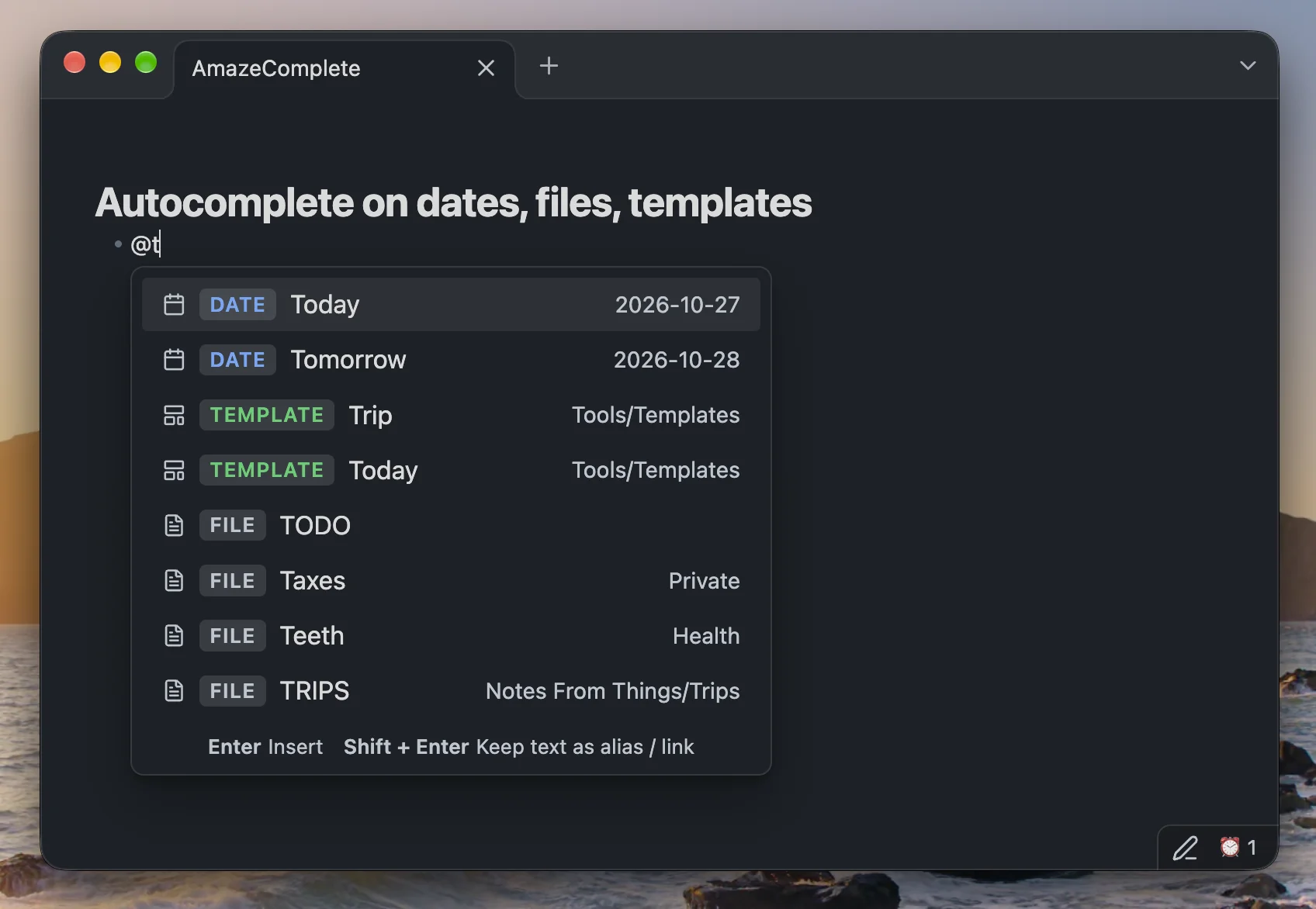
AmazeComplete — unified @ autocomplete for dates, templates, and files
AmazeComplete brings natural language dates, inline Templater template expansion, and vault file linking together under a single configurable trigger character (default @).
Built on the date-parsing foundation of Natural Language Dates (nldates-obsidian), AmazeComplete extends your @ menu so you never have to juggle separate trigger symbols or conflicting autocomplete popups.
Features
- Natural Language Dates (
DATE)- Type
@Today,@Tomorrow,@Yesterday,@next Friday,@in 3 days,@2 weeks ago,@time:now, or any natural language date phrase powered bychrono-node. - Live formatted preview right inside the suggestion menu (e.g.
2026-10-27). - Insert as
[[2026-10-27]]wikilinks or plain text depending on your settings.
- Type
- Inline Templates (
TEMPLATE)- Automatically discovers templates from your Templater template folder (with fallback support for Obsidian's core Templates plugin or a custom folder override).
- Selecting a template (e.g.
@Bookor@Trip) strips the trigger text and executes/expands the template directly at your cursor position.
- Vault Files & Aliases (
FILE)- Fuzzy-searches across markdown files in your vault as well as YAML frontmatter
aliases(e.g.@Taxesor@Trips). - Inserts clean
[[File]]or[[File|Alias]]links while automatically excluding your templates folder from duplicate file suggestions.
- Fuzzy-searches across markdown files in your vault as well as YAML frontmatter
Keyboard Shortcuts in the Popup
| Key | Action on DATE | Action on TEMPLATE | Action on FILE |
|---|---|---|---|
Enter | Inserts formatted date (e.g. [[2026-10-27]]) | Executes & expands the template inline at cursor | Inserts file link (e.g. [[Taxes]]) |
Shift + Enter | Keeps natural language text as alias ([[2026-10-27|Today]]) | Inserts a link to the template file ([[Trip]]) without expanding | Inserts link with alias |
Installation
From Obsidian Community Plugins
- Open Settings → Community plugins in Obsidian.
- Click Browse and search for AmazeComplete.
- Click Install, then Enable.
Install Manually
- Download
main.js,manifest.json, andstyles.cssfrom the latest release. - Copy them into your vault's plugin folder:
<Vault>/.obsidian/plugins/amazecomplete/. - Reload Community Plugins in Obsidian and enable AmazeComplete.
Development
npm install
npm test
npm run build
Credits
- Natural language date parsing and configuration model based on nldates-obsidian by Argentina Ortega Sainz.
For plugin developers
Search results and similarity scores are powered by semantic analysis of your plugin's README. If your plugin isn't appearing for searches you'd expect, try updating your README to clearly describe your plugin's purpose, features, and use cases.