Awesome Yearbook
approvedby awesomedog
A beautiful, zero-config dashboard of your vault's writing stats: heatmaps, streaks, top tags, folder treemaps, and shareable year-in-review cards. Nothing is stored — every number is recomputed from a single scan. - This plugin has not been manually reviewed by Obsidian staff.
📖 Awesome Yearbook
Writing statistics, year in review & vault analytics for Obsidian
Turn your vault into a yearbook. Word counts, writing heatmaps, streaks, tag trends, vault health — and a one-tap, share-ready Year in Review card. 100% local, zero telemetry.



Install · Features · Share Card · How it works · FAQ
✨ What is Awesome Yearbook?
Awesome Yearbook is an all-in-one writing statistics and vault analytics dashboard for Obsidian. It answers the questions every note-taker eventually asks:
How much did I actually write this year? When am I most productive? What do I keep writing about? Is my second brain healthy — or just hoarding?
One full vault scan gives you five dashboards — Yearbook, Overview, Rhythm, Content and Health — plus a beautiful shareable "Wrapped"-style year-in-review image you can post anywhere.
Think of it as Spotify Wrapped + GitHub contribution graph + a writing tracker, built natively for your Obsidian vault.
🚀 Features
📖 Yearbook — your writing year, in one page
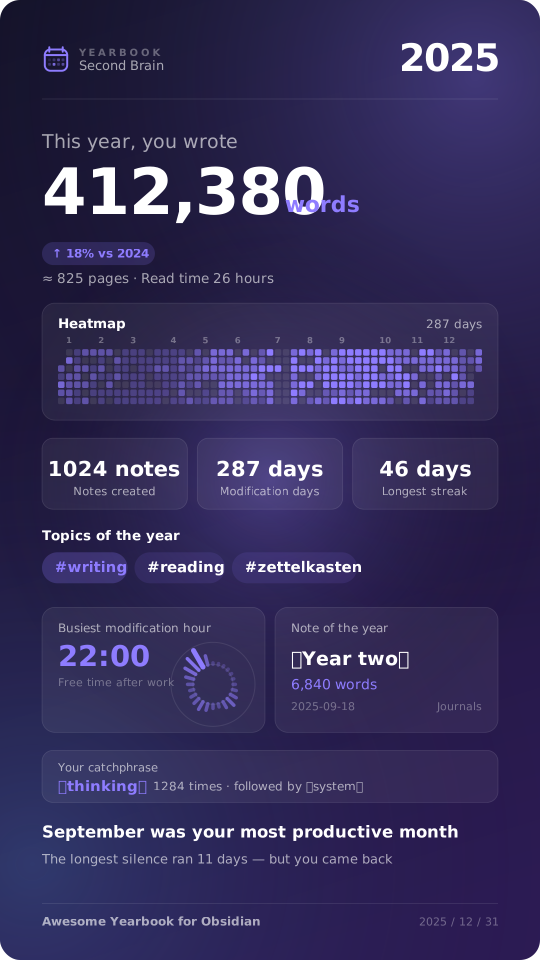
- Year headline: “This year, you wrote 412,380 words” — with a plain-language translation (≈ an 825-page book · 11 hours to read aloud).
- Year switcher with year-over-year (YoY) comparison badges.
- Key stats: new notes, days written, longest streak, average words per active day, top month, same period last year.
- Monthly output chart: this year as bars, last year as a dashed line.
- Cumulative vs. last year: are you ahead of or behind last year’s pace?
- Themes of the year: your most-written tags, ranked.
- Top notes of the year: your longest, most substantial pieces.
- Moments timeline: first note of the year, most productive day, longest streak, longest silence — the story hidden in your data.
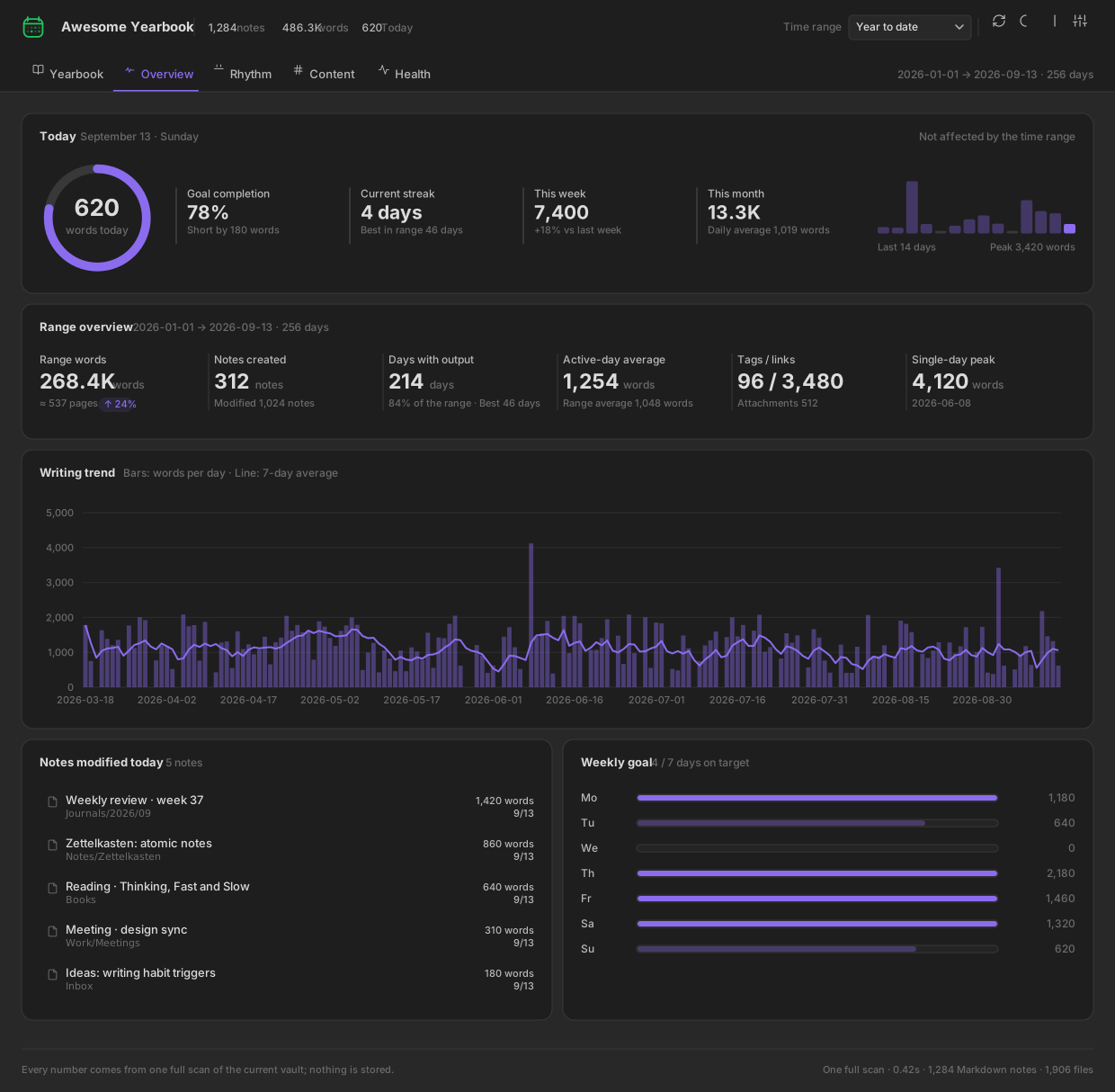
📈 Overview — today, this week, this month
- Daily word goal ring with progress %, remaining words and streak.
- 14-day sparkline with peak markers.
- Range overview: words, new notes, active days, daily average, tags & backlinks, single-day peak.
- Writing trend chart: daily bars + 7-day moving average.
- Notes edited today, one click away from opening them.
- Weekly goal meters: which days hit target, which didn’t.
🗓️ Rhythm — when you write
- Writing heatmap — a GitHub-style contribution calendar for your vault.
- Punch card: weekday × hour bubble chart of your writing sessions.
- 24-hour clock: polar chart of when the words actually happen.
- Monthly output & cumulative current word count (attributed by last modification date).
- Rhythm summary: current streak, longest streak, longest gap, most active weekday, golden hour, night-owl index (22:00–05:00 share).
🏷️ Content — what you write about
- Top tags ranked by note count and word count.
- Folder treemap — area = current note words, instantly showing where your notes are concentrated.
- Note length histogram (<200 / 200–500 / 500–1k / 1k–2k / 2k–5k / 5k+).
- Vault file composition donut: Markdown, PNG, JPG, PDF, Canvas, audio…
- Frequent words ranked bar chart, stop-words removed — find your verbal tics.
- Most-linked notes (hubs) and longest notes in range.
🩺 Health — is your second brain tidy?
- Vault health score (0–100) with a radar breakdown across connectivity, tagging, freshness, completeness and link integrity.
- Actionable issue lists: orphan notes, untagged notes, broken links, stale notes, stub/fragment notes, unfinished tasks, unused attachments.
- Cleanup advice, sorted by effort-to-impact — not generic tips, but numbers from your vault.
🔍 Inspector — charts are entry points, not decoration
Click any bar, cell, bubble, tag or treemap block → the side inspector lists the exact notes behind that number. Click a note → it opens in Obsidian. No dead ends.
🎨 Share Card: your Year in Review
A pure-Canvas, @2x high-resolution image generator built for social media.
| Aspect ratios | 9:16 Stories · 4:5 Feed · 1:1 Square |
| Palettes | Midnight · Rice Paper · Forest · Ember (decoupled from your UI theme) |
| Modules | Header, hero number, full-year heatmap, stat cards, top-3 tags, golden hour + star note, catchphrase, closing line — toggle any of them off |
| Smart layout engine | Disabled modules give their space back; spacing is re-balanced automatically for every ratio |
| Export | ⬇️ Download PNG · 📋 Copy image to clipboard · 📝 Copy matching caption text |
The auto-generated caption is ready to paste:
In 2025, I wrote 412,380 words in my vault — about an 825-page book. 1,024 notes, 287 days with a trace, longest streak 46 days. Golden hour: 22:00. September was my most productive month. Most-written topics: #writing #reading #zettelkasten
📦 Installation
From the Obsidian Community Plugins (recommended)
- Open Settings → Community plugins and make sure Restricted mode is off.
- Click Browse, search for “Awesome Yearbook”.
- Click Install, then Enable.
- Click the 📖 ribbon icon, or run
Awesome Yearbook: Open yearbookfrom the Command Palette (Ctrl/Cmd + P).
🧠 How it works
- One full scan, everything derived. Opening the view — or clicking Rescan — reads every Markdown file once: word count, created and modified timestamps, tags, links, tasks and attachments. All five dashboards are computed from that single snapshot.
- Nothing is stored. No history, no cache, no background indexing. Close the view and the snapshot is gone; reopening it runs a fresh scan. The plugin never writes to your vault, not even to its own
data.json. - Attributed by last modification date. A single scan cannot recover how many words you added on a given day, so daily output attributes each note’s current word count to the day it was last modified.
Σ daily = Σ notes, so the numbers on different tabs always agree — and the UI labels them as “by last modification date” rather than pretending otherwise. - Charts are bundled locally — the dashboard works completely offline, and the share card is drawn on a raw
<canvas>with no external dependency at all.
🔒 Privacy
- ✅ No network requests. Nothing leaves your device — ever.
- ✅ No telemetry, no analytics, no account.
- ✅ Read-only. Awesome Yearbook never modifies, moves or deletes your notes.
- ✅ Share cards are generated on your machine; you decide what to export.
💻 Compatibility
- Obsidian v1.13.7+ (the
minAppVersiondeclared inmanifest.json) - ✅ Desktop: Windows · macOS · Linux
- ✅ Mobile: iOS · Android — responsive, single-column layout
- ✅ Follows the Obsidian light/dark theme; the accent color is chosen inside the plugin
- ✅ No dependency on Dataview, Templater or any other plugin
❓ FAQ
Does it change my notes in any way?
No. The plugin only reads file metadata and content. It never writes to your Markdown files.
Does it count code blocks, front matter and links?
Yes — word counts are taken from the raw note text, so front matter, code fences and link syntax are all included. There is no setting to exclude them.
Where does the historical data come from if I just installed it?
From your vault itself. Created/modified timestamps and current word counts provide an attributed view of the past; daily output is assigned to the note's last modification date.
Does it work on mobile?
Yes. All five dashboards are responsive, and PNG export / clipboard copy work on both iOS and Android.
🗺️ Roadmap
- Monthly & weekly recap cards
- Per-folder and per-tag writing goals
- Export stats to CSV / JSON, and a Dataview-friendly API
- Multi-year comparison view
Have an idea? Open a feature request.
🤝 Contributing
Pull requests are welcome!
git clone https://github.com/AwesomeDog/obsidian-awesome-yearbook.git
cd obsidian-awesome-yearbook
npm install
npm run dev       # watch build -> main.js
npm run build     # typecheck + tests + minified main.js
npm run deploy -- /path/to/test-vault   # copy the three files into a vault
Please open an issue first for larger changes so we can discuss the design.
🚢 Release
npm version patch                    # bump package.json, manifest.json, versions.json; commit and tag
git push origin main --follow-tags   # push the commit and the tag
❤️ Support
If Awesome Yearbook made you proud of your writing year:
- ⭐ Star this repo — it genuinely helps other Obsidian users find the plugin
- 🐦 Share your year-in-review card and tag the project
- 🐛 Report bugs or suggest features
📄 License
Keywords: Obsidian plugin · writing statistics · word count tracker · vault analytics · year in review · wrapped · writing heatmap · contribution calendar · writing streak · daily word goal · note statistics · tag analytics · backlink analysis · vault health · orphan notes · broken links · word cloud · dashboard · PKM · Zettelkasten · second brain · digital garden · journaling · daily notes · productivity tracker · share card generator
Made for everyone whose second brain deserves a yearbook.
For plugin developers
Search results and similarity scores are powered by semantic analysis of your plugin's README. If your plugin isn't appearing for searches you'd expect, try updating your README to clearly describe your plugin's purpose, features, and use cases.