YourPulse - Your Writing Activity Visualised
approvedby jsifalda
It's like your Github profile, but for your vault (featuring daily streak, average daily word count, comprehensive stats and plugins overview).
YourPulse - Your Ultimate Obsidian Writing Toolkit
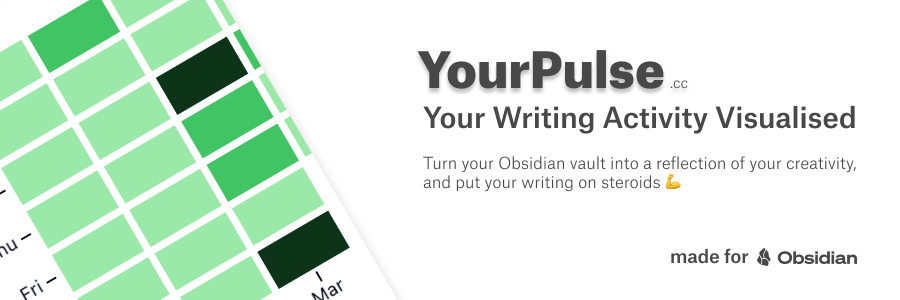
YourPulse is a plugin for Obsidian that allows users to track their daily word count across all notes in their vault. It provides a visual representation of your writing activity, similar to GitHub's contribution graph, and offers a public profile feature for sharing selected notes.
Bundled with some additional features for complete creative writing workflow - uploading and sharign notes in public, and public profiles for your audience to discover you.
More details available on YourPulse.cc.
Features
- Gamify your writing by tracking your daily writing streak.
- Gain valuable insights into your writing habits.
- Upload & share selected notes (with support of Dataview rendering, and linked notes resolution).
- Private Mode: Activate with your license key to ensure no data leaves your vault - perfect for users who value their privacy.
Sharing Notes Features
- Always in sync: YourPulse automatically detects changes in your notes and updates your public profile in real-time.
- Dataview Rendering: Supports rendering of Dataview queries within your notes, allowing you to share dynamic and interactive content.
- Linked Notes Resolution: Automatically resolves
![[note]]references before upload, ensuring published content is complete - also with support of![[note#section]]and![[note#^blockId]] - HTML Comment Stripping: Removes HTML comments from published content to exclude private notes within markdown files (
<!-- this part of the note will not be publsuhed -->) - Total control over published content: You can mark individual notes for publishing by adding
yp-publish: trueto their file properties (frontmatter) - plugin will automatically addyp-publish-url: https://yourpulse.cc/app/profile/your-user-id/file/your-file-hashproperty to the file after successful upload
Public Profile Features
- Compete with other Obsidian users on a shared leaderboard.
- Share Your Progress with a free public profile URL to share your writing journey with friends or colleagues.
- Never answer the question "What Obsidian plugins do you use?" → it's all on your profile.
- Seamlessly manage insights across multiple vaults.
Usage
- Install the plugin from Obsidian's community plugins
- Write notes as you normally would.
- Run
YourPulsecommand and your YourPulse profile will open.
Example of a public profile: https://www.yourpulse.cc/app/profile/0b3417c00370b98c
Configuration
Settings
(Optional)
- License Key: Enter your license key to activate the plugin.
- Files to be Published: Specify the list of files to be shared publicly -> or you can also mark a note for publishing by adding
yp-publish: trueto its file properties (frontmatter). - Private Mode: Activate with your license key to ensure no data leaves your vault - perfect for users who value their privacy.
- Hide Status Bar: Hide the status bar info.
Development Server
Run yarn run dev to start the development server
Contributing
Contributions are welcome! Please open an issue or submit a pull request on GitHub.
Contact
- Author: Jiri Sifalda, @jsifalda
- Author Webs: Craft Engineer Blog, & Engineering “Vibe Manager” Blog
- Project Web: https://yourpulse.cc
FAQ
- How secure is my data with YourPulse?
- We take your privacy seriously. No personal data from your vault is shared with us (it stays in your vault), plugin only collects your anonymised behavioural data points - such as the number of words written. (If you are still concerned, you can activate Private Mode with your license key.)
- Will YourPulse work with multiple Obsidian vaults?
- Yes, YourPulse supports tracking across multiple vaults seamlessly.
- Can I use YourPulse offline?
- Yes, all features work offline, with sync occurring when you're back online.
- What network requests and why this plugin does?
- YourPulse Plugins makes API calls to store meta data of your writing activity and the list of plugins you use. Nothing else, no third party tracking or analysis. We don't send your note content anywhere without your permission! (and when the Private Mode is enabled)
- What is Private Mode?
- Private Mode is a security feature that can be activated with your license key. When enabled, YourPulse operates completely offline - no data is sent outside your vault, ensuring maximum privacy for privacy-conscious users.
License
This project is licensed under the MIT License. See the LICENSE file for details.
Support the Project
If you find this plugin valuable, consider supporting its development, because it helps me a lot!

Other Projects

For plugin developers
Search results and similarity scores are powered by semantic analysis of your plugin's README. If your plugin isn't appearing for searches you'd expect, try updating your README to clearly describe your plugin's purpose, features, and use cases.