Writing Heatmap
unlistedby 0xAiKang
GitHub-style heatmap for daily note creation and writing word count. Visualize your writing habit.
Obsidian Writing Heatmap
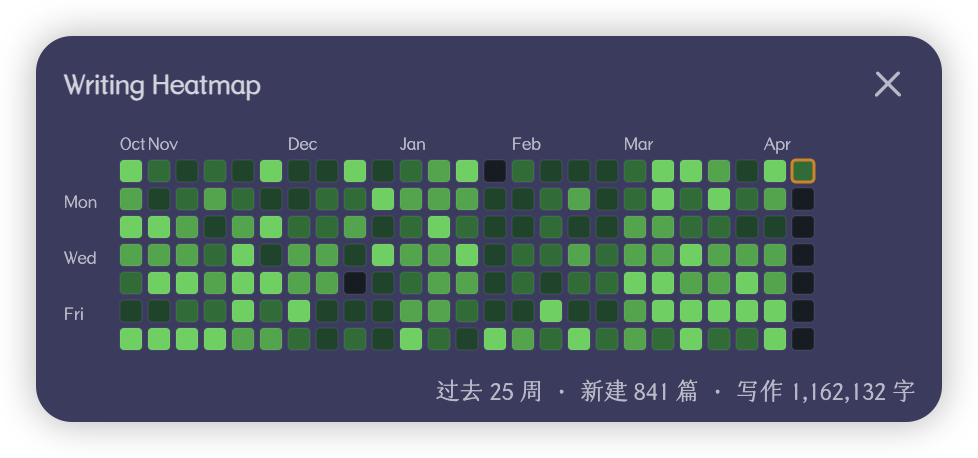
A GitHub-style heatmap plugin for Obsidian that visualizes your daily writing activity — notes created and words written — to help you build and maintain a consistent writing habit.
一个 Obsidian 插件,以 GitHub 风格的热力图展示你的每日写作活动(笔记数 & 字数),帮助你养成持续写作的习惯。
Features | 功能
-
Daily note count — Track how many notes you create each day 每日笔记数 — 统计每天创建的笔记数量
-
Daily word count — Track total character count of notes created each day (updates in real-time as you edit) 每日字数 — 统计每天创建的笔记的总字数(编辑后实时更新)
-
GitHub-style heatmap — 25 weeks (half a year) of activity at a glance, with adaptive color scaling GitHub 风格热力图 — 一览过去 25 周的写作活动,颜色深浅自适应
-
Status bar — Always visible today's stats:
📝 3 · ✍️ 1,240状态栏 — 底部常驻显示今日数据 -
Tooltip — Hover over any cell to see: date, notes created, words written 悬停提示 — 鼠标移到方格上即可查看详细数据
-
Daily note navigation — Click any cell to jump to that day's daily note 日记跳转 — 点击方格直接打开对应日期的日记
-
Folder exclusion — Glob patterns & whitelist mode to control which files are counted 文件夹排除 — 支持 glob 模式和白名单,灵活控制统计范围
-
Light & dark theme — Follows Obsidian's theme with GitHub's green color palette 深浅主题 — 自动跟随 Obsidian 主题切换配色
Settings | 设置
| Setting | Description |
|---|---|
| Exclude patterns | Glob patterns for files/folders to exclude (e.g. templates/**, **/archive/**) |
| Include patterns | Whitelist mode — if set, only matching files are tracked |
| Count code blocks | Toggle whether code block characters count toward word count (default: off) |
| Color by | Color cells by word count (default) or note count |
| Rebuild index | Force a full rescan if data seems incorrect |
How word count works | 字数统计规则
The plugin strips Markdown syntax before counting characters:
- Frontmatter (
---...---) is removed - Code blocks and inline code are removed (unless enabled in settings)
- Image embeds, link URLs, and HTML tags are removed
- Markdown symbols (
# * _ ~ > |etc.) are removed - Remaining characters (Chinese characters, English letters, numbers, etc.) are counted
This means "Hello 世界" = 7 characters. Optimized for Chinese-first writing with mixed English.
Installation | 安装
From Community Plugins (Recommended)
- Open Obsidian Settings → Community plugins → Browse
- Search for Writing Heatmap
- Click Install, then Enable
Manual Installation
- Download
main.js,manifest.json, andstyles.cssfrom the latest release - Create a folder
writing-heatmapin your vault's.obsidian/plugins/directory - Copy the three files into that folder
- Restart Obsidian and enable the plugin in Settings → Community plugins
Development | 开发
# Clone the repo
git clone https://github.com/0xAiKang/obsidian-writing-heatmap.git

# Install dependencies
npm install

# Development mode (watch)
npm run dev

# Production build
npm run build
License
For plugin developers
Search results and similarity scores are powered by semantic analysis of your plugin's README. If your plugin isn't appearing for searches you'd expect, try updating your README to clearly describe your plugin's purpose, features, and use cases.